Car owners at the first snow
Car owners upload a photo of their own car and post the drift when the first snow falls, without risking the car on real ice. It works best with a car you'd never actually take sideways on a frozen lake.
Upload one photo of your car. A gloved hand sets a toy version of it on a frozen lake, it rolls off, snow hits the lens, and your real car slides sideways across the ice. Post it as your winter car flex.
Effect
Your photos1 photo
Winter Car Drift AI turns one photo of your car into a 14-second vertical video with sound: a toy of your car is set down on a frozen lake, drives off, vanishes into a burst of snow and comes back as the full-size car drifting across the ice. It's a one-click template, not a prompt-based generator like Sora or Kling, and you don't need CapCut, a frozen lake or a drone.
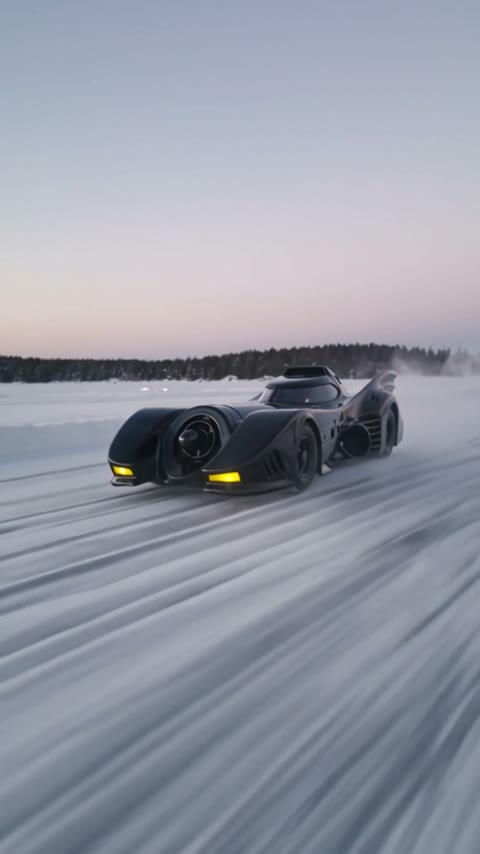
The winter car drift trend is a single low chase shot at dusk on a frozen lake: a gloved hand lets go of a toy car, it rolls away, kicks up powder, and when the snow clears the same car is full size and sliding sideways. It took off on Russian-speaking TikTok in late November 2026 as a CapCut template called Зимний дрифт ("winter drift").
The hook is the scale jump. For five seconds you think you're watching a toy on the snow, then the snow wall hides the cut and a real car comes out of it at speed. Nobody needed a frozen lake, a drift car or a drone to film it, which is why car owners started posting their own.
Add one photo of your car. It plays both parts, the toy in the glove and the car on the ice, so its shape, paint, lights and wheels come from that photo; the lake, the snow spray and the camera moves are already set up. In our demo a black custom car was the toy from the first second, with its tail fins, red taillights and yellow headlights, and kept them through the whole drift. The full test and the prompt are in how to make the Winter Car Drift AI video.
This template is unofficial and not affiliated with TikTok, CapCut or any car brand. Only upload photos of cars you own or have the right to use; you must be 18 or older; and photos showing celebrities, public figures or children are not allowed.
Car owners upload a photo of their own car and post the drift when the first snow falls, without risking the car on real ice. It works best with a car you'd never actually take sideways on a frozen lake.
Owners of modified cars use a photo that shows the spoiler, wheels and wrap, because those details carry over to both the toy and the full-size car. Car clubs post one for a member's build as a winter shout-out.
People who saw the Зимний дрифт CapCut template but can't use it, or don't have a clip of their car, start here from one photo instead. The result is a 14-second vertical MP4 to post on TikTok.
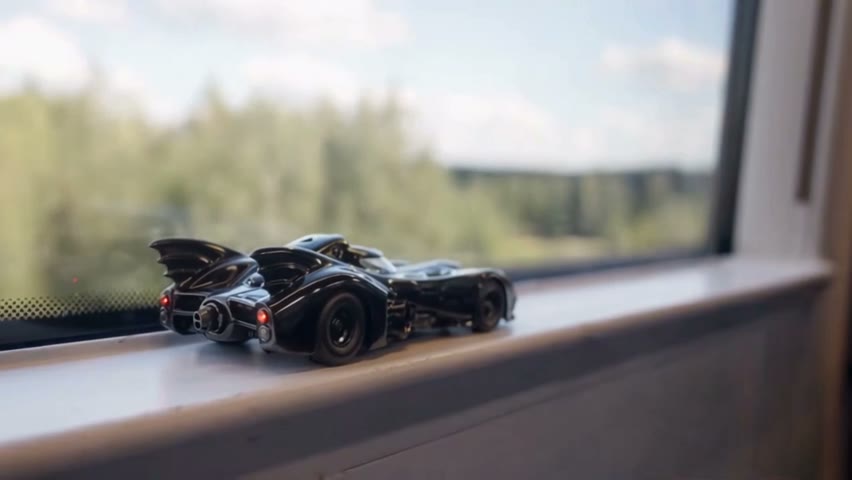
Car fans use a photo of a car they love, with the right to use it, and post it as their winter dream drift. For the windowsill version of the same toy-to-real idea, use [AI Toy Car to Real Car](/effects/ai-toy-car-to-real-car).
The winter car drift trend, also called winter drift, ice drift or Зимний дрифт, is an AI video in which a toy car set down on a snowy frozen lake drives off, disappears behind a burst of snow and comes back as the full-size car drifting across the ice. It is AI-made, not real footage.
It spread through Russian-language TikTok as a CapCut template. @rhetta.chandler posted a tutorial for the Зимний дрифт template on November 21, 2026 that had 379,177 views by November 26, and that account's three most-watched tutorials passed 1.07 million views in five days. The next day, posts began offering the same effect from one uploaded car photo.
An early cousin: a ChatGPT prompt for a still of your car drifting in a snowy forest, 6,123 views. TikTok @aiiskhakov
The toy-to-real winter drift takes off as the CapCut template Зимний дрифт: 379,177 views. TikTok @rhetta.chandler
Copies offer it from one uploaded car photo, no video needed: 19,078 views. TikTok @phtuc4bfu3
More tutorials follow; the top three pass 1.07 million views by November 26, 2026. TikTok @rhetta.chandler
One car photo, about 5 minutes. Turn the sound on for the drift.
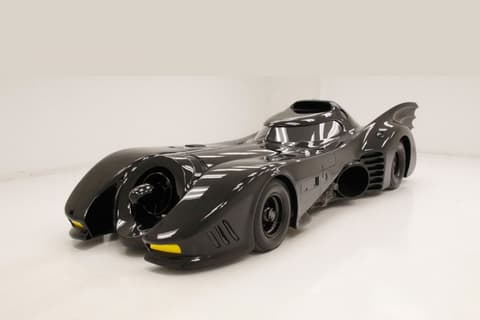
The whole car in view, from a front or rear corner, in daylight. It becomes both the toy and the full-size car.
Check the credits on the button and tap Generate. No prompt to write; the frozen lake, the snow and the camera moves are set up.
Wait about 5 minutes, then download the MP4 from My Videos and post it vertical.
Your car is seen from behind as a toy, side-on in the drift and head-on at the end. A sharp daylight photo of the whole car from a corner gives every angle enough to work with.
Whole car, from a corner
One end, one side and the wheels.
Daylight
Keeps the paint color true on snow.
Close-up of a wheel or grille
The model needs the whole car.
Night shot under colored lights
Can change the paint color.
You get the whole trick in 14 seconds: the toy drops from a gloved hand, rolls off with its taillights on, snow bursts across the lens, and the full-size car slides out sideways and turns to face the camera with its headlights on.
Your car is the toy from the first second, not just the car at the end. In our test the toy and the full-size car both had the photo's fins, red taillights and yellow headlights, with no trace of any other car.
The video is 14 seconds, 9:16 vertical, with sound, so it goes straight to TikTok, Reels or Shorts.
One video is 385 credits, about $4.27 from the one-time $5.99 starter pack, with no subscription. The MP4 has no watermark, and failed generations return their credits.
Unlike Sora or Kling, you don't write or tune a prompt to get the toy, the snow burst and the drift right, and you don't need the CapCut template, an app or a clip of your car. Add one car photo in your browser.
Winter Car Drift AI is a 14-second vertical video made from one photo of your car: a toy of your car is set down on a frozen lake, drives off into a burst of snow, and comes back as the full-size car drifting across the ice. The car's shape, color and lights come from your photo.
The winter car drift trend is an AI video trend from November 2026 in which a toy car on a snowy frozen lake turns into the full-size car mid-drift. It spread on Russian-language TikTok as a CapCut template; @rhetta.chandler's tutorial from November 21, 2026 had 379,177 views by November 26.
It's also called winter drift, ice drift and Зимний дрифт. Зимний дрифт (Russian for "winter drift") is the name of the CapCut template most TikTok posts used, and winter drift and ice drift are the English names AI template sites use.
0–2s, a gloved hand sets a toy of your car on the snow of a frozen lake at dusk; 2–5s, the toy rolls away from the low camera with its taillights on, leaving tracks; 5–6.5s, it kicks sideways and a burst of snow fills the screen; 6.5–9s, the snow clears and your car is full size, sliding sideways across the ice; 9–14s, it swings around to face the camera with its headlights on and drifts past in a wave of snow.
Yes. The toy in the glove is already your car from the first second, with the shape, paint and lights from your photo, and the same car comes out of the snow at full size. In our test no part of any other car showed up.
Yes. In our test the car kept the body shape, tail fins, red taillights, yellow headlights and glossy black paint from the photo, as a toy from behind, side-on in the drift and head-on at the end. Small badges and number plates may not carry over.
Not completely. New accounts get 75 free credits, and one Winter Car Drift AI video costs 385 credits. The one-time $5.99 starter pack (540 credits) covers one video, about $4.27, with 155 credits left in your account and no subscription. The exact credits show on the Generate button, and failed generations are refunded automatically.
Four reasons: the car looks like your photo, it costs less, you get a clean video, and it's ready to post.
Looks like your car: the toy and the full-size car both keep your car's shape, paint and lights from the first second to the last; our test worked the first time, so you don't spend credits on retries.
Costs less: about $4.27 a video from a one-time $5.99 pack, with no subscription; among the winter drift templates we found with a listed price, it's the cheapest per video.
Clean video: every plan, including free credits, downloads a watermark-free MP4, and failed generations return their credits.
Ready to post: 14 seconds, 9:16 vertical, with sound, no prompt, no CapCut and no editing.
Yes, most TikTok posts were made with a CapCut AI template called Зимний дрифт, but it needs a clip of your car and isn't available everywhere. This template needs no CapCut and no clip: add one car photo in your browser and download the MP4.
We have tested one car so far, a black custom car photographed from the front corner, and it worked. SUVs and pickups should follow the photo the same way, but we haven't tested them, and a white or silver car may blend into the snow; use a sharp daylight photo of the whole car.
Use your own car or one you have the right to use. A dream car works technically, but don't present the video as a car you own, and avoid showing someone else's number plate.
About 5 minutes; our test took 4 minutes 47 seconds. The video is 14 seconds, 480p, 9:16 vertical, with sound and no watermark.
Usually it's the snow burst at about 6 seconds, where the toy turns into the full-size car behind a wall of powder; in our test one frame there showed a faint double outline. It passes in a fraction of a second at normal speed, and the car is sharp again from about 6.5 seconds.
Usually it's the photo: only part of the car, people or other cars in front of it, a night shot or colored lights. Use a clear daylight photo of the whole car from a corner, then run this template again.
Загрузите одно фото своей машины целиком при дневном свете и нажмите Generate: получится 14-секундное вертикальное видео, где игрушка вашей машины уезжает по льду, а из снежного облака выезжает настоящая машина в дрифте. CapCut и видео машины не нужны.
Your photos and videos stay in your account, so you can download them again from My Videos at any time. They are never used to train AI models and are not sold or shared, except with the video model provider that renders your clip.
Last updated