A birthday message from your pet
Pet owners send it to a partner, a parent or a friend as a card from the cat or the dog. Add the person's name in the caption, since the song itself doesn't change.
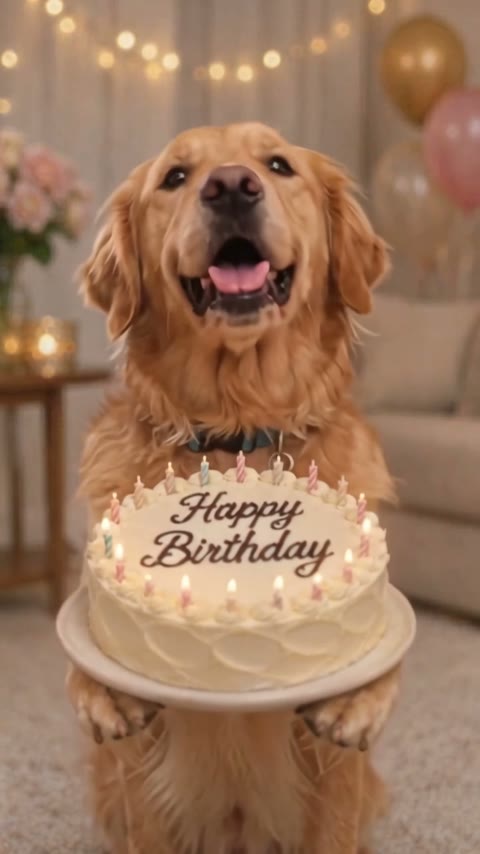
Upload one photo of your cat or dog. It sits up on its back legs, holds a birthday cake with lit candles and sings at a party with balloons and string lights. Send it to whoever's birthday it is.
Effect
Your photos1 photo
Cat Singing Happy Birthday AI turns one photo of your cat or dog into a 14-second vertical video with sound: your pet sits up on its hind legs, holds a cream birthday cake with lit candles and sings Happy Birthday in a party room with balloons and string lights. Your photo doesn't need a cake or a party; both come with the template. It's a one-click template, not a prompt-based generator like Sora or Kling.
Most singing-pet apps animate a close-up of your pet's face. This one puts the whole animal in the shot: up on its back legs, a Happy Birthday cake balanced in its front paws, candles lit, head tilting and eyes squeezed shut on the long notes.
It works as a birthday card that the person actually recognizes. A friend who gets a video of their own cat, or of your dog, singing to them laughs harder than at any stock GIF, and it's quick to send on WhatsApp or post on Instagram.
Add one photo of your pet. Its face, fur color, markings and even its collar come from that photo; the cake, the party room and the song are already set up. In our demo a golden retriever photographed sitting on a living-room rug became the singer, collar tag and all. The full test and the prompt are in how to make a cat singing happy birthday AI video.
This template is unofficial and not affiliated with TikTok or CapCut. Only upload photos of your own pet or a pet whose owner has agreed; you must be 18 or older; and photos showing celebrities, public figures or children are not allowed.
Pet owners send it to a partner, a parent or a friend as a card from the cat or the dog. Add the person's name in the caption, since the song itself doesn't change.
Ask the birthday person's family for a photo of their pet, or use one from their posts with permission. Getting sung to by their own cat is the part that makes them laugh.
Owners post it on the pet's birthday or adoption day on Instagram, TikTok or a pet account. For a version where the pet just moves in its own photo, use [Animate Pet Photo AI](/animate-pet-photo-ai).
One pet photo, about 5 minutes. Turn the sound on.
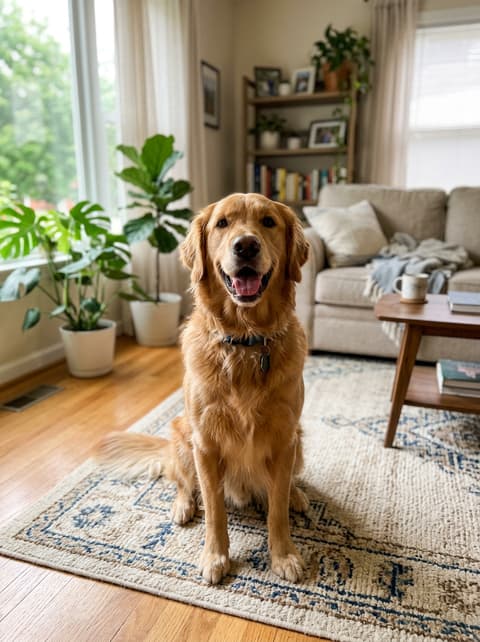
One cat or dog, face and fur clear, in good light. A photo of it sitting and facing the camera works best.
Check the credits on the button and tap Generate. No prompt to write; the cake, the party and the song are set up.
Wait about 5 minutes, then download the MP4 from My Videos and send it to the birthday person.
Your pet faces the camera for all 14 seconds, standing with the cake at chest height. A sharp, well-lit photo where its face, ears and fur are easy to see gives the model enough to keep it looking like your pet.
One pet, face forward
Eyes, ears and nose clear.
Even daylight
Keeps the fur color true.
Two pets in one photo
The scene has one singer.
Dark or blurry shot
Markings get lost.
You get more than a face mouthing a song: your pet stays up on its hind legs for all 14 seconds, holding a cream cake with a ring of lit candles, while balloons and string lights glow behind it.
The face, fur and markings come from your photo. In our test a golden retriever kept its coat, its ears and even its blue collar and tag through the whole video, with nothing of the template's cat left.
The video is 14 seconds, 9:16 vertical, with sound, so it plays right away in WhatsApp, Instagram Stories or TikTok.
One video is 360 credits, about $3.99 from the one-time $5.99 starter pack, with no subscription. The MP4 has no watermark, and failed generations return their credits.
Unlike Sora or Kling, you don't write or tune a prompt to get the cake, the candles and the pose right, and you don't need to film your pet or install an app. Add one photo in your browser.
A cat singing happy birthday video is a short clip in which a pet appears to sing the birthday song, usually sent as a birthday greeting. With this template, one photo of your cat or dog becomes a 14-second vertical video of it standing on its hind legs, holding a candlelit cake and singing at a party.
People also search for it as a happy birthday cat video, a singing cat birthday video or, for dogs, a dog singing happy birthday video. On CapCut the related templates are listed as cat singing happy birthday and birthday cat trend.
The shot stays still for all 14 seconds. From the first second your pet sits up on its hind legs holding the cake at chest height; through the song it opens and closes its mouth, tilts its head side to side and squints on the long notes, while the candles flicker and the string lights glow behind it.
No. Any clear everyday photo of your pet works. The cake, candles, balloons, flowers and the party room all come from the template; our demo photo was a golden retriever sitting on a living-room rug.
Yes. Our demo is a golden retriever, and it kept its coat, ears and collar for all 14 seconds. We haven't tested cats, rabbits or other pets with our own photos yet; use one animal with its face clearly visible.
Yes, the face, fur color, markings and body come from your photo. In our test even the collar and tag carried over. The mouth moves while it sings, so the face shape can shift slightly on the widest notes.
No. The song and sound are part of the template and stay the same for every video. Put the person's name in the caption or the message you send with it.
Not completely. New accounts get 75 free credits, and one cat singing happy birthday video costs 360 credits. The one-time $5.99 starter pack (540 credits) covers one video, about $3.99, with 180 credits left in your account and no subscription. The exact credits show on the Generate button, and failed generations are refunded automatically.
Four reasons: it looks like your pet, it costs less, you get a clean video, and it's ready to send.
Looks like your pet: the face, fur, markings and even the collar come from your photo, and the whole pet stands holding the cake instead of just a face mouthing words; our test worked the first time, so you don't spend credits on retries.
Costs less: about $3.99 a video from a one-time $5.99 pack, with no subscription.
Clean video: every plan, including free credits, downloads a watermark-free MP4, and failed generations return their credits.
Ready to send: 14 seconds, 9:16 vertical, with sound, no prompt, no filming and no editing.
CapCut birthday templates mostly add stickers, text and music around your photo. This template puts your own pet into the scene as the singer, standing and holding the cake, and you don't need CapCut or any app.
About 5 minutes; our test took exactly 5 minutes. The video is 14 seconds, 480p, 9:16 vertical, with sound and no watermark.
Usually it's the photo: two pets in one shot, a dark or blurry picture, or the face turned away. Use a sharp, well-lit photo of one pet facing the camera, then run this template again.
The script on the cake can soften in a few frames while the pet moves. It's part of the scene and doesn't change with your photo; the words read Happy Birthday for most of the video.
Yes. Download the watermark-free MP4 and send or post it as is. Keep the platform's AI label on when you post publicly.
Your photos and videos stay in your account, so you can download them again from My Videos at any time. They are never used to train AI models and are not sold or shared, except with the video model provider that renders your clip.
Last updated