Fans of the show
Peaky Blinders fans put themselves in Tommy Shelby's walk away from Arrow House and post it on TikTok or Reels. A dark suit in the photo gets closest to the show.
Add one photo. You light a cigarette, look up at the camera and keep walking while the red-brick manor goes up in flames behind you.
Effect
Your photos1 photo
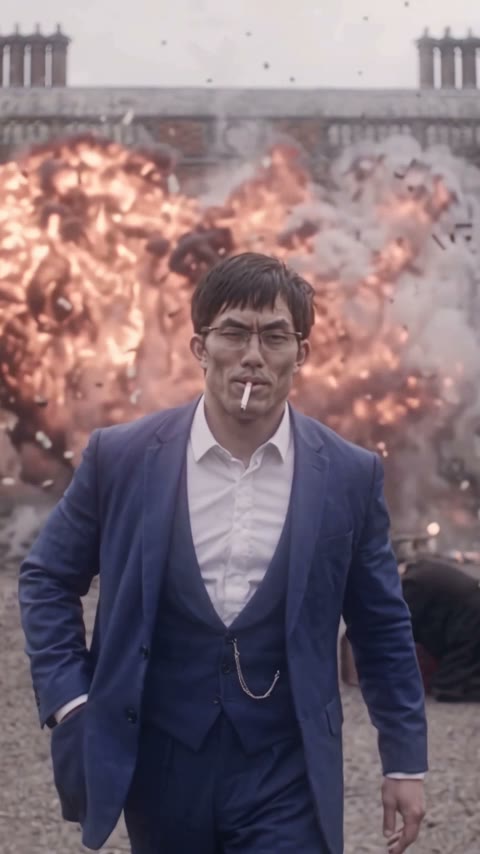
Peaky Blinders Explosion AI turns one photo into a 14-second vertical video with sound: you light a cigarette, look up and walk toward the camera while a red-brick manor explodes behind you. It's a one-click template, not a prompt-based generator like Sora or Kling, and your face, hair and outfit all come from your photo.
The Peaky Blinders explosion walk comes from the show's last episode, "Lock and Key" (series 6, episode 6, BBC One, April 3, 2022), in which Tommy Shelby's Arrow House is blown up, as Den of Geek's finale review covers. Fans cut it into edits of a man in a flat cap and long coat who never looks back at the blast.
The pay-off is the calm: a fireball fills the frame and the person in front doesn't flinch, just keeps walking with the cigarette in their mouth. Start from an ordinary photo, like our demo in a blue office suit and glasses, and the contrast gets funnier.
Add one photo of one person. The cigarette, the walk and the explosions are already set; your face, glasses, hairstyle and clothes come from the photo, so you don't need a flat cap or coat. Our full test, with timing and the small slips, is in how to make the Peaky Blinders Explosion AI video.
This template is unofficial and not affiliated with Peaky Blinders, the BBC, Netflix or Cillian Murphy. Only upload photos of yourself or people who agreed; you must be 18 or older; and photos of celebrities, public figures and children are not allowed.
Peaky Blinders fans put themselves in Tommy Shelby's walk away from Arrow House and post it on TikTok or Reels. A dark suit in the photo gets closest to the show.
People use a work photo, suit and glasses and all, to post it on a Friday or after a big deadline: the office goes up, they walk out calm.
Friends make one of the birthday person, with their OK, and drop it in the group chat. It works for any adult, whatever they wear in the photo.
The Peaky Blinders explosion trend is a walk-away shot: a man in 1920s Birmingham clothes lights a cigarette and walks toward the camera while a country house explodes behind him. It is based on the series finale "Lock and Key", which aired on BBC One on April 3, 2022, where Tommy Shelby's Arrow House is dynamited.
Fan edits of Tommy walking away kept circulating after the show ended, and the March 2026 film Peaky Blinders: The Immortal Man brought the look back. In November 2026 AI template sites started offering a version where your own photo does the walk.
The finale "Lock and Key" airs and Arrow House is blown up. Den of Geek
The film The Immortal Man brings Tommy Shelby back to screens. Wikipedia
One photo, about 5 minutes. Watch it with the sound on.

One person, face to the camera, waist-up or wider. Wear what you want to walk out of the blast in.
No prompt and no cap or coat needed: the cigarette, the walk and the explosions are already set.
Check the credits on the button, tap Generate and wait about 5 minutes. Download the MP4 from My Videos.
The first 6 seconds are a close-up of your face and hands; after that you are a full figure walking toward the camera. A sharp, front-facing photo matters most.
Face to the camera
Both eyes visible, even light.
Waist-up or wider
Shows the outfit you'll walk in.
Group photo
One person per photo.
Tiny or blurry face
Gets soft in the wide shots.
You get the close-up of lighting the cigarette, the look up, the walk toward the camera, the fireballs and the wall of smoke, and you never look back.
Your face, glasses, hair and outfit come from your photo and stay the same for all 14 seconds, instead of everyone being dressed in the same cap and coat.
The video is 9:16 and 14 seconds with sound, so it posts straight to TikTok, Reels or Shorts without cropping.
One video is 385 credits, about $4.27 from the one-time $5.99 starter pack, with no subscription. The MP4 has no watermark, and failed generations return their credits.
Unlike Sora or Kling, you don't write or tune a prompt, and you don't mask yourself into a clip in CapCut. Add one photo in your browser.
The Peaky Blinders Explosion AI trend is a short video in which you light a cigarette and walk toward the camera while a red-brick manor explodes behind you, based on Tommy Shelby's Arrow House in the show's finale. With one photo, the person walking away is you.
It's the series finale, "Lock and Key" (series 6, episode 6), which aired on BBC One on April 3, 2022. In that episode Tommy Shelby's Arrow House is blown up.
0–6s, a close-up of you looking down and cupping your hands to light a cigarette; 6–7s, you look up with the cigarette in your mouth and start walking toward the camera; 8–10s, the manor behind you goes up in fireballs; 10–12s, a wall of smoke and debris, and you don't look back; 12–14s, you keep walking and lift a hand to the cigarette.
No. Your outfit comes from your photo: our demo walked out in a blue suit and glasses. Wear a dark suit or coat if you want to look like the show.
Yes, the template works from any one-person photo, and the face, hair and outfit come from that photo. Our demo is a man; we haven't run a separate test with a woman.
One photo of one person, face to the camera, waist-up or wider.
Not completely. New accounts get 75 free credits, and one Peaky Blinders Explosion AI video costs 385 credits. The one-time $5.99 starter pack (540 credits) covers one video, about $4.27, with 155 credits left in your account and no subscription. The exact credits show on the Generate button, and failed generations are refunded automatically.
Four reasons: you look like your photo, it costs less, you get a clean video, and it's ready to post.
You look like your photo: your face, glasses, hair and own clothes stay the same from the lighter close-up to the smoke, and our test came out right the first time, so you don't spend credits on retries.
Costs less: about $4.27 a video from a one-time $5.99 pack, with no subscription; among the tools we found with a listed price, it's the cheapest per video.
Clean video: every plan, including free credits, downloads a watermark-free MP4, and failed generations return their credits.
Ready to post: 9:16, 14 seconds, with sound, no prompt and no editing.
About 5 minutes; our test took 4 and a half. The video is 14 seconds, 480p, vertical 9:16, with sound and no watermark.
Usually it's a small or blurry face in the photo, which gets softer once you're a full figure in the wide shots. Use a sharp, front-facing photo, waist-up, then run the template again.
Your photos and videos stay in your account, so you can download them again from My Videos at any time. They are never used to train AI models and are not sold or shared, except with the video model provider that renders your clip.
Last updated