You, unbothered
TikTok users make a Riding Lion video of themselves with captions like “how I get home after the party.” A full-body photo in your going-out outfit makes the ride look like your night.
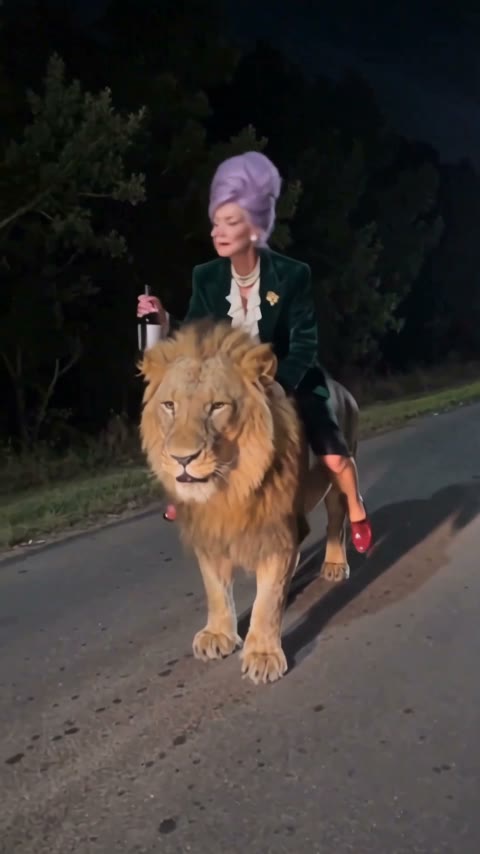
Add one photo of you. You stroll down a dark road with a bottle in hand, a lion pads up and roars, and you calmly hop on its back and ride it straight at the camera. Drop it in the group chat and watch the replies.
Effect
Your photos1 photo
Riding Lion AI Trend turns one photo into a 5-second vertical video with sound: you walk a dark road at night, a lion strolls up and roars, you pat its mane, climb onto its back and ride it toward the camera. It’s a one-click template, not a prompt-based generator like Sora or Kling, and you don’t need CapCut. Your face, hair and outfit come from your photo, so the rider is clearly you.
Riding Lion is a CapCut AI photo template that took off on TikTok in mid-November 2026. The earliest post we found is @po94275’s riding-a-lion clip from November 13, 2026: a woman walks down a tree-lined road at night holding a bottle of wine, a lion catches up and roars beside her, and she climbs on as if it were a taxi.
What makes people replay it is how unbothered the rider is. A full-grown lion roars a foot away, and the reaction is a pat on the mane, a leg over its back and a grin at the camera, bottle still in hand. That calm is why it works so well on someone who would never do it in real life, like your mom, your grandma or your most cautious friend.
Add one clear photo of the rider, ideally knees-up or full body, because the last two seconds show you sitting on the lion from head to feet. Whatever is in the photo, from a suit to a costume, is what rides the lion. For a full walkthrough with photo tips and fixes, read how to make the Riding Lion AI video.
This template is unofficial and not affiliated with CapCut, TikTok or any creator of the trend. Only upload your own photo or a photo of someone who agreed; you must be 18 or older; and photos of celebrities, public figures and children are not allowed.
TikTok users make a Riding Lion video of themselves with captions like “how I get home after the party.” A full-body photo in your going-out outfit makes the ride look like your night.
The calmer the rider in real life, the funnier the ride. Make one of your mom or grandma, with her OK, and send it to the family chat; show her first so she’s in on the joke.
Make the birthday friend ride in on a lion and post it at midnight with “arriving like”. Ask them first, and use a clear photo of their face.
Cosplayers and creators use a full-body photo in costume, because the outfit rides the lion exactly as photographed. Our demo is a stylized AI character, and her blazer, skirt and pearls held in every frame.
The Riding Lion trend is a TikTok format built on a CapCut AI photo template: you upload one photo and become the person a lion lets ride on its back down a dark road. The clip always follows the same beats: a walk at night, the lion catching up, a roar, a calm pat on the mane, and the ride toward the camera.
The earliest post we found is from TikTok account @po94275 on November 13, 2026 at 12:44 UTC, a CapCut template promo captioned “Upload just one photo and create this fun video of you riding a lion!” By November 17, 2026 it had about 800,000 views, 12,700 likes and 10,000 shares. Other template accounts such as @c0pe6zs0b9 reposted it from November 14, and single clips passed 470,000 views on November 15. The posts use each account’s original sound, not a named song. Creators also call it Lion Ride AI or riding a lion AI.
@po94275 posts the first riding-a-lion CapCut template clip; it becomes the hit. TikTok @po94275
Other template accounts copy it; @c0pe6zs0b9’s version reaches 239K views. TikTok @c0pe6zs0b9
The first clip has about 800K views and 10K shares; new versions still pass 470K. TikTok @po94275
One clear photo is all it takes. Play it with the sound on.
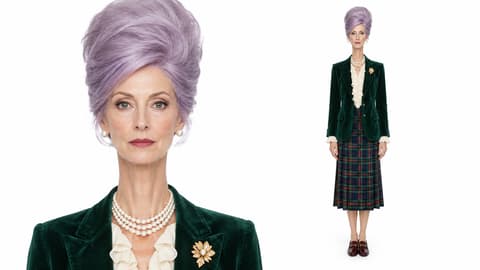
The ride shows you from head to feet, so a photo that includes your legs works best. Face the camera with both eyes visible and good light.
Upload it to the single slot. Use your own photo, or ask first if you’re making one of your mom, grandma or a friend.
Check the credits on the button, tap Generate and wait about three minutes. Download the MP4 from My Videos.
The rider is seen from head to feet on the lion’s back, so start with one sharp photo that shows most of your body.
Face to the camera
Both eyes visible, good light.
One person, legs in frame
Only the rider, from head to at least the knees.
Sunglasses or a covered face
The rider grins at the camera at the end.
Group photo
Only one person rides the lion.
The lion catches up, roars, gets a pat on the mane, and you swing a leg over and ride it toward the camera, all in one 5-second clip with the bottle still in your hand.
Your face, hair and clothes come from your photo and stay the same in every frame, so nobody mistakes the rider for someone else.
You get a 9:16 vertical clip with sound already on it. Download it and post it to TikTok, Reels or Shorts with no cropping or editing.
One video is 155 credits, about $1.72 from a one-time $5.99 pack that covers three rides, with no subscription. The MP4 has no watermark, and failed generations return their credits.
Unlike Sora or Kling, you don’t write or tune a prompt, and you don’t need to install CapCut or hunt for the template link. It runs in your browser and takes about three minutes.
The Riding Lion AI trend is a TikTok trend from November 2026 that turns one photo into a short video of you walking a night road while a lion walks up, roars, lets you pat its mane and carries you toward the camera on its back.
No. The riding-a-lion videos are made with AI from a single photo; there is no real lion, road or rider in the shot, and the clip started as a CapCut template promo on TikTok.
0–1s, you walk down a dark tree-lined road holding a bottle while a lion comes up from behind; 1–2s, the lion reaches you and roars; 2–3s, you reach out and pat its mane; 3–4s, you swing a leg over and sit on its back; 4–5s, the lion carries you toward the camera while you grin with the bottle raised.
The earliest post we found is from TikTok account @po94275 on November 13, 2026, a CapCut template promo that had about 800,000 views and 10,000 shares by November 17, 2026. Other template accounts such as @c0pe6zs0b9 copied it from November 14.
It’s also called Lion Ride AI and riding a lion AI. Both come from TikTok captions and template names for the same night-road clip.
There is no single song: the original Riding Lion posts use each account’s own original sound. Your video comes with sound on it, and you can pick any track when you post on TikTok.
No. You make the Riding Lion video in your browser from one photo, without installing CapCut or finding a template link.
Not completely. One Riding Lion AI video costs 155 credits, about $1.72 from the $5.99 starter pack of 540 credits, which covers three videos with no subscription. The 75 free signup credits aren’t enough for this template. The exact credits show on the Generate button, and failed generations are refunded automatically.
Four reasons: the rider looks like your photo, it costs less, you get a clean video, and it’s ready to post.
The rider looks like your photo: your face, hair and outfit stay the same from the first step to the ride, and our first run worked, so you don’t spend credits on retries.
It costs less: about $1.72 per video from a one-time $5.99 pack, with no subscription; among the Riding Lion tools we found with a listed price, it is the lowest per video.
Clean video: every plan, including free credits, downloads a watermark-free MP4, and failed generations return their credits.
Ready to post: 5 seconds, vertical 9:16, with sound, no editing and no CapCut.
Mostly. The rider wears the clothes in your photo in every frame: our demo’s velvet blazer, tartan skirt and pearls came straight from the photo. Shoes can drift: her wine-red loafers turned into heels of the same color once she sat on the lion.
The video is 5 seconds, 480p, vertical 9:16, with sound and no watermark, so you can post it on TikTok, Reels or Shorts as it is.
Usually it’s a small, blurry or side-on face, such as one cropped from a group photo, or sunglasses over the eyes. Use a sharp, front-facing photo that shows you from head to at least the knees, then run the template again.
Your photos and videos stay in your account, so you can download them again from My Videos at any time. They are never used to train AI models and are not sold or shared, except with the video model provider that renders your clip.
Last updated