People who saw the trend
People who don't have a leather swivel chair, or don't want to film themselves falling back in one, upload a selfie and post the villain chair video as their own take on the trend.
Upload one photo. You start sunk almost flat in a leather chair, rock forward to face the camera, steeple your fingers and deliver the villain line, in your own clothes, with the POV caption on screen. Send it to the group chat.
Effect
Your photos1 photo
Villain Trend AI turns one photo into a 6-second vertical video with sound: you start reclined almost flat in a leather swivel chair, rock forward to face the camera, steeple your fingers and deliver the villain line, with "POV: you're the villain but the chair leaned way more than you expected" on screen. It's a one-click template, not a prompt-based generator like Sora or Kling, and the villain keeps your face, your hair and your whole outfit from the photo.
The villain trend is a TikTok skit: you play the movie villain who swivels round in a big chair to face the hero, except the chair reclines so far that it takes a moment to come back up. It started with a 6.5-second clip by @mattfletcher14 on November 9, 2026, captioned "POV: you're the villain but the chair leaned way more than you expected", and most versions use Myuu's "Living in the Dark (Evil Larry Version)".
What sells it is how seriously the villain takes himself. The fingers are already steepled and the face is set for a big reveal, but for the first second and a half he is lying almost flat and has to wait for the chair to bring him back. In November 2026 Mercedes F1 posted its own take, with Keanu Reeves flailing in Toto Wolff's office chair.
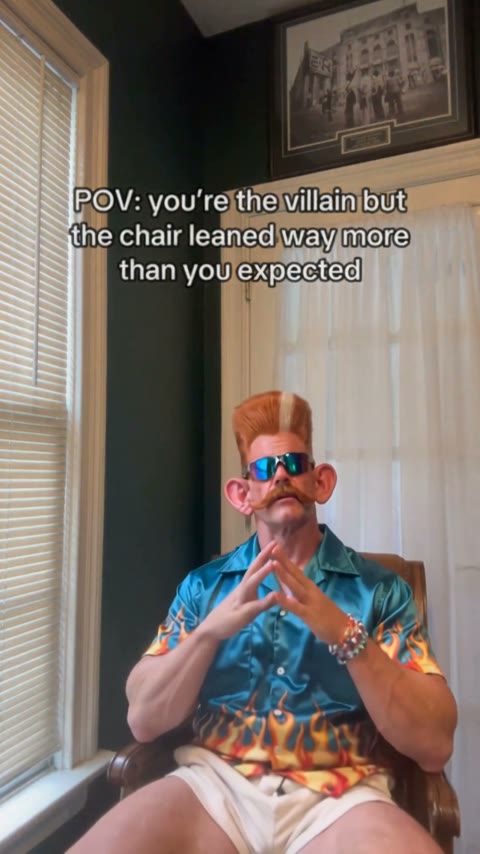
Add one photo. Your face, hair and whole outfit come from it; the room, the chair, the movement and the caption are already set up. In our demo, a character with an orange flat-top, mirrored sunglasses, a handlebar moustache and a teal flame shirt kept every one of those in every frame. The full test and the prompt are in how to make the Villain Trend AI video.
This template is unofficial and not affiliated with TikTok, Mercedes-AMG F1, Keanu Reeves or the creators of the trend. Only upload photos of yourself or people who agreed; you must be 18 or older; and photos of celebrities, public figures or children are not allowed.
People who don't have a leather swivel chair, or don't want to film themselves falling back in one, upload a selfie and post the villain chair video as their own take on the trend.
Friends make one, with the person's OK, of whoever always ruins the plans or never replies, and caption it "POV: you're the villain but…". It works best with that friend's most serious photo.
Kids or coworkers use a photo of a dad or boss who agreed and post it as the boss-fight intro, ideally a photo in a suit or blazer.
The villain trend, also called the villain chair trend, is a POV skit in which someone plays a movie villain in a swivel chair and the chair leans back much further than planned. The original by @mattfletcher14, posted on TikTok on November 9, 2026, is 6.5 seconds long and had passed about 20 million views by late November, according to third-party trackers.
The usual sound is Myuu's "Living in the Dark (Evil Larry Version)". During the 2026 Las Vegas Grand Prix weekend, Mercedes F1 posted a version with Keanu Reeves in Toto Wolff's office, reported by Motorsport.com on November 24. By November 26, Virlo counted 220 villain trend videos with 154.2 million views combined.
@mattfletcher14 posts the 6.5-second clip that starts the trend. TikTok
Keanu Reeves's Mercedes F1 version takes it beyond TikTok. Yahoo Sports
220 villain trend videos total 154.2 million views; the original is near 20 million. Virlo
One photo, about 2 minutes. Turn the sound on for the villain line.
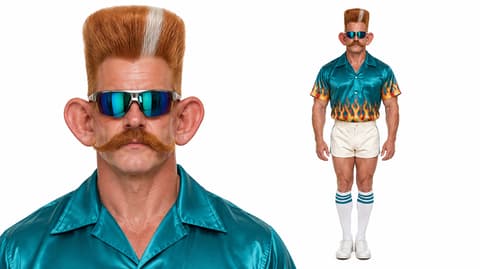
One person, face to the camera, waist-up or full body. Whatever you wear in it is what the villain wears.
Check the credits on the button and tap Generate. No prompt to write; the room, the chair and the caption are set up.
Wait about 2 minutes, then download the MP4 from My Videos and post it.
You sit facing the camera from the chest up for most of the video, so your face, hair and top carry it. Your legs and shoes show in the first second while you're leaning back.
Full body, face on
Even light, one person.
A villain outfit
Suit, hoodie or something loud.
Group photo
One villain per video.
Side view
The stare needs your face.
You start reclined almost flat and side-on, the chair slowly brings you round, and you deliver the line with your fingers steepled, by the window with the blinds and the framed photo, with the POV caption across the top.
The villain keeps your face, hair and clothes from head to socks for the whole video, so it reads as you in the chair, not someone else's hoodie with your face pasted on.
The video is 6 seconds, 9:16 vertical, with sound and the caption already on screen, so it goes straight to TikTok, Reels or Shorts.
One video is 180 credits, so the one-time $5.99 starter pack makes three, about $2 each, with no subscription. The MP4 has no watermark, and failed generations return their credits.
Unlike Sora or Kling, you don't write or tune a prompt to get the lean-back timing right, and you don't need a swivel chair or a video of yourself. One photo in your browser is enough.
Villain Trend AI is a 6-second vertical video made from one photo: you start reclined almost flat in a leather swivel chair, rock forward and deliver the villain line under the caption "POV: you're the villain but the chair leaned way more than you expected". Your face, hair and outfit come from your photo.
The villain trend is a POV skit where someone plays a movie villain in a swivel chair and the chair leans back far more than planned. It started with a 6.5-second TikTok by @mattfletcher14 on November 9, 2026, which had about 20 million views by late November.
It's also called the villain chair trend, "POV: you're the villain but" and the chair leaned back trend. The first two come from TikTok captions and tags like #villaintrend; the last comes from the original caption.
0–1.5s, you are reclined almost flat and side-on in the leather chair, fingers steepled; 1.5–3s, the chair slowly rocks you forward and round to the camera; 3–5s, you face the camera and deliver the villain line; 5–6s, you lean in and clasp your hands. The POV caption stays across the top the whole time.
Most villain trend videos use Myuu's "Living in the Dark (Evil Larry Version)", a dark piano track tied to the Evil Larry meme. Our video comes with sound already on it.
Yes. The villain wears the clothes from your photo, top to bottom. In our test, a teal flame shirt, white shorts and striped tube socks all stayed on in every frame, along with the orange flat-top and sunglasses.
Not a dedicated one as of November 26, 2026; the CapCut villain templates we found need you to film a clip yourself. This template needs one photo and makes the whole chair scene from it.
Not completely. New accounts get 75 free credits, and one Villain Trend AI video costs 180 credits. The one-time $5.99 starter pack (540 credits) makes three videos, about $2 each, with no subscription. The exact credits show on the Generate button, and failed generations are refunded automatically.
Four reasons: the villain looks like your photo, it costs less, you get a clean video, and it's ready to post.
Looks like your photo: your face, hair and full outfit stay the same for the whole video, with nothing left of anyone else's clothes; our test came out right the first time, so you don't spend credits on retries.
Costs less: about $2 a video from a one-time $5.99 pack, with no subscription; it was the lowest per-video price among the villain trend tools whose prices we found.
Clean video: every plan, including free credits, downloads a watermark-free MP4, and failed generations return their credits.
Ready to post: 6 seconds, 9:16 vertical, with sound and the POV caption, no prompt and no editing.
About 2 minutes; our test took 2 minutes 13 seconds. The video is 6 seconds, 480p, 9:16 vertical, with sound and no watermark.
Yes, if they agreed. Use a clear photo with their face to the camera, ideally in a suit or a dark hoodie, and keep the AI label on when you post it.
Usually it's the photo: a side view, sunglasses, a busy group shot or a tiny face. Use a photo with your face to the camera and at least your upper body in frame, then run this template again.
Usually it's because the first second and a half is the lean-back: you are side-on and almost lying flat, just like in the original. Your face turns to the camera from about the 2-second mark.
We have only tested this template with one adult man so far, so we can't show a pet or a woman in the chair yet, and photos of children are not allowed. A clear photo of an adult, face to the camera, is what we know works.
No. It's an unofficial template, not affiliated with TikTok, Mercedes-AMG F1, Keanu Reeves or @mattfletcher14. Post it as a personal meme, keep the platform's AI label on, and don't use it in ads.
The POV caption is already in the video, so add a line about who the villain is, like "my manager on Monday". Hashtags people use: #villaintrend, #villainchair, #povyourethevillain.
Your photos and videos stay in your account, so you can download them again from My Videos at any time. They are never used to train AI models and are not sold or shared, except with the video model provider that renders your clip.
Last updated