The Monday office entrance
Office workers post a King Jin video with “me walking in on Monday” and drop it in the team chat. A work photo in a jacket fits the street scene best.
Add one photo of you. You stand still on a neon street while everyone bows, pull a lollipop from your mouth, walk out of a stairwell hallway and end on a rooftop above the city. Post it on Monday morning.
Effect
Your photos1 photo
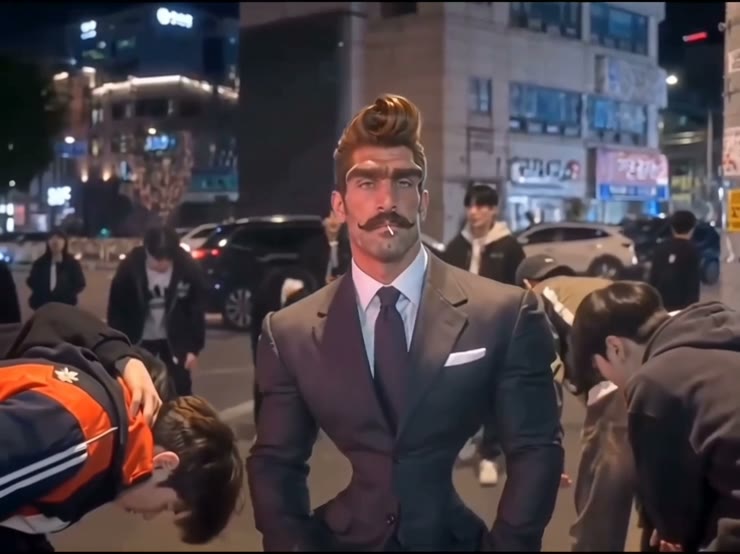
King Jin AI Trend turns one photo into a 10-second video with sound of you as the calm boss of a Korean night street: a crowd bows, you take a lollipop from your mouth, walk out of a teal stairwell and stand on a rooftop over the city. It’s a one-click template, not a prompt-based generator like Sora or Kling, and you don’t need CapCut. All four scenes keep your face, hair and outfit, not just the first shot.
King Jin is a CapCut AI photo template that took off on TikTok in mid-November 2026. The earliest post we found is @tramthoigian_01’s “trend AI King Jin” from November 13, 2026: a calm figure stands in the middle of a neon street at night while young men around them bow deeply, then the clip cuts to a lollipop close-up, a teal stairwell and a rooftop.
The joke is the gap between how ordinary the photo is and how seriously the street treats you. Nobody explains why everyone bows; you just stand there, unbothered, and take the lollipop out like a drama villain. People post it with captions like “me walking into the office on Monday” or “when I get home and the family group chat goes quiet.”
Add one clear photo of you from the chest up. Your face, hair and clothes come from the photo in every scene, so a suit or a dark jacket gives the strongest boss look. For the full walkthrough, photo tips and fixes, read how to make the King Jin AI Trend video.
This template is unofficial and not affiliated with CapCut, TikTok or any creator of the trend. Only upload your own photo or a photo of someone who agreed; you must be 18 or older; and photos of celebrities, public figures and children are not allowed.
Office workers post a King Jin video with “me walking in on Monday” and drop it in the team chat. A work photo in a jacket fits the street scene best.
Make a King Jin video of yourself and send it to the family chat before a holiday visit, captioned “arriving home.” Use a recent photo so relatives know it’s you.
Make the birthday friend the boss the whole street bows to and post it at midnight. Ask them first, and use a clear photo of their face.
Creators with a drawn or AI avatar use it as the photo, so their character gets the King Jin entrance. Our demo is a stylized portrait, and it stayed consistent in every scene.
The King Jin trend is a TikTok format built on a CapCut AI photo template: you upload one photo and become the untouchable boss of a Korean night street. The template clip has four scenes in a fixed order: the street where the crowd bows, a lollipop close-up, a teal stairwell hallway and a rooftop with a city skyline.
King Jin is the name of the template and hashtag, not a real person, and it has nothing to do with BTS’s Jin, whose fans also use the nickname “King Jin.” The earliest post we found is @tramthoigian_01’s “trend AI King Jin” from November 13, 2026, tagged for CapCut’s Southeast Asia template program. By November 16, 2026, #kingjinaitrend had 744 videos and 12.7 million views, and #kingjin another 571 videos and 2.5 million views. Creators also call it King Jin powerful entrance or King Jin powerful incoming.
@tramthoigian_01 posts “trend AI King Jin”, the earliest CapCut template clip we found. TikTok @tramthoigian_01
Three days later, #kingjinaitrend holds 744 videos and 12.7 million views. TikTok #kingjinaitrend
One clear photo is all it takes. Play it with the sound on.
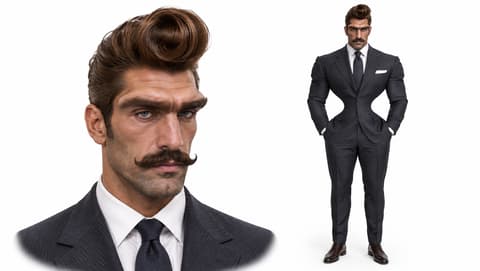
Two of the four scenes are close-ups of your face, so choose a front-facing photo with both eyes visible and good light. A suit or dark jacket looks the most like a boss.
Upload it to the single slot. Use your own photo, or ask your friend first if you’re making one of them.
Check the credits on the button, tap Generate and wait about four minutes. Download the MP4 from My Videos.
The lollipop scene and the rooftop are close-ups of your face, so start with one sharp photo of you.
Face to the camera
Both eyes visible, good light.
One person, chest up
Only you in the photo, face large and sharp.
Sunglasses or a covered face
The close-ups need your eyes and mouth.
Group photo
A small face cropped from a crowd looks less like you.
You get the bowing street, the lollipop close-up, the teal hallway walk and the rooftop, in the same order as the trend, in one 10-second clip.
Your face, hair and outfit carry from the street to the rooftop, so friends know it’s you from the first second.
The clip comes with the trend’s sound already on it. Download it and post it to TikTok, Reels or Shorts with no editing.
One video is 285 credits, about $3.16 from a one-time $5.99 pack, with no subscription. The MP4 has no watermark, and failed generations return their credits.
Unlike Sora or Kling, you don’t write or tune a prompt, and you don’t need to install CapCut or hunt for the template link. It all runs in your browser.
The King Jin AI trend is a TikTok trend from November 2026 that turns one photo into a 10-second boss-entrance video: a crowd bows to you on a Korean night street, then you take a lollipop from your mouth, walk out of a teal hallway and stand on a rooftop over the city.
King Jin is the name of the template and the #kingjinaitrend hashtag, not a real person, and it is not BTS’s Jin. The boss in your video is the person in the photo you upload.
It’s also called King Jin powerful entrance, King Jin powerful incoming and trend King Jin. The first two come from tutorial titles on TikTok; “trend King Jin” is how the earliest Southeast Asian CapCut posts caption it.
0–3s, you stand on a neon street at night while the young men around you bow deeply; 3–5s, close-up as you take a lollipop from your mouth; 5–6s, a cold little smile at the camera; 6–8s, in a teal stairwell hallway you turn around and walk toward the camera; 8–10s, you stand on a rooftop in daylight with the city skyline and a row of men in black behind you.
No. You make the King Jin video in your browser from one photo, without installing CapCut or finding a template link, and the template works in any country.
Not completely. One King Jin AI video costs 285 credits, about $3.16 from the $5.99 starter pack of 540 credits, with 255 credits left over and no subscription. The 75 free signup credits aren’t enough for this template. The exact credits show on the Generate button, and failed generations are refunded automatically.
Four reasons: you look like your photo, it costs less, you get a clean video, and it’s ready to post.
You look like your photo: your face, hair and outfit stay the same in all four scenes, from the street to the rooftop, and our first run worked, so you don’t spend credits on retries.
It costs less: about $3.16 per video from a one-time $5.99 pack, with no subscription; among the King Jin tools we found with a listed price, it is the lowest per video.
Clean video: every plan, including free credits, downloads a watermark-free MP4, and failed generations return their credits.
Ready to post: 10 seconds with the sound already on it, no editing, no CapCut.
Most King Jin posts use “KIAT JUD DAY HARDTEKK (TikTok Version)” by hardangel. Your video comes with the trend’s sound on it, so you don’t need to add music.
Yes. Our demo used a stylized AI portrait with a huge pompadour and moustache, and the face, hair and suit held in every scene. Only use a character you created or have the right to use.
The video is 10 seconds, 480p, in a 4:3 frame with sound and no watermark. You can post it on TikTok, Reels or Shorts; it shows with bars above and below.
Usually it’s a small, blurry or side-on face, such as one cropped from a group photo, or sunglasses over the eyes. Use a sharp, front-facing photo from the chest up and run the template again.
Your photos and videos stay in your account, so you can download them again from My Videos at any time. They are never used to train AI models and are not sold or shared, except with the video model provider that renders your clip.
Last updated