You, after seeing the trend
Most people who saw the @s.nemz clip just want to play the guy themselves. Add your own photo and post it with “I got this !” as the caption.
Add one photo and you’re the guy at the fancy dinner who refuses her card, proudly unzips a pouch with a kitchen sponge inside and gets walked straight to the dish pit. You wear what you wore in the photo. Send it to the one who always says “I’ll get it.”
Effect
Your photos1 photo
You Never Let Her Pay AI turns one photo into an 11-second vertical video with sound: you wave off your date’s card, show the waiter a kitchen sponge and get walked to the dishes, wearing what you wore in the photo. It’s a one-click template, not a prompt-based generator like Sora or Kling.
The trend is an 11-second dinner skit. At an upscale restaurant, the date reaches for her card, he stops her with a thumbs-up, unzips a small black pouch and shows the waiter what he’s paying with: a yellow and green kitchen sponge. The waiter laughs, puts an arm around him and walks him to a kitchen full of dirty bowls.
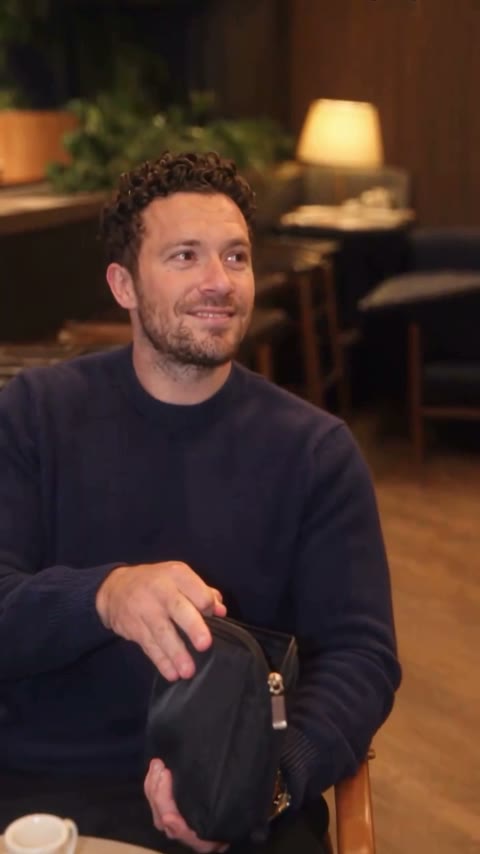
It lands because of the confidence. He plays the “a real man never lets her pay” line completely straight, and the payoff is the old joke about washing dishes when you can’t cover the bill. In our demo, a guy in a navy crew-neck sweater plays the whole scene, from the proud nod at the table to the walk into the dish room.
Add one photo of the person who says “I got this”; the date, the waiter and the restaurant stay as they are. The step-by-step guide covers which photos work best and the settings we used.
This is an independent fan template, not affiliated with the creator of the original TikTok. Use your own photo or a photo of an adult who agreed to appear. You must be 18 or older to use the template. Photos of celebrities, public figures and children are prohibited.
Most people who saw the @s.nemz clip just want to play the guy themselves. Add your own photo and post it with “I got this !” as the caption.
Girlfriends make it with their boyfriend’s photo and send it after he “forgets” his wallet again; boyfriends make it of themselves as a joke before date night. Use a photo your partner is happy to share.
Every group has one friend who reaches for the bill and then can’t find his card. Put him in the dish room and drop it in the group chat, with his OK.
This template changes only the guy who says “I got this”; the date and the waiter stay the same. For a dinner with grandparents instead, try [Grandpa Said He’d Handle Dinner](/effects/grandpa-said-hed-handle-dinner-ai).
The You Never Let Her Pay trend started with an AI-made TikTok by Los Angeles creator @s.nemz, posted on November 8, 2026 with the caption “I got this !”. TikTok labels the 11-second clip as AI-generated, and he plays the guy with the sponge himself.
As of November 16, 2026, the original post had 3.7 million views, 180,900 likes and 37,200 shares. Remakes followed the next day under #youneverletherpay, and @boby.biggsjohnson’s version from November 10 became the breakout with 21.9 million views and 1.5 million likes.
@s.nemz posts the sponge dinner skit with the caption “I got this !”. TikTok @s.nemz
Remakes start under #youneverletherpay, with other people playing the guy. TikTok #youneverletherpay
@boby.biggsjohnson’s version becomes the breakout: 21.9M views. TikTok @boby.biggsjohnson
The @s.nemz original passes 3.7M views (counts as of November 16). TikTok @s.nemz
We launch the You Never Let Her Pay AI template: one photo, in your own outfit.
Pick who says “I got this,” add the photo and play it back with sound.

It’s you, your boyfriend or the friend who always grabs the bill. Whatever they wear in the photo is what they wear to dinner.
Upload a sharp, front-facing photo of one person, waist up. Ask first if it’s someone else’s photo.
Check the credit cost on the button, tap Generate and wait about four minutes. Download the MP4 from My Videos.
You’re close to the camera at the table and small in the kitchen, so start with a sharp, well-lit photo of one person.
Face to the camera
Both eyes visible, good light.
Outfit in frame
The clothes you see are the clothes you wear to dinner.
Couple photos
Two people in one photo can mix up who pays.
Sunglasses or covered faces
Skip photos where hands, hats or dark lenses hide the eyes.
Face, hair and outfit come from your photo, so a hoodie stays a hoodie at the fancy table instead of turning into a cream dinner jacket and bow tie. That mismatch makes the sponge even funnier.
From the thumbs-up at the table to the walk to the kitchen, it’s the same person from your photo. Our first run worked, so you don’t pay for retries.
The finished clip is 11 seconds in a 9:16 frame at 480p with sound on, ready for TikTok, Reels or Shorts.
Download a watermark-free MP4. If a generation fails, the credits go back to your account automatically.
Unlike Sora or Kling, you don’t write or tune anything, and you don’t need CapCut or an app. Add one photo in your browser and tap Generate.
The You Never Let Her Pay AI trend is an 11-second dinner skit where a man refuses to let his date pay, shows the waiter a kitchen sponge instead of a card and gets walked to the dishes. It started with @s.nemz’s TikTok on November 8, 2026, and people now make AI versions starring themselves or their friends.
It’s also called Never Let Her Pay, the Sponge Wallet meme, the Sponge Dinner trend and “POV: You never let her pay.” The TikTok tag is #youneverletherpay, and “I got this !” is the caption of the original post.
TikTok creator @s.nemz started the You Never Let Her Pay trend with a post captioned “I got this !” on November 8, 2026. TikTok labels the clip as AI-generated, and it had 3.7 million views and 180,900 likes as of November 16, 2026.
0–3s, at a restaurant table, your date offers her card and you stop her with a thumbs-up while the waiter holds the card machine; 3–5s, close-up of a black pouch being unzipped to show a yellow and green kitchen sponge; 5–8s, you grin and hold it up as the waiter bursts out laughing; 8–9s, the waiter puts an arm around you and walks you away; 9–11s, a dish room where a staff member points you to a pile of dirty bowls.
He pays with a kitchen sponge because the joke is that he insists on paying but has no money, so he’ll wash dishes to cover the bill. The sponge is the punchline to “a real man never lets her pay.”
No. A You Never Let Her Pay AI video is an AI-made parody, and the person at the table comes from your photo. The original @s.nemz clip is also labeled AI-generated on TikTok, so label yours as AI-made when you post it.
A You Never Let Her Pay AI video needs one photo, of the person who says “I got this.” You don’t need a suit: you wear what you wear in the photo, and our demo was made with a navy sweater.
Yes, if they agreed: You Never Let Her Pay AI works with your own photo or a photo of an adult who said yes. Photos of celebrities, public figures and children are not allowed, and keep it a joke rather than passing it off as real.
Not completely. New accounts get 75 free credits, and one You Never Let Her Pay AI video costs 310 credits, about $3.44 from the $5.99 starter pack of 540 credits, which leaves 230 credits in your account with no subscription. The exact credits show on the Generate button before you start, and failed generations are refunded automatically.
Four reasons: you look like your photo, it costs little, you get a clean video, and it’s ready to post.
Looks like you: your face, hair and outfit stay the same from the table to the kitchen, and our first run worked, so you don’t spend credits on retries.
Costs little: about $3.44 a video from a one-time $5.99 pack, with no subscription.
Clean video: every plan, including free credits, downloads a watermark-free MP4, and failed generations are refunded.
Ready to post: 11 seconds, vertical 9:16 with sound, so it goes straight to TikTok, Reels or Shorts without editing.
Yes. The You Never Let Her Pay AI video is a vertical 9:16 MP4, 11 seconds at 480p with sound, so you can post it to TikTok, Reels or Shorts as is. Use #youneverletherpay and add an AI-made label when the platform asks.
Usually it’s because the last two shots show you small and turned to the side, so a blurry or side-on photo gives the AI too little to keep. Use a sharp, front-facing photo of one person and run the template again.
Your photos and videos stay in your account, so you can download them again from My Videos at any time. They are never used to train AI models and are not sold or shared, except with the video model provider that renders your clip.
Last updated