Best AI Photo Animator Apps Compared (2026): Which to Use
What’s new on this page
- — Added a column showing which kinds of photo animation AI Photo Animator supports, and links to each tool’s official site.
- — Published. Pricing and free tiers checked on each tool’s own pages on 10 October 2026.
Three kinds of photo animator (and why it matters)
| Kind | How motion is made | Examples | Good for | Weak at | AI Photo Animator (this site) |
|---|---|---|---|---|---|
| Preset animator | Applies a ready-made movement (zoom, pan, a recorded face motion) | Canva photo animation, MyHeritage Deep Nostalgia | Quick social graphics, making an old portrait blink and smile | Anything specific: you can’t ask for “she laughs and turns to her husband” | ✓ Supported: viral templates recreate a popular effect in one click, no prompt needed |
| Single-model generator | One AI video model invents new frames from your photo and a prompt | Runway, Kling AI | Realistic, directed motion if that model suits your photo | When that model struggles with your photo, you have no plan B | ✓ Supported: pick a single model such as Kling 3.0 or Seedance 2.5 and stick with it |
| Multi-model generator | Same as above, but you choose from several model families | AI Photo Animator, Adobe Firefly | Comparing results; using the cheapest model for drafts and the best one for finals | More choices can feel like more decisions | ✓ Supported: switch between Seedance, Kling, Wan, Hailuo and MiniMax in one generator |
This is the single most useful thing to know before picking a tool. A lot of disappointment with “AI photo animation” comes from expecting generated motion from a preset tool, or expecting one-click simplicity from a prompt-based one. If you’re not sure which you need, a tool that covers all three lets you start with a template and move to prompts later, without switching apps.
The tools side by side
| Tool | Kind | Free to try | Paid entry point (from its own page) | Best for |
|---|---|---|---|---|
| AI Photo Animator | Multi-model generator (Seedance, Kling, Wan, Hailuo, MiniMax) | Free credits on sign-up | $4.99 one-time for 500 credits; no subscription required | Animating real photos, comparing models, pay-as-you-go |
| Runway | Single-family generator plus editing tools | 125 one-time credits | Standard $15/month ($12/month billed annually), 625 credits | Creators who also want an AI video editing suite |
| Adobe Firefly | Multi-model generator (Firefly Video plus partner models) | Daily free generations | Standard plan: 2,000 credits, “up to 20” 5-second videos a month | People already paying for Adobe Creative Cloud |
| Kling AI | Single-model generator (Kling) | Check its site | Credit subscriptions | Fans of Kling’s cinematic motion who don’t need other models |
| MyHeritage Deep Nostalgia | Preset face animation for family photos | Check its site | MyHeritage subscription (“Go Premium”) | Genealogy users animating old family portraits |
| Canva | Preset animation styles (pan, zoom, tumble, brush strokes) | Yes | Canva Pro for more features | Social posts and slides that need light movement |
Prices are in USD unless noted and were taken from each tool’s public pricing page on 10 October 2026. Adobe lists Firefly prices by region; the Standard plan is around €11 a month in Europe.
Each one in a paragraph
AI Photo Animator: best for animating real photos without a subscription
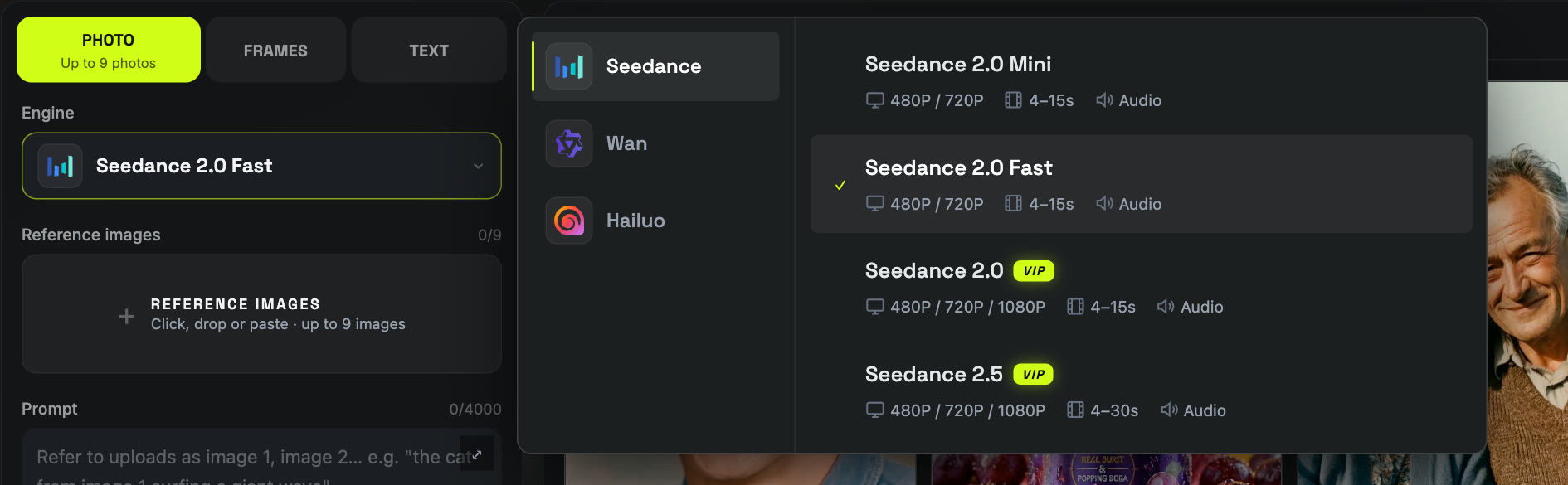
AI Photo Animator puts the leading image-to-video models in one generator: Seedance 2.0 and 2.5, Kling 3.0, Wan 3.0, MiniMax H3 and Hailuo. You upload up to 9 photos (10 on Wan 3.0), describe the motion, and choose duration, resolution (up to 1080p, or 4K on Kling 3.0) and aspect ratio. Most models also generate native audio. The credit cost appears on the Generate button before you click, failed generations are refunded automatically, and there’s a one-time $4.99 starter pack if you don’t want a subscription. A 5-second 720p clip on Seedance 2.0 Fast costs 155 credits.
Pick it if: you want realistic motion from real photos (portraits, old family pictures, pets, products), like being able to try another model when the first result isn’t right, or just want to recreate a trending effect from a template. Skip it if: you need a full video editor with timelines; this is a generator, not an editor. New to it? Our step-by-step guide walks through every screen.
Runway: best if you also want an AI editing suite
Runway is a creative suite: video generation sits next to editing, upscaling and other tools. Its free plan gives 125 one-time credits; Standard is $15 a month (or $12 billed annually) for 625 credits and no watermarks, with Pro and Max tiers above. It’s a strong choice for filmmakers and editors who will use the rest of the suite. For simply bringing a photo to life, you’re paying for a lot you may not use.
Adobe Firefly: best if you already live in Creative Cloud
Firefly’s Generate Video uses Adobe’s own Firefly Video Model, and Adobe also offers partner models such as Kling and Veo inside Firefly. Paid plans are counted in generative credits: the Standard plan’s 2,000 monthly credits cover “up to 20” 5-second videos, according to Adobe’s plan page. The free plan includes some daily generations. It fits naturally into a Photoshop or Premiere workflow; on its own, 20 short clips a month is not a lot if you like to iterate.
Kling AI: best for Kling-only fans
Kling, from Kuaishou, is known for cinematic, physically convincing motion, and it is one of the models people search for by name. Using Kling’s own app gets you its latest features first. The trade-off is that you only get Kling: when a photo doesn’t suit it (and every model has photos it struggles with), you have to go elsewhere. Kling 3.0 is also available inside AI Photo Animator alongside other models.
MyHeritage Deep Nostalgia: best for one-click family portraits
Deep Nostalgia uses deep learning “to animate the faces in still family photos”, in MyHeritage’s own words. It became famous for making ancestors blink, smile and turn their heads. It is quick and needs no prompt, but motion is limited to the face and follows pre-made movements, so results look similar from photo to photo. Extended use requires a MyHeritage subscription. For more varied motion on old photos, such as a couple laughing together or a slow push-in on a wedding portrait, see our animate old photos page.
Canva: best for light motion in designs
Canva’s photo animation applies styles like pan, zoom, tumble, brush strokes and ink splotches to a photo inside your design. It’s free, fast and perfect for social posts and presentations. It does not invent new motion: the people in your photo won’t move, smile or talk. Think of it as animating the picture, not what’s in it.
How to choose: match the tool to the job
| You want to… | Use |
|---|---|
| Make a grandparent’s portrait blink and smile, nothing more | AI Photo Animator’s old photo templates, or MyHeritage Deep Nostalgia |
| Make people in a photo actually do something (laugh, hug, wave, turn) | A generator: AI Photo Animator, Kling, Runway or Firefly |
| Try several models on the same photo and keep the best | AI Photo Animator or Adobe Firefly |
| Recreate a trending effect without writing a prompt | AI Photo Animator’s viral templates |
| Pay once without a subscription | AI Photo Animator (one-time credit packs) |
| Add light motion to an Instagram post or slide | Canva |
| Generate, then edit, upscale and cut in one place | Runway, or Firefly together with Premiere |
What to check before you pay for any photo animator
- Real cost per clip, not per month. Divide the plan price by how many 5-second videos it actually buys. A cheap monthly plan with very few generations can cost more per clip than a pricier one.
- Do failed generations cost credits? Some tools charge for every attempt. On AI Photo Animator, failed generations are refunded automatically.
- Watermark and commercial use on the plan you’re buying, not just the top tier.
- Does it generate motion or apply a preset? Look at examples with people. If every example shows the same zoom or head turn, it’s a preset.
- Audio. Newer models generate sound with the video; older ones are silent.
- Privacy. Check whether your uploads or results appear in a public feed, and whether you can turn that off.
FAQ
What is the best AI photo animator?
It depends on the job. For realistic, prompt-directed motion from real photos with the option to compare models, a multi-model generator like AI Photo Animator is the most flexible. For one-click family portraits, MyHeritage Deep Nostalgia is the simplest. For light motion in a design, Canva is enough.
Is there a free AI photo animator?
Yes, with limits. Canva’s preset animations are free. AI Photo Animator gives free credits on sign-up, Runway gives 125 one-time credits, and Adobe Firefly’s free plan includes some daily generations. Generated motion uses real GPU time, so unlimited free generation is rare.
Which AI is best for animating old photos?
For a quick blink and smile, Deep Nostalgia works. For more natural, varied motion (people interacting, a camera move, keeping black and white), use an image-to-video generator with a gentle prompt. See our guide on how to animate photos with AI for prompts.
Can ChatGPT animate a photo?
ChatGPT can help you write a motion prompt, but turning a photo into a video needs an image-to-video model such as Seedance, Kling, Wan or Hailuo.
Why do results differ so much between tools?
Each tool runs a different video model, and models are trained differently. The same photo and prompt can look great on one and odd on another, which is why being able to switch models matters.