How to Make the Winter Car Drift AI Video From One Photo
What’s new on this page
- — Published: our first Winter Car Drift AI video from one car photo (Wan 3.0, 14 s, 480p, 9:16, with sound, 385 credits, first try, 4 min 47 s), the prompt, frame-by-frame results, what didn't match, photo tips and a price comparison with two other sites and the CapCut template.
A Winter Car Drift AI video starts with a toy and ends with a real car: a gloved hand sets a toy car on a frozen lake at dusk, it drives off, a burst of snow hits the lens, and the same car comes out full size, sliding sideways across the ice. We made one on 26 November 2026 from a single car photo, and it worked on the first try.
What is the Winter Car Drift AI trend?
The winter car drift trend, also called winter drift, ice drift or Зимний дрифт (Russian for "winter drift"), is an AI clip in which a toy car on a snowy frozen lake disappears behind a burst of snow and comes back as the full-size car mid-drift. It is AI-made, not real footage: nobody needs a frozen lake, a drift car or a drone.
It took off on Russian-language TikTok as a CapCut AI template. @rhetta.chandler's tutorial for the Зимний дрифт template, posted on 21 November 2026, had 379,177 views by 26 November, and the account's three most-watched tutorials passed 1.07 million views in five days. By 22 November other posts were offering the same effect from one uploaded car photo instead of a video.
What happens in a Winter Car Drift AI video, second by second?
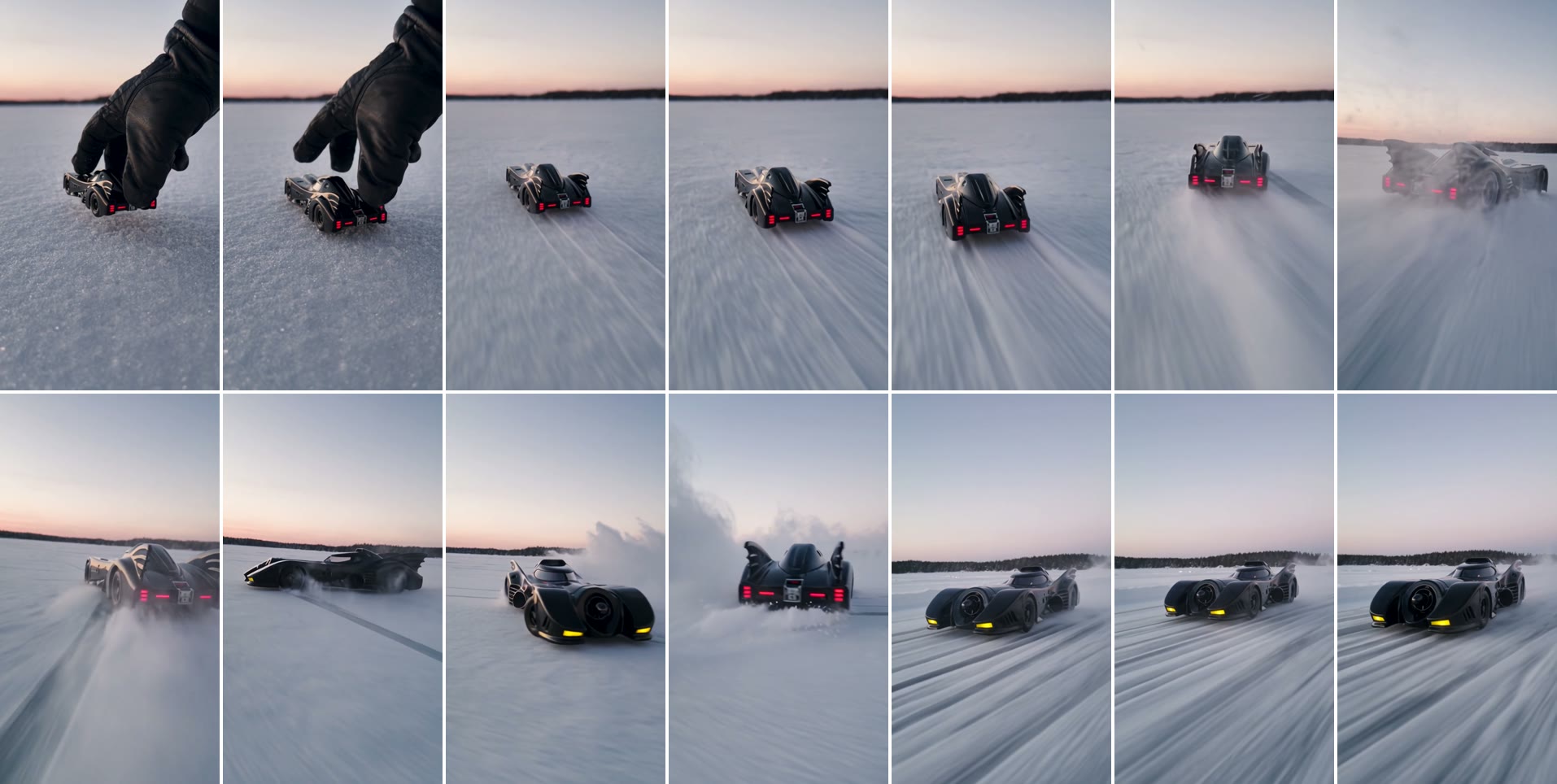
One continuous low chase shot, 14 seconds in all. In our result:
| Seconds | What happens |
|---|---|
| 0–2 | A gloved hand sets a toy of our car on the snow of a frozen lake; pink dusk sky, a dark treeline far away |
| 2–5 | The hand lets go and the toy rolls away from the low camera, red taillights on, leaving tracks in the powder |
| 5–6.5 | It kicks sideways and a burst of snow fills the screen |
| 6.5–9 | The snow clears: the car is full size, sliding sideways across the ice with its whole side in view |
| 9–14 | It swings around to face the camera, yellow headlights on, and drifts past in a wave of snow |
What you need to make the Winter Car Drift AI video
- One car photo. The whole car, from a front or rear corner, in daylight. Your own car or one you have the right to use.
- An account and 385 credits. New accounts get 75 free credits, so you need the one-time $5.99 pack (540 credits), which leaves 155 credits after one video. No subscription.
- About five minutes. Ours took 4 minutes 47 seconds; you can close the tab and find the video in My Videos later.
- No CapCut and no video of your car. The CapCut template asks for a clip; this one needs only a still photo.
How to make the Winter Car Drift AI video in 4 steps
1. Pick the car
Use your own car, or one you have the right to use. A car you'd never actually take sideways on a frozen lake makes the best joke: a family hatchback, a freshly washed new car, or a modified car whose spoiler and wheels you want to show off.
2. Pick the photo
Pick a sharp daylight photo of the whole car from a corner, so one end, one side and the wheels are all visible. The video shows the car from behind as a toy, side-on in the drift and head-on at the end, so a corner shot gives the model something for every angle. Daylight keeps the paint color right on the blue-white snow.
3. Upload it to the template
Open the Winter Car Drift AI generator and add your car photo. There is one slot and no prompt box: the frozen lake, the snow burst, the camera moves and the timing are already set up.
4. Generate, download and post
Press Generate. Ours was ready 4 minutes 47 seconds later. Download the MP4 from My Videos: it is 14 seconds, vertical 9:16, with sound and no watermark, ready for TikTok, Reels or Shorts.
Our Winter Car Drift AI test: one black custom car
We used one showroom photo of a black, movie-style custom car with tail fins and yellow lights, shot from the front corner. A dark, unusual shape is a hard test: any leftover from another car would show at once.
| Setting | Our test |
|---|---|
| Date | 26 November 2026 |
| Model | Wan 3.0 |
| Photos | 1 (the car) |
| Length | 15-second setting (14.0 s file) |
| Resolution and frame | 480p (480 × 854), 9:16 vertical |
| Sound | On |
| Cost | 385 credits, about $4.27 |
| Render time | 4 minutes 47 seconds |
| Attempts | 1 (worked first time) |
The prompt we used
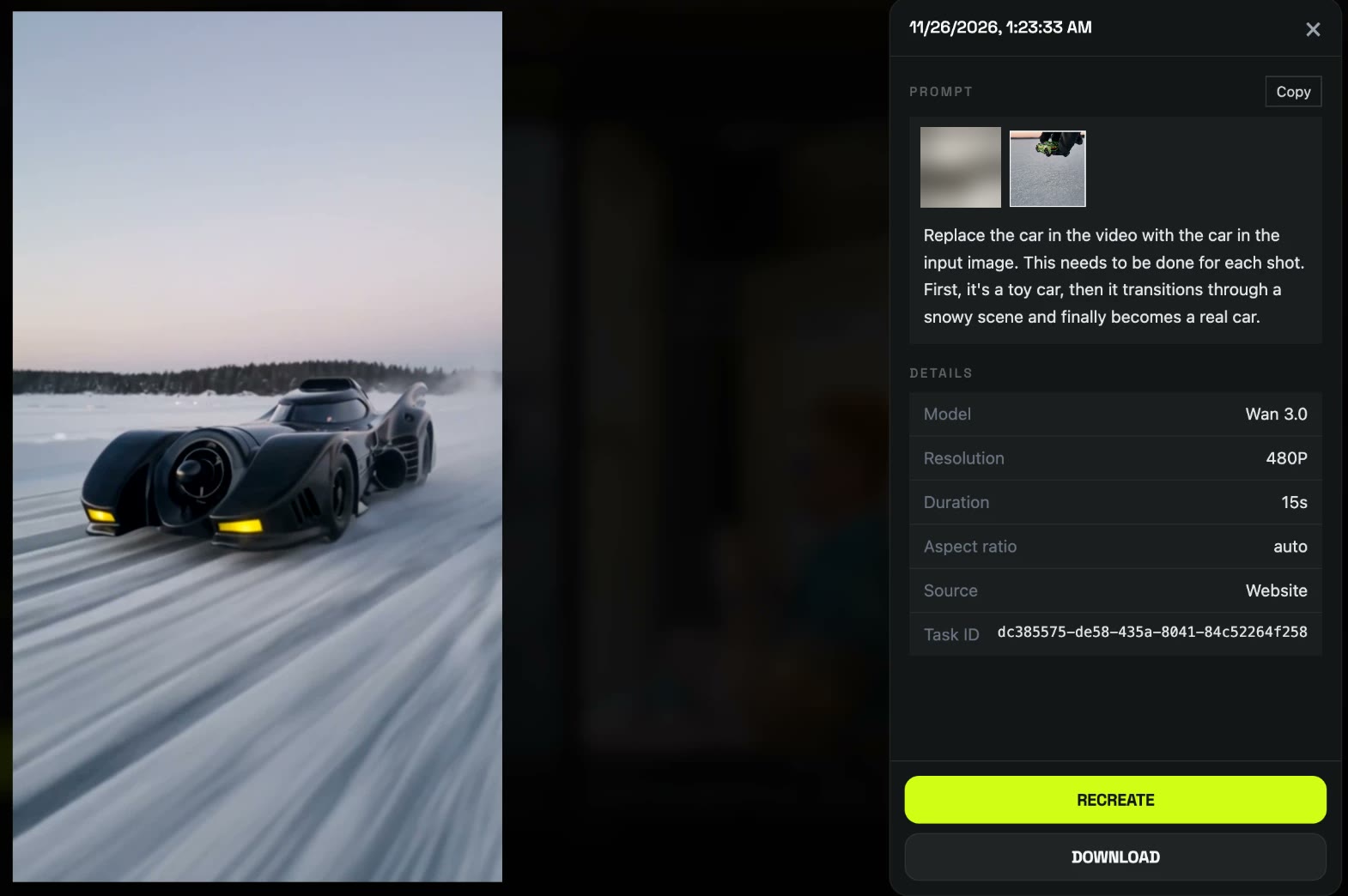
Three sentences, written in English, first try. We gave Wan 3.0 the car photo plus a 15-second winter drift clip as the reference video. The template runs the same setup for you, so you don't need any of this unless you want to try it on your own tools.
Replace the car in the video with the car in the input image. This needs to be done for each shot. First, it's a toy car, then it transitions through a snowy scene and finally becomes a real car.
把视频里的车换成输入图片里的车。 每个镜头都要换。 先是一辆玩具车,然后穿过一段雪景,最后变成一辆真车。
The second and third sentences did the work. "For each shot" stopped the model from swapping the car only at the end, and naming the three stages (toy, snowy transition, real car) told it that the toy in the glove had to be our car too. Without that, a common failure in toy-to-real clips is a toy that still looks like the reference car.
What we saw, frame by frame:
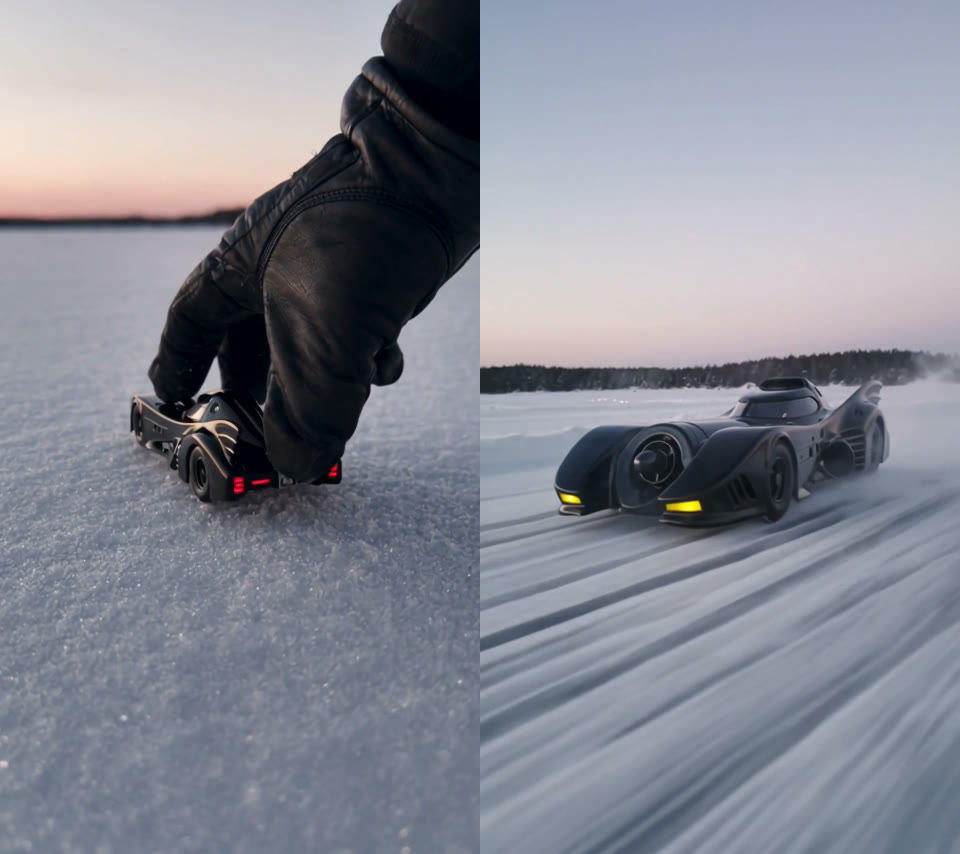
- The toy was our car from the first second. Tail fins, red taillights and the black body were all there in the glove at 0.8 seconds.
- The full-size car matched the photo. Fins, yellow headlights, the turbine nose and the glossy black paint held from the side-on slide to the head-on finish.
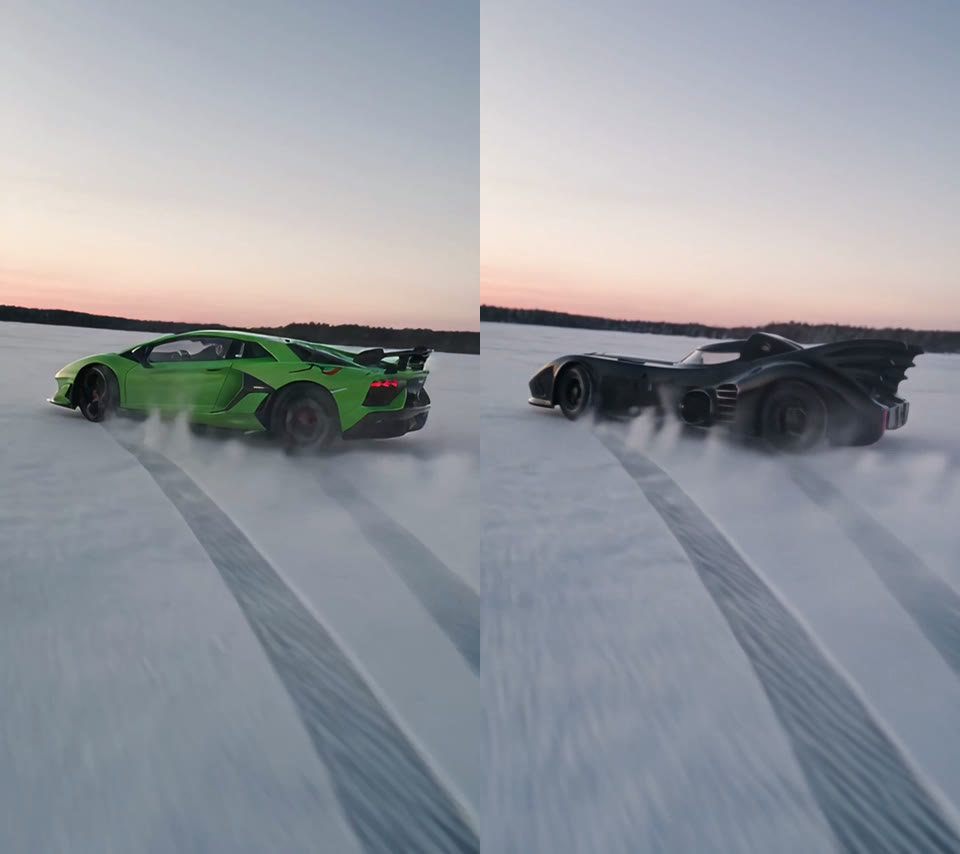
- Nothing of the reference car was left. The green sports car in the reference clip didn't show up in any frame.
- One soft frame at the snow burst. At about 6 seconds, behind the snow, the car had a faint double outline for a frame. At normal speed you don't see it.
- 480p is soft. Fine enough for a phone screen, but not as sharp as a 720p render.
How close is the Winter Car Drift AI video to the trend?
Very close. At the same second, the tire tracks, the snow spray, the treeline and the low camera angle line up with the reference clip; only the car is different. The pink dusk sky and the speed lines in the snow carried over too.
Which photos work best for the Winter Car Drift AI video?
- The whole car, from a corner. One end, one side and the wheels in view.
- Daylight or even light. Night shots and colored lights can change the paint color on the snow.
- Nothing in front of the car. People or other cars hide its shape.
- No close-ups. A grille or wheel on its own isn't enough.
- Keep the mods in frame. Spoilers, wheels and wraps carry over to both the toy and the full-size car.
- Expect small details to change. Badges and number plates may not carry over; hide a plate you don't want shown.
Does the Winter Car Drift AI video work for SUVs, pickups and white cars?
We've tested one car so far, the black custom car above, and it worked first time. SUVs and pickups should follow the photo the same way, but we haven't tested them yet. A white or silver car is the one to watch: on white snow it may lose contrast, so pick a photo with a clear outline and good light. We'll add results here as we test more cars.
Winter Car Drift AI generators compared
On 26 November 2026 we read two other sites with a winter drift template and the CapCut template posts. The figures below come from their own pages; we did not generate on these tools.
| Tool | What you add | Length and frame | Price per video |
|---|---|---|---|
| Our template | 1 car photo | 14 s, 480p, 9:16, with sound | 385 credits, about $4.27 ($5.99 pack, no subscription) |
| Seadanse | 1 car photo | 15 s, 720p or 1080p, with sound | $9.90 for 500 credits, one 720p video; 1080p uses 1,480 credits |
| MakeViral | 1 car photo | 15 s, 720p, 9:16, with sound | 228 credits; smallest pack $39.99 |
| CapCut Зимний дрифт template | A video of your car | Not checked | Not checked; availability varies by region |
Ours is the cheapest per video of the templates with a listed price, a one-time pack with no subscription, and the only one of the three that shows a real first-try result with the toy and the full-size car checked frame by frame.
Winter Car Drift AI video problems and fixes
| Problem | Fix |
|---|---|
| The car looks blurry for a moment at about 6 seconds | That's the snow burst where the toy becomes the full-size car. It passes in a fraction of a second; the car is sharp again from 6.5 seconds. |
| The car doesn't look like mine | Use a daylight photo of the whole car from a corner, with nobody and no other car in front of it. |
| The paint color changed | Night photos and colored lights shift the color. Use a daylight photo. |
| The badge or number plate is gone | Small details may not carry over at 480p. The body, paint, lights and wheels are what follow the photo. |
| The generation failed | The credits come back automatically. Try again, or try another photo. |
Is the Winter Car Drift AI video free?
Not completely. New accounts get 75 free credits and one Winter Car Drift AI video takes 385, so you need the one-time $5.99 pack (540 credits). That is about $4.27 for the video, with 155 credits left over and no subscription. See pricing. Failed renders are refunded automatically.
Do I need the Зимний дрифт CapCut template?
No. Most TikTok posts used a CapCut AI template called Зимний дрифт, which asks for a video of your car. Our Winter Car Drift AI page needs no CapCut and no video: one car photo in your browser.
Will the toy and the real car both look like my car?
In our test, yes. The toy in the glove was our car from the first second, and the full-size car kept the fins, taillights, yellow headlights and paint from the photo through the whole drift. Small badges and plates may not carry over.
Can I write my own prompt on another tool?
Yes. Our three-sentence prompt above worked on Wan 3.0 with a 15-second winter drift clip as the reference video. Name the three stages (toy, snow, real car) and ask for the change in every shot, or the toy may stay as the reference car.
How long does it take and how long is the video?
Our render took 4 minutes 47 seconds. The video is 14 seconds, 480p, vertical 9:16, with sound and no watermark.
Want another video with your car? Our AI Toy Car to Real Car template turns it into a windowsill model that drives off at night, and Lego Car Wash AI has tiny toy workers wash it; the Lego Car Wash tutorial walks through that one.