How to Make the Villain Trend AI Video From One Photo
What’s new on this page
- — Published: our first Villain Trend AI video from one photo (Wan 3.0, 6.4 s, 480p, 9:16, with sound, 180 credits, first try, 2 min 13 s), the prompt we used, beat by beat, a comparison with makeviral, Soracai, PixQuill, CapCut and Seedance, photo tips and fixes.
A Villain Trend AI video puts the person in your photo into the TikTok skit "POV: you're the villain but the chair leaned way more than you expected": they start reclined almost flat in a leather swivel chair, wait for it to rock them forward, then deliver the villain line with their fingers steepled. We made the clip above on 26 November 2026 from one photo of a deliberately loud character (orange flat-top, mirrored sunglasses, handlebar moustache, teal flame shirt, white shorts, tube socks) to see whether every piece of that outfit would survive the lean-back. It did. This guide covers the steps, the exact prompt, what came out well and what didn't, and which photos work.
What is the villain trend?
The villain trend, also called the villain chair trend, is a POV skit: someone plays a movie villain in a swivel chair, the kind who turns round slowly to face the hero, except the chair reclines so far that it takes a moment to bring them back up. It started with a 6.5-second clip by @mattfletcher14 posted on 9 November 2026, which third-party trackers put at about 20 million views by late November.
Most versions use Myuu's "Living in the Dark (Evil Larry Version)". The trend reached Formula 1 during the Las Vegas Grand Prix weekend, when Mercedes posted Keanu Reeves leaning back much too far in Toto Wolff's office chair (reported by Motorsport.com on 24 November). By 26 November, Virlo counted 220 villain trend videos with 154.2 million views between them.
What happens in a Villain Trend AI video, beat by beat?
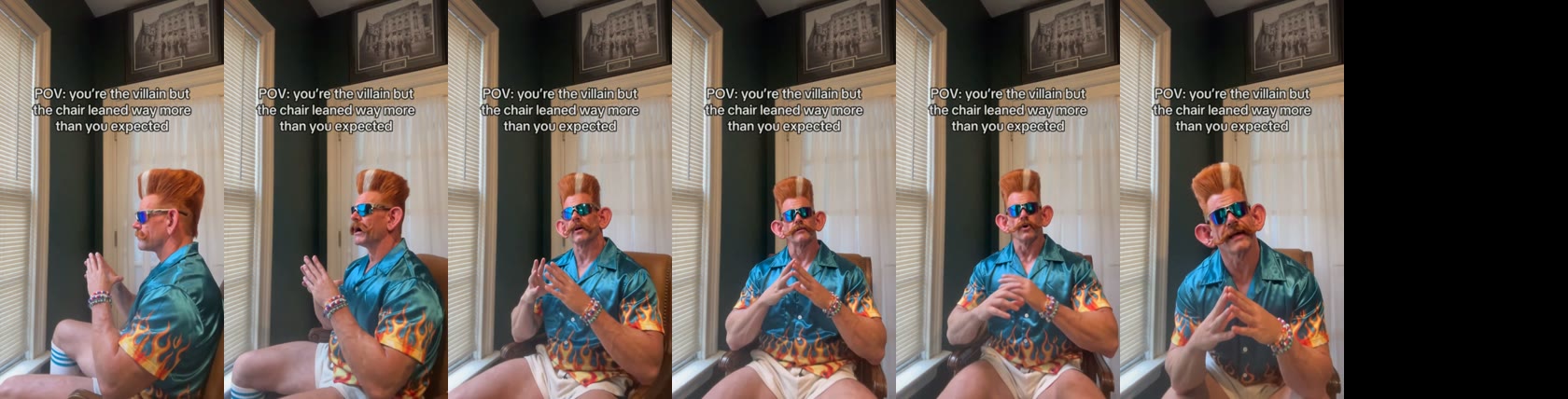
The video follows the original clip beat for beat. In our result:
| Seconds | What happens |
|---|---|
| 0–1.5 | Side-on and reclined almost flat in a brown leather chair by the window, fingers already steepled |
| 1.5–3 | The chair slowly rocks him forward and turns him to the camera |
| 3–5 | Face to the camera, fingers steepled, he delivers the villain line |
| 5–6.4 | He leans in toward the lens and clasps his hands |
| Whole clip | The caption "POV: you're the villain but the chair leaned way more than you expected" stays across the top |
What you need to make the Villain Trend AI video
- One photo. One person, face to the camera, waist-up or full body. It can be you, or an adult friend or family member who agreed.
- An account and 180 credits. New accounts get 75 free credits, so you need the one-time $5.99 pack (540 credits), which makes three villain videos. No subscription.
- About two minutes. Ours took 2 minutes 13 seconds; you can close the tab and find the video in My Videos later.
- No swivel chair, no filming. You don't record anything yourself.
How to make the Villain Trend AI video in 4 steps
1. Pick the villain
There is one villain per video, so pick one person: you, or the friend who always cancels plans, as long as they said yes. The more seriously they take themselves, the better the lean-back lands. Photos of celebrities, public figures and children are not allowed.
2. Pick the photo
Use a sharp, front-facing photo with even light. A full-body shot is best, because the first second shows you side-on with your legs in view, and what you wear in the photo is what the villain wears, down to the socks. A suit or a dark hoodie looks the most villainous; something loud is funnier.
3. Upload it to the template
Open the Villain Trend AI generator and add your photo. There is no prompt to write: the room, the chair, the timing and the caption are already set. The Generate button shows the credit cost before you start.
4. Generate and download
Press Generate. Ours was ready 2 minutes 13 seconds later. Download the MP4 from My Videos: it is vertical 9:16, about 6 seconds long, has no watermark and already has the sound and the POV caption, so you can post it straight to TikTok, Reels or Shorts.
Our Villain Trend AI test: a flame shirt instead of a black hoodie
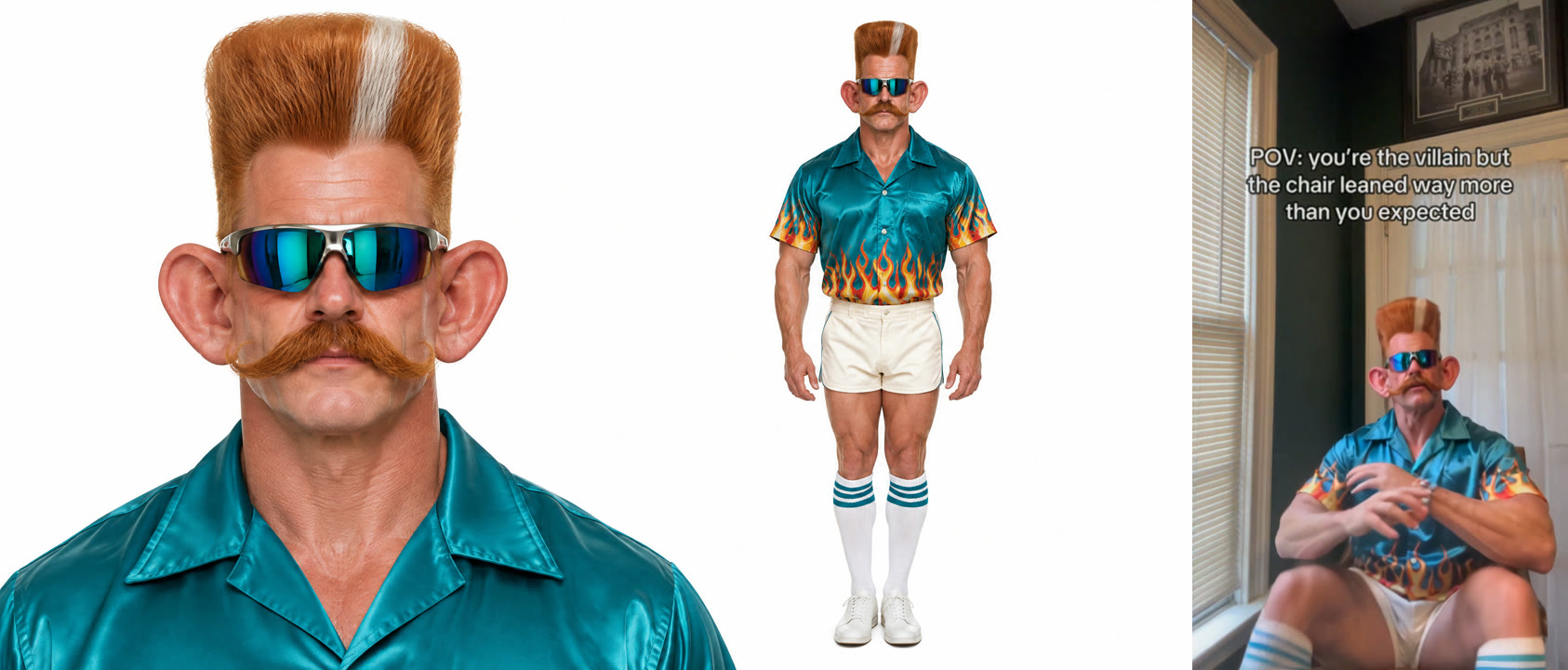
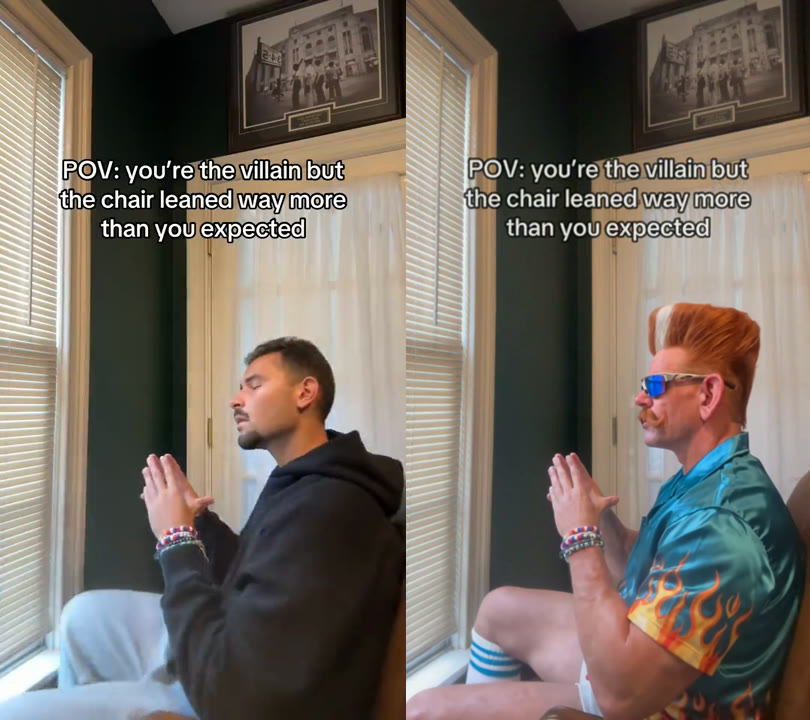
In the original clip the villain wears a black hoodie and grey sweatpants and has short dark hair. We wanted to see whether the video would drift back toward that, so we picked the opposite: an AI-made character with an orange flat-top and a white streak, mirrored sunglasses, big ears, a handlebar moustache, a teal satin shirt with flames, white shorts and striped tube socks. If anything slipped back to the hoodie, it would be obvious.
| Setting | Our test |
|---|---|
| Date | 26 November 2026 |
| Model | Wan 3.0 |
| Photos | 1 |
| Length | 6.4 seconds (7-second setting) |
| Resolution | 480p, 480×854, 9:16 vertical |
| Sound | Yes |
| Credits | 180 (about $2 from the $5.99 pack) |
| Render time | 2 minutes 13 seconds |
| Attempts | 1, first try |
What came out well
- The whole outfit stayed his. Flame shirt, white shorts and tube socks are all there, including in the first second when his legs are in view; nothing of the black hoodie or sweatpants is left.
- The hair and face stayed his. The flat-top kept its height and white streak, and the sunglasses, ears and moustache never changed between frames.
- The lean-back is the real one. He starts almost flat and side-on, and the chair brings him round at the same pace as the original, so the joke still lands.
- The caption and room are intact. The POV caption, the blinds, the curtains and the framed photo above the door are exactly where they should be, and the window light falls on him naturally.
What didn't
- The first second is a side view. He is side-on while reclined, as in the original, so the face only turns to the camera from about 2 seconds.
- Sunglasses hide the villain stare. Our character wore them, so the eyes never show. That's the photo, not the template; a photo with your eyes visible reads better.
- 480p. Sharp enough on a phone, but not crisp on a big screen.
- One tester. We have only run this template with one adult male character, not with a real selfie, a woman or a pet yet.
The Villain Trend AI prompt we used
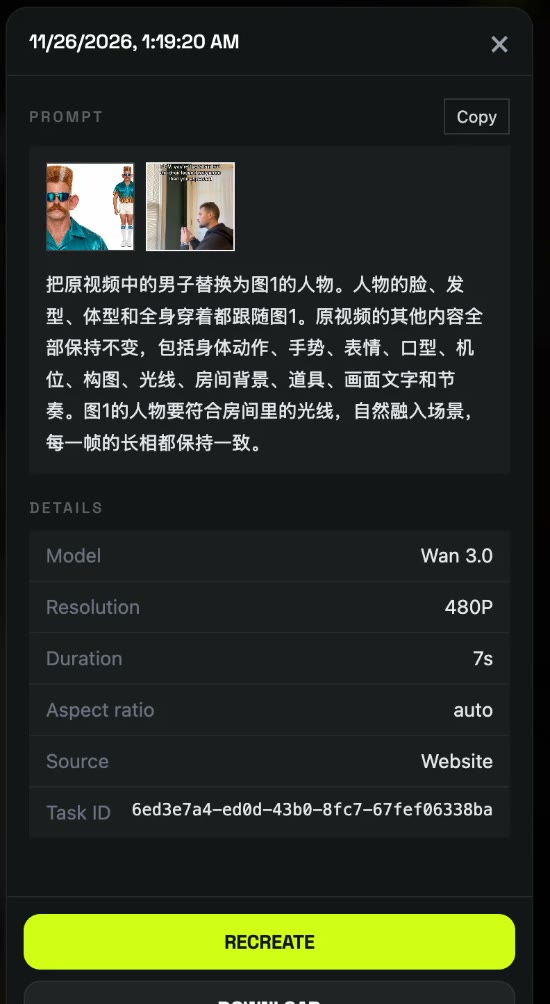
You don't need this on the effect page, where the template is already set up. If you want to make it yourself with Wan 3.0 in our custom video tool, this is the prompt that worked on the first try, with the villain chair clip as the reference video and your photo as image 1. We submitted it in Chinese; the English version says the same thing.
Replace the man in the reference video with the person from image 1. The face, hairstyle, body shape and full outfit all follow image 1. Keep everything else from the reference video unchanged, including the body movements, gestures, facial expressions, lip sync, camera angle, framing, lighting, room background, props, on-screen text and timing. The person from image 1 should look naturally lit by the room's lighting and blend into the scene, with a consistent look in every frame.
把原视频中的男子替换为图1的人物。人物的脸、发型、体型和全身穿着都跟随图1。原视频的其他内容全部保持不变,包括身体动作、手势、表情、口型、机位、构图、光线、房间背景、道具、画面文字和节奏。图1的人物要符合房间里的光线,自然融入场景,每一帧的长相都保持一致。
Two lines in it matter. "Full outfit follows image 1" is what kept the flame shirt, shorts and socks instead of the hoodie. "On-screen text" in the keep list is what kept the POV caption readable instead of being redrawn as gibberish. The prompt also doesn't describe the person in image 1, so you can reuse it with any photo.
Which photos work best for the Villain Trend AI video?
- One person, face to the camera. The villain line at 3–5 seconds is a straight-to-camera close-up.
- Full body if you have it. Your legs and shoes show in the first second, and the outfit comes from the photo.
- Dress the part. A suit, a dark hoodie or something absurdly loud; it all carries over.
- Eyes visible. Sunglasses carry over too and hide the stare.
- No celebrities or children. Only photos of yourself or adults who agreed.
Villain Trend AI generators compared
Taken from each tool's public page on 26 November 2026. We did not generate a video on the other tools. Per-video prices assume you buy the smallest pack that covers one video.
| Tool | What you give it | Clothes | Sound and caption | Length | Price per video |
|---|---|---|---|---|---|
| AI Photo Animator Villain Trend AI template | 1 photo | Yours, head to socks | With sound and the POV caption | 6 s, 480p | 180 credits, about $2 ($5.99 pack makes three, no subscription) |
| makeviral | 1 photo (person or pet) | Not stated | With sound | 6 s person / 9 s pet, 720p | 92 credits; smallest pack $9.99 for 100 credits |
| Soracai | 1 photo (person or pet) | Not stated | A spoken villain line over piano, not the trend's sound | 8 s | 140 credits; pack price unclear on the page |
| PixQuill | 1 photo (person or pet) | The template's outfit; only the face and head change | Template sound and caption | 6 s person / 9 s pet, 480p | 700 credits; smallest pack on the page $9.99 for 700 |
| Seedance 2.5 via Atlas Cloud | 1 photo + your own timed prompt | From your image | Generated audio; add the song yourself | 12 s, 720p or 1080p | About $3.64 (720p) to $9.01 (1080p), per Atlas |
| CapCut | A clip you film yourself | Whatever you wore | Add in the app | Short template | Free app; no dedicated villain chair template found |
Villain Trend AI video problems and fixes
- The villain doesn't look like you. Usually it's the photo: a side view, sunglasses or a tiny face. Use a front-facing photo with your upper body in frame and run the template again.
- You can't see your face at the start. That's the lean-back: the first second and a half is side-on, as in the original, not a fault.
- The outfit looks off. A cropped selfie gives the video nothing to work with below the chest. Use a waist-up or full-body photo.
- It failed. Failed generations return their credits automatically; try again or switch photos.
Villain Trend AI FAQ
Is Villain Trend AI free?
Not completely. New accounts get 75 free credits and one Villain Trend AI video takes 180, so you need the one-time $5.99 pack (540 credits). That makes three videos at about $2 each, with no subscription. See pricing. Failed renders are refunded automatically.
Will I be wearing my own clothes?
Yes. The villain wears the clothes from your photo, top to bottom. In our test, a teal flame shirt, white shorts and striped tube socks stayed on for the whole video.
What song is used in the villain trend?
Most villain trend videos use Myuu's "Living in the Dark (Evil Larry Version)". Our video already comes with sound.
Do I need a swivel chair or a video of myself?
No. One photo is enough; the chair, the room and the lean-back are made from it.
Can I make my dad or a friend the villain?
Yes, if they agreed. Use a clear, front-facing photo of them, ideally in a suit or a dark hoodie, and keep the AI label on when you post.
Can my dog or cat do the villain trend?
We haven't tested a pet with this template yet, so we can't show a result. A clear photo of an adult, face to the camera, is what we know works.
Is it official?
No. The template is unofficial and not affiliated with TikTok, Mercedes-AMG F1, Keanu Reeves or @mattfletcher14. Post it as a personal meme, not as an ad.
Want a friend in the next one? Try the two-person Balcony Stare meme, or browse every prank and meme in the funny AI video generator.