Cat owners joining a dog trend
The original clip is a husky, but a cat's side-eye is even more judgmental. Our demo is a cat, so you can see the result before you spend credits.
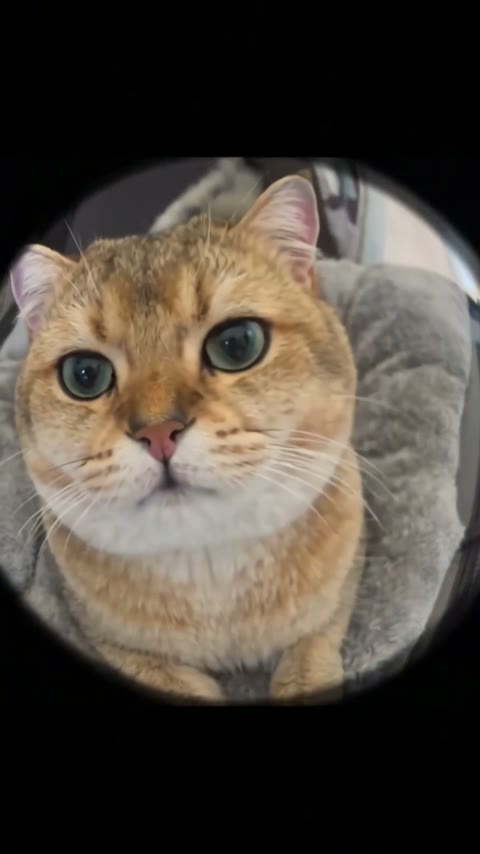
Upload one photo of your pet. It pushes its face into the round lens, gives you a grumpy side-eye and flashes its front teeth. Send it to anyone who has ever been judged by their pet.
Effect
Your photos1 photo
Peephole Puppy AI turns one photo of your dog or cat into an 8-second vertical video with sound: your pet's face fills a round fisheye frame with a black border, it looks up with a sulky side-eye, twitches its ears and ends by pulling back its lips to show its front teeth. It's a one-click template, not a prompt-based generator like Sora or Kling, so there's nothing to write or edit.
The Peephole Puppy trend is a pet seen through a door peephole: the fisheye glass makes the nose huge, the eyes wide and the whole face look like it's pressed right up against you. The best-known clip stars a black-and-white husky with blue eyes, staring into the lens on a gray blanket.
It lands because of the attitude. A wide-eyed face in a tiny round window already looks silly, and the slow side-eye followed by a flash of teeth reads like your pet grumbling that you took too long to open the door.
Add one photo of your pet. Its face, fur color, markings, eye color and ear shape come from that photo; the round frame, the blanket and the expressions are already set up. In our demo a golden British Shorthair cat became the star, green eyes and all.
This template is unofficial and not affiliated with TikTok or CapCut. Only upload photos of your own pet or a pet whose owner has agreed; you must be 18 or older; and photos showing celebrities, public figures or children are not allowed.
The original clip is a husky, but a cat's side-eye is even more judgmental. Our demo is a cat, so you can see the result before you spend credits.
Send it to your partner or roommate when you're on your way home, as if the pet is waiting at the door and not impressed.
Post it on TikTok or Reels next to the original husky clip. For a version where your pet just moves inside its own photo, use [Animate Pet Photo AI](/animate-pet-photo-ai).
One pet photo, about 3 minutes. Turn the sound on.
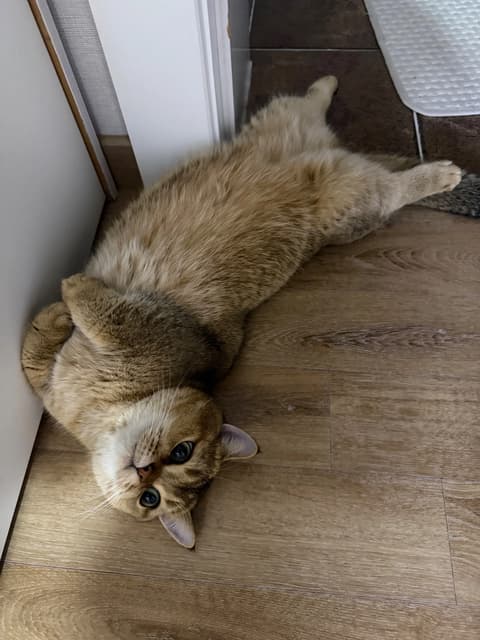
One dog or cat facing the camera, eyes and nose sharp, in good light. A close-up of the head works best.
Check the credits on the button and tap Generate. No prompt to write; the fisheye frame and the expressions are set up.
Wait about 3 minutes, then download the MP4 from My Videos and post it or send it to a friend.
The fisheye frame is a tight close-up, so your pet's face fills almost the whole circle for all 8 seconds. A sharp, front-facing photo where the eyes, nose and ears are easy to see keeps it looking like your pet.
Close, front-facing
Eyes and nose stay sharp.
Side profile
The face gets guessed.
Two pets
Only one fits the circle.
You get the real peephole look: a round fisheye window with a black border, the face bulging toward the lens, and the side-eye, ear twitch and teeth flash that make the trend funny.
Your pet keeps its own face. In our test a golden cat kept its green eyes, its coat and its ear shape for all 8 seconds.
The video is 8 seconds, 9:16 vertical, with sound, so it plays right away on TikTok, Reels, Shorts or WhatsApp.
One video is 205 credits, about $2.27 from the one-time $5.99 starter pack, with no subscription. The MP4 has no watermark, and failed generations return their credits.
Unlike Sora or Kling, you don't write or tune a prompt, and unlike a CapCut fisheye filter you don't need to film your pet at a door. Add one photo in your browser.
The Peephole Puppy AI trend is a short video of a pet seen through a fisheye door peephole, its face filling a round black-bordered window while it stares, side-eyes and grumbles at the camera. With this template, one photo of your dog or cat becomes that 8-second video with sound.
People also call it the peephole dog video or the peephole husky, after the black-and-white husky in the best-known clip. CapCut lists a related camera effect as Peephole Effect, which only adds the fisheye look to footage you film.
0–2s, your pet's face fills the round fisheye frame and it looks up into the lens; 2–5s, it gives a sulky side-eye and twitches its ears; 5–8s, it pulls its lips back to show its front teeth as if grumbling. The framing stays the same for all 8 seconds.
Yes. Our demo is a golden British Shorthair cat, and it kept its green eyes, coat and ear shape through the whole video. Any single cat or dog with a clear, front-facing photo works.
No. The husky only appears in the original clip. Your pet's breed, fur color, markings and eye color all come from your photo.
Not completely. New accounts get 75 free credits, and one Peephole Puppy AI video costs 205 credits. The one-time $5.99 starter pack (540 credits) covers two videos, about $2.27 each, with no subscription. The exact credits show on the Generate button, and failed generations are refunded automatically.
Four reasons: it looks like your pet, it costs less, you get a clean video, and it's ready to post.
Looks like your pet: the face, fur, markings and eye color come from your photo, and our test cat came out right on the first try, so you don't spend credits retrying.
Costs less: about $2.27 a video from a one-time $5.99 pack, no subscription.
Clean video: every plan, free credits included, downloads a watermark-free MP4, and failed generations return their credits.
Ready to post: 8 seconds, 9:16 vertical, with sound, so it goes straight to TikTok, Reels or Shorts without editing.
CapCut's peephole effect adds a fisheye frame to a video you film yourself, so you'd need footage of your pet pressing its face to the lens. This template only needs one still photo and adds the expressions for you.
About 3 minutes; our test took 2 minutes 42 seconds. The video is 8 seconds, 480p, 9:16 vertical, with sound and no watermark.
Usually it's the photo: a side profile, two pets in one shot, or a dark or blurry picture. Use a sharp, well-lit photo of one pet facing the camera, then run this template again.
That's the fisheye lens. The round peephole frame bulges the middle of the face toward you, so the nose and eyes look bigger than in your photo; it's the look the trend is known for.
Yes. Download the watermark-free MP4 and post it as is. Keep the platform's AI label on when you post publicly.
Your photos and videos stay in your account, so you can download them again from My Videos at any time. They are never used to train AI models and are not sold or shared, except with the video model provider that renders your clip.
Last updated