How to Make the Show You Off AI Trend Video From One Photo
What’s new on this page
- — Published: our first Show You Off AI Trend video from one photo (Wan 3.0, 14 s, 480p, 16:9, with sound, 360 credits, first try, 4 min 33 s), the 7-sentence prompt we submitted, second by second, photo tips, widescreen vs vertical, fixes.
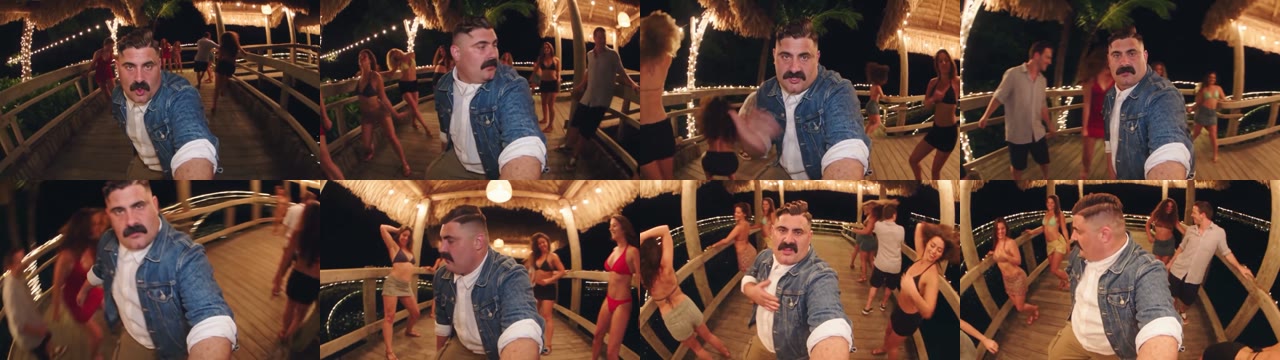
A Show You Off AI Trend video puts the person in your photo behind the lens of the viral fisheye party selfie: arm stretched toward the camera, singing to it while walking down a string-lit tiki deck at night, with a crowd of dancers behind them. We made the clip above on 26 November 2026 from one photo of a man with a big mustache, a denim jacket and a white shirt, to see whether the face and outfit would hold up that close to a fisheye lens. They did. This guide covers the steps, the exact prompt we submitted, what came out well and what didn't, and which photos work.
What is the Show You Off AI Trend?
The Show You Off trend is named after a line in the chorus of "Beauty and a Beat", Justin Bieber's 2012 song featuring Nicki Minaj. Its video, released on 12 October 2012 and co-directed by Bieber and Jon M. Chu, is one long party selfie: Bieber holds a GoPro at arm's length and sings into the wide lens as a water-park party carries on behind him. It has passed 1.3 billion YouTube views.
After Bieber performed it at Coachella in April 2026, the song reportedly went back onto the Billboard charts, and people started searching it by the hook, "show you off," rather than the title. One-photo AI templates followed from September 2026, putting anyone in Bieber's spot. By 25 November 2026 the #showyouoff tag reportedly held about 146,000 TikTok videos.
What happens in a Show You Off AI Trend video, second by second?
| Seconds | What happens |
|---|---|
| 0–2 | His arm reaches toward the fisheye lens; the wooden deck and string lights stretch out behind him |
| 2–8 | He walks backward, singing and pointing at the camera, while dancers in swimwear move behind him |
| 8–12 | He passes under the thatched roofs as the dancers close in around him |
| 12–14 | He drops his chin and pulls a face at the lens while the party keeps going |
How to make the Show You Off AI Trend video in 4 steps
1. Pick who leads the party
There is one lead per video: you, or a partner or friend you want to show off. If it's someone else, ask first and show them the result before you post it.
2. Pick the photo
Use a sharp, well-lit photo with the face to the camera and at least the upper body in frame. The face sits close to the lens for all 14 seconds, so a clear face matters more than a full-body shot. Whatever the person wears in the photo is what they wear at the party.
3. Upload it to the template
Open the Show You Off AI Trend generator and drop the photo into the single slot. The deck, the lights, the dancers and the sound are already set up; there's no prompt to write.
4. Generate and download
Check the credits on the Generate button (360) and press it. When it's done, download the MP4 from My Videos. It has no watermark, and if a generation fails the credits go back to your balance automatically.
Our Show You Off AI Trend test
| Setting | What we used |
|---|---|
| Model | Wan 3.0 |
| Photos | 1 (a head shot and a full-body shot of the same man, side by side in one image) |
| Length | 14 seconds |
| Resolution and shape | 480p, 854×480, 16:9 widescreen |
| Sound | On |
| Credits | 360 |
| Time | 4 minutes 33 seconds |
| Attempts | 1, first try |
What came out well
- The outfit stayed his. The denim jacket and white shirt were there in every frame.
- The face held up close. The mustache and side-parted hair didn't drift, even when he leaned into the lens.
- The light matches. His face picks up the warm orange of the string lights instead of looking pasted in.
What didn't
- 480p is soft. Fine on a phone, visibly soft on a big screen.
- Fisheye stretch. When he leans toward an edge, his face widens. That is the lens, and the original does it too.
- No pool scene. Our clip is the 14-second deck walk only.
- One test person. We have only tried an adult man; we can't show a woman, a pet or a group yet.
The prompt we used for the Show You Off AI Trend
You don't need a prompt for the template. If you want to run the same thing yourself in Wan 3.0 with the fisheye party clip and one photo, this is exactly what we submitted:
把视频中间的主角,也就是那个灰蓝色皮肤、穿深色西装、白衬衫、打黑领带的光头男人,换成 image 1 中的人。这个人的穿着跟随 image 1。整段视频里,这个人的脸、发型和体型都与 image 1 保持一致。原视频的镜头运动、广角自拍视角、舞蹈动作、节奏和表情完全保持不变。背景里跳舞的人、茅草亭、串灯和夜间光线都不变。人物身上的光线要和温暖的夜景一致。
Replace the lead in the middle of the video, the bald man with grey-blue skin in a dark suit, white shirt and black tie, with the person in image 1. This person's clothing follows image 1. Throughout the video, this person's face, hairstyle and build match image 1. Keep the original video's camera movement, wide-angle selfie view, dance moves, rhythm and expressions exactly the same. The dancers in the background, the thatched huts, the string lights and the night lighting stay unchanged. The light on the person should match the warm night scene.
Two things made it work. The lead is picked out by what he looks like, not by what he does, so the model knows exactly who to change. And the prompt never describes the new person; it only says "image 1", so the same prompt works for any photo. Some template sites publish prompts close to 3,000 characters long; seven sentences were enough here.
Is the Show You Off AI Trend video vertical or widescreen?
The Show You Off AI Trend video is 16:9 widescreen, because the original fisheye shot is widescreen. On TikTok you can post it as is and it shows with bars above and below, or crop it to 9:16 in an editor, which keeps you in the middle but cuts the dancers at the sides. On YouTube and Instagram feed posts it plays full width.
Which photos work best for the Show You Off AI Trend?
- One person, face to the camera. You look into the lens the whole time.
- Sharp and well lit. The face is large in the frame; blur shows.
- Waist-up is enough. Legs barely show in a selfie shot.
- No sunglasses, no heavy filters, no side views.
- No celebrities, public figures or children.
Show You Off AI Trend problems and fixes
- The lead doesn't look like you. Usually it's the photo: a side view, sunglasses, a dark selfie or a tiny face. Use a well-lit, front-facing photo and run the template again.
- Your face looks stretched. That's the fisheye near the edge of the frame; it settles when you're back in the middle.
- It's not vertical. It's widescreen on purpose; see the section above for posting it on TikTok.
Show You Off AI Trend FAQ
Is the Show You Off AI Trend free?
Not completely. New accounts get 75 free credits and one Show You Off AI Trend video takes 360, so you need the one-time $5.99 pack (540 credits). That covers one video at about $3.99 and leaves 180 credits, with no subscription. See pricing.
What song is the Show You Off trend?
"Beauty and a Beat" by Justin Bieber featuring Nicki Minaj, from the 2012 album Believe. "Show you off" is a line from its chorus.
Do I need a GoPro or a video of myself?
No. One photo is enough; the camera angle, the party and the dancers come from the template.
Can I use a photo of my partner or friend?
Yes, if they agreed. Show them the video before you post it and keep the AI label on.
How long does it take?
About 5 minutes. Our test took 4 minutes 33 seconds.
Are my photos used for training?
No. Photos and videos stay in your account and are only shared with the video model provider that renders the clip.
Want more party after this one? The Balcony Stare Dancer Meme is another one-photo dance, and DJ Cooking AI puts you behind the decks in a kitchen that catches fire.