How to Make the DJ Cooking AI Video From One Photo
What’s new on this page
- — Published: our first DJ Cooking AI video from one photo (Wan 3.0, 14.9 s, 480p, 9:16, with sound, 385 credits, first try, 6 min 21 s), the 4-sentence prompt we submitted, second by second, a comparison with makeviral, Viberot and PixQuill, photo tips and fixes.
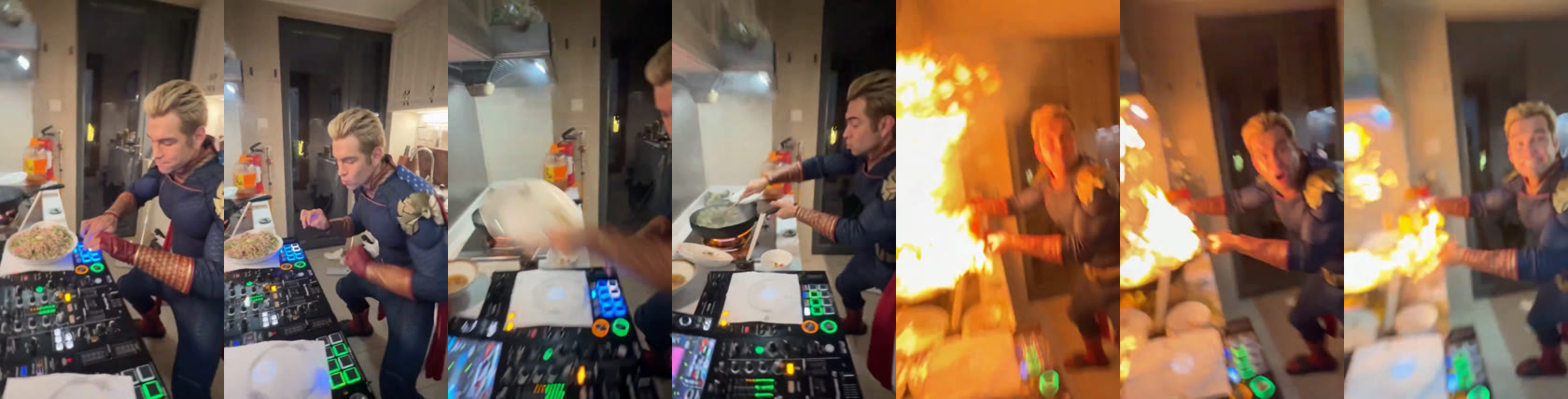
A DJ Cooking AI video puts the person in your photo into the viral kitchen DJ clip: they work a glowing DJ controller next to a gas stove, throw a plate of food into the wok, and on the beat drop the wok bursts into a fireball while they keep tossing it at the camera. We made the clip above on 26 November 2026 from one photo of a character in a navy suit with a red cape and gold bracers, a costume about as far from the original leopard-print shirt as it gets, to see whether the outfit would survive 15 seconds of movement and fire light. It did. This guide covers the steps, the exact prompt we submitted, what came out well and what didn't, and which photos work.
What is the DJ cooking trend?
The DJ cooking trend, also called the kitchen DJ fire meme or the DJ wok meme, comes from Instagram creator @fisher.8887, whose bio reads "Cooking DJ". He sets up a DJ controller beside his gas stove and stir-fries between drops. The clip that took off was posted on 6 February 2026: one 20-second take in which he pours oil, works the decks, throws in the food and plays to a wok fireball. It reportedly had about 51.9 million plays and 3.38 million likes by 24 November 2026.
The caption was "这不是ai", Chinese for "this is not AI", and that's half the joke: the clip looks so staged that viewers kept calling it generated, and he kept answering with posts like "AI cannot replace humans!". On 24 November 2026, one-photo AI DJ cooking templates started appearing, and he posted "AI cannot replace me!" the same day. On TikTok, #kitchendj had 788 videos and 3.7 million views by then.
What happens in a DJ Cooking AI video, second by second?
The video follows the kitchen DJ clip beat for beat. In our result:
| Seconds | What happens |
|---|---|
| 0–4 | At the DJ controller, tapping the glowing pads, a plate of stir-fry on the counter beside the mixer |
| 4–5 | A quick turn to the stove to pour into the wok |
| 5–8 | Back at the decks for one more run, then he picks up the plate |
| 8–9 | The food goes into the wok and he tosses it once |
| 9–15 | The wok bursts into a fireball, the kitchen turns orange, and he shouts and tosses the flaming wok toward the camera again and again |
What you need to make the DJ Cooking AI video
- One photo. One person, face to the camera, waist-up or full body. It can be you, or an adult friend who agreed.
- An account and 385 credits. New accounts get 75 free credits, so you need the one-time $5.99 pack (540 credits), which covers one video and leaves 155 credits. No subscription.
- About six minutes. Ours took 6 minutes 21 seconds; you can close the tab and find the video in My Videos later.
- No DJ controller, no stove, no fire. You don't film anything yourself.
How to make the DJ Cooking AI video in 4 steps
1. Pick the kitchen DJ
There is one DJ per video, so pick one person: you, or the friend who always brags about their cooking or their sets. If it's someone else, ask first and show them the result before you post it.
2. Pick the photo
Use a well-lit photo with the face to the camera and at least the upper body in frame. Whatever the person wears in the photo is what they wear at the decks, so a loud shirt or a chef's apron is a good choice. Avoid sunglasses and dark selfies: the last six seconds are lit almost entirely by the fireball, and a face that was hard to read in the photo gets harder to read in orange light.
3. Upload it to the template
Open the DJ Cooking AI generator and drop the photo into the single slot. The kitchen, the decks, the wok, the fire and the sound are already set up; there's no prompt box to fill in.
4. Generate and download
Check the credits on the Generate button (385) and press it. When it's done, download the MP4 from My Videos. It has no watermark, and if a generation fails the credits go back to your balance automatically.
Our DJ Cooking AI test: a caped suit instead of a leopard-print shirt
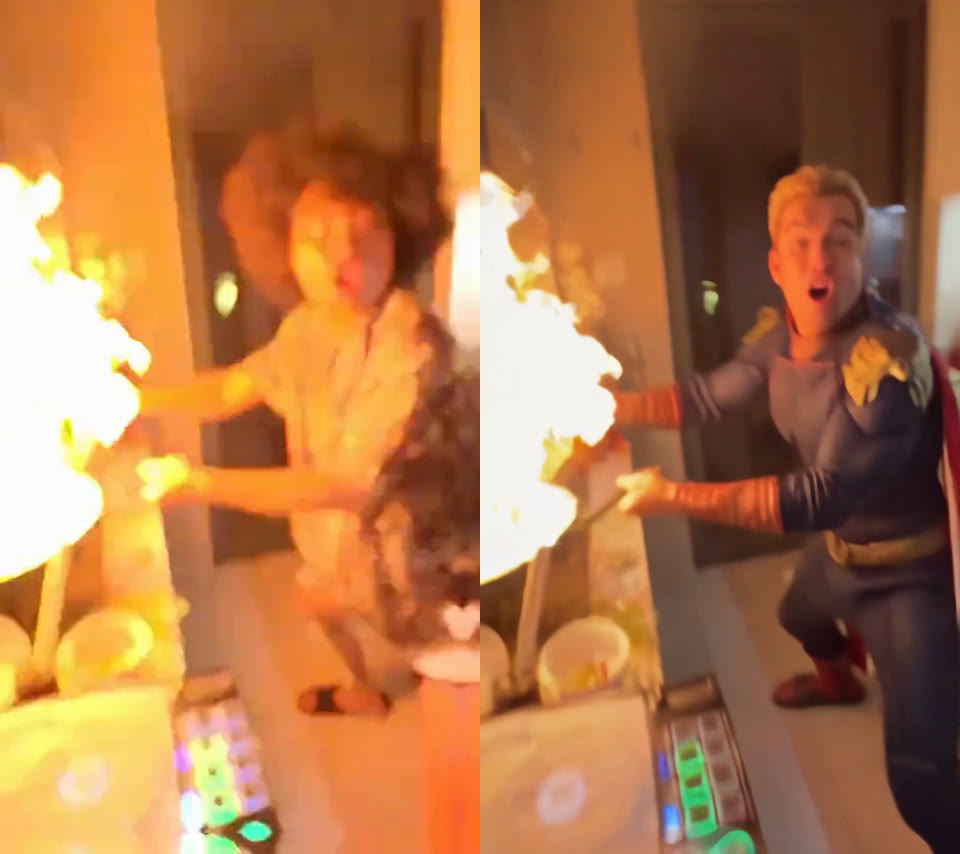
We picked a reference character whose look is the opposite of the original kitchen DJ: slicked-back blond hair instead of a big curly afro, and a fitted navy suit with gold shoulder pieces, gold bracers and a red cape instead of a loose leopard-print shirt and white shorts. If any of the original's look leaked through, it would be obvious.
| Setting | What we used |
|---|---|
| Model | Wan 3.0 |
| Photos | 1 |
| Length | 15 seconds (the file is 14.9 s) |
| Resolution and shape | 480p, 480×854, 9:16 vertical |
| Sound | On |
| Credits | 385 |
| Time | 6 minutes 21 seconds |
| Attempts | 1, first try |
What came out well
- The whole outfit stayed his. Navy suit, gold shoulder pieces, bracers and cape are there in every frame, including the wide shots at the stove; nothing of the leopard-print shirt or white shorts is left.
- The hair and face stayed his. The slicked-back blond hair kept its shape through the head-bobbing, and the face was still recognisable when the fireball turned everything orange.
- The fireball lands on the beat. At 9 seconds the wok goes up, the kitchen lights orange and he tosses it toward the camera, the same timing as the trend.
- The kitchen is the real one. The glowing pads, the plate of stir-fry on the counter, the fire extinguisher and the handheld camera all match the original.
What didn't
- A blurry second around 5 seconds. The quick turn from the decks to the stove smears, as it does in the original handheld clip.
- 480p. Fine on a phone, soft on a big screen.
- One tester. We have only run this template with one adult male character, not with a woman, a group or a pet.
The DJ Cooking AI prompt we used
You don't need a prompt for the template; it's already set up. If you want to run the same thing yourself in Wan 3.0 with the kitchen DJ clip and one photo, this is exactly what we submitted. We had written a longer version that also listed the kitchen, the decks, the fire extinguisher and the orange fire light, but only the first four sentences went through, and those four were enough. Wan kept the kitchen and the fire without being told about them in detail.
把原视频中留着蓬松爆炸卷发、穿豹纹衬衫的年轻男子替换为图1的人物。人物的脸、发型和穿着都跟随图1。镜头运动、手持晃动、节奏和时间点与原视频完全一致。场景保持不变
Replace the young man with big curly afro hair and a leopard-print shirt in the original video with the person from image 1. The person's face, hairstyle and clothing all follow image 1. Keep the camera movement, handheld shake, rhythm and timing exactly the same as the original video. Keep the scene unchanged.
Two things made it work. The original DJ is picked out by what he looks like (the curly hair and the leopard shirt), not by what he does, so the model knows exactly who to change. And the prompt never describes the new person; it only says "image 1", so the same prompt works with any photo.
Which photos work best for the DJ Cooking AI video?
- One person, face to the camera. The fireball section at 9–15 seconds faces the camera.
- Full body if you have it. You walk between the decks and the stove, so legs and shoes show.
- Good, even light. The fire turns the kitchen orange; a clear face in the photo keeps you recognisable.
- Dress the part. A loud shirt, an apron or something absurd; it all carries over.
- No celebrities or children. Only photos of yourself or adults who agreed.
DJ Cooking AI generators compared
Three other sites had a DJ cooking template when we checked on 26 November 2026. The details below come from their own pages; we did not generate on them.
| Tool | What you give it | Clothes | Length | Price per video |
|---|---|---|---|---|
| AI Photo Animator DJ Cooking AI template | 1 photo | Yours, head to toe | 15 s, 480p, with sound | 385 credits, about $4.27 ($5.99 pack, no subscription) |
| makeviral | 1 photo (person or pet) | From your photo | 15 s, 720p, with sound | 228 credits; smallest pack that covers it is $39.99 |
| Viberot | 1 photo | From your photo | 15 s, 480p or 720p, with sound | 270 credits (480p) or 594 (720p); packs from $9.90 for 600 |
| PixQuill | 1 photo | Keeps the template's leopard-print shirt | 19 s, 480p | 700 credits; packs from $9.99 for 700 |
DJ Cooking AI video problems and fixes
- The kitchen DJ doesn't look like you. Usually it's the photo: a side view, sunglasses, a dark selfie or a tiny face. Use a well-lit, front-facing photo with your upper body in frame and run the template again.
- The face blurs for a second around 5 seconds. That's the quick turn to the stove on a handheld camera, as in the original, not a fault.
- Your skin looks orange at the end. That's the fire light from 9 seconds on. A photo in daylight keeps the face readable.
- It failed. Failed generations return their credits automatically; try again or try a different photo.
DJ Cooking AI FAQ
Is DJ Cooking AI free?
Not completely. New accounts get 75 free credits and one DJ Cooking AI video takes 385, so you need the one-time $5.99 pack (540 credits). That covers one video at about $4.27 and leaves 155 credits, with no subscription. See pricing. Failed renders are refunded automatically.
Is the original DJ cooking video AI?
No, according to the creator, @fisher.8887. He captioned it "this is not AI" in Chinese and later posted "AI cannot replace humans!" because so many viewers thought it was generated.
Will I be wearing my own clothes?
Yes. The kitchen DJ wears the clothes from your photo, top to bottom. In our test, a navy suit, red cape and gold bracers stayed on for the whole video, with no leopard print left.
How long is the video?
15 seconds, 480p, 9:16 vertical, with sound and no watermark. Ours took 6 minutes 21 seconds to generate.
Can I use my friend's photo?
Yes, if they agreed. Use a clear front-facing photo, show them the video before you post it, and keep the platform's AI label on.
Can my dog or cat be the kitchen DJ?
We haven't tested a pet photo with this template yet, so we can't show how it looks. A clear photo of an adult is what we know works.
Want a bigger stage after the kitchen? The AI Concert Video puts you in front of a giant LED wall, and the funny AI video generator has every prank and meme template in one place.