How to Make the Peaky Blinders Explosion AI Video (1 Photo)
What’s new on this page
- — Published: our first Peaky Blinders Explosion AI video (Wan 3.0, 14 s, 480p, 9:16, with sound, 385 credits, first try, about 4.5 minutes), second by second, photo tips, a comparison of five other tools and fixes.
A Peaky Blinders Explosion AI video puts the person in your photo into the walk-away shot fans know from the show's finale: you light a cigarette, look up and walk toward the camera while a red-brick manor blows up behind you, and you never look back. We made the clip above on 19 November 2026 from one photo of a man in a blue office suit and glasses. This guide covers the steps, what our test showed, which photos work and how the other Peaky Blinders Explosion AI tools compare.
What is the Peaky Blinders Explosion AI trend?
The Peaky Blinders Explosion AI trend is a set of AI videos in which an ordinary photo becomes a 1920s-style walk away from an exploding country house. It is based on the last episode of the show, "Lock and Key" (series 6, episode 6), which aired on BBC One on 3 April 2022 and in which Tommy Shelby's Arrow House is blown up, as Den of Geek's finale review describes.
Fan edits of Tommy walking away kept going after the show ended, and the March 2026 film Peaky Blinders: The Immortal Man brought the look back. AI template sites started selling a one-photo version in November 2026. People also call it the Tommy Shelby walking away explosion or the 1920s gangster explosion walk.
What happens in a Peaky Blinders Explosion AI video, second by second?
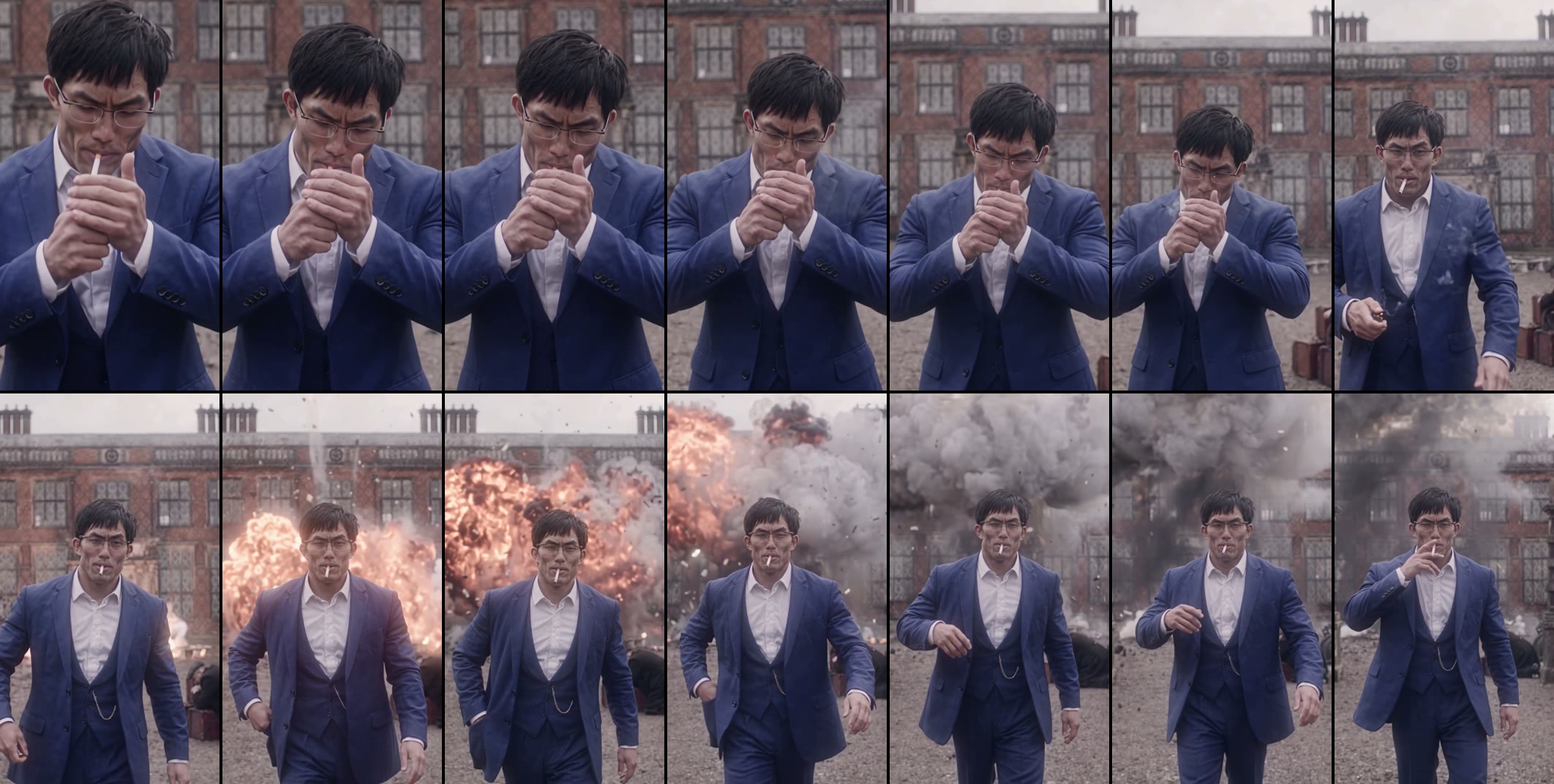
It is one vertical shot in flat, overcast light with a desaturated period look. In our result:
| Seconds | What happens |
|---|---|
| 0–6 | Close-up: you look down and cup both hands around a cigarette to light it |
| 6–7 | You look up, cigarette in your mouth, and start walking toward the camera |
| 8–10 | The manor behind you goes up in a row of fireballs |
| 10–12 | A wall of smoke and flying debris; you keep walking and don't look back |
| 12–14 | Still walking, you lift a hand to the cigarette at your lips |
What you need to make the Peaky Blinders Explosion AI video
- One photo of one person, face to the camera, waist-up or wider. It can be you, an adult friend who agreed, or a character you made.
- An account and 385 credits. New accounts get 75 free credits, so you need the one-time $5.99 pack (540 credits), which leaves 155 credits after one video. No subscription.
- About five minutes. Our render took about 4.5 minutes; you can close the tab and find the video in My Videos later.
How to make the Peaky Blinders Explosion AI video in 4 steps
1. Pick who walks away
The shot has one person in front of the blast, so pick one: you, a friend whose birthday it is, or the colleague who just handed in their notice. Ask first if the photo isn't yours. Photos of Cillian Murphy or other public figures are not allowed.
2. Pick the photo
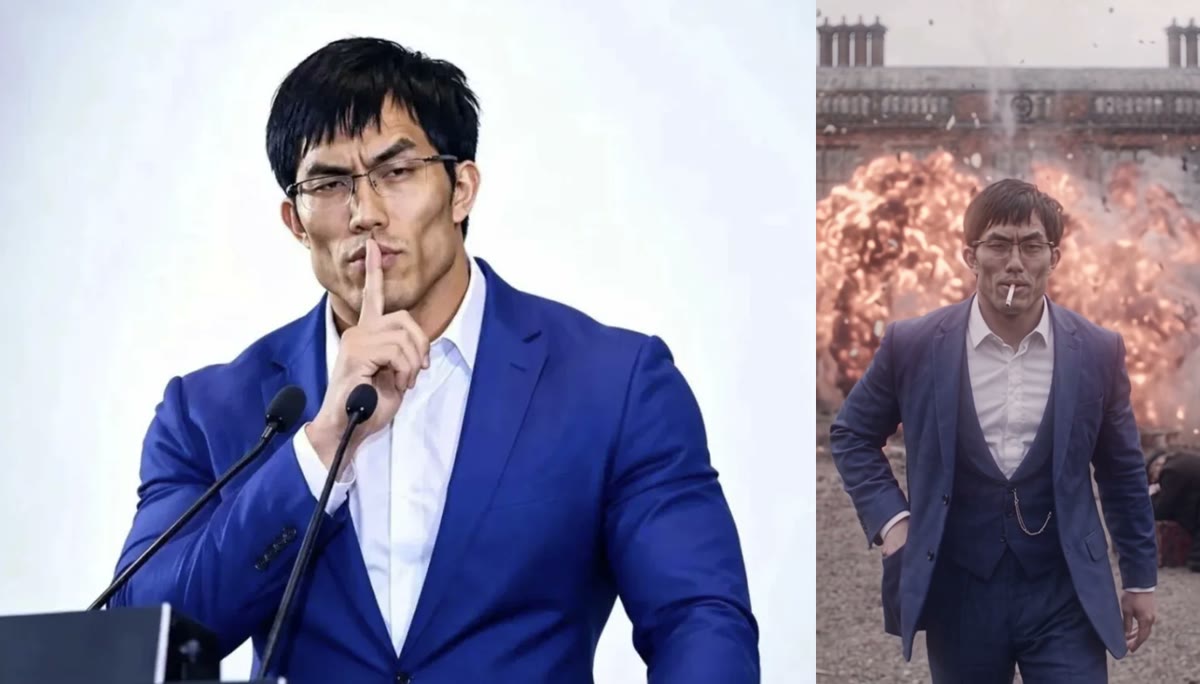
Choose a sharp, front-facing photo with even light, waist-up or wider. The first six seconds are a close-up of the face and hands, and after that you are a full figure walking in from the back of the frame, so a tiny face cropped from a group shot gets soft. What you wear in the photo is what you wear in the video: a dark suit or coat looks most like the show, and anything else makes a funnier contrast.
3. Upload it to the template
Open the Peaky Blinders Explosion AI generator and add the photo to the single slot. There is no prompt to write: the cigarette, the walk and the explosions are already set. The Generate button shows the credit cost before you start.
4. Generate and download
Press Generate. Ours was ready about 4.5 minutes later. Download the MP4 from My Videos: it has no watermark and the sound is already on it, so it posts straight to TikTok, Reels or Shorts.
Our Peaky Blinders Explosion AI test: a blue suit walks out of the blast
We used one photo of a man with short black hair, wire glasses, a white shirt and a blue suit, about as far from a flat cap and wool coat as you can get. We wanted to see whether the template keeps your own clothes or dresses everyone the same.
| Setting | Our test |
|---|---|
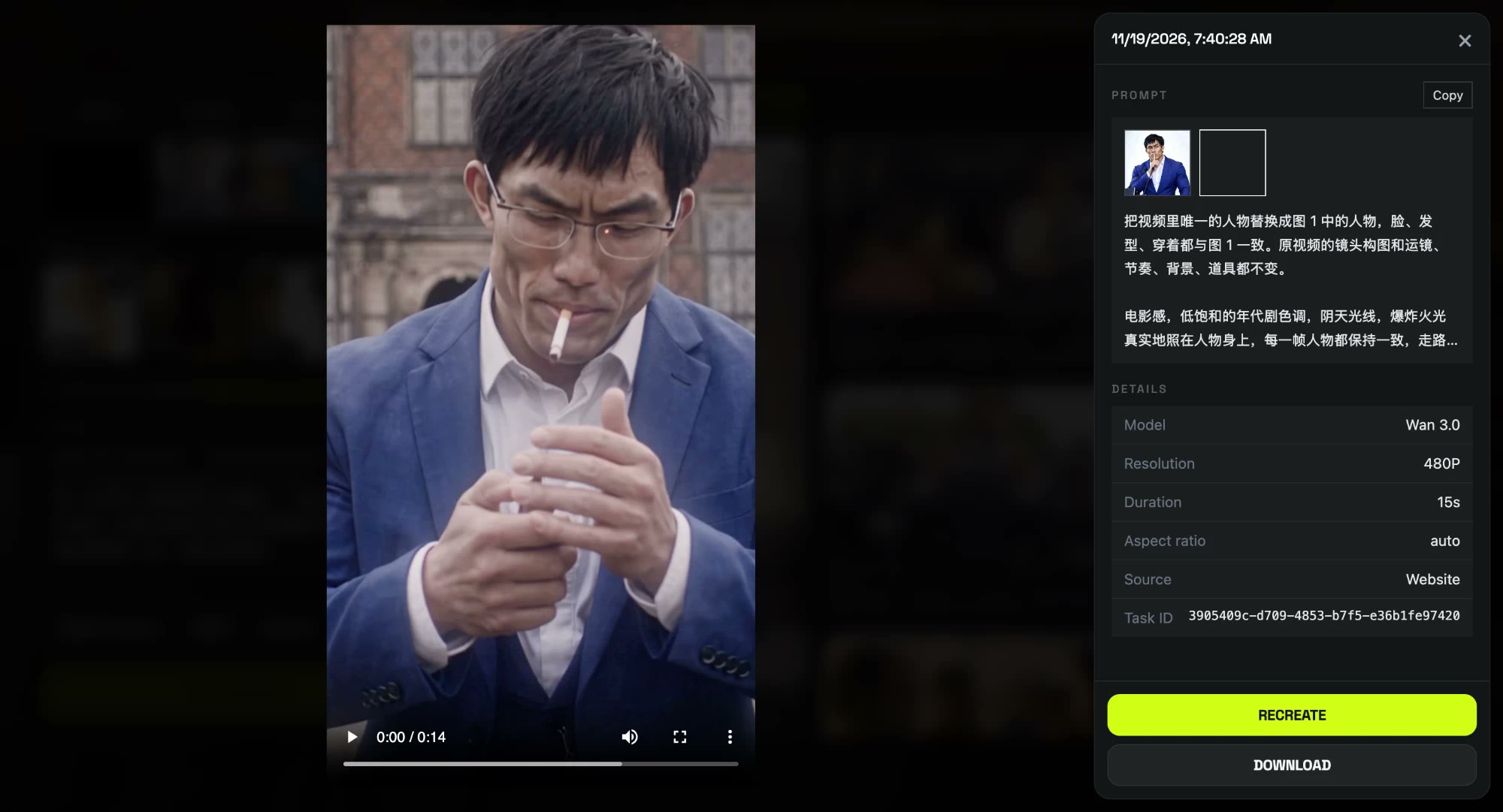
| Date | 19 November 2026 |
| Model | Wan 3.0 |
| Photos | 1 |
| Length | 14 seconds |
| Resolution and frame | 480p (480 × 854), 9:16 vertical |
| Sound | On |
| Cost | 385 credits, about $4.27 |
| Render time | About 4.5 minutes |
| Attempts | 1 (worked first time) |
What we saw, frame by frame:
- The outfit stayed mostly his. The blue suit and white shirt stayed blue and white from the lighter close-up through the smoke, and he was never put in a cap or a long coat. One period touch crept in: a matching blue waistcoat with a watch chain that wasn't in the photo.
- The glasses and hair held. The wire frames and messy fringe matched the photo in the close-up and in the walk.
- He never looked back. The fireballs start at about 8 seconds and he keeps the same pace toward the camera to the end.
- The small slips. Around 7 seconds the lighter in his hand is a vague shape rather than a clear lighter, and once he is a full figure at the back of the frame the face is softer than in the close-up, which is the 480p limit.
Peaky Blinders Explosion AI in your own clothes vs. the 1920s costume
Some Peaky Blinders AI tools dress everyone in the same 1920s outfit, a flat cap and a long coat, whatever the photo shows. Our template keeps the clothes in your photo. That gives you two ways to play it:
- Look like the show: use a photo in a dark suit, a coat or a waistcoat. The red-brick manor and the grey light do the rest.
- Play it for the contrast: use a work photo, a hoodie or a summer shirt. A calm walk away from a fireball is funnier when the outfit has nothing to do with Birmingham in 1920.
Which photos work best for the Peaky Blinders Explosion AI video?
- One person, face to the camera. The opening is a close-up of the face and hands, so a front-facing face gives the model the most to work with.
- Waist-up or wider. You become a full figure from about 6 seconds, and a photo that shows the outfit keeps it consistent.
- A big, sharp face. Faces cropped small from group shots get soft in the wide part of the walk.
- Glasses are fine. Ours stayed on and stayed the same frame shape the whole time.
- No celebrities or children. Only photos of yourself or adults who agreed.
Peaky Blinders Explosion AI generators compared
These figures come from each tool's own page on 19 November 2026; we have not generated videos with them.
| Tool | Photos | Length and frame | Outfit | Price per video |
|---|---|---|---|---|
| Our template | 1 | 14 s, 480p, 9:16 | From your photo | 385 credits, about $4.27 (one-time $5.99 pack) |
| MakeViral | 1 | 15 s, 720p, 9:16 | Not stated | 228 credits (dollar price not stated) |
| Starrd | 1 | 15 s, 9:16 | Same 1920s outfit for everyone | 150 credits, about $7.50 |
| Memelry | 1 | 29 s, 720p, 16:9 | Not stated | $28.99 |
| Motion Transfer | 1 | About 29 s, 16:9 | Replaced | Shown at Generate |
| Media.io | — | Depends on model | Prompt-based | Not stated |
Pick ours if you want to walk out in your own clothes, post vertically without cropping and pay once with no subscription. The 29-second versions are widescreen and longer; ours is the 14-second cut that fits a TikTok or Reel.
Is the Peaky Blinders Explosion AI video official?
No. Peaky Blinders Explosion AI videos are fan-made parodies. Our template is not affiliated with Peaky Blinders, the BBC, Netflix or Cillian Murphy, and the person in your video comes from your photo. When you post it, label it as AI-made and only use photos of yourself or adults who agreed to appear.
Peaky Blinders Explosion AI video problems and fixes
| Problem | Fix |
|---|---|
| The face doesn't look like the photo in the walk | Use a sharper, front-facing photo, waist-up, with a bigger face. Small faces lose detail once you're a full figure. |
| You wanted the 1920s look | Use a photo in a dark suit or coat; the outfit comes from the photo. |
| The lighter looks strange | It's a split-second shape around 7 seconds and the cigarette is fine after it. Run it again if it bothers you. |
| The generation failed | The credits come back automatically. Try again, or try another photo. |
Is Peaky Blinders Explosion AI free?
Not completely. New accounts get 75 free credits and one Peaky Blinders Explosion AI video takes 385, so you need the one-time $5.99 pack (540 credits). That is about $4.27 for the video, with 155 credits left over and no subscription. See pricing. Failed renders are refunded automatically.
Which episode has Tommy Shelby walking away from the explosion?
The series finale, "Lock and Key" (series 6, episode 6), aired on BBC One on 3 April 2022. In it Tommy Shelby's Arrow House is blown up.
Do I have to wear a flat cap and coat?
No. Your outfit comes from your photo; our test walked out of the blast in a blue suit and glasses.
Can a woman do the Peaky Blinders explosion trend?
Yes. The template works from any one-person photo and keeps that person's face, hair and outfit. Our test used a man; we haven't run a separate test with a woman yet.
How long is the video?
14 seconds, 480p, vertical 9:16, with sound and no watermark. Ours took about 4.5 minutes to render.
Is the cigarette real smoke?
No, everything in the video is generated: the cigarette, the lighter, the explosions and the smoke.
Want another big-screen entrance? Our James Bond AI trend tutorial puts one photo into the new 007 reveal. For a two-person movie scene, our Bathroom Fight AI tutorial puts you in the tub and a friend on the ceiling. Want the White House version? Our I'm a 2020 President Candidate AI tutorial has you dance through a car explosion, then take the podium.