How to Make the Window Dance Trend AI Video From One Photo
What’s new on this page
- — Published: our first Window Dance Trend AI video from one photo (Wan 3.0, 12 s, 480p, 9:16, with sound, 335 credits, first try, 4 minutes), the three-line prompt we used, second by second, photo tips and fixes.
A Window Dance Trend AI video puts the person in your photo in the only lit window of a dark apartment block at night: the camera zooms in from across the street, finds them dancing next to a little speaker, they notice, stare back, and pull the curtain. We made the clip above on 22 November 2026 from one photo of a heavy-set man with a big moustache and a denim jacket, and checked whether his face, build and clothes survived. They did. This guide covers the steps, the exact prompt, what came out well and what didn't, and which photos work.
What is the Window Dance Trend?
The Window Dance Trend, also called the window peeper dance or "caught dancing at the window", is one long shot from across a dark street: a single warm window in a brick apartment block, someone inside dancing alone, and the curtain pulled the moment they notice the camera. It followed the window peeper meme, where the person in the window is eating a burger instead.
The dancing version spread as a CapCut template. @dancevault14's post from 22 October 2026 had 1.25 million TikTok views by 22 November, and by the same date #windowdance counted 928 videos and 6.6 million views. The template swaps a face into a fixed dancer; this guide makes the whole person, body and clothes included, from your photo.
What happens in a Window Dance Trend AI video, second by second?
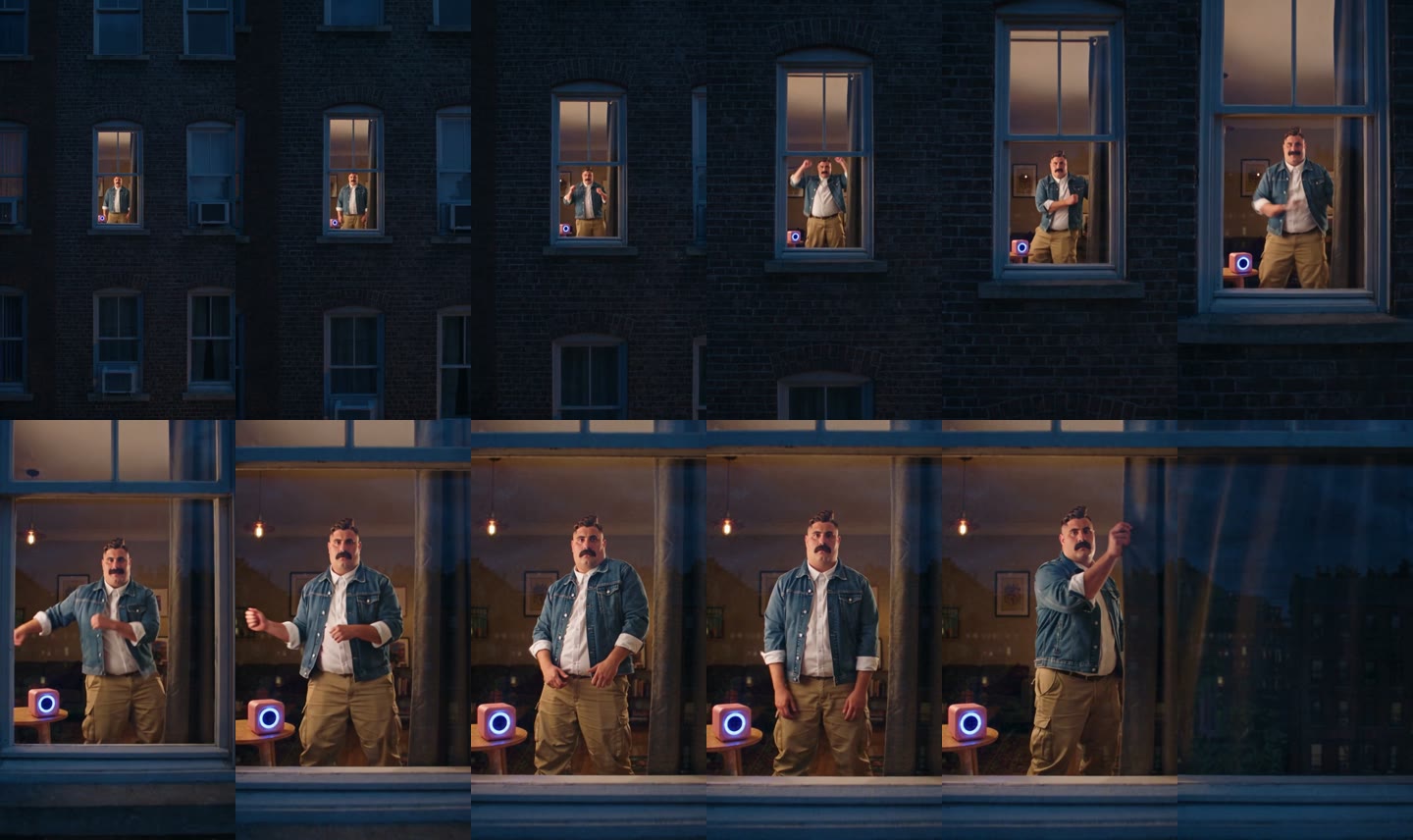
One continuous push-in from the street to the glass. In our result:
| Seconds | What happens |
|---|---|
| 0–1 | A dark brick apartment block at night; one window is lit warm |
| 1–4 | The camera pushes in; he dances next to a pink speaker with a blue light ring, arms up |
| 4–7 | At the window he rolls his fists and sways his hips; the pendant lamp and framed pictures behind him come into focus |
| 7–9 | He stops, hands on hips, and looks straight at the camera |
| 9–10 | He holds the stare |
| 10–12 | He grabs the curtain and pulls it; the glass goes dark and reflects the buildings across the street |
What you need to make the Window Dance Trend AI video
- One photo. One person, face to the camera, full body or knees-up. It can be you, an adult friend who agreed, or a character you made.
- An account and 335 credits. New accounts get 75 free credits, so you need the one-time $5.99 pack (540 credits), which leaves 205 credits after one video. No subscription.
- About four minutes. Ours took exactly 4 minutes; you can close the tab and find the video in My Videos later.
How to make the Window Dance Trend AI video in 4 steps
1. Pick the dancer
There is one person in the window, so pick one: you, or the friend who swears they never dance. Ask first if the photo isn't yours. Photos of celebrities, public figures and children are not allowed.
2. Pick the photo
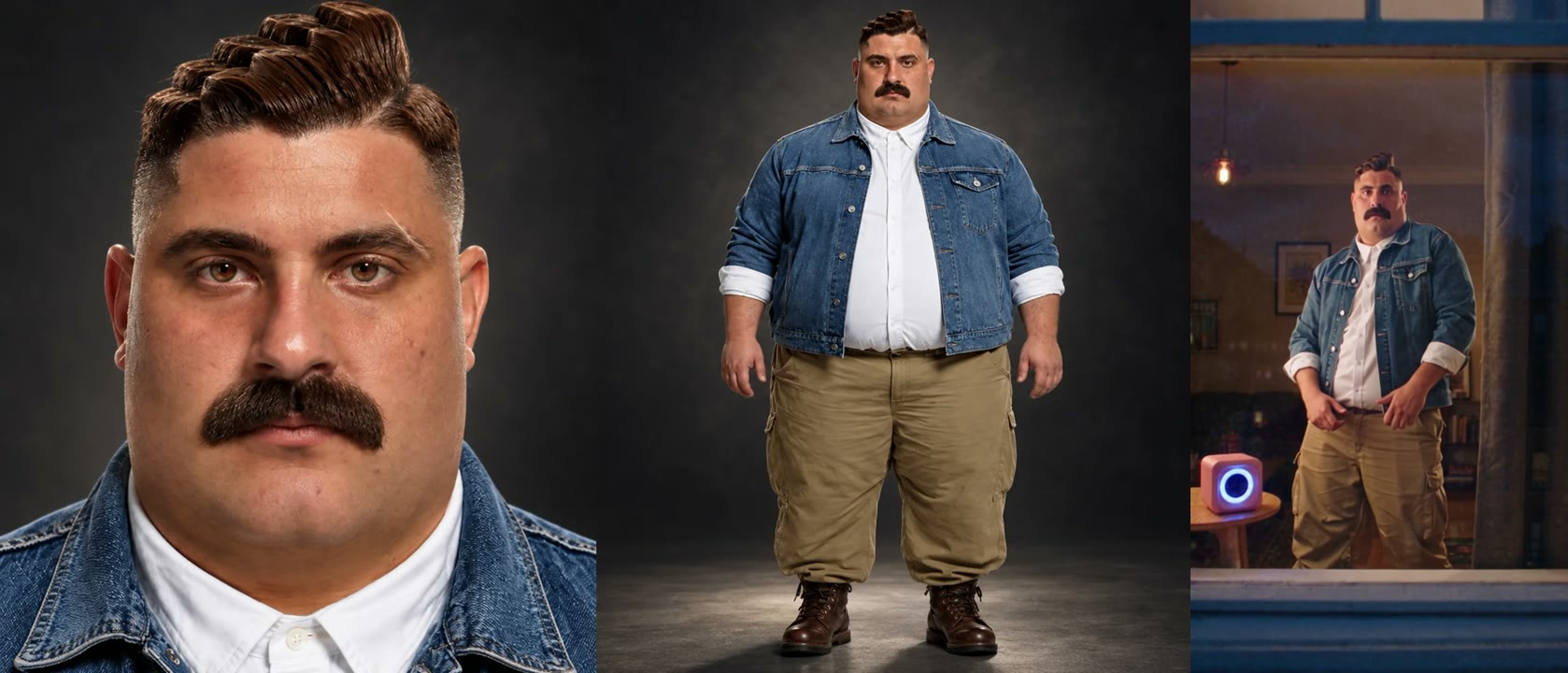
Use a sharp, front-facing photo with even light that shows your body from at least the knees up. At the window you are framed about knees-up for the dance, the stare and the curtain, and what you wear in the photo is what you dance in. A face close-up and a full-body shot side by side in one image works well; that is what we used.
3. Upload it to the template
Open the window dance AI generator and add your photo. There is no prompt to write: the street, the zoom, the speaker, the dance and the curtain are already set. The Generate button shows the credit cost before you start.
4. Generate, download and add the sound
Press Generate. Ours was ready 4 minutes later. Download the MP4 from My Videos: it is vertical 9:16, has no watermark and comes with its own AI-made dance music. To match the trend, add the sound from a window dance post in TikTok or CapCut when you upload.
Our Window Dance Trend AI test: a big moustache and a denim jacket
We used one image of one man: a face close-up next to a full-body shot, with a swept-up quiff, a wide black moustache, a heavy-set build, a denim jacket over a white shirt and khaki cargo pants. We picked him on purpose. The dancer in the trend is slim in a navy T-shirt and jeans, so if the video slimmed him down or dressed him in a T-shirt, we would see it at once.
| Setting | Our test |
|---|---|
| Date | 22 November 2026 |
| Model | Wan 3.0 |
| Photos | 1 |
| Length | 12 seconds (13-second setting) |
| Resolution and frame | 480p (480 × 854), 9:16 vertical |
| Sound | On |
| Cost | 335 credits, about $3.72 |
| Render time | 4 minutes |
| Attempts | 1 (worked first time) |
The prompt we used
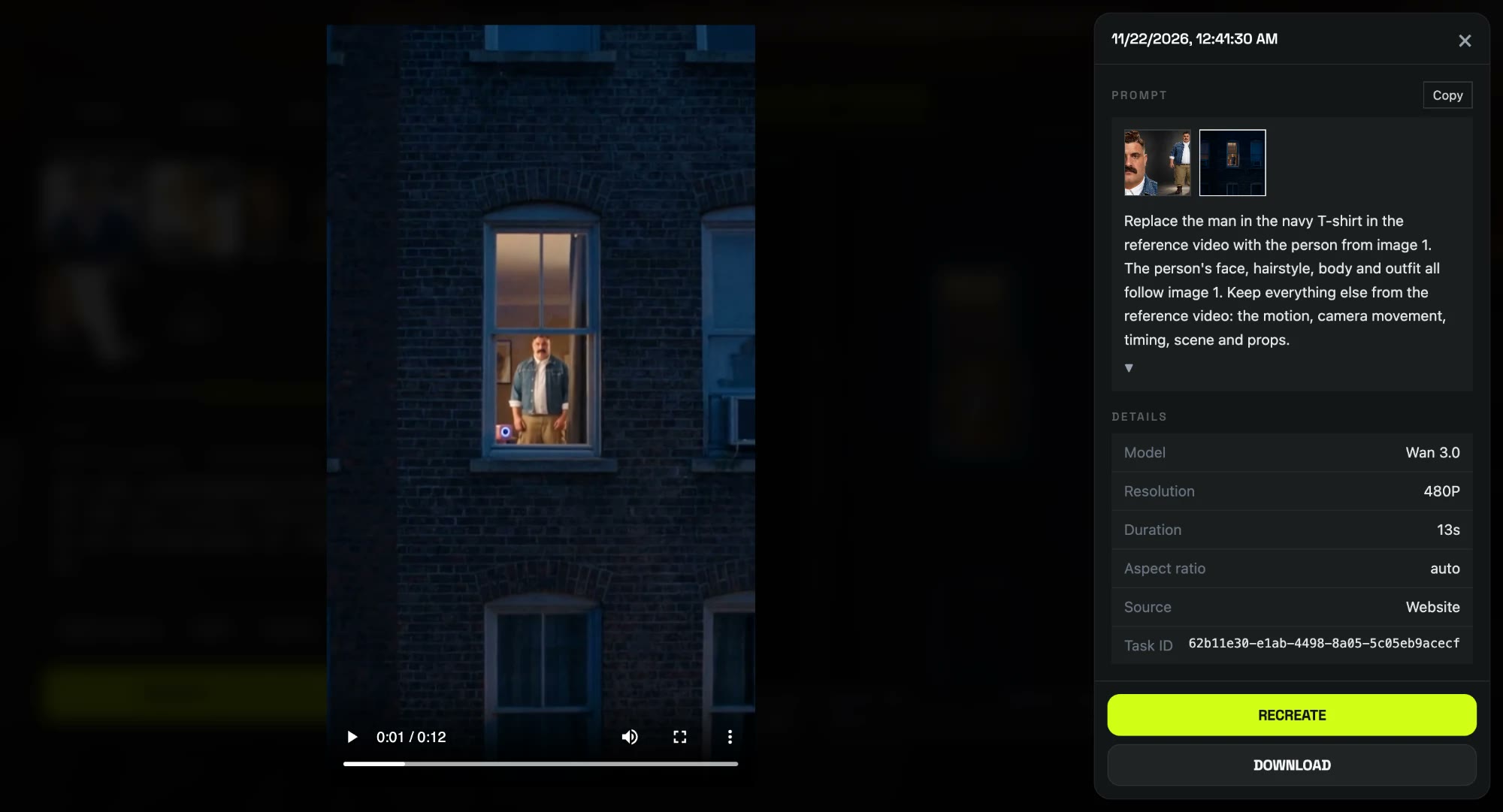
Three sentences, and it worked on the first try. Each has one job: who goes in the window, what comes from the photo, and what stays the same.
Replace the man in the navy T-shirt in the reference video with the person from image 1. The person's face, hairstyle, body and outfit all follow image 1. Keep everything else from the reference video: the motion, camera movement, timing, scene and props.
把参考视频中穿深蓝色 T 恤的男人替换成图 1 的人物。 人物的脸、发型、身材和穿着都跟随图 1。 动作、运镜、节奏、场景和道具都保持参考视频不变。
Two choices mattered. We pointed at the dancer only by what he wears (the navy T-shirt), not by what he does, so the model knew who to change without us describing the dance. And we put body next to face, hairstyle and outfit: that one word is why our heavy-set man stayed heavy-set instead of taking the original dancer's slim build. We didn't describe the person in the photo at all, so the same three lines work for any photo. The template on our effect page runs this setup for you, so you don't paste anything.
What we saw, frame by frame:
- His build stayed his. The heavy-set frame holds through the dance and the stare; nothing was slimmed down.
- His clothes stayed his. Denim jacket, white shirt and khaki cargo pants in every frame, and none of the navy T-shirt or jeans left over.
- The face held up close. The moustache and the swept-up quiff are there in the stare; the quiff came out a little lower than in the photo.
- The small slips. In the first three seconds he is a tiny figure in a wide shot, so you can't judge the face until the camera reaches the window. At 480p the room behind him is soft, and the frame stops around the knees, so his boots never show.
Which photos work best for the Window Dance Trend AI video?
- One person, face to the camera. The stare at the end is the punchline, and it only works with a front-facing face.
- Knees-up or full body. Your build and outfit come from the photo, so the photo has to show them.
- No sunglasses. Clear glasses are fine; the stare needs your eyes.
- Even light, no heavy filters. A filtered face can drift once it starts moving.
- No celebrities or children. Only photos of yourself or adults who agreed.
Is the Window Dance Trend the same as Window Peeper?
No, but it's the same window. In Window Peeper the camera catches you eating a burger; in the Window Dance Trend it catches you dancing. Both end with the curtain. If you made the burger one with our Window Peeper AI template, use the same photo here and post them as part one and part two.
Window Dance Trend AI generators compared
On 22 November 2026 we found more than a dozen sites with a window dance template. The figures below come from their own pages; we have not generated videos with them.
| Tool | Photos | Length and frame | Price per video |
|---|---|---|---|
| Our template | 1 | 12 s, 480p, 9:16 | 335 credits, about $3.72 ($5.99 pack) |
| Remake the Trend | 1 | 10 s, 720p, 9:16 | $4.99 first video, then $9.99 |
| ViralVideoAI | 1 | 12 s, 720p, 9:16 | 130 credits, about $5 |
| MakeViral | 1 | 12 s, 720p, 9:16 | 152 credits |
| AI Window Peeper | 1 | 12 s, 480p to 1080p | 50 to 200 credits; packs from $7.90 |
Is the Window Dance Trend AI video real?
No. The Window Dance Trend AI video is generated from one still photo; nobody was filmed through a real window. Our template is not affiliated with TikTok, CapCut or the creators of the trend. When you post it, keep the platform's AI label on, and don't film real neighbors.
Window Dance Trend AI video problems and fixes
| Problem | Fix |
|---|---|
| My face is tiny at the start | The first seconds are a wide shot of the building. The camera reaches the window by about 5 seconds and your face is clear from there. |
| The dancer doesn't look like me | Use a front-facing photo with your body in frame; skip side views, sunglasses and group shots. |
| My shoes don't show | The shot at the window stops around the knees, so footwear isn't in frame. |
| The generation failed | The credits come back automatically. Try again, or try another photo. |
Is Window Dance Trend AI free?
Not completely. New accounts get 75 free credits and one Window Dance Trend AI video takes 335, so you need the one-time $5.99 pack (540 credits). That is about $3.72 for the video, with 205 credits left over and no subscription. See pricing. Failed renders are refunded automatically.
Will the video change my body or my clothes?
No. The dancer follows your face, build and outfit from the photo. Our heavy-set test subject in a denim jacket and khaki cargo pants kept all of it for 12 seconds.
Which song is in the Window Dance Trend?
Our video comes with its own AI-made dance music, not the TikTok sound. Add the sound from a window dance post in TikTok or CapCut when you upload.
Can my dog or cat do the window dance?
We have only tested a person so far, so we can't show a pet result. A person's photo, face to the camera, is what we know works.
How long is the video?
12 seconds, 480p, 9:16 vertical, with sound and no watermark. Ours took 4 minutes to render.
Do I need to write a prompt?
No. On the effect page the template is already set up; you only add your photo. The prompt above is what we used in our own test.
Want another way to get caught? Our Balcony Stare Dancer template puts you dancing on a balcony instead.