How to Make a Boom Clap Confetti AI Video From 1 Photo
What’s new on this page
- — Published: our first Boom Clap Confetti AI video from one photo (Wan 3.0, 12 s, 480p, 9:16, with sound, 335 credits, first try, 3 min 59 s), the prompt we used, second by second, photo tips and fixes. TikTok figures checked on the original posts on 26 November 2026.
A Boom Clap Confetti AI video puts the person in your photo into the November 2026 TikTok trend: they sit facing the camera, sing along to Charli XCX's "Boom Clap" with big hand moves, and confetti falls on them, white flakes first, then a gold shower on the boom. We made the clip above on 26 November 2026 from one photo of a man in a tan suit with a huge moustache, and checked one thing above all: would he keep his own suit, hair and moustache, or drift toward the look of the trend post? He kept all three. This guide covers the steps, the exact settings and prompt, what came out well and what didn't, and which photos work.
What is the Boom Clap Confetti trend?
The Boom Clap Confetti trend is a TikTok format where you sing the chorus of Charli XCX's "Boom Clap" (released 17 June 2014 on The Fault in Our Stars soundtrack, per Wikipedia) straight to the phone while a friend fires a confetti cannon on the "boom." Many creators then post the outtakes, because getting the confetti to land on the beat takes several tries.
We opened the posts ourselves on 26 November 2026. The earliest we found is @blossom_in_my_moonlight's "BOOM !!" from 11 November, tagged #confetticannon. @po1ives posted "BOOM CLAP🎉" on 12 November and had 24.4 million plays. The biggest is @sayka_chu's "Boom clap✨✨" from 17 November, with 59.5 million plays and 5.2 million likes. The same day, Cadel and Mia posted their take (6.2 million plays), and their behind-the-scenes clip the next day passed it at 8.9 million. The trend tracker Virlo counted 215 creators posting it in the week to 26 November, up from 113 the week before.
What happens in a Boom Clap Confetti AI video, second by second?
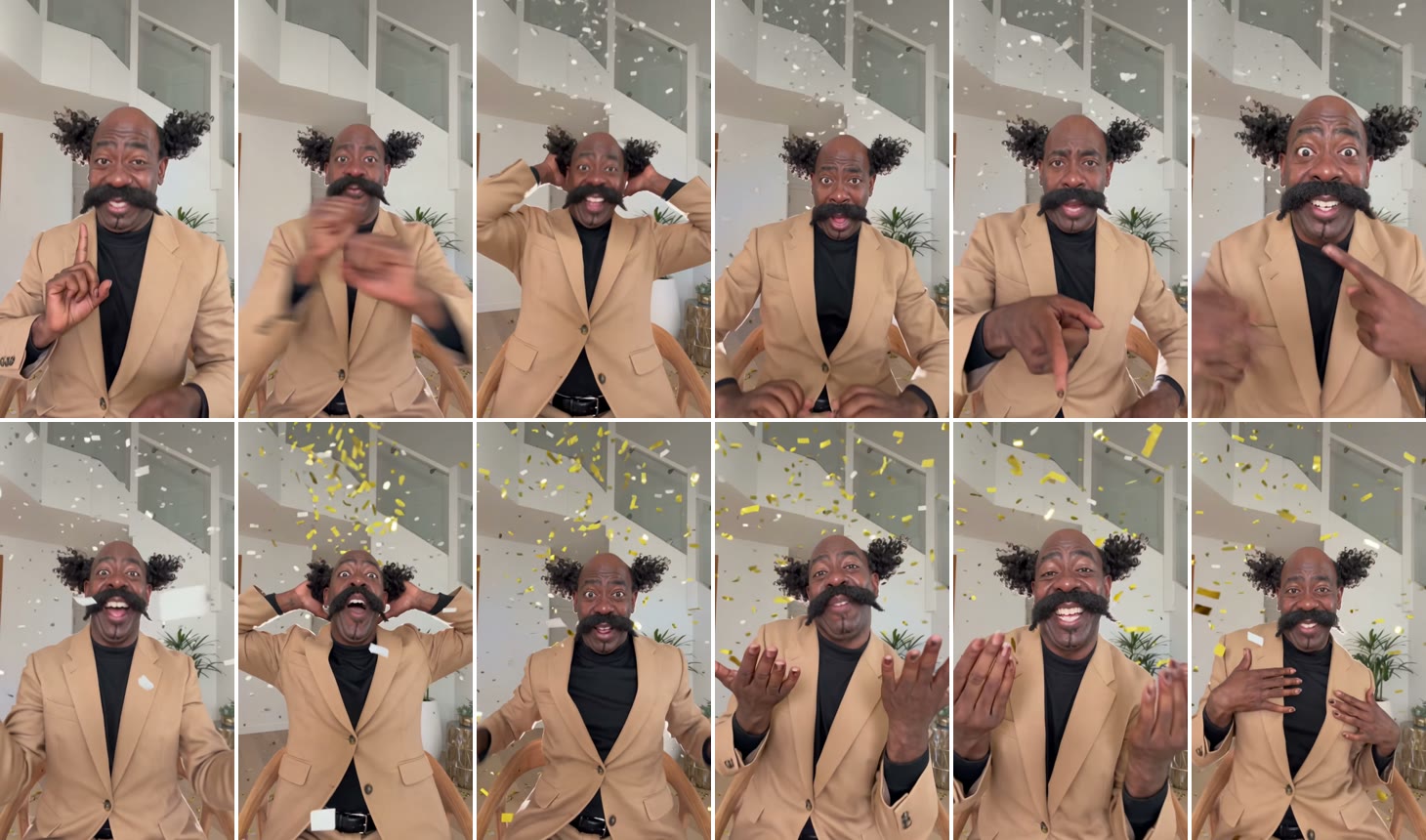
The video follows the trend's moves and confetti timing. In our result:
| Seconds | What happens |
|---|---|
| 0–1 | One finger up, a big grin at the camera |
| 1–2 | Hands wave fast and cross in front of the chest |
| 2–3 | Hands on the head; white flakes start drifting down |
| 3–5 | Head tilt, a point down, exaggerated faces |
| 5–7 | Wide eyes, pointing straight at the camera, then to the side |
| 7–8 | Hands on the head as the gold confetti pours down (the big moment) |
| 8–11 | Leaning in through the confetti with open hands, like blowing kisses |
| 11–12 | A hand on the chest to finish |
What you need to make a Boom Clap Confetti AI video
- One photo. One person, face to the camera, waist-up or full body. It can be you, or an adult friend or family member who agreed.
- An account and 335 credits. New accounts get 75 free credits, so you need the one-time $5.99 pack (540 credits), which leaves 205 credits after one video. No subscription.
- About four minutes. Ours took 3 minutes 59 seconds; you can close the tab and find the video in My Videos later.
- No confetti cannon, no helper, no app. The confetti and the song are already in the template, and it runs in the browser.
How to make a Boom Clap Confetti AI video in 4 steps
1. Pick the singer
There is one singer, so pick one person: you, or someone who said yes. The more serious they usually look, the funnier the wide-eyed pointing and the gold shower get. Photos of celebrities, public figures and children are not allowed.
2. Pick the photo
Use a sharp, front-facing photo with even light that shows at least your upper body. You sit facing the camera from the chest up for the whole video, and what you wear in the photo is what the confetti lands on. Something dressy, like a suit or a bright top, looks best under gold confetti.
3. Upload it to the template
Open the Boom Clap Confetti AI generator and add your photo. There is no prompt to write: the white stairwell, the chair, the moves, both confetti drops and the song are already set. The Generate button shows the credit cost before you start.
4. Generate and download
Press Generate. Ours was ready 3 minutes 59 seconds later. Download the MP4 from My Videos: it is vertical 9:16, 12 seconds long, has no watermark and already has the Boom Clap chorus on it, so you can post it straight to TikTok, Reels or Shorts.
Our Boom Clap Confetti AI test: a tan suit in the gold confetti
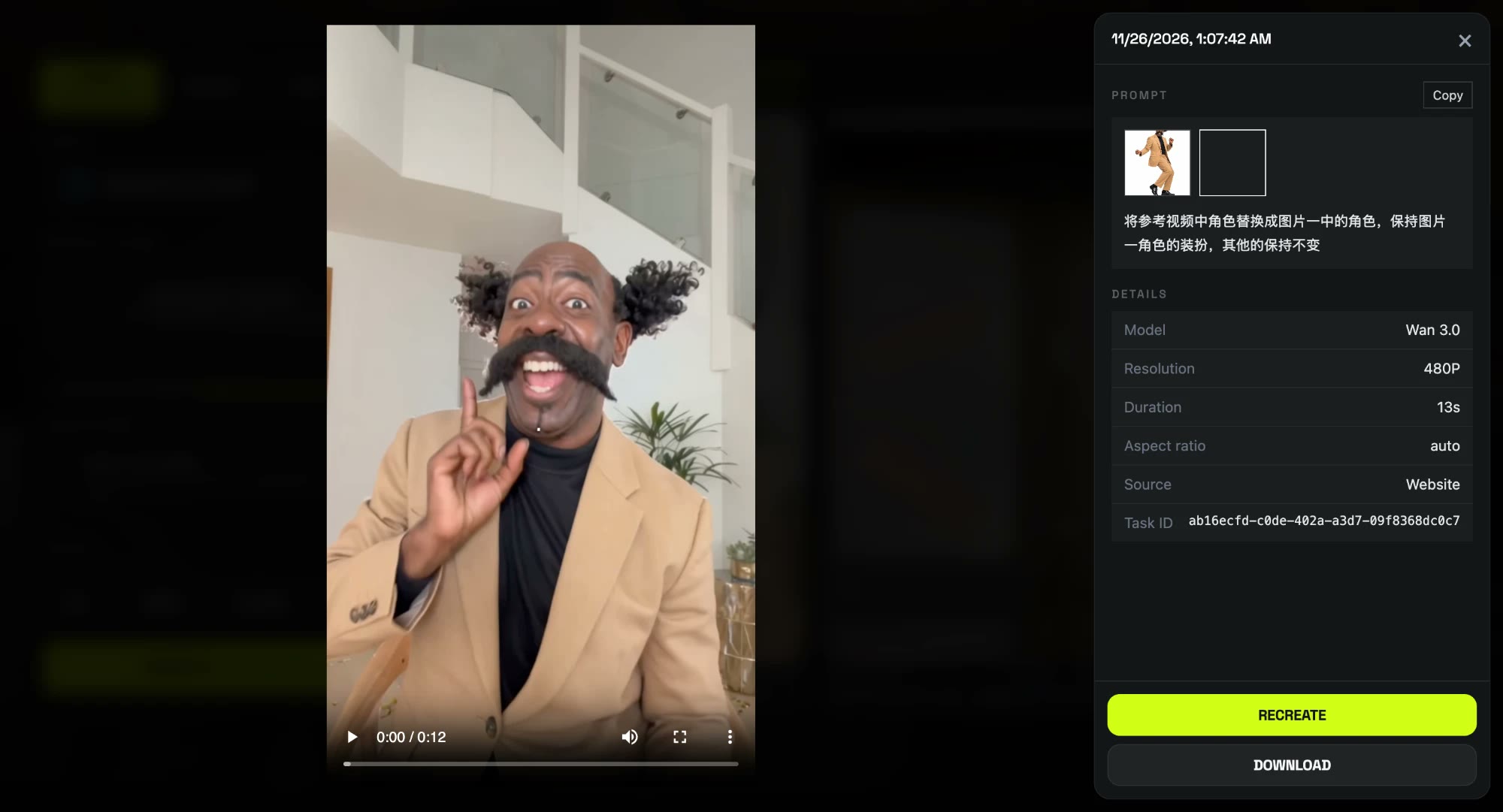
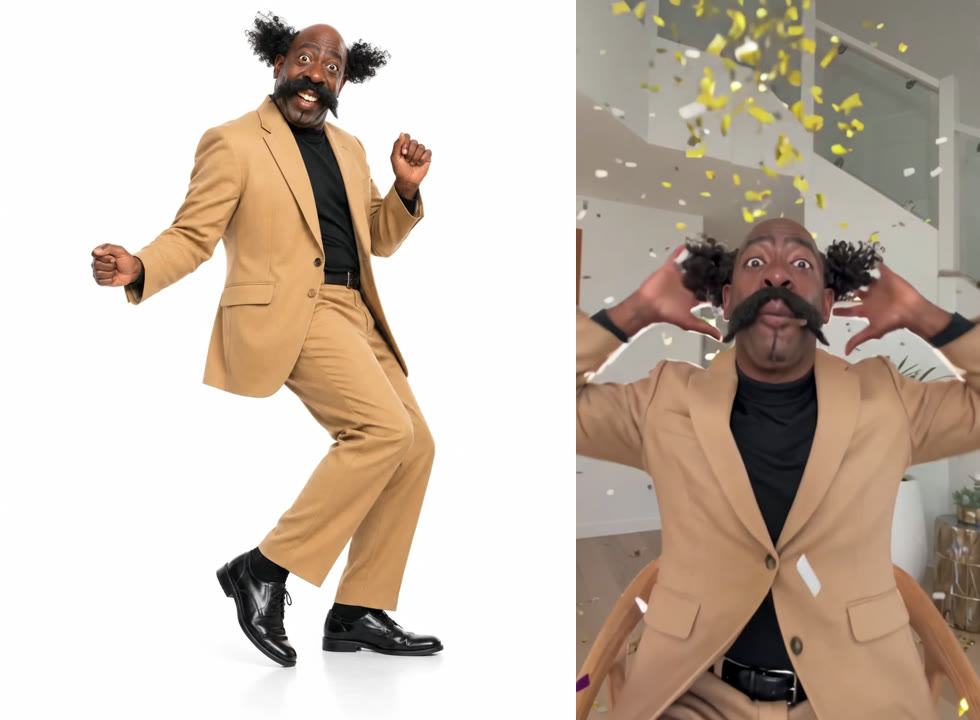
We used one photo of one man on a plain white background: a bald crown with two big curly tufts at the sides, a thick black moustache, a tan suit over a black turtleneck, black shoes, mid-dance. We picked a look that is nothing like the trend post on purpose. Mia wears a plum top and has long dark hair in Cadel and Mia's clip, so if the video pulled the singer back toward it, the moustache, the tufts and the suit would be the first things to go.
| Setting | Our test |
|---|---|
| Date | 26 November 2026 |
| Model | Wan 3.0 |
| Photos | 1 |
| Length | 12.2 seconds (13-second setting) |
| Resolution | 480p, 480×854, 9:16 vertical |
| Sound | Yes, the Boom Clap chorus |
| Credits | 335 (about $3.72 from the $5.99 pack) |
| Render time | 3 minutes 59 seconds |
| Attempts | 1, first try |
What came out well
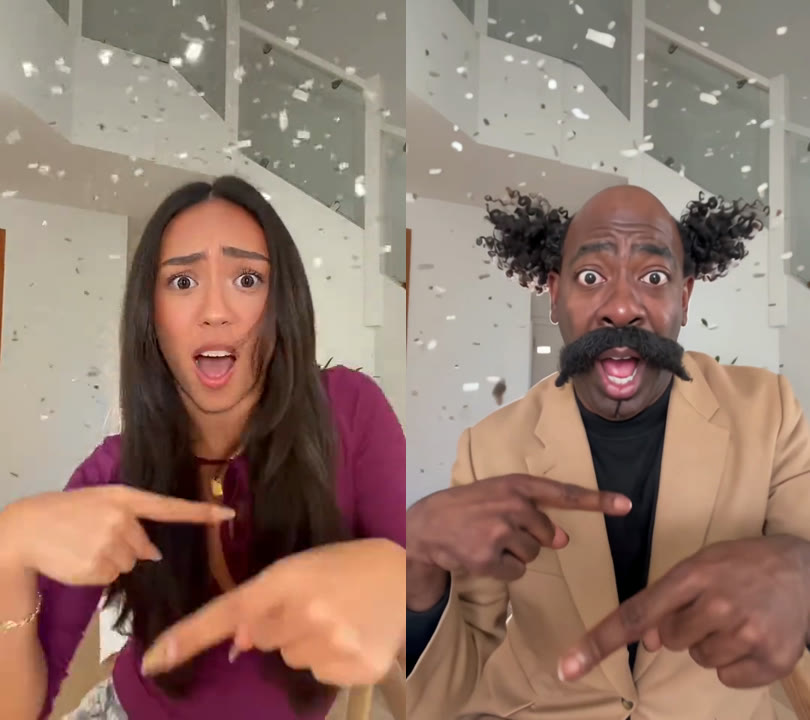
- The clothes stayed his. The tan suit, its buttons and the black turtleneck are there in every frame; no plum top appears at any point.
- The hair and moustache stayed his. The two curly tufts and the moustache hold through the hands-on-head moves and the confetti, even when his hands are right next to them.
- Both confetti drops are there. White flakes from about 2 seconds, then the gold shower at 7 seconds, at the same moments as in the trend post.
- The faces sell it. The wide-eyed point at 5 seconds and the open-mouthed grin in the confetti read as his face, not a mask.
What didn't
- The setting is fixed. You always sit in the same white stairwell; the background in your photo is not used.
- Hands cross the face. Around 1–2 seconds and 8–10 seconds the hand moves pass in front of the face for a moment, as in the trend.
- 480p. Sharp enough on a phone, soft on a laptop screen.
- One kind of person tested. We have tried one adult man so far; we can't yet show a woman or a pet doing it.
The Boom Clap Confetti AI prompt we used
You don't need this on the effect page, where the template is already set up. If you want to make it yourself with Wan 3.0 in our custom video tool, this is what worked on the first try: a 12-second Boom Clap confetti clip as the reference video, your photo as image 1, 480p, the 13-second setting and sound on. We wrote the prompt in Chinese; the English version says the same thing.
Replace the character in the reference video with the character in image 1, keep the outfit of the character in image 1, and keep everything else the same.
将参考视频中角色替换成图片一中的角色,保持图片一角色的装扮,其他的保持不变
One line does most of the work: "keep the outfit of the character in image 1." Without it, models tend to keep the clothes from the reference clip and only change the face. There is only one person in the clip, so the prompt doesn't need to describe who to replace.
Which photos work best for a Boom Clap Confetti AI video?
- One person, face to the camera. The wide-eyed point at 5 seconds needs a front-facing face.
- Waist-up or full body. Your outfit comes from the photo, so the photo has to show it. A full-body shot on a plain background worked for us.
- Dress for the confetti. A suit, a blazer or a bright top looks best when the gold falls on it.
- No sunglasses. Clear glasses are fine; the joke is in the eyes.
- No celebrities or children. Only photos of yourself or adults who agreed.
Boom Clap Confetti AI video problems and fixes
- The singer doesn't look like you. Usually it's the photo: a side view, sunglasses or a tiny face. Use a front-facing photo with your upper body in frame and run the template again.
- The background isn't yours. The white stairwell is part of the template, so every video uses it.
- The CapCut Boom Clap template won't open. Usually it's unavailable in your region or has been taken down. This template needs one photo and runs in the browser.
- It failed. Failed generations return their credits automatically; try again or switch photos.
Boom Clap Confetti AI FAQ
Is Boom Clap Confetti AI free?
Not completely. New accounts get 75 free credits and one Boom Clap Confetti AI video takes 335, so you need the one-time $5.99 pack (540 credits). That is about $3.72 for the video, with 205 credits left over and no subscription. See pricing. Failed renders are refunded automatically.
Do I need a confetti cannon?
No. The white flakes and the gold confetti shower are part of the template; you only add a photo, and nothing needs cleaning up.
What song is the Boom Clap Confetti trend?
"Boom Clap" by Charli XCX, released 17 June 2014 on The Fault in Our Stars soundtrack. The chorus is already on the video.
Will I keep my own clothes?
Yes. In our test a tan suit and black turtleneck stayed on for all 12 seconds, along with the moustache and curly side tufts from the photo.
Can I make my dad do the Boom Clap trend?
Yes, if he agreed. Use a clear, front-facing photo of him, ideally in something dressy, and keep the AI label on when you post.
Is it real or AI?
The TikTok trend posts are real people with real confetti cannons. A video made with our template is AI-generated from your photo.
Is it official?
No. The template is unofficial and not affiliated with Charli XCX, her label, TikTok or the trend's creators. Post it as a personal video, not as an ad.
Want more to sing along to? Try the viral song in Bécane Yamê AI or arrive with a crown and cake in the Birthday Car Trend AI.