How to Make a You Never Let Her Pay AI Video (Sponge Wallet)
What’s new on this page
- — Published with our first tested one-photo run: settings, second-by-second breakdown, photo tips, the full prompt and TikTok numbers checked on the original posts.
We made our You Never Let Her Pay AI video from one selfie of a guy in a navy sweater. One run, under four minutes, and he waved off his date’s card, showed the waiter a kitchen sponge and got walked to the dish room, still in that sweater. Here is exactly how to make yours, what each second looks like and where it can go wrong.
You Never Let Her Pay sponge wallet trend
You Never Let Her Pay AI video result
What Is the You Never Let Her Pay Trend?
The You Never Let Her Pay trend is an 11-second dinner skit in which a man refuses to let his date pay, shows the waiter a kitchen sponge instead of a card and is walked off to wash dishes. It started with an AI-made TikTok by @s.nemz, posted on November 8, 2026 with the caption “I got this !”, which had 3.7 million views and 180,900 likes as of November 16.
Remakes began the next day under #youneverletherpay. The biggest one so far is @boby.biggsjohnson’s version from November 10, with 21.9 million views, 1.5 million likes and 288,600 shares as of November 16, 2026. The joke is the gap between “a real man never lets her pay” and the old line about washing dishes when you can’t cover the bill.
What Happens in a You Never Let Her Pay AI Video?
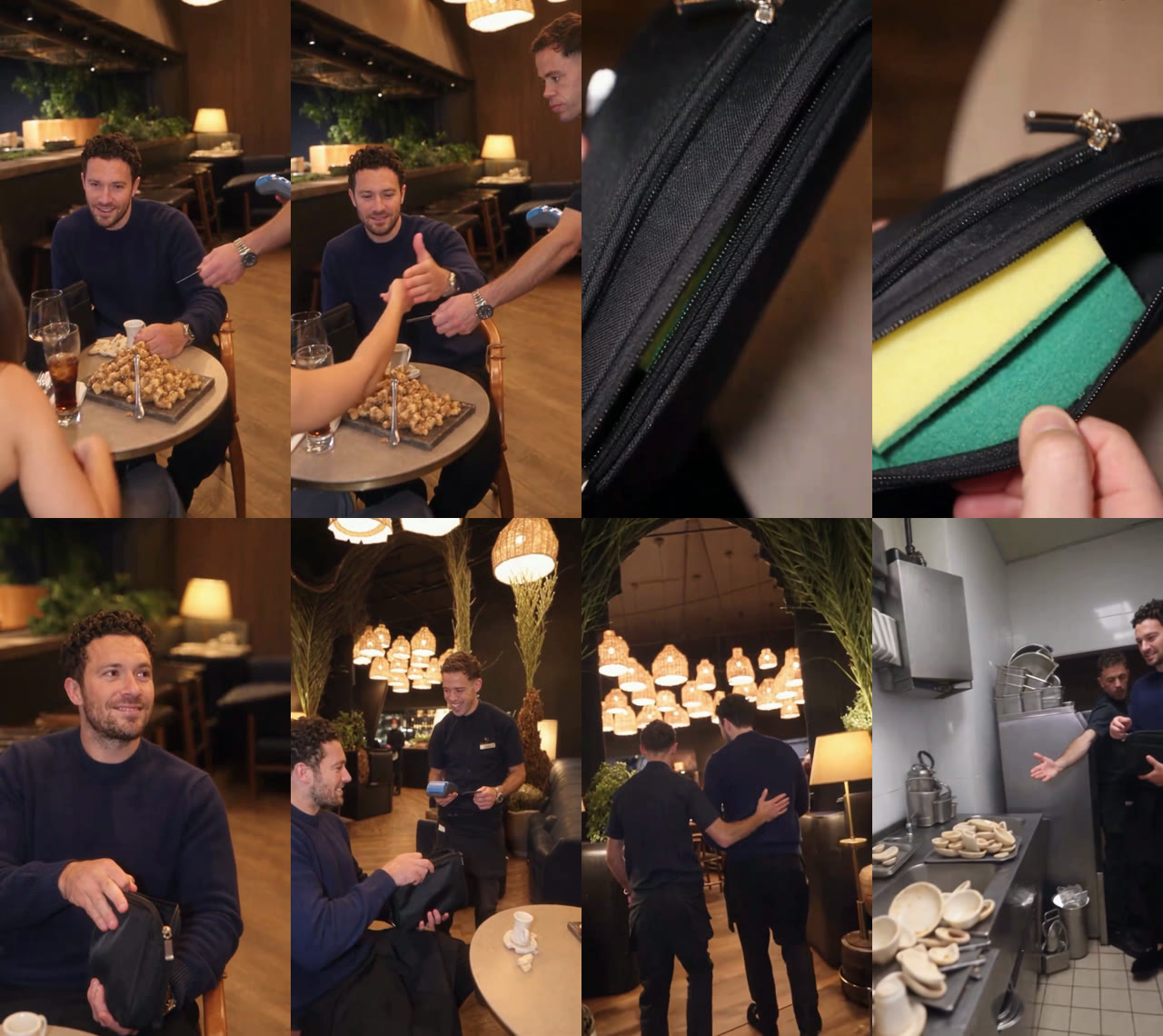
A You Never Let Her Pay AI video has six shots over 11 seconds: the table, the sponge close-up, your proud grin, the waiter laughing, the walk to the back and the dish room. Only the guy who pays changes; the date, the waiter, the restaurant and the kitchen staff stay the same in every video.
| Time | What happens | What to check |
|---|---|---|
| 0–3s | Your date offers her card; you stop her with a thumbs-up while the waiter holds the card machine | Your face and outfit at the table |
| 3–5s | Close-up: a black pouch is unzipped to show a yellow and green kitchen sponge | Nothing: hands only |
| 5–8s | You grin and hold the pouch up; the waiter bursts out laughing | Your smile in the close-up |
| 8–9s | The waiter puts an arm around you and walks you away, seen from behind | Your build and clothes |
| 9–11s | The dish room: a staff member points you to a pile of dirty bowls | Your face, small and side-on |
How Do I Make a You Never Let Her Pay AI Video? (3 Steps)
- Open the template. Go to the You Never Let Her Pay AI page and play the example once with sound.
- Add one photo. Upload a sharp, front-facing photo of the one person who pays, waist up. If it’s your boyfriend or a friend, ask them first.
- Generate and download. Check the credit cost on the Generate button, tap it and wait about four minutes. The video lands in My Videos as a watermark-free MP4.

If you don’t have credits yet, the $5.99 starter pack on the pricing page gives 540 credits: enough for one You Never Let Her Pay AI video with 230 credits left, no subscription. New accounts get 75 free credits, which isn’t enough for this template on its own.
Which Photo Works Best for a You Never Let Her Pay AI Video?
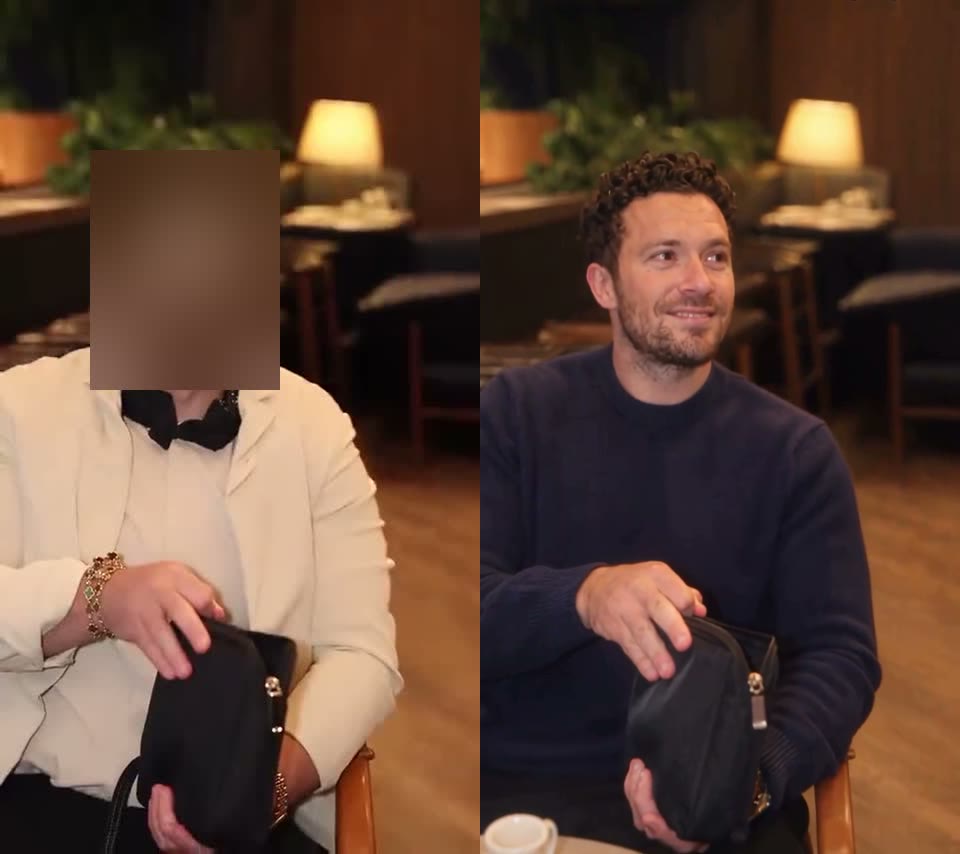
A sharp, front-facing photo of one person, waist up, works best for a You Never Let Her Pay AI video. You sit close to the camera at the table, but the last two shots show you small and turned to the side, so the photo has to carry your face on its own.
- Both eyes visible, even light. Our street selfie had soft daylight and a straight-on face, and the table shots looked like him straight away.
- Waist up or more. Most of the clip frames you from the waist up at the table; a photo that shows your top tells the AI what you wear to dinner.
- Dress for the contrast. The outfit comes from your photo, so a hoodie, a gym top or a work uniform at a candle-lit table makes the sponge even funnier than a suit would.
- One person only. A couple photo can make the AI pick the wrong person to pay.
The Exact Settings and Prompt We Used
Behind the one-tap template is a video-to-video run on Wan 3.0: the dinner clip sets the shots, the waiter and the timing, and your photo sets who pays. These were the settings on November 16, 2026.
| Setting | Value |
|---|---|
| Model | Wan 3.0 |
| Resolution and length | 480p · 11.4 seconds · vertical 9:16 (480 × 854) |
| Inputs | 1 reference photo + the 12-second dinner clip |
| Audio | On (the original dinner sound comes through) |
| Cost and time | 310 credits · 3 minutes 42 seconds · first try |
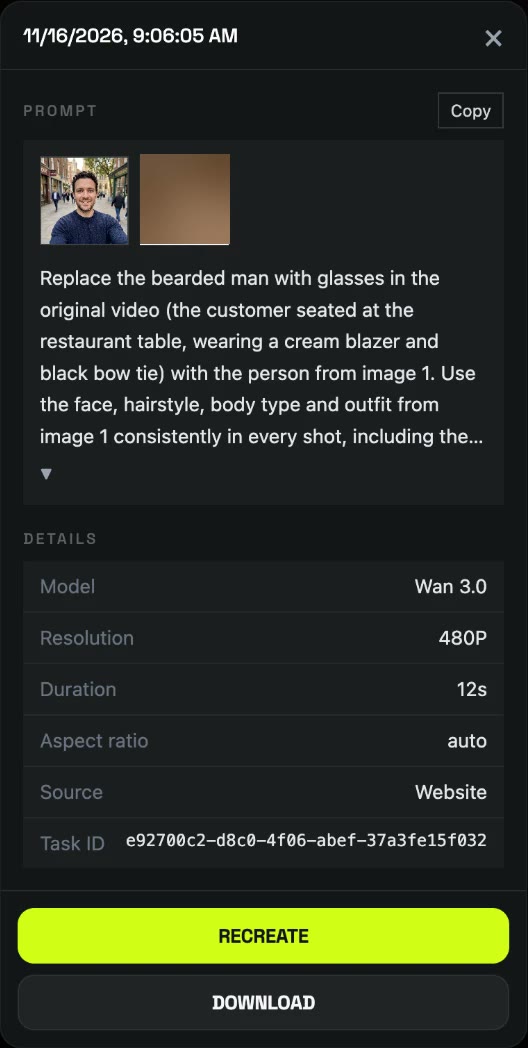
This is the prompt we used. It points at the guy by what he wears in the clip and never describes the person in your photo, so it works with any photo. The line about the later shots is what kept the same person in the walk to the kitchen.
Replace the bearded man with glasses in the original video (the customer seated at the restaurant table, wearing a cream blazer and black bow tie) with the person from image 1. Use the face, hairstyle, body type and outfit from image 1 consistently in every shot, including the later shots where he walks away from behind and stands in the kitchen. Keep everything else exactly as in the original video.
You don’t need any of this to make one: the You Never Let Her Pay AI template already has the clip, the prompt and the settings.
Why Doesn’t It Look Like Me in the Kitchen Shots?
In a You Never Let Her Pay AI video, the kitchen shots are the hardest part, because your face is small, turned to the side and lit by cold kitchen light. In our run the table shots and the close-up grin looked clearly like the photo, while in the last two seconds the face read more generic and only the sweater and hair stayed obviously his.
- Start from a sharper face. A front-facing photo with both eyes visible gives the AI more to hold on to when the face is tiny.
- Skip sunglasses and hats. Anything covering the eyes or hairline makes the side-on shots drift further.
- Run it again if the ending matters. Each run is a new render; the table and close-up shots carry most of the joke, so most people post the first one.
What Caption and Hashtags Should I Use for the You Never Let Her Pay Trend?
Most remakes reuse the original caption “I got this !” and the tag #youneverletherpay; “POV: You never let her pay” is the other common hook. The video comes with sound, so you don’t need to add audio. Both the original by @s.nemz and the trend itself are AI-made, so turn on TikTok’s AI-generated label when you post.
You Never Let Her Pay AI Video FAQ
Who started the You Never Let Her Pay trend?
TikTok creator @s.nemz started it with a post captioned “I got this !” on November 8, 2026. TikTok labels it AI-generated, and it had 3.7 million views as of November 16, 2026; the biggest remake, by @boby.biggsjohnson, had 21.9 million.
Why does he pay with a sponge?
He pays with a kitchen sponge because he insists on paying but has no money, so he’ll wash dishes to cover the bill. The sponge is the punchline to “a real man never lets her pay.”
How much does a You Never Let Her Pay AI video cost? Is it free?
About $3.44. A You Never Let Her Pay AI video costs 310 credits, and the $5.99 starter pack of 540 credits covers one with 230 left, no subscription. The 75 free signup credits aren’t enough for one, and failed generations are refunded automatically.
Do I have to wear a suit like the guy in the original?
No. The You Never Let Her Pay AI template keeps the outfit from your photo, so you go to dinner in whatever you wear in it; ours was a navy sweater.
Can I make one of my boyfriend or a friend?
Yes, with their OK. Use a photo of an adult who agreed to it; photos of celebrities, public figures and children aren’t allowed. Post it as a joke, not as something that really happened.
Does the video have the TikTok sound?
Yes. Our You Never Let Her Pay AI video came out with the dinner sound from the trend, so you can post it without adding audio.
Want another dinner gone wrong? Grandpa Said He’d Handle Dinner and First Time in a Fancy Cafe also work from one photo. Got someone who never drives either? Make the Passenger Princess AI video from two photos.