How to Make the Passenger Princess AI Video (Real People)
What’s new on this page
- — Published: our first Passenger Princess AI video (Wan 3.0, 15 s, 480p, 16:9, 385 credits, first try, about 10 minutes) with him as the princess and her driving, second by second, photo tips, real-people vs. cartoon versions and fixes.
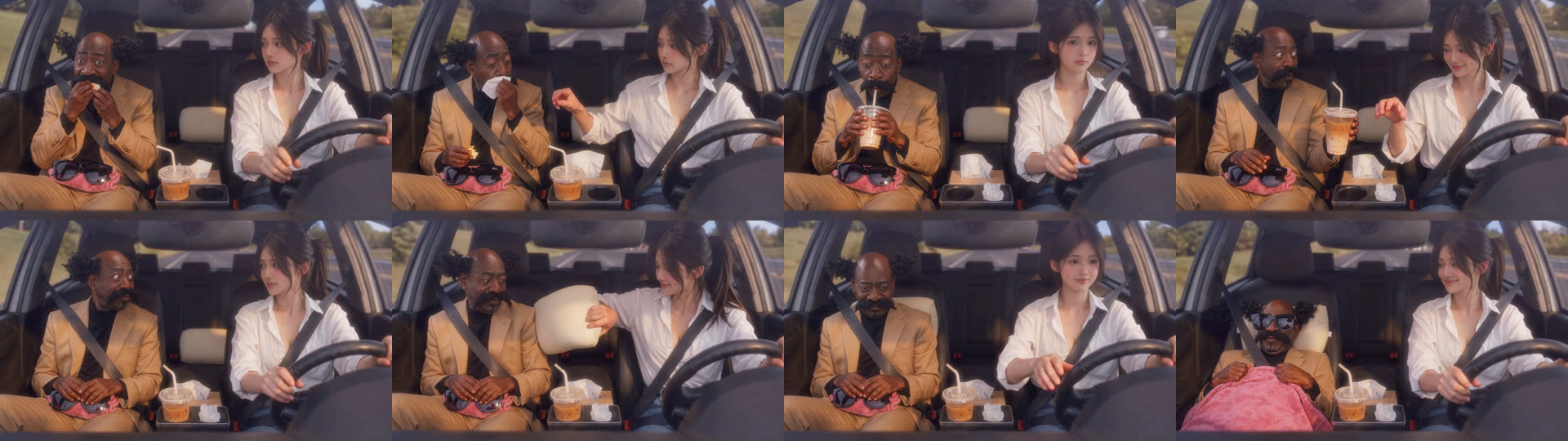
A Passenger Princess AI video puts two people in a car: the driver keeps both hands on the wheel and still finds time to pamper the passenger with a tissue, an iced coffee, a neck pillow, a pink blanket and a pair of sunglasses, until the passenger princess is fully off duty. We made the clip above on 18 November 2026 from two photos, with the roles flipped: he's the princess, she drives.
What is the Passenger Princess AI trend?
Passenger princess is TikTok slang for the person who always rides shotgun while someone else drives; Know Your Meme tracks the phrase back to 2022. The off duty version took off on 27 October 2026, when TikTok creator @capisean_capisara posted an AI capybara couple under the line "POV: Your passenger princess is off duty 👑" and the caption "Tag your princess". By 18 November 2026 that clip had 2.76 million views and 113,000 shares.
The original is a cartoon capybara clip. Most people asking AI assistants about it want the same scene with themselves and their partner, and that is what the Passenger Princess AI generator makes: a real-people version with your two faces in it.
What happens in a Passenger Princess AI video?
It is one continuous 15-second shot through the windshield in warm golden-hour light, the princess on the left of the frame and the driver on the right. In our result:
| Seconds | What happens |
|---|---|
| 0–1 | The princess eats a small snack; the driver glances over |
| 1–3 | The driver hands over a tissue and the princess wipes his mouth |
| 3–5 | The princess sips an iced coffee through the straw |
| 5–7 | The driver reaches over, takes the cup and puts it back in the holder |
| 7–9 | The princess chews and side-eyes the driver |
| 9–10 | The driver tucks a cream neck pillow behind the princess's head |
| 10–11 | A fluffy pink blanket goes on |
| 11–15 | Sunglasses on, blanket up, the princess leans back grinning; the driver smiles at the road |
What you need to make the Passenger Princess AI video
- Two photos, one person in each. Photo 1 is the passenger princess, photo 2 is the driver. Chest-up or wider, face to the camera.
- An account and 385 credits. New accounts get 75 free credits, so you need the one-time $5.99 starter pack (540 credits). It covers one video at about $4.27 and leaves 155 credits, with no subscription.
- About 10 minutes. Ours took 10 minutes 35 seconds from Generate to download.
How to make the Passenger Princess AI video in 3 steps
1. Decide who's the princess
Whoever goes in photo 1 sits in the passenger seat and gets pampered; photo 2 drives. The classic version puts the one who never drives in photo 1. For the role reversal, the one people keep asking AI assistants about, put him in photo 1 and her in photo 2, the way we did.
2. Upload both photos to the template
Open the Passenger Princess AI page and add one photo to each slot. The car, the props, the timing and the sound are already set, so there is nothing to write. The button shows the credits before you spend anything.
3. Generate and download
Press Generate and come back in about 10 minutes. Download the MP4 from My Videos; it has no watermark and the background music is already on it.
Our Passenger Princess AI test: he's the princess, she drives
We wanted to know two things: does each person keep their own look in a two-person scene, and do they stay in the right seats? Our photo 1 was the cartoon gentleman we use in other tests, with side curls, a big moustache and a camel suit; photo 2 was a woman with a dark ponytail in a white shirt.
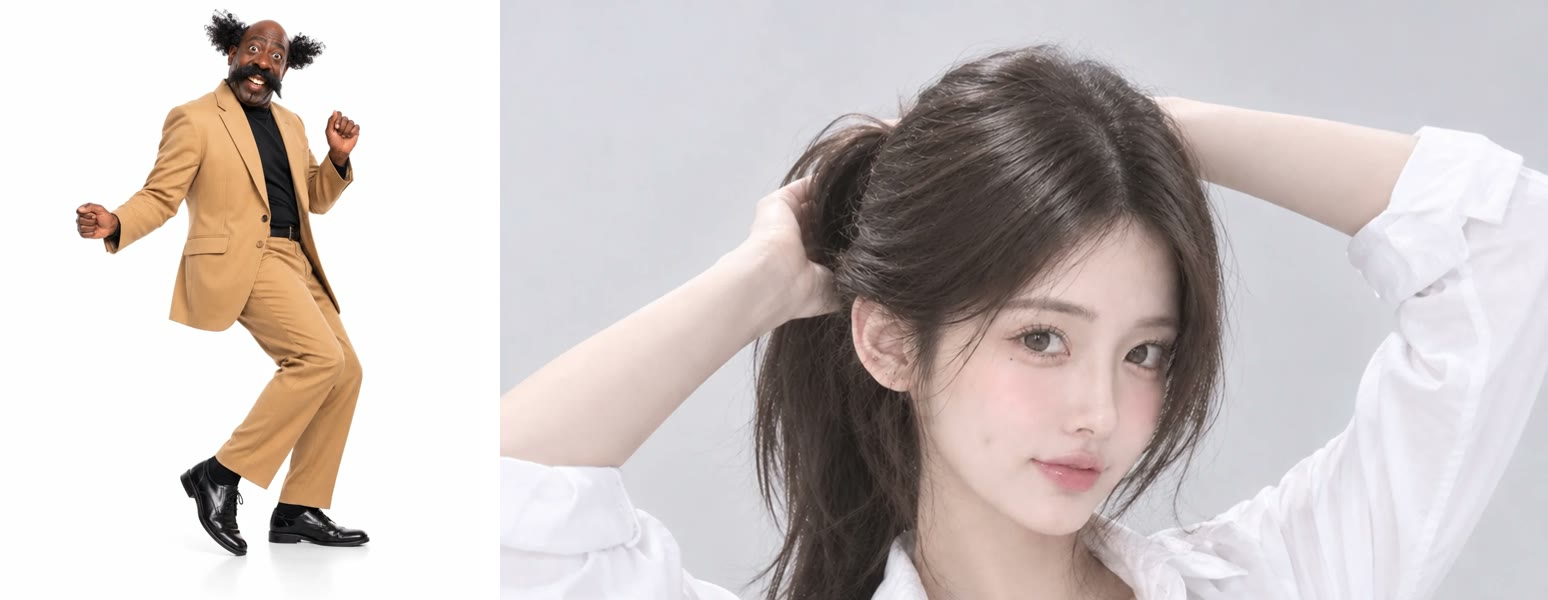
We ran it on Wan 3.0 at 480p with sound on 18 November 2026. It worked on the first try, cost 385 credits and took about 10 minutes. What we saw, second by second:
- Nobody changed seats. The princess stayed on the left and the driver on the right for all 15 seconds. This is the most common failure in two-person templates, and it didn't happen.
- Both looks held. His curls, moustache, camel suit and black turtleneck and her ponytail and white shirt stayed the same from the first bite to the sunglasses shot.
- Every pampering beat landed: the tissue, the cup taken away, the pillow, the blanket and the sunglasses, in that order.
- Three small slips. The sunglasses and the pink blanket sat on his lap from the first second instead of appearing later; an extra crumpled tissue showed up next to the cup holder; and the neck pillow pops in quickly at 9–10 seconds. None of them spoil the ending.
Which photos work best for Passenger Princess AI?
- One person per photo. A couple selfie gives the model two faces to choose from; crop each person into their own photo, or better, use separate photos.
- Chest-up or wider, face to the camera. Both of you are seen from the front, waist-up, through the windshield the whole time.
- No sunglasses on the princess. The template puts a pair on at the end, and the face before that comes from your photo.
- Wear what you want to be seen in. Outfits come from the photos and show for all 15 seconds.
- Only adults who agreed. Use your own photos or a friend's with their OK; no celebrities, public figures or children.
Passenger Princess AI: 15-second real-people version vs. 10-second cartoon versions
Most Passenger Princess AI templates we read on 18 November 2026 copy the capybara clip closely. We didn't generate on those tools; this is from their public pages.
| Typical cartoon-style template | Our template | |
|---|---|---|
| Length | 8–10 seconds | 15 seconds |
| Look | Stylized, close to the capybara clip | Real-people, golden-hour car scene |
| Beats | Drink, pillow, blanket, sunglasses | Snack, tissue, iced coffee, pillow, blanket, sunglasses |
| Shape | Vertical 9:16 | Widescreen 16:9 |
| Photos | Usually two, some allow one or a pet | Two people |
| Price per video | About $5–$10 | About $4.27, no subscription |
If you want the full routine with your real faces, make the Passenger Princess AI video here. It is widescreen, so on TikTok and Reels it shows with bars above and below.
Passenger Princess AI video problems and fixes
| Problem | Fix |
|---|---|
| The wrong person is the princess | Photo 1 is always the passenger. Trade the two photos and generate again. |
| A face doesn't look like the photo | Use a sharp, front-facing photo of that person alone. Faces cropped from group shots lose detail. |
| The sunglasses or blanket are there from the start | We saw this too. They still end up on the princess by the last four seconds, so the ending works. |
| The generation failed | Credits come back automatically. Check both photos show one clear face and try again. |
Is Passenger Princess AI free?
Not completely. New accounts get 75 free credits and one Passenger Princess video takes 385, so you need the one-time $5.99 starter pack (540 credits). That makes one video at about $4.27, with 155 credits left and no subscription. See pricing. Failed generations are refunded.
Can the passenger princess be a man?
Yes. Whoever is in photo 1 is the princess. Our test has a man in the passenger seat and a woman driving.
How long is the Passenger Princess AI video and what format is it?
15 seconds, 480p, 16:9 widescreen, with sound and no watermark. It takes about 10 minutes to make. On TikTok and Reels it shows with bars above and below.
What song is in the passenger princess TikTok?
The original capybara clip uses Sneaky Snitch by Kevin MacLeod. Your video comes with background music on it, and you can switch to the trend sound inside TikTok when you post.
Can I make it with my dog or cat?
We've only tested two people, so we can't promise how a pet comes out. For a pet in the passenger seat, It's My Life Dog AI puts your dog in sunglasses singing along.
Want another couple joke? Our You Never Let Her Pay AI tutorial turns the fight over the bill into one, from a single photo.