How to Make the What's Poppin AI Video (1 Photo, First Try)
What’s new on this page
- — Published: our first What's Poppin AI video (Wan 3.0, 10 s, 480p, 16:9, with sound, 285 credits, first try, 3 min 29 s), the prompt we used in Chinese and English, shot by shot, photo tips and fixes.
A What's Poppin AI video puts the person in your photo into the diner from Jack Harlow's "WHATS POPPIN" music video: you lean on the counter, point at a neon OPEN sign, get mobbed by a crowd of girls, walk out across the night parking lot and end up talking in a booth. We made the clip above on 21 November 2026 from one photo of a big man with a waxed quiff, a wide moustache and a denim jacket. This guide covers the steps, the exact prompt we used, what came out well and what didn't, and which photos work.
What is the What's Poppin AI trend?
The What's Poppin AI trend puts a new lead into the diner scenes of "WHATS POPPIN", the Jack Harlow single released on 21 January 2020 that reached No. 2 on the Billboard Hot 100. Its music video, directed by Cole Bennett for Lyrical Lemonade, was shot entirely in one diner, with the booth dressed up as a nightclub.
The song was a TikTok hit first: Charli D'Amelio's video of 1 April 2020 passed 5.5 million likes, according to Know Your Meme. From October 2026 AI versions started showing up on TikTok, putting other people in the singer's seat; on 13 October 2026 one tagged #higgsfieldai had 18,800 views. None of them has gone big yet. On 21 November 2026 #WhatsPoppin had 10.3 billion TikTok views across 933,754 videos, though that tag also covers the song itself and a street-interview show of the same name.
What happens in a What's Poppin AI video, shot by shot?
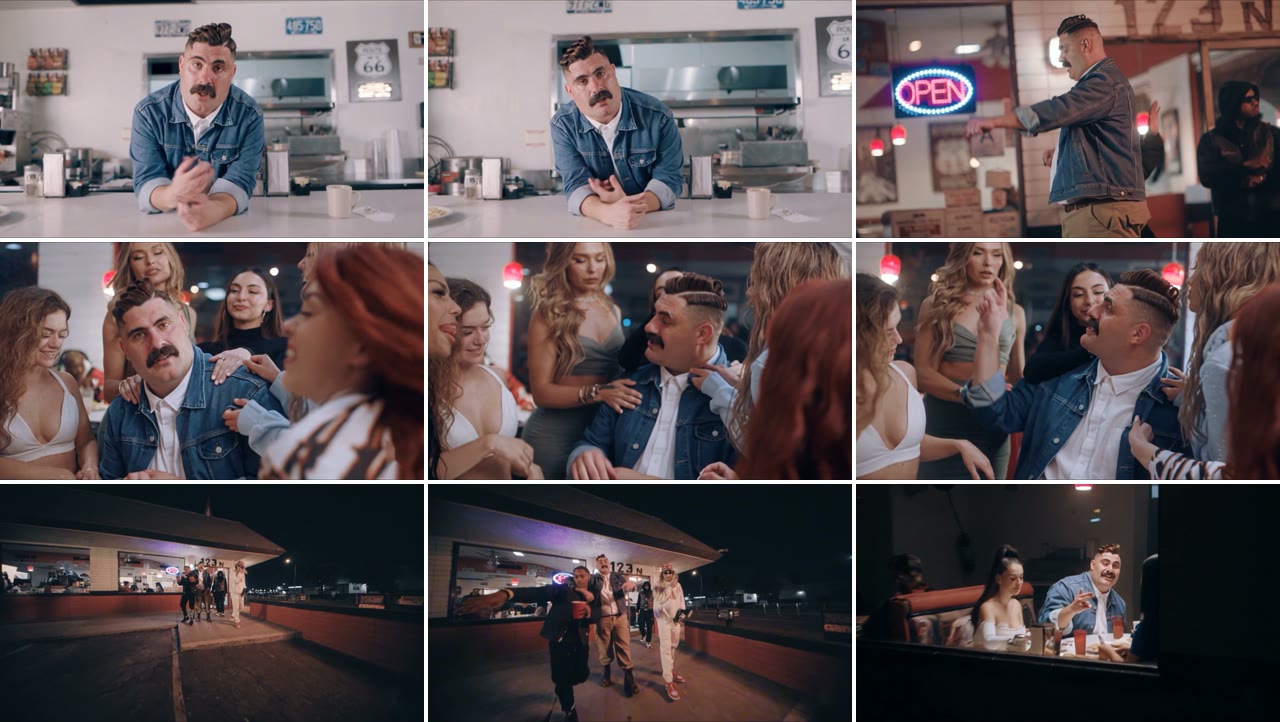
Five quick cuts in ten seconds. In our result:
| Seconds | What happens |
|---|---|
| 0–2 | Inside the diner: you lean on a white counter with your arms crossed and sing into the camera, a Route 66 sign behind you |
| 2–3 | Night, by the door under the "123 N" sign: you point next to a neon OPEN sign |
| 3–7 | A crowd of girls presses in, hands on your shoulders; you point at the camera and wave your hands |
| 7–9 | Wide shot of the night parking lot as the group walks out of the diner |
| 9–10 | In a booth across from a girl, a fry in your hand, talking with your hands |
What you need to make the What's Poppin AI video
- One photo of one person, face to the camera, full body or knees-up. It can be you, an adult friend who agreed, or a character you made.
- An account and 285 credits. New accounts get 75 free credits, so you need the one-time $5.99 pack (540 credits), which leaves 255 credits after one video. No subscription.
- About four minutes. Ours took 3 minutes 29 seconds; you can close the tab and find the video in My Videos later.
How to make the What's Poppin AI video in 4 steps
1. Pick your lead
There is one main character in every shot, so pick one: you, or the friend who has never once been the center of attention. Ask first if the photo isn't yours. Photos of celebrities, Jack Harlow included, and of other public figures are not allowed.
2. Pick the photo
Choose a sharp, front-facing photo with even light, full body or knees-up. The video has close shots at the counter and in the crowd, a standing shot by the door and a wide parking-lot shot, so the photo has to cover your face and your outfit. Whatever you wear in it is what you wear in the diner.
3. Upload it to the template
Open the What's Poppin AI generator and add the photo to the single slot. There is no prompt to write: the diner, the girls and the cuts are already set. The Generate button shows the credit cost before you start.
4. Generate and download
Press Generate. Ours was ready 3 minutes 29 seconds later. Download the MP4 from My Videos: it has no watermark and the sound is already on it. It is widescreen, so for a vertical TikTok add bars or a caption strip above and below.
Our What's Poppin AI test: a denim jacket in the diner
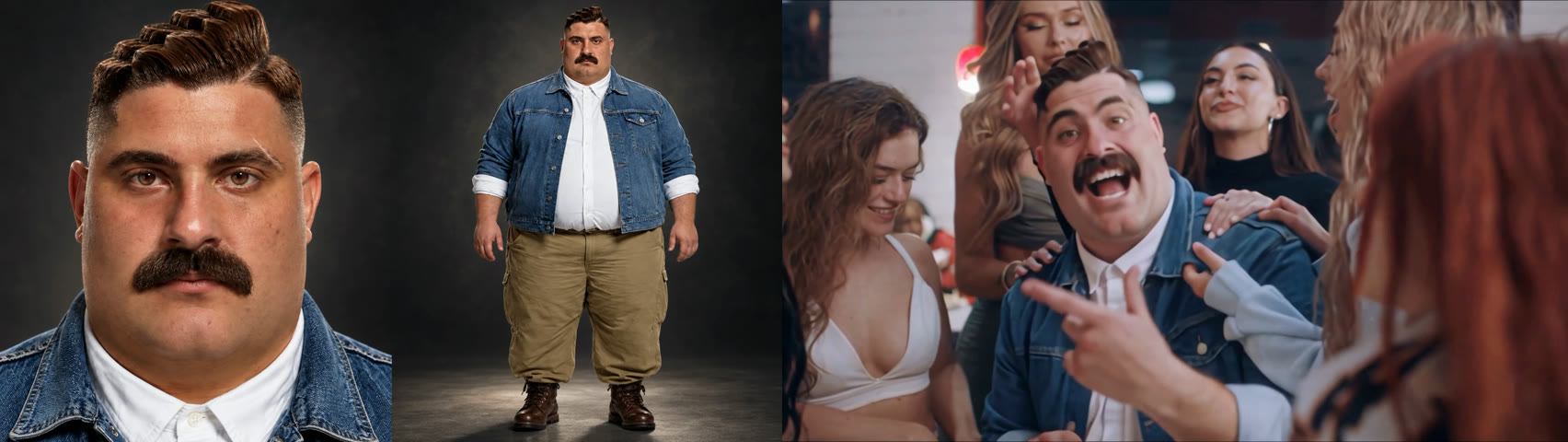
We used a character sheet as the one photo: a face close-up on the left and a full-body view on the right of a big man with a tall waxed quiff, a wide black moustache, a denim jacket over a white shirt, khaki cargo pants and brown boots. We picked a look nothing like the singer in the music video, so we could see in every shot whether it was still him.
| Setting | Our test |
|---|---|
| Date | 21 November 2026 |
| Model | Wan 3.0 |
| Photos | 1 |
| Length | 10 seconds (11-second setting) |
| Resolution and frame | 480p (854 × 480), 16:9 widescreen |
| Sound | On |
| Cost | 285 credits, about $3.16 |
| Render time | 3 minutes 29 seconds |
| Attempts | 1 (worked first time) |
The prompt we used
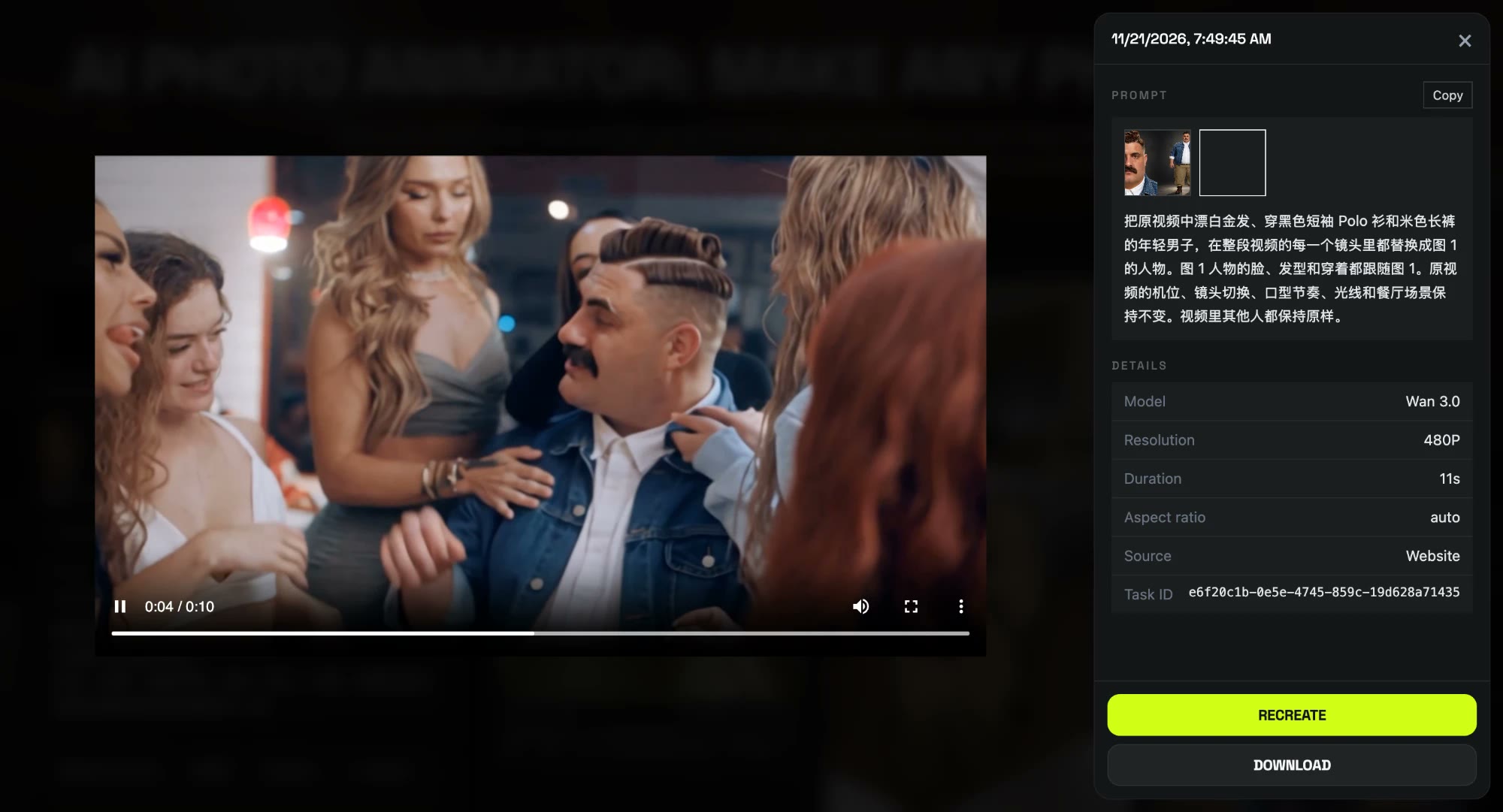
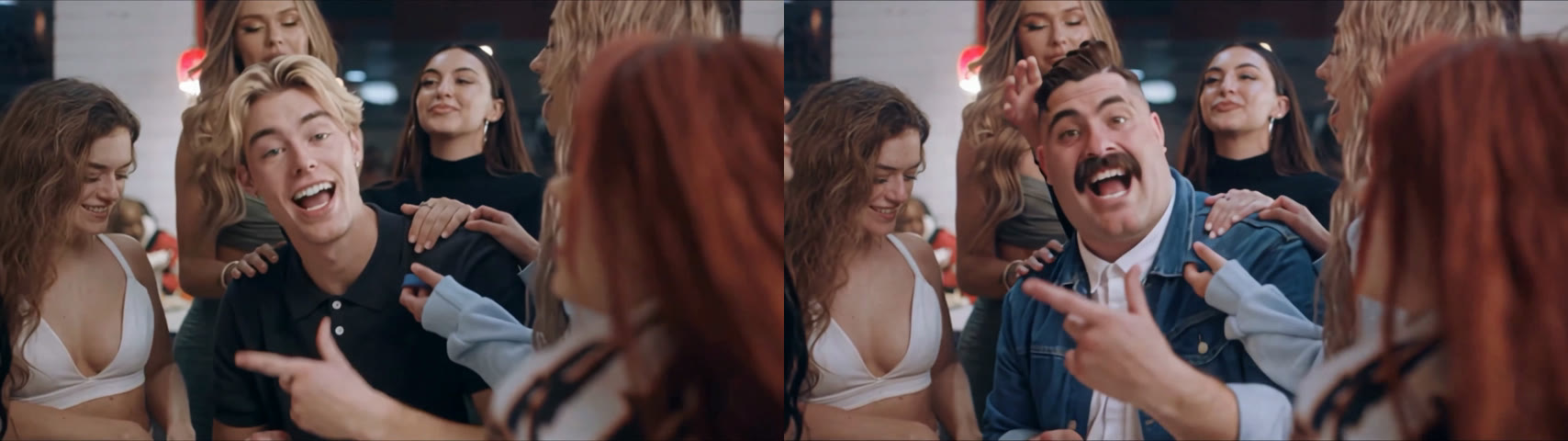
We ran it with a short prompt in Chinese, and it worked on the first try. Two things mattered. First, it points at the singer only by how he looks (bleached blond hair, black polo, cream trousers), not by what he does, so the model doesn't confuse him with anyone else in the crowd. Second, it says "every shot", because the clip cuts five times and models tend to stop after the first one or two.
把原视频中漂白金发、穿黑色短袖 Polo 衫和米色长裤的年轻男子,在整段视频的每一个镜头里都替换成图 1 的人物。图 1 人物的脸、发型和穿着都跟随图 1。原视频的机位、镜头切换、口型节奏、光线和餐厅场景保持不变。视频里其他人都保持原样。
Replace the young man with bleached blond hair wearing a black short-sleeve polo shirt and cream trousers in the original video with the person from image 1, in every shot throughout the entire video. The person from image 1 keeps their own face, hairstyle, and outfit from image 1. Keep the original camera angles, shot cuts, lip-sync timing, rhythm, lighting, and diner setting unchanged. All other people in the video stay exactly as they are.
We did not describe the diner, the girls or the moves. Because the prompt says the face, hairstyle and outfit all follow image 1, the clothes came from the photo too, not only the face. The template on our effect page runs this setup for you, so you don't paste anything.
What we saw, shot by shot:
- All five shots changed. The counter, the OPEN sign, the crowd, the parking lot and the booth all show our man; the black polo and bleached hair never come back.
- The outfit stayed his. The denim jacket, white shirt and khaki pants are there from the counter to the booth.
- The quiff and moustache held. Both are clear in every close shot, including when the girls crowd in.
- Everyone else stayed the same. The girls and the man in the black hoodie were not changed.
- The small slips. In the parking-lot shot at 7 to 9 seconds everyone is tiny and his face can't be made out, which is the 480p limit. His mouth moves with the beat rather than word for word. He is stockier than the singer in the clip, but not as big as in our reference photo.
Which photos work best for the What's Poppin AI video?
- One person, face to the camera. Three of the five shots are close, so a front-facing face matters most.
- Full body or knees-up. The door shot and the parking lot show you standing, and a photo that shows the whole outfit keeps it the same in every shot.
- A big, sharp face. A tiny face cropped from a group shot gets lost in the crowd.
- Dress for the diner. A plain shirt plays it straight; a loud jacket or a big hairdo makes the main-character moment funnier.
- No celebrities or children. Only photos of yourself or adults who agreed.
Is the What's Poppin AI video real or official?
Neither. The What's Poppin AI video is a fan-made parody generated from one still photo; nobody filmed it. Our template is not affiliated with Jack Harlow, Atlantic Records, Generation Now or Lyrical Lemonade. When you post it, keep the platform's AI label on.
What's Poppin AI video problems and fixes
| Problem | Fix |
|---|---|
| The face is tiny in the parking lot | That shot is wide so the whole group fits. Your face is big at the counter, in the crowd and in the booth; a sharper, front-facing photo keeps it clearest. |
| The mouth doesn't match every word | It moves with the beat, not word for word. At phone size it reads as singing along. |
| The video is widescreen | Add bars or a caption strip above and below for TikTok or Reels. |
| It's only 10 seconds | The template covers the five-shot diner run, not the whole song. Loop it or pair it with a second clip. |
| The generation failed | The credits come back automatically. Try again, or try another photo. |
Is What's Poppin AI free?
Not completely. New accounts get 75 free credits and one What's Poppin AI video takes 285, so you need the one-time $5.99 pack (540 credits). That is about $3.16 for the video, with 255 credits left over and no subscription. See pricing. Failed renders are refunded automatically.
What song is the What's Poppin AI trend from?
"WHATS POPPIN" by Jack Harlow, released on 21 January 2020, with a Cole Bennett music video shot in one diner. It peaked at No. 2 on the Billboard Hot 100. The official title is in capitals with no apostrophe.
Can I make one of my friend?
Yes, with their OK. One clear photo of them, face to the camera, full body or knees-up, is enough, and their own outfit carries into every shot.
Can I use a cartoon character or my pet?
We have only tested a person so far, so we can't show a cartoon or pet result. A person's photo, face to the camera, is what we know works.
How long is the video?
10 seconds, 480p, 16:9 widescreen, with sound and no watermark. Ours took 3 minutes 29 seconds to render.
Do I need to write a prompt?
No. On the effect page the template is already set up; you only add the photo. The prompt above is what we used in our own test.
Want another rap video moment? Our I'm a 2020 President Candidate AI tutorial puts you at a White House podium with one photo, and the Bruno Fernandes singer AI tutorial hands you the mic.