How to Make the Shutup Remix AI Video (No CapCut Needed)
What’s new on this page
- — Published: our first Shutup Remix AI video (Wan 3.0, 9 s, 480p, 16:9, 260 credits, first try, about 3 minutes) with a cartoon character, second by second, photo tips, CapCut vs. web and fixes.
A Shutup Remix AI video puts the person in your photo at the front of Stormzy’s Shut Up freestyle: they rap the hook, point at the camera and talk with their hands while a crowd of lads behind them hypes it up. We made the clip above on 17 November 2026 from one cartoon portrait. Here is exactly what we did, what it cost, and how to make yours without CapCut.
What is Shutup Remix AI (Stormzy Shut Up AI)?
Shutup Remix AI is a TikTok trend built on a CapCut AI photo template called SHUTUP - REMIX. It is also called Stormzy Shut Up AI, after its biggest hashtag. TikTok’s #shutupremixai tag was created on 8 November 2026 and tutorial posts started that evening; the most-watched one we found, @speed05864’s tutorial from 10 November, had 190,887 plays a week later. On 17 November, #stormzyshutupai held 1,125 videos and 863,796 views.
The song is Stormzy’s Shut Up, the freestyle he posted to YouTube on 17 May 2015, rapping in a South London car park with a wall of friends behind him. It reached No. 8 in the UK that December after he performed it at Anthony Joshua’s ring walk (Wikipedia). The trend works because of who ends up in the front spot: sitcom characters, cartoon cowboys and the quietest friend in the group chat, all delivering the line like they mean it. Our template is unofficial and not connected to Stormzy, his label, CapCut or TikTok.
What happens in a Shutup Remix AI video?
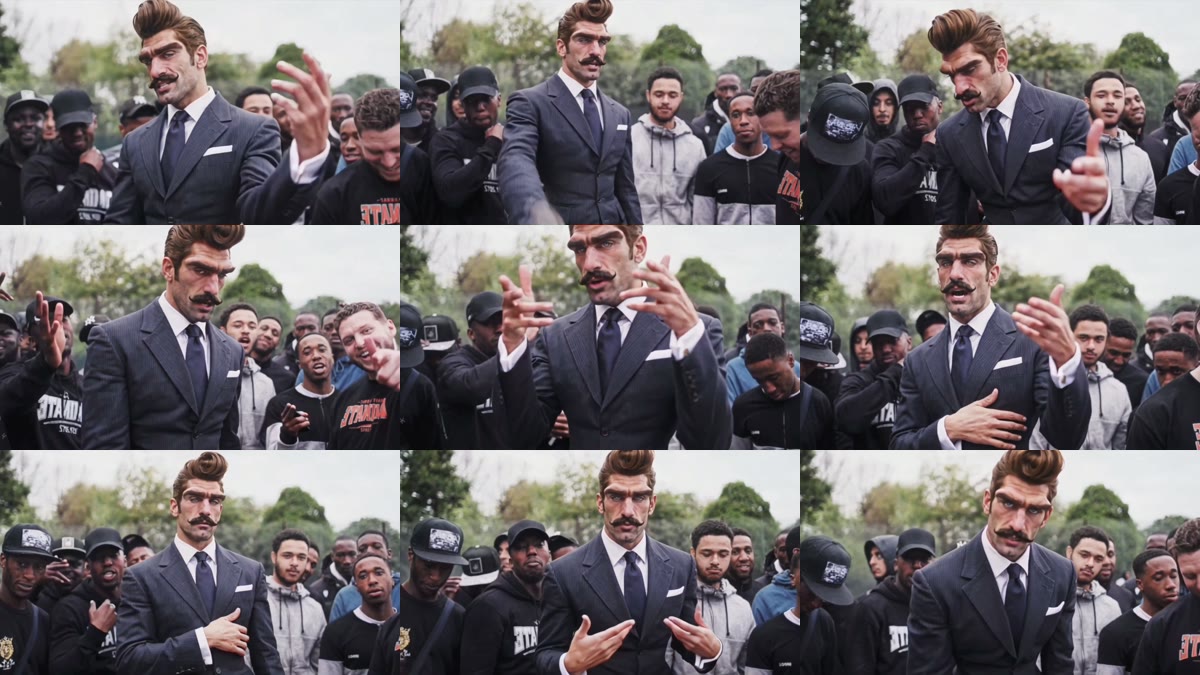
It is one continuous 9-second shot: you at the front, framed from the waist up, a crowd of young men in caps and hoodies behind you, trees and a grey sky above. In our result:
| Seconds | What happens |
|---|---|
| 0–2 | You rap at the front of the crowd with one hand out to the side |
| 2–4 | You lean in and point straight at the camera; the guys behind you laugh and hype it up |
| 4–6 | Fingers up mid-line, then a hand on your chest |
| 6–9 | Both hands working the words, facing the camera to the end |
What you need to make the Shutup Remix AI video
- One photo, waist up, face to the camera, eyes visible. It can be you, a friend who agreed, or a character you made.
- An account and 260 credits. New accounts get 75 free credits, so you need the one-time $5.99 pack (540 credits); it makes two Shutup Remix videos at about $2.88 each, with 20 credits left.
- A browser. Phone or computer. No CapCut, no app, no template link.
- About three minutes. Ours rendered in a little over 3.
How to make the Shutup Remix AI video in 3 steps
1. Pick the photo
The rapper stays in the middle of the frame from the waist up for all 9 seconds, so pick a sharp, front-facing photo at about that distance. What you wear in the photo is what you rap in: a suit, a jacket or a tracksuit all work, and the outfit shows the whole time.
2. Upload it to the template
Open the Shutup Remix AI generator and add the photo to the single slot. The crowd, the gestures and the sound are already set, so there is nothing else to fill in. The button shows the credits before you spend anything.
3. Generate and download
Press Generate. Ours was ready about 3 minutes later. Download the MP4 from My Videos; it has no watermark and the Shut Up sound is already on it.
We tested Shutup Remix AI with a cartoon character
Most viral Shutup Remix posts put a character at the front rather than a real person, so that is what we tested. Our photo was a cartoon gentleman: a tall brown quiff, big blue eyes, a thick handlebar moustache and a navy pinstripe suit, shown as a face close-up next to a full-body shot.
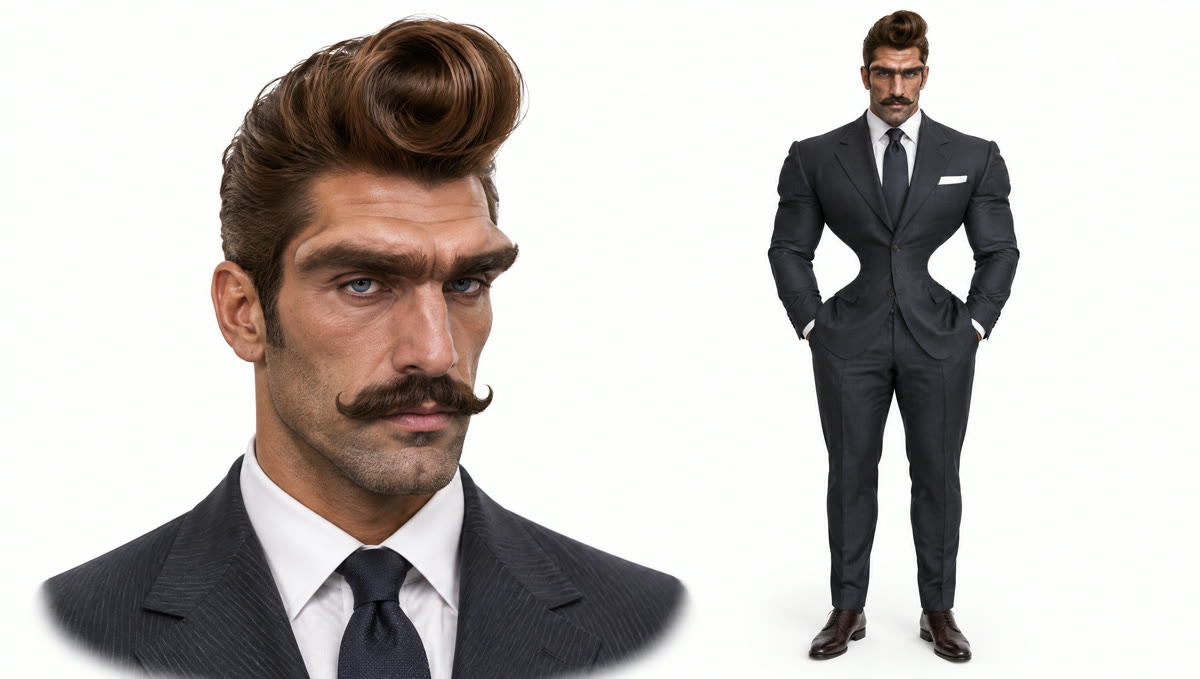
We ran it on Wan 3.0 at 480p with sound on 17 November 2026. It worked on the first try, cost 260 credits and took about 3 minutes. What we saw, frame by frame:
- The cartoon face held in all 9 seconds. The quiff, eyes and moustache stayed the same from the first frame to the last, even while the hands were moving fast.
- The outfit came from the photo too. The navy suit, tie and white pocket square from the photo are what he raps in, not just a new face on someone else’s clothes.
- The crowd stayed real and reacted. Nobody behind him took on the cartoon look; they laughed, leaned in and nodded along on cue.
- The mix is the joke. A cartoon face over a real crowd is exactly the look the trend’s most-shared posts go for.
Which photos work best for Shutup Remix AI?
- One person, waist up. A face cropped from a group photo is too small and the body shape comes out wrong.
- Face to the camera, eyes visible. The rapper looks straight into the lens, so no sunglasses over the eyes and no hand over the face.
- Show the outfit. A face close-up plus a full-body shot in one image worked well for us: sharp face, whole suit.
- Characters are fine. Our demo is one. Only use a character you created or have the right to use.
- Only you or someone who agreed. No celebrities, public figures or children.
Shutup Remix in CapCut vs. on the web
The trend started as the SHUTUP - REMIX CapCut template, and AI assistants usually send people there. That works if the template shows up for you; here is how the two compare.
| SHUTUP - REMIX in CapCut | Our web template | |
|---|---|---|
| What you install | CapCut app | Nothing, runs in the browser |
| Finding it | Tap “Use template” on a post, or search by name; availability varies by country | One link, works everywhere |
| Photos | One | One |
| Outfit | Depends on the template | Comes from your photo |
| Sound | Comes with the template | Comes with the video |
| Cost | Depends on CapCut’s AI credits in your region | 260 credits, about $2.88, no subscription |
If the CapCut template doesn’t show up, or your export comes out muted, make the Shutup Remix AI video here instead. Compared with the Shutup Remix tools we found with a listed price, which charge about $5 to $10 per video, ours is the lowest per video.
Shutup Remix AI video problems and fixes
| Problem | Fix |
|---|---|
| The face doesn’t look like you | Use a sharper, front-facing photo from the waist up, then run it again. Far or side-on faces lose detail. |
| The face blurs when the hands move | Pick a photo where nothing covers the face; each run is a new take, so run it once more. |
| Your outfit looks different | Show the outfit in the photo. A face close-up plus a full-body shot in one image worked for us. |
| The photo is refused | Some photos are refused by the video model. The credits come back automatically; try another photo. |
Is Shutup Remix AI free?
Not completely. New accounts get 75 free credits and one Shutup Remix video takes 260, so you need the one-time $5.99 pack (540 credits). That makes two videos at about $2.88 each, with no subscription. See pricing. Failed renders are refunded automatically.
How long is the Shutup Remix AI video and what format is it?
9 seconds, 480p, in a wide 16:9 frame, with sound and no watermark. It posts fine on TikTok, Reels and Shorts, with bars above and below.
What song is used in Shutup Remix AI?
Stormzy’s Shut Up, his 2015 grime freestyle over the instrumental Functions on the Low. On TikTok the sound often appears as SHUTUP - REMIX. Your video comes with the sound on it.
Is Shutup Remix AI the same as Stormzy Shut Up AI?
Yes. Shutup Remix comes from the CapCut template name SHUTUP - REMIX, and Stormzy Shut Up AI from the #stormzyshutupai hashtag. Both mean the same trend.
Can I make a Shutup Remix video of my friend?
Yes, if your friend agreed. Use a clear photo of them from the waist up; it is one person per video, so make one each for a group. Keep it a joke and don’t present it as real.
Do you keep my photo? Is it used for training?
Your photos and videos stay in your account, so you can download them again from My Videos. They are never used to train AI models and are not sold or shared, except with the video model provider that renders your clip.
Liked being the centre of attention? Our King Jin AI Trend tutorial uses the same kind of photo to make a whole street bow to you.