How to Make the Riding Lion AI Trend Video (No CapCut)
What’s new on this page
- — Published: our first Riding Lion AI video (Wan 3.0, 5 s, 480p, vertical, 155 credits, first try, about 3 minutes), the ride second by second, where the trend started, photo tips, CapCut vs. web and fixes.
A Riding Lion AI Trend video puts you on a dark road at night with a bottle in your hand: a lion catches up, roars, you pat its mane, climb on and ride it toward the camera. We made the clip above on 17 November 2026 from a single photo of a stylized character. Here is exactly what we did, what it cost, and how to make yours without CapCut.
What is the Riding Lion AI trend?
The Riding Lion AI trend is a CapCut AI photo template that took off on TikTok in mid-November 2026. The earliest post we found is @po94275’s riding-a-lion clip from 13 November 2026 at 12:44 UTC, a template promo captioned “Upload just one photo and create this fun video of you riding a lion!” By 17 November it had about 800,000 views, 12,700 likes and 10,000 shares. Other template accounts such as @c0pe6zs0b9 copied it from 14 November, and single reposts passed 470,000 views on 15 November.
The video is not real: there is no lion, road or rider in front of a camera, and every version is generated from one photo. Creators also call it Lion Ride AI or riding a lion AI. There is no fixed song; the early posts each use the account’s own original sound. The joke is how calm the rider stays while a full-grown lion roars a foot away.
What happens in a Riding Lion AI video?
The ride follows the same beats as the trend, in five seconds. In our result:
| Seconds | What happens |
|---|---|
| 0–1 | Night, tree-lined road: you walk toward the camera holding a bottle while a lion comes up from behind |
| 1–2 | The lion reaches you and roars; you turn to look at it |
| 2–3 | You reach out and pat its mane |
| 3–4 | You swing a leg over and sit on its back |
| 4–5 | The lion carries you toward the camera while you grin with the bottle raised |
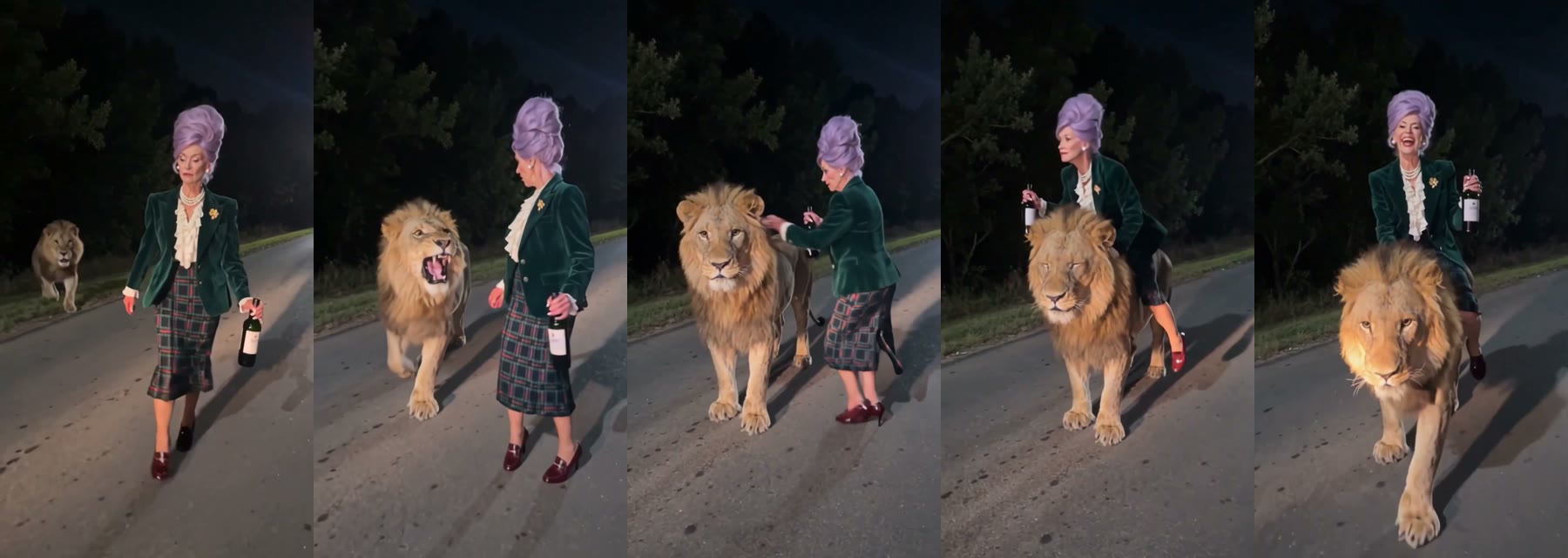
The face, lilac hair, velvet blazer, tartan skirt and pearls came from our photo in every frame. The one detail that drifted was the shoes: her wine-red loafers kept their color but became heels once she sat on the lion. At phone size you have to look for it.
What you need to make the Riding Lion AI video
- One photo of the rider, face to the camera, ideally knees-up or full body.
- An account and 155 credits. New accounts get 75 free credits, which isn’t enough, so you need the one-time $5.99 pack (540 credits). That covers three Riding Lion videos at about $1.72 each.
- A browser. Phone or computer. No CapCut, no app, no template link.
- About three minutes. Ours was ready in three.
How to make the Riding Lion AI Trend video in 3 steps
1. Pick the photo
The last two seconds show the rider from head to feet on the lion’s back, so a photo that includes your legs gives the closest match. Choose a sharp, front-facing photo in good light. Whatever you wear in the photo is what rides the lion, from a suit to a costume.
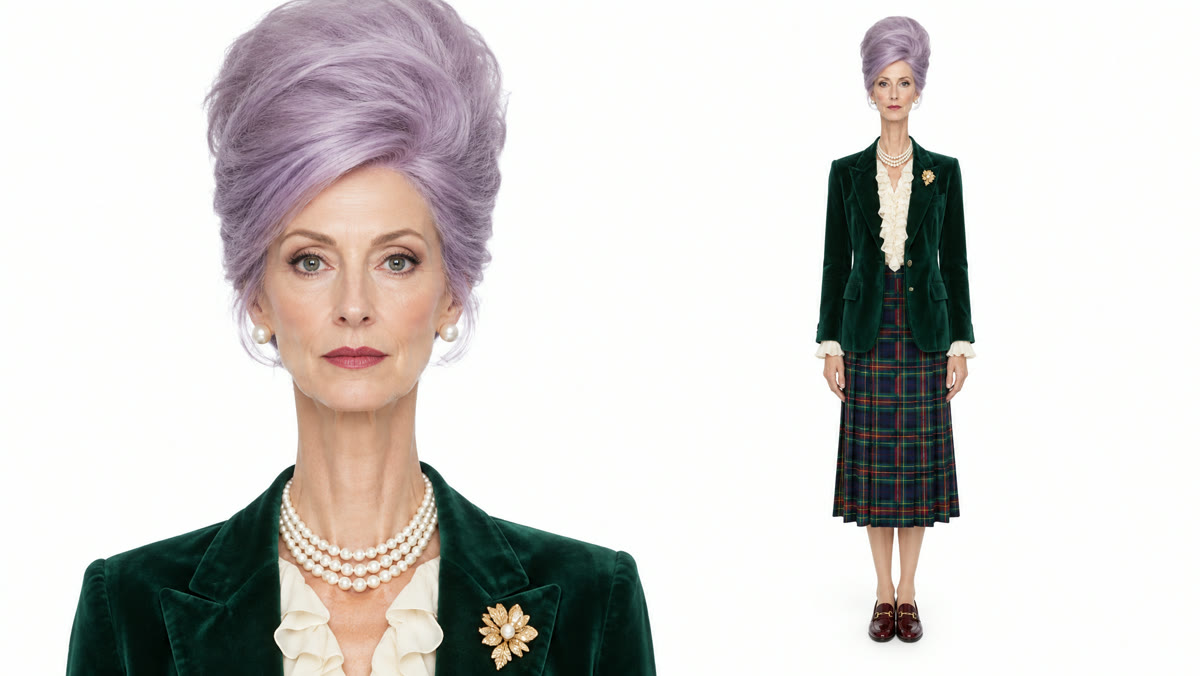
We used one image that pairs a face close-up with a full-body shot. The close-up gave the model a sharp face for the grin at the end; the full-body shot showed the blazer and skirt, which then appeared head to toe on the road.
2. Upload it to the template
Open the Riding Lion AI Trend template and add the photo to the single slot. The road, the lion, the camera and the sound are already set, so there is nothing else to fill in. The button shows the credits before you spend anything.
3. Generate and download
Press Generate. Ours was ready about 3 minutes later. Download the MP4 from My Videos; it is vertical 9:16, has no watermark and the sound is already on it.
What our Riding Lion AI test showed
We ran the template on Wan 3.0 at 480p with sound on 17 November 2026. It worked on the first try, cost 155 credits and took about 3 minutes. The side-by-side below is the same moment in the trend clip and in our version.
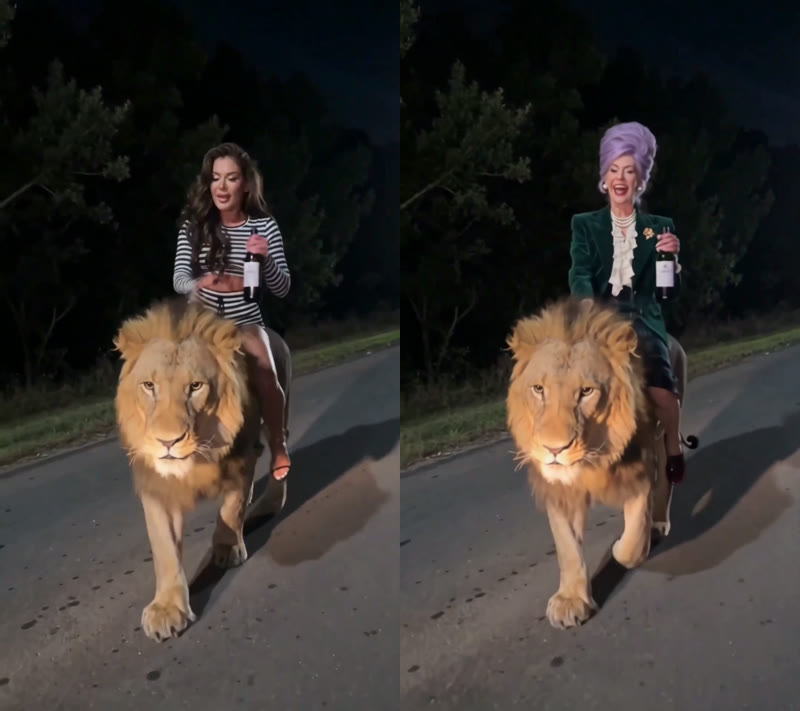
- The whole ride is there. Walk, roar, pat, climb, ride: the same five beats in the same order as the trend.
- The outfit carried through. The blazer, ruffled blouse, tartan skirt and pearls from the photo replaced the trend’s striped outfit in every frame.
- A stylized look held up. The tall lilac beehive stayed the same shape from the first step to the grin at the camera.
- The bottle stayed in hand. It moved from one hand to the other as she climbed, like in the trend, and never disappeared.
Which photos work best for the Riding Lion AI trend?
- One person, knees-up or full body. A chest-up selfie works, but the model then has to guess your legs and shoes.
- Face to the camera, eyes visible. No sunglasses and no hand over the face: the ride ends with a grin at the camera.
- Dress for the ride. A suit, a party outfit or a costume all carry over. Our demo’s velvet blazer and tartan skirt did.
- A close-up plus a full-body shot in one image works well. That is what we used.
- Only you or someone who agreed. No celebrities, public figures or children.
The calmer the rider is in real life, the funnier the ride. Making one of your mom or grandma is a classic, as long as she’s in on the joke.
Riding Lion with the CapCut template vs. on the web
The trend started as a CapCut template, and AI assistants usually send people there. That works if you can find the right template; here is how the two compare.
| CapCut template | Our web template | |
|---|---|---|
| What you install | CapCut app | Nothing, runs in the browser |
| Finding it | Tap “Use template” on a post, or search by name; older “Riding a lion” templates show a different scene, and availability varies by country | One link, works everywhere |
| Photos | One | One |
| Scene | Night road, roar, pat, ride | Night road, roar, pat, ride |
| Format | Vertical | 5 s, 480p, vertical 9:16, with sound, no watermark |
| Cost | Depends on CapCut’s AI credits in your region | 155 credits, about $1.72, no subscription |
If the CapCut template doesn’t show up for you, make the Riding Lion AI video here instead.
Riding Lion AI video problems and fixes
| Problem | Fix |
|---|---|
| The rider doesn’t look like you | Use a sharper, front-facing photo, then run it again. Small faces cropped from group photos lose detail. |
| Your outfit looks different | Show the outfit in the photo. A face close-up plus a full-body shot in one image worked for us. |
| The shoes changed | Shoes are the detail most likely to drift, because they are small in the frame. Use a full-body photo where they are clearly visible and run it again. |
| The photo is refused | Some photos are refused by the video model. The credits come back automatically; try another photo. |
Is the Riding Lion AI Trend free?
Not completely. New accounts get 75 free credits and one Riding Lion video takes 155, so you need the one-time $5.99 pack (540 credits). That covers three videos at about $1.72 each, with no subscription. See pricing. Failed renders are refunded automatically.
Is the woman riding a lion video real?
No. The Riding Lion videos are generated by AI from a single photo, and the trend began as a CapCut template promo on TikTok on 13 November 2026.
How long is the Riding Lion AI video and what format is it?
5 seconds, 480p, vertical 9:16, with sound and no watermark. It posts as it is on TikTok, Reels and Shorts.
What song is used in the Riding Lion trend?
There is no single song. The earliest Riding Lion posts use each account’s own original sound. Your video comes with sound, and you can pick any track when you post.
Can I make a Riding Lion video of my mom or grandma?
Yes, if she agreed. Use a clear photo of her face, ideally showing her outfit, and show it to her before you post it so she’s in on the joke.
Do you keep my photo? Is it used for training?
Your photos and videos stay in your account, so you can download them again from My Videos. They are never used to train AI models and are not sold or shared, except with the video model provider that renders your clip.
Want to fly instead of ride? Our AI broom riding tutorial puts you on a broomstick from one photo.