How to Make an AI Broom Riding Video (2026): Prompts + 1-Photo Template
What’s new on this page
- — Published: why the trend took off, the prompts I used with Seedance 2.0 Mini, model prices and the one-photo template.
If you've opened TikTok in the past few weeks, you've probably seen it: you're looking out a car window, the lane next to you is empty, and then someone on a wooden broom drifts up beside you, gives you a little grin and takes off down the road. The caption is almost always "my ride is here".
I wanted to make one myself, so I tried it on our own site, kept the prompt that worked, and wrote down everything here: why it blew up, the prompts, what each model costs, and the shortcut if you don't feel like fiddling with any of it.
Why is everyone suddenly riding brooms?
Honestly, it's Halloween. The earliest tutorials I could find on TikTok are from September 28, another wave showed up in early October, and new ones still pop up every week. That's exactly when people start hunting for witch content and costume ideas.
- It's a Halloween post with zero effort. No costume, no props, no filming. A selfie is enough.
- You get the joke instantly. A boring street, a regular car, and a person casually flying past on a broom.
- It looks like something someone really filmed. The passenger-seat angle and the shadow on the asphalt sell it.
- Anyone can be the rider. I've seen witches, grandmas, guys in suits. That's why people keep remaking it.
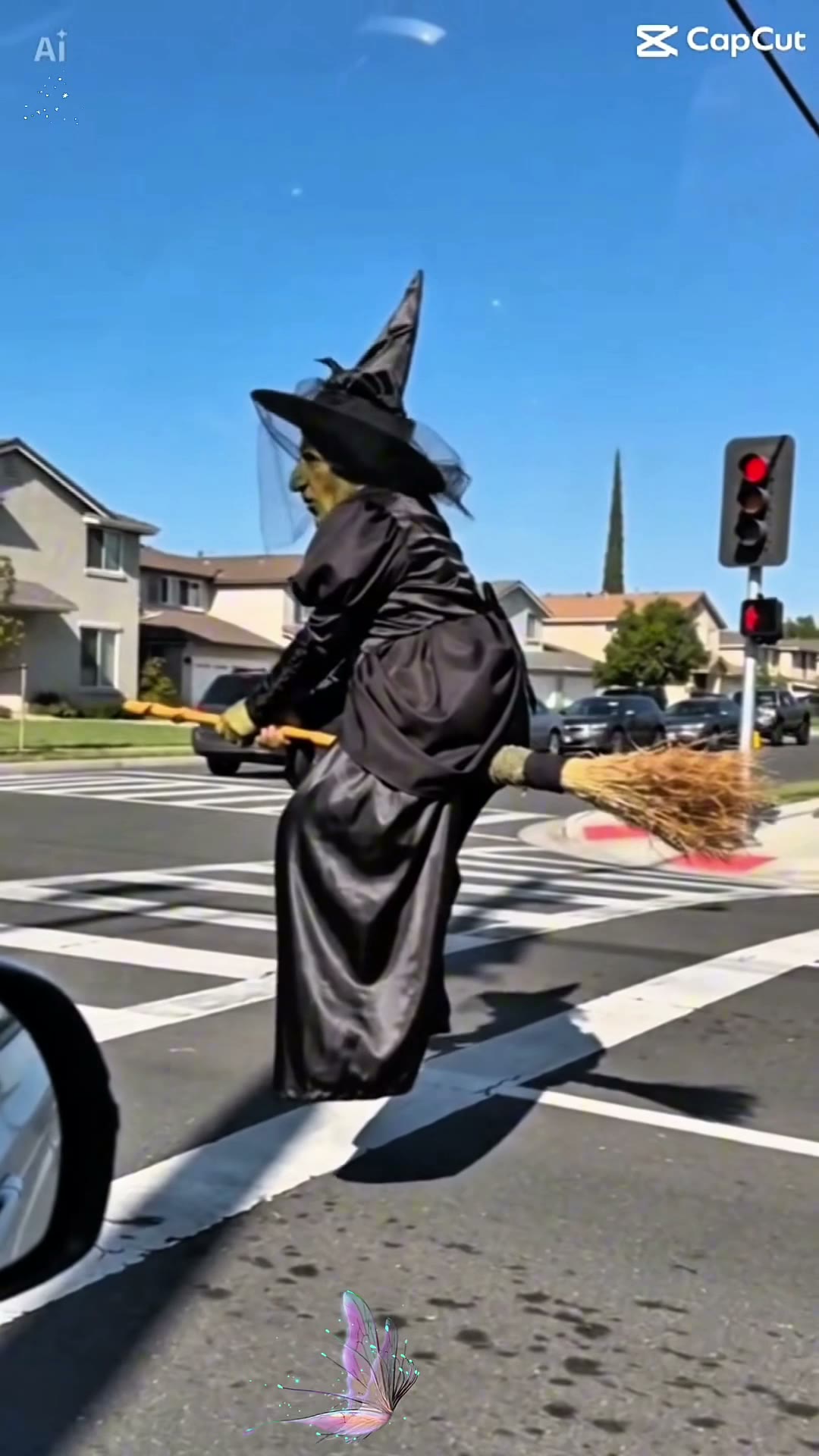
Method 1: Make it yourself with prompts
There are two ways to go. If you have a broom clip you like, video to video (clip + your photo) copies its camera and timing, and it ends up looking closest to the original. If you only have a photo, image to video works too, but you have to describe the whole scene and the results swing more.
Step 1: Pick a photo
One person, face clearly visible, decent light. A waist-up or full-body shot is better because the AI carries your outfit over. You don't need a broom or a costume. If you happen to have a photo in a cloak, even better.
Step 2: Choose a model
These all work on AI Photo Animator. Prices below are for 10 seconds at 720p with sound (MiniMax is 768p):
| Model | Video to video (10s clip + 10s output) | Image to video (10s) |
|---|---|---|
| Seedance 2.0 Mini | 125 | 105 |
| MiniMax H3 | 200 | 100 |
| Wan 3.0 | 400 | 200 |
| Seedance 2.0 Fast | 375 | 310 |
| Kling 3.0 | — | 250 |
I went with Seedance 2.0 Mini. It's the cheapest for video to video, free accounts can use it, and the rider stayed on the broom the whole time. Kling 3.0 only does image to video here, so pair it with the second prompt.
Step 3: Copy a prompt
I read through the prompts people share (Dreamina, Media.io, Supermaker, a bunch of TikTok tutorials) and they all land on the same recipe: car-window view, the rider catches up from behind, one look or smile, then a smooth getaway. Plus a list of don'ts: don't fly into the sky, don't bend the broom, don't let the rider fall off. Mine follows the same idea. This is the exact prompt I used:
Use @Video1 as the reference for the camera viewpoint, scene layout, action order, pacing, and broom flight path. Replace only the broom rider with the person in @Image1, preserving their recognizable face, hairstyle, skin tone, body proportions, and outfit. Keep the camera inside the moving car, looking through the side window. Begin with the adjacent road empty. The rider approaches from behind on a wooden broomstick, catches up, and briefly travels alongside the car at the same speed. They turn toward the camera with a playful smile, then look forward, lean slightly ahead, and accelerate smoothly into the distance. Keep the rider seated astride the broom, with the handle between their legs and the straw bristles behind them. The rider and broom move together as one connected unit, hovering low above the road. Maintain the reference lighting, road perspective, window framing, and continuous shot. Keep the face recognizable during the close encounter. No extra main characters, detached limbs, broom deformation, teleportation, sudden cuts, or flight into the sky. Do not include watermarks.
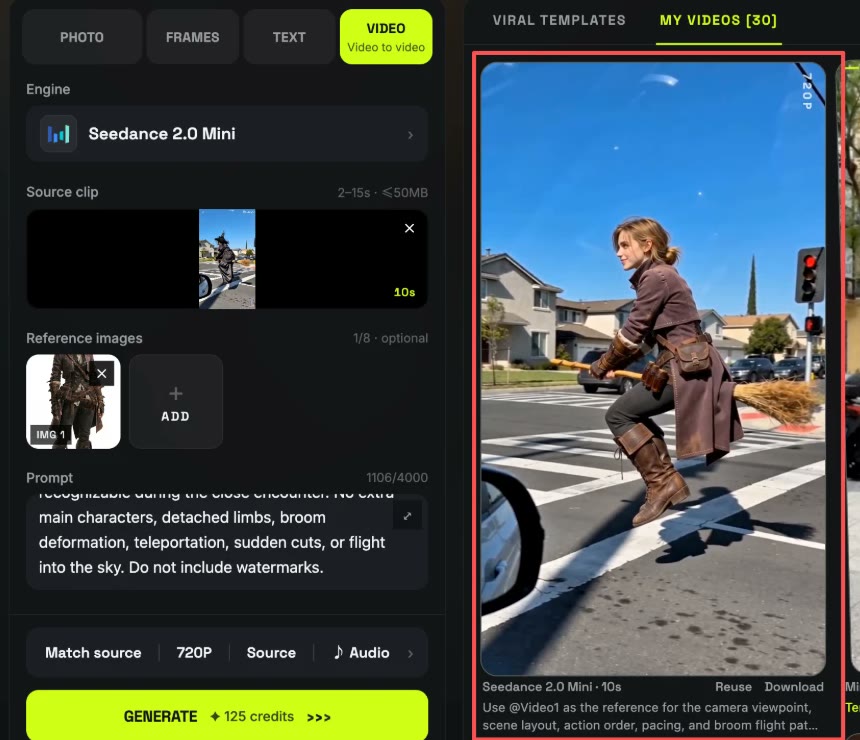
No clip? Upload your photo in image-to-video mode and describe the scene instead. This one works with Kling 3.0, Seedance and Wan:
Vertical 9:16 phone video filmed from the passenger seat of a moving car, looking out through the side window at a sunny suburban street. The person from the photo rides a wooden broomstick low above the road, about half a meter off the asphalt, keeping pace with the car. They sit astride the broom, both hands on the handle, straw bristles behind them, their outfit and hair moving in the wind. They turn their head toward the camera, give a playful grin, then face forward, lean in and speed away down the road, getting smaller in the distance. Natural daylight, real shadow on the road, slight handheld shake, one continuous shot. Keep the face, hairstyle and clothes from the photo. No skyward flight, no bent or missing broom, no extra riders, no text or watermark.
Want it spookier for Halloween? Try this one:
Same car-window shot at golden hour on a quiet suburban street with carved pumpkins glowing on the porches. The person from the photo wears a dark cloak and a pointed hat, rides a wooden broomstick low beside the car, waves once at the camera with a mischievous smile, grabs the handle again and zooms ahead, leaving a faint trail of orange sparks. Keep their face recognizable. One continuous shot, no horror makeup, no flight into the sky, no extra riders, no watermark.
Method 2: Just use my template (one photo)
Once the prompt worked, I didn't want to paste it in every time, so I turned it into a template. Model, prompt and settings (10s · 720p · vertical · sound) are locked in. You only add a photo.
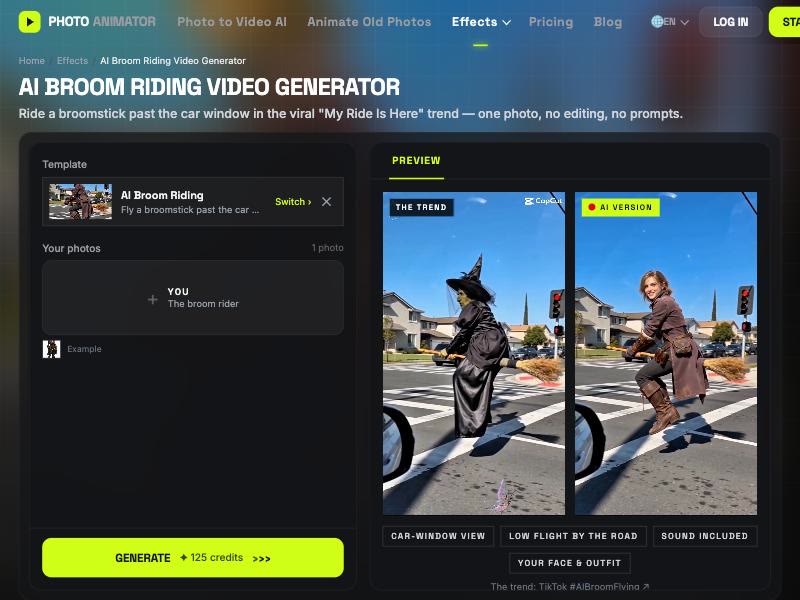
- Open the AI broom riding video generator. The template is already loaded.
- Upload one clear photo of yourself (or someone who agreed).
- Press Generate (125 credits). The video lands in My Videos, so you can close the tab.
- Download the MP4 (no watermark), add a "my ride is here" caption and post it to TikTok, Reels or Shorts.
Which method should you use?
| Method 1: Prompts | Method 2: Template | |
|---|---|---|
| What you need | Photo, prompt, settings (+ a clip for video to video) | 1 photo |
| Model | Seedance, Wan, MiniMax or Kling | Seedance 2.0 Mini, tested |
| Prompt | Copy and tweak it yourself | Already set up |
| Cost (10s) | 100–400 credits | 125 credits |
| Best for | Custom scenes, Halloween variations | A quick result |
FAQ
When did the AI broom riding trend start?
Late September 2026 on TikTok and Instagram, about a month before Halloween. It's still going strong through October.
Which AI model is best for the broom riding video?
For me it was Seedance 2.0 Mini: 125 credits for a 10-second video-to-video clip with sound. MiniMax H3 and Wan 3.0 work too; Kling 3.0 works with the photo-only prompt.
Can I make it with just one photo?
Yes. Use the template, or the image-to-video prompt above. Video to video needs a broom clip as well.
Do I need a witch costume?
No. The AI keeps the outfit from your photo, and everyday clothes are honestly funnier. Use the Halloween prompt if you want the cloak and hat.
Can I use a photo of someone else?
Only of people who said yes, or characters you made up. Celebrity photos usually get rejected by the models anyway.