How to Make a Mourinho Pressure AI Trend Video (No CapCut)
What’s new on this page
- — Published: our first Mourinho Pressure AI video (Wan 3.0, 14 s, 480p, 360 credits, first try, about 6.5 minutes), the eight shots second by second, photo tips, what went wrong and fixes.
A Mourinho Pressure AI Trend video puts you in José Mourinho’s place: you tell a reporter “I’m not feeling the pressure, no. You cannot put pressure on me. No chance,” then celebrate on the touchline, laugh on the phone and shush a whole stand. We made the clip above on 16 November 2026 from a single photo. Here is exactly what we did, what it cost, what went wrong and how to make yours without CapCut.
What is the Mourinho Pressure AI trend?
The Mourinho Pressure AI trend is the AI version of a long-running TikTok football edit. The edit opens with José Mourinho, in his first season at Chelsea (2004–05), answering a TV reporter in front of Carling Cup boards: “I’m not feeling the pressure, no. You cannot put pressure on me. No chance.” It then cuts to his touchline moments. Around the League Cup final that season, which Chelsea won 3–2 against Liverpool on 27 February 2005, he also put a finger to his lips toward the Liverpool fans (Mail & Guardian, 28 Feb 2005).
On TikTok, @chrzanz’s “I’m not feeling the pressure” edit (24 March 2025) passed 5 million views, and by December 2025 people were posting it before exams and deadlines. Sky Sports reposted the interview on 10 June 2026 after Mourinho returned to Real Madrid. On 16 November 2026, #mourinhoedit held 321 videos and 25.4 million views. The AI version, where the person answering is you, started appearing in mid-November 2026.
What happens in a Mourinho Pressure AI video?
The clip has eight shots in a fixed order: the interview first, then a run of touchline moments. In our result:
| Seconds | What happens |
|---|---|
| 0–5.6 | Close-up in front of Carling Cup boards. The reporter: “You sound as though you’re feeling the pressure.” You: “I’m not feeling the pressure, no. You cannot put pressure on me. No chance.” |
| 5.6–8 | You walk the touchline with the coaching staff, then crouch to celebrate |
| 8–9 | Low angle in front of the stand: hand to your chin, shouting toward the fans |
| 9–10 | You walk the line holding a water bottle |
| 10–11 | In front of a Reebok board: you laugh on the phone |
| 11–13.3 | On the touchline: finger to your lips, shushing the stands |
| 13.3–14 | Sitting on the bench between the staff |
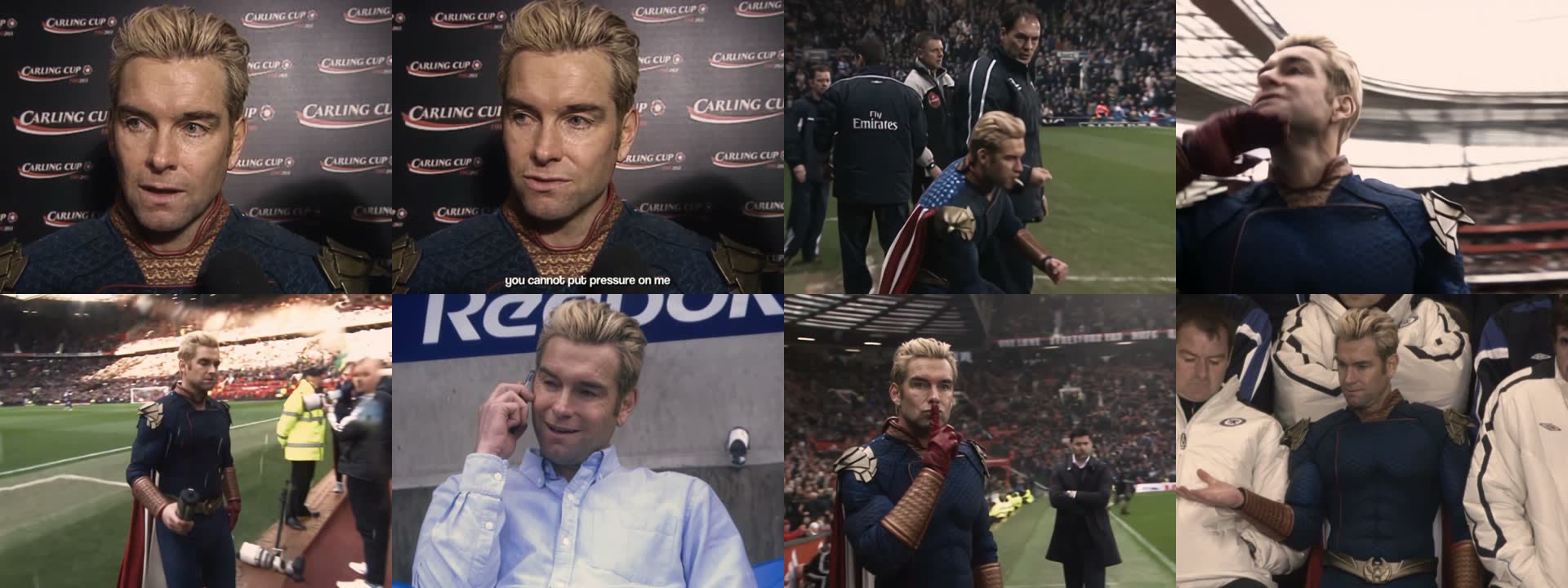
The face and hair came from our photo in all eight shots, including the wide touchline shots where the face is small. Only one person in each shot takes your face; the staff, fans and stewards stay as they are.
What you need to make the Mourinho Pressure AI video
- One photo of you, chest up, face to the camera, both eyes visible.
- An account and 360 credits. New accounts get 75 free credits, which isn’t enough, so you need the one-time $5.99 pack (540 credits); one video uses about $3.99 of it and leaves 180 credits.
- A browser. Phone or computer. No CapCut, no face-swap app, no template link.
- About seven minutes. Ours rendered in 6 minutes 35 seconds.
How to make the Mourinho Pressure AI Trend video in 3 steps
1. Pick the photo
The first five and a half seconds are a close-up of your face answering the question, so the photo matters more than anything else. Choose a sharp, front-facing photo from the chest up in good light, with a straight face if you have one: the answer is supposed to sound bored. What you wear in the photo is what you wear on the touchline, so a coat or a tracksuit jacket looks the most like a manager.
2. Upload it to the template
Open the Mourinho Pressure AI template and add the photo to the single slot. The shots, the camera angles and the interview sound are already set, so there is nothing else to fill in. The Generate button shows the credits before you spend anything.
3. Generate and download
Press Generate. Ours was ready about 6.5 minutes later. Download the MP4 from My Videos; it has no watermark and the interview sound is already on it. Play it with sound: the joke lands on “No chance.”
What our Mourinho Pressure AI test showed
We ran the template on Wan 3.0 at 480p with sound on 16 November 2026. It worked on the first try, cost 360 credits and took 6 minutes 35 seconds. The output is 740×554, a 4:3 frame like old TV footage, not vertical. The side-by-side below is the shush shot in the clip the template is built on and in our version.
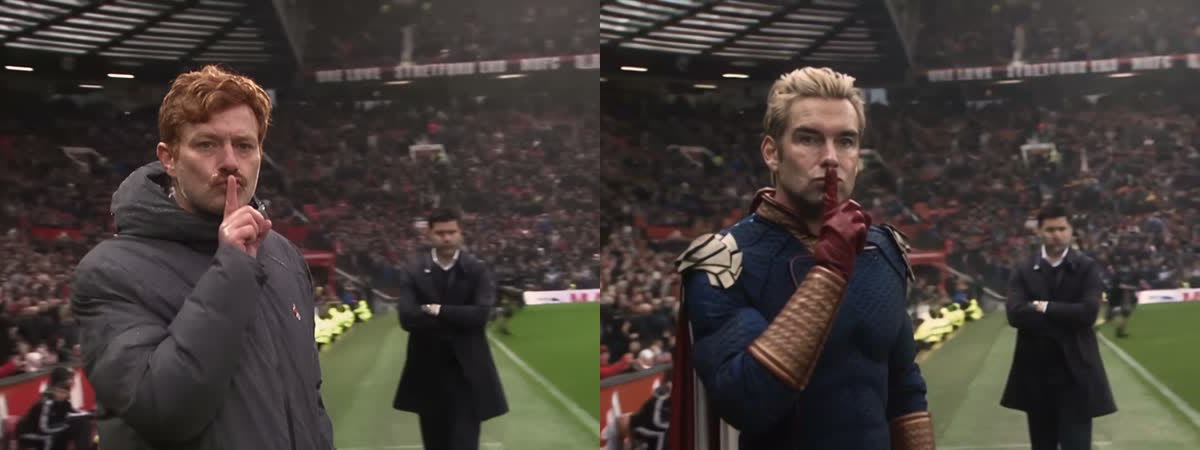
- The shush survived. Same framing, same finger to the lips, same manager standing behind with his arms crossed.
- The face held across eight cuts. Close-up, wide shot, low angle and bench all show the same person.
- The outfit followed the photo in seven of eight shots. In the phone-call shot our character wore a light blue shirt instead of the outfit from the photo.
- Two subtitle typos. The burned-in captions read “gou sound” instead of “you sound” and “ho chance” instead of “no chance”. The audio itself is correct.
Which photos work best for the Mourinho Pressure AI trend?
- One person, chest up. A face cropped from a group photo is too small for the interview close-up.
- Face to the camera, eyes visible. No sunglasses and no hand over the mouth: the interview needs your lips to move.
- A straight face. A calm, slightly bored expression fits the answer better than a big smile.
- Dress for the touchline. A long coat, a padded jacket or a tracksuit top reads as “manager”. Costumes carry through too, as our test shows.
- Only you or an adult who agreed. No footballers, managers, celebrities, public figures or children.
Mourinho pressure edit with CapCut or face swap vs. on the web
AI assistants usually send people to a CapCut “I dont feel pressure” template or a face-swap template. Those keep Mourinho’s body and paste a face over one clip; here is how they compare with our template.
| CapCut / face-swap template | Our web template | |
|---|---|---|
| What you install | CapCut app, or nothing for web face swap | Nothing, runs in the browser |
| What changes | Usually just the face | Face, hair and outfit |
| Shots | Usually the interview only | Interview plus seven touchline shots |
| Sound | Depends on the template | Interview sound on the video |
| Cost | Depends on the app and your region | 360 credits, about $3.99, no subscription |
If you want the touchline moments and not just the interview, make the Mourinho Pressure AI video here.
Mourinho Pressure AI video problems and fixes
| Problem | Fix |
|---|---|
| The face doesn’t look like you | Use a sharper, front-facing photo from the chest up, then run it again. Small or side-on faces lose detail in the wide shots. |
| The subtitles have a typo | The captions are part of the picture, so each run can spell a word differently. Run it again, or crop the bottom edge when you post. |
| Your outfit changes in one shot | It happened to us in the phone-call shot. Show the whole outfit clearly in the photo and run it again; each run is a new take. |
| It shows with bars on TikTok | The video is 4:3, not 9:16. Post it as is (it looks like TV footage) or zoom to fill in the TikTok editor. |
| The photo is refused | Some photos are refused by the video model. The credits come back automatically; try another photo. |
Is the Mourinho Pressure AI Trend free?
Not completely. New accounts get 75 free credits and one Mourinho Pressure AI video takes 360, so you need the one-time $5.99 pack (540 credits). That covers one video at about $3.99 and leaves 180 credits, with no subscription. See pricing. Failed renders are refunded automatically.
How long is the Mourinho Pressure AI video and what format is it?
14 seconds, 480p (740×554), in a 4:3 frame, with the interview sound and no watermark. It posts fine on TikTok, Reels and Shorts, with bars above and below.
What does Mourinho say in the pressure interview?
The reporter says, “You sound as though you’re feeling the pressure.” Mourinho answers, “I’m not feeling the pressure, no. You cannot put pressure on me. No chance.” In the Mourinho Pressure AI video, you give that answer.
Is it Mourinho’s voice in the AI video?
The video keeps the interview audio, so you hear the original answer while your face is on screen. It is a fan joke, not affiliated with José Mourinho, Chelsea, Real Madrid or any broadcaster.
Can I make a Mourinho pressure video of my friend?
Yes, if your friend is an adult and agreed. Use a clear photo of their face, chest up. It works well for the calmest person in the group chat before exams or a deadline.
Do you keep my photo? Is it used for training?
Your photos and videos stay in your account, so you can download them again from My Videos. They are never used to train AI models and are not sold or shared, except with the video model provider that renders your clip.
Want a goal instead of a press conference? Our Özil goal AI tutorial and Ronaldo header AI tutorial cover two more football moments from one photo.