How to Make the Goodbye GTA 5 AI Video (We Ran It 3 Times)
What’s new on this page
- — Published with our three test runs of the sunset pier scene (Wan 3 Prime, Seedance 2.5 twice), what went wrong in the first two, the prompt that fixed it, and the settings the template uses.
We ran the Goodbye GTA 5 pier scene three times before it worked. The first run put two extra copies of our character next to the sports car. The second gave our character’s face to the wrong man on the pier, twice. The third, with one sentence changed in the prompt, got it right in every shot: our character, a man with a big moustache, side curls and a camel suit, took the game, took the keys and got his collar grabbed for a last word.
Goodbye GTA 5 sunset pier scene
Goodbye GTA 5 AI video result
What Is the Goodbye GTA 5 AI Trend?
The Goodbye GTA 5 AI trend is a wave of AI farewell videos posted before GTA 6 comes out on November 19, 2026: on a pier at sunset, GTA V’s three leads hand a young man the new game and the keys to a sports car, then send him off. It was started by Japanese AI creator UEKAN with “It’s Time to Say Goodbye” on November 10, 2026, and his follow-up “thank you for 13 years” reached 4.65 million TikTok views by November 17. None of it is game footage, and none of it comes from Rockstar Games.
The AI version puts you in the young man’s place. In the 15 seconds our template covers, you get five shots:

| Time | What happens | What to check |
|---|---|---|
| 0–4s | The man in the suit hands you the game and pats your shoulder | That you are the one second from left |
| 4–6s | Close-up of the game box in your hand | Your sleeve matches your outfit |
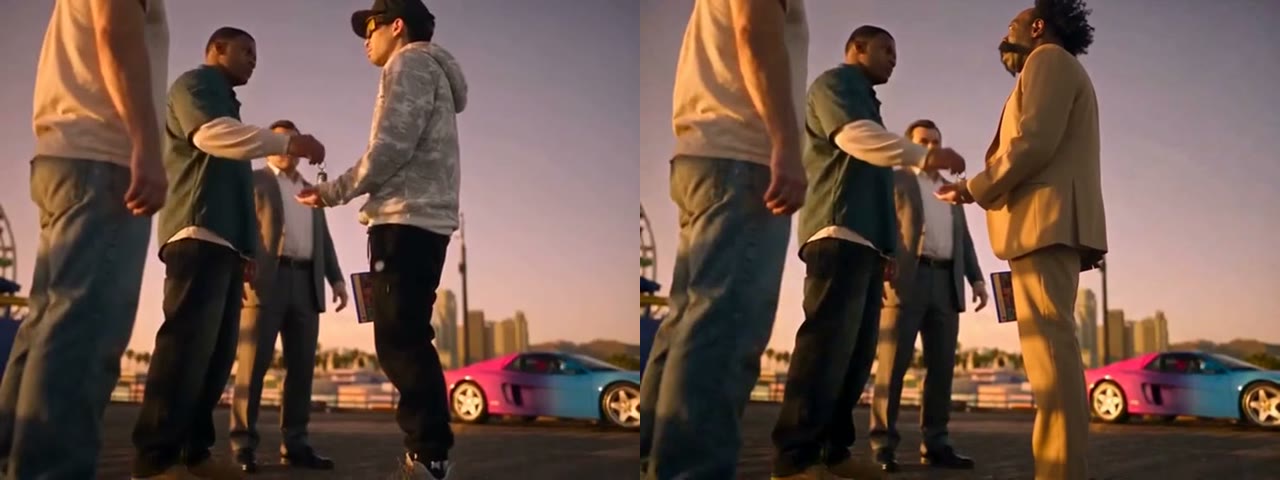
| 6–9s | The man in the green shirt gives you the car keys; you shake hands | Your face and full outfit next to the car |
| 9–12s | The back of the pink car, the four of you behind it | Exactly four people, no extra copies of you |
| 12–15s | Close-up as the man in the white T-shirt grabs your collar | Your face up close, and his face is still his |
How Do I Make the Goodbye GTA 5 AI Video? (3 Steps)
- Open the template. Go to the Goodbye GTA 5 AI page and play the example once with sound.
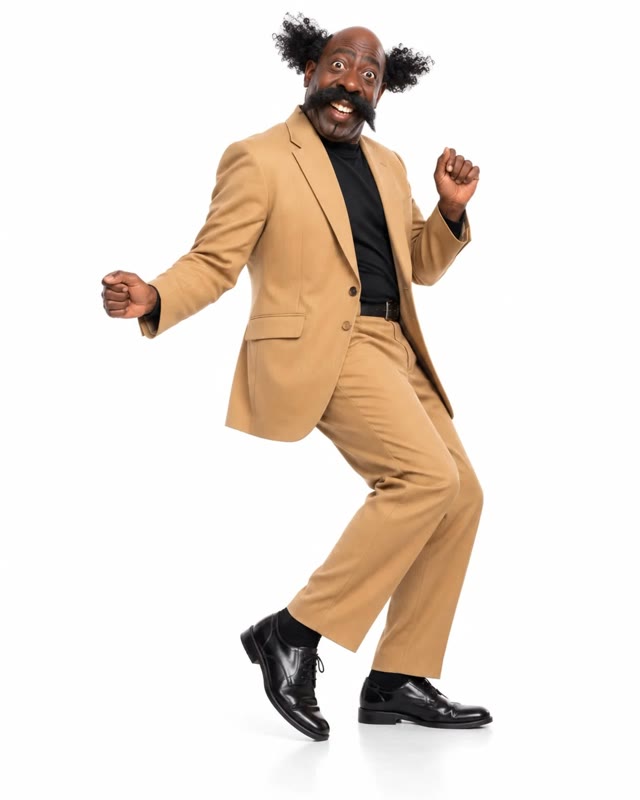
- Add one photo. A sharp, front-facing photo from head to at least the knees works best, because the key handover is a full-length shot. Your outfit in the photo is what you wear on the pier.
- Generate and download. The Generate button shows the cost before you start (820 credits on November 17, 2026). Our video was ready in about 4 minutes 40 seconds; download the watermark-free MP4 from My Videos.
If you don’t have credits yet, the pricing page lists the options: the Lite plan gives 1,000 credits for $9.99 a month, and a one-time $14.99 pack gives 1,000 credits with no subscription. Either covers one Goodbye GTA 5 AI video. The $5.99 starter pack (540 credits) and the 75 free signup credits aren’t enough for this template.
We Ran the Goodbye GTA 5 Scene 3 Times: What Went Wrong?
We used the same photo and the same 15 seconds of the pier scene every time. Only the model and one line of the prompt changed:
| Run | Model and cost | How the prompt named the person | Result |
|---|---|---|---|
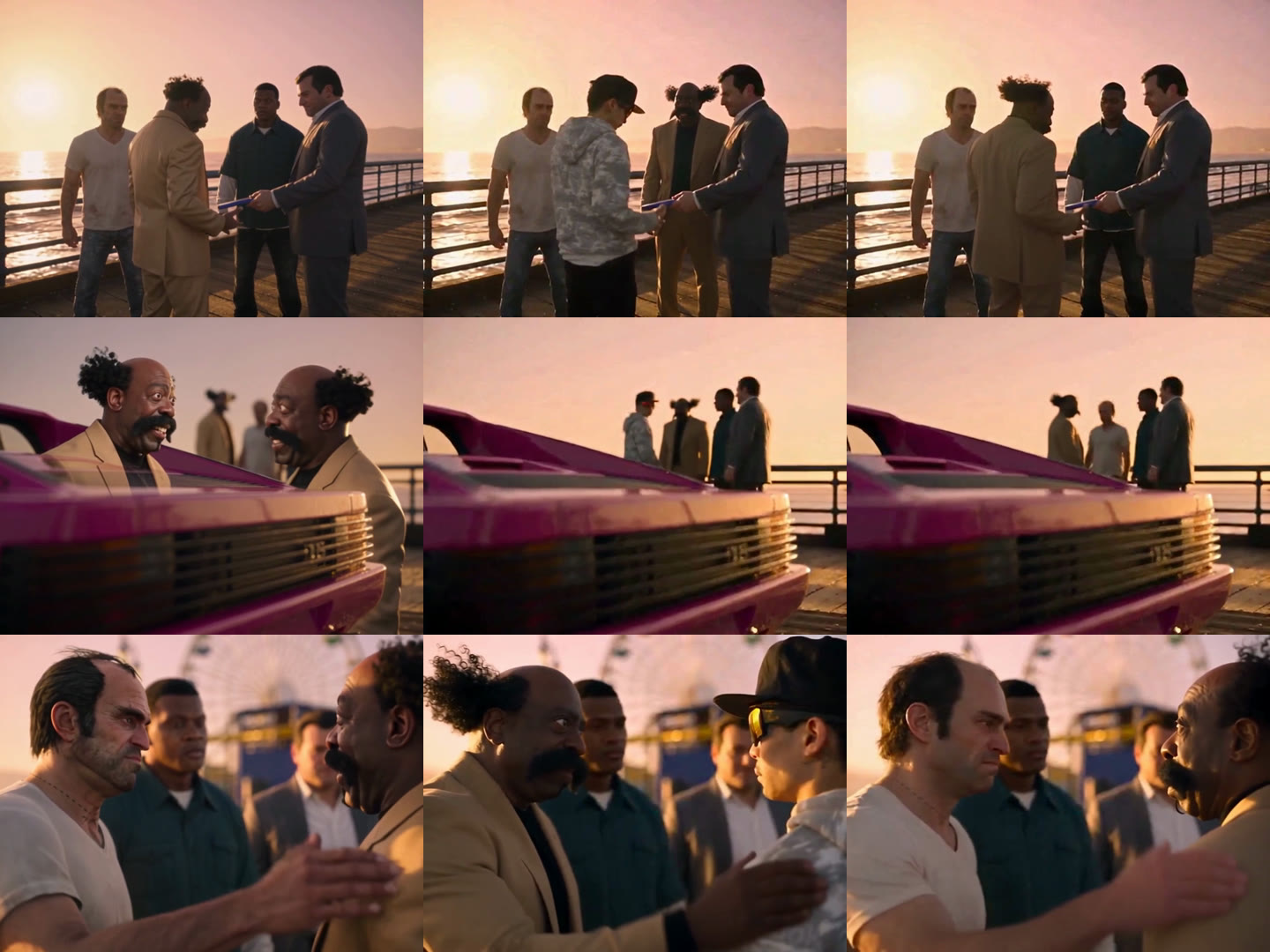
| 1 | Wan 3 Prime, 480p, 590 credits, 2 min 13 s | “the young man wearing the black baseball cap and the light camo hoodie” | The opening was right, but at 10–12 seconds two extra copies of our character appeared in front of the car, where nobody stands in the scene |
| 2 | Seedance 2.5, 480p, 820 credits, 3 min 29 s | The same English line | Wrong person: the man in the green shirt got our character’s look in the opening, the man in the white T-shirt got it in the close-up, and the young man in the cap stayed as he was |
| 3 | Seedance 2.5, 480p, 820 credits, 4 min 40 s | “the young man with his back to the camera at the start, wearing a black cap and glasses” | Right in every shot. This is the run the template uses |
Three things we learned from the Goodbye GTA 5 runs:
- Clothes alone don’t pick out a person in a group. With four men on screen, “black cap and camo hoodie” wasn’t enough for Seedance 2.5: it chose a different man in the opening and another one in the close-up.
- Position and pose do. Naming him as the one “with his back to the camera at the start” fixed it on the next run, with the same model, photo and settings.
- Wan 3 Prime is cheaper but can add people. It picked the right man, but filled the empty car shot with two extra copies of our character, so we didn’t use it.
Which Prompt Picked the Right Person in the Goodbye GTA 5 Scene?
This is the prompt from run 3, the one the template uses, with Seedance 2.5 at 480p, 15 seconds, sound on and one reference image. We ran it in Chinese; the English below is a direct translation. The first sentence is the part that matters.
把视频开头背对着镜头的戴黑色帽子和眼镜的年轻男子替换成图 1 的人物。以图 1 作为身份和外观的唯一依据:脸、五官结构、发型、肤色、身材比例、服装和配饰都和图 1 完全一致。不要保留原角色的帽子、墨镜和连帽衫,也不要添加图 1 里没有的衣物或配饰。 风格统一 人物的画面风格要和周围场景一致:渲染质量、光照、调色、质感和细节程度都相同。看起来要像本来就在这段画面里,不能像贴上去的。 场景融合 原视频的其他内容全部不变:其他角色、场景、背景、道具、机位、镜头切换、构图、节奏和光照。新人物在每个镜头里做和原角色相同的动作:接过游戏盒、被拍肩膀、接车钥匙、握手、近景里被揪住衣服。每个镜头的透视、大小和站位都和原角色一致,姿势和动作自然。 一致性 人物的脸、发型和穿着在每个镜头、每一帧都保持一致。衣服随身体自然摆动,被其他角色碰到时有真实的反应。 最终要求 成片要像图 1 的人物本来就是在这个场景里拍的。不要重新设计、简化或重新诠释他的任何标志性特征。
Replace the young man at the start of the video who has his back to the camera, wearing a black cap and glasses, with the person from image 1. Use image 1 as the only guide for identity and appearance: face, facial structure, hairstyle, skin tone, body proportions, clothing and accessories all match image 1 exactly. Do not keep the original character’s cap, sunglasses or hoodie, and do not add any clothing or accessories that are not in image 1. Style matching Render the person in the same style as the surrounding scene: same rendering quality, lighting, color grading, texture and level of detail. They should look like they were always in this footage, not pasted on. Scene integration Keep everything else from the original video unchanged: the other characters, setting, background, props, camera angles, cuts, framing, timing and lighting. The new person does the same actions as the original character in every shot: taking the game box, being patted on the shoulder, taking the car keys, shaking hands, and being grabbed by the clothes in the close-up. Match the perspective, size and position of the original character in each shot, with natural posture and movement. Consistency Keep the person’s face, hairstyle and outfit the same in every shot and every frame. Clothes move naturally with the body and react when the other characters touch them. Final requirement The result should look as if the person from image 1 was filmed in this scene. Do not redesign, simplify or reinterpret any of their defining features.
If you write your own version for another group scene, two habits help: describe the person by where they stand and what they do in the first shot, and name the other people in the shot as staying unchanged. Or skip the prompt entirely and make a Goodbye GTA 5 AI video with the template, which already uses this setup.
Which Photo Works Best for the Goodbye GTA 5 AI Video?
A sharp, front-facing photo from head to at least the knees works best for the Goodbye GTA 5 AI video. You appear from behind, from the side, full length beside the car and up close, so the model needs your face, your build and your outfit. Our reference was one full-body image, and the camel suit, black turtleneck, side curls and moustache held in every shot, including the sleeve in the game-box close-up.
- Do: one person, face to the camera, good light, knees or feet in frame.
- Do: wear what you want to say goodbye in. The outfit carries over as photographed.
- Don’t: group photos, a hand over the face, or sunglasses unless you want them in the video.
- Don’t: photos of celebrities, public figures or children, or anyone who hasn’t agreed.
What If the Goodbye GTA 5 AI Video Goes Wrong?
| Problem | Usual cause | Fix |
|---|---|---|
| Someone else on the pier has your face | The person was described by clothes only (our run 2) | Use the template, or name the person by position and pose |
| Extra copies of you appear | A model that fills empty shots with the reference person (our run 1, Wan 3 Prime) | Use Seedance 2.5, as the template does |
| The face doesn’t look like you | A small, blurry or side-on face in the photo | Use a sharp, front-facing photo and run it again |
| Your outfit changed | A chest-up photo, so the model guessed the rest | Use a knees-up or full-body photo |
Goodbye GTA 5 AI Video FAQ
How much does a Goodbye GTA 5 AI video cost? Is it free?
A Goodbye GTA 5 AI video costs 820 credits: about $8.19 on the Lite plan, or one $14.99 pack of 1,000 credits with no subscription. It isn’t free, because the 75 signup credits and the $5.99 starter pack aren’t enough. See pricing; failed runs are refunded automatically.
How long does it take?
Our working Seedance 2.5 run took about 4 minutes 40 seconds for a 15-second video. The earlier runs took 2 to 3.5 minutes.
Should I use Wan 3 Prime or Seedance 2.5 for the pier scene?
Seedance 2.5. In our test, Wan 3 Prime cost less (590 credits against 820) but added two extra copies of the person in the car shot, while Seedance 2.5 with the position-based prompt was right in every shot.
Is the Goodbye GTA 5 video real?
No. The pier farewell is AI-made fan content, not GTA V footage and not from Rockstar Games. We are not affiliated with Rockstar Games or Take-Two Interactive; label your video as AI-made when you post it.
Who made the first Goodbye GTA 5 video?
Japanese AI creator UEKAN (TikTok @uekan2b) posted “It’s Time to Say Goodbye” on November 10, 2026. His November 12 sequel became the hit, with 4.65 million views by November 17, 2026.
Can I post it on TikTok?
Yes. The MP4 is 15 seconds, 4:3, 480p, with sound and no watermark; vertical apps show it with bars above and below.
Saying goodbye to the year as well? Goodbye 2026, Welcome 2027 works from one photo, and King Jin AI puts you in another famous scene. Want a solo reveal instead? The James Bond AI trend tutorial puts one photo into the new 007 Identity Confirmed teaser.