How to Make the Desert Truck Jump AI Video With Your Own Car
What’s new on this page
- — Published: our first desert truck jump AI video with a person photo and a car photo (Wan 3.0, 12 s, 480p, 9:16, with sound, 335 credits, first try, 3 minutes 58 seconds), the four-line prompt we used, second by second, photo tips and fixes.
A desert truck jump AI video puts the person in your photo in a folding chair in a golden-hour field while a car launches over the ridge behind them, flies over their head and parks behind the chair, and they never look back. Most versions online use a fixed pickup. We made the clip above on 21 November 2026 from two photos, one of a man with a big moustache and one of a black movie-style custom car, so the car in the air is the one we chose. This guide covers the steps, the exact prompt, what came out well and what didn't, and which photos work.
What is the desert truck jump AI trend?
The desert truck jump AI trend, also called the car jump AI trend or the unbothered car trend, is a single shot: someone sits in a camp chair in a dry field, a truck flies over the ridge behind them and lands, and they don't flinch. Trend trackers credit the first version to a reel by @ya_danilova01 on Instagram from 26 September 2026, and TikTok tutorials spread it from 28 September.
In November 2026 it picked up a second wave built on two photos, one of you and one of your car or dream car. A Spanish-language TikTok post by @kimberlihayes1 from 10 November explains it that way and had passed 1.2 million views by 21 November. That two-photo version is what this guide makes.
What happens in a desert truck jump AI video, second by second?
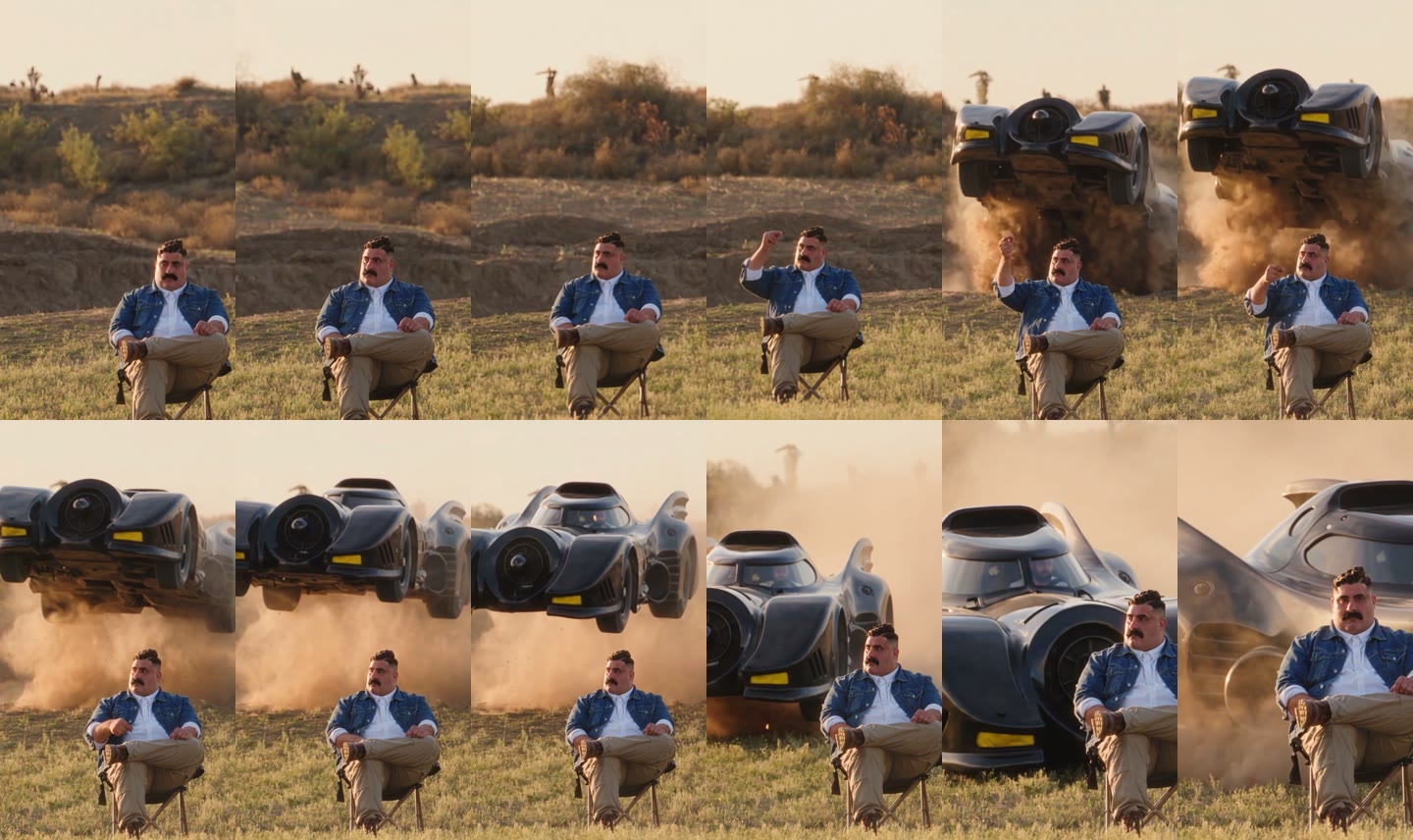
One continuous shot with a slow push-in. In our result:
| Seconds | What happens |
|---|---|
| 0–3 | Golden-hour field: you sit in a black folding chair with your legs crossed, looking calm |
| 3–5 | You raise a fist; the car bursts over the ridge behind you in a spray of sand, underside to the camera |
| 5–8 | It flies over your head in slow motion while dust fills the background |
| 8–10 | It lands and slides in behind you |
| 10–12 | It stops right behind your chair, close to your shoulder; you never turn around |
What you need to make the desert truck jump AI video
- A photo of you. One person, face to the camera, full body or knees-up. It can be you, an adult friend who agreed, or a character you made.
- A photo of your car. The whole car, side-front view, daylight. A car you own, or one you have the right to use.
- An account and 335 credits. New accounts get 75 free credits, so you need the one-time $5.99 pack (540 credits), which leaves 205 credits after one video. No subscription.
- About four minutes. Ours took 3 minutes 58 seconds; you can close the tab and find the video in My Videos later.
How to make the desert truck jump AI video in 4 steps
1. Pick the person for the chair
There is one person in the shot, so pick one: you, or the friend who never panics. Ask first if the photo isn't yours. Photos of celebrities, public figures and children are not allowed.
2. Pick the two photos
For you: a sharp, front-facing photo with even light, full body or knees-up, because you are in the chair head to toe the whole time and whatever you wear in the photo is what you wear in the video. For the car: the whole car from the side-front in daylight, with no other cars in front of it. You see its underside in the air and its front when it parks, so a full view helps the video get both right.
3. Upload them to the template
Open the desert truck jump AI generator. Photo 1 goes in the first slot, the car in the second. There is no prompt to write and no car to describe: the field, the ridge, the jump and the landing are already set. The Generate button shows the credit cost before you start.
4. Generate and download
Press Generate. Ours was ready 3 minutes 58 seconds later. Download the MP4 from My Videos: it is vertical 9:16, has no watermark and the sound is already on it, so it goes straight to TikTok, Reels or Shorts.
Our desert truck jump AI test: a moustache and a custom car
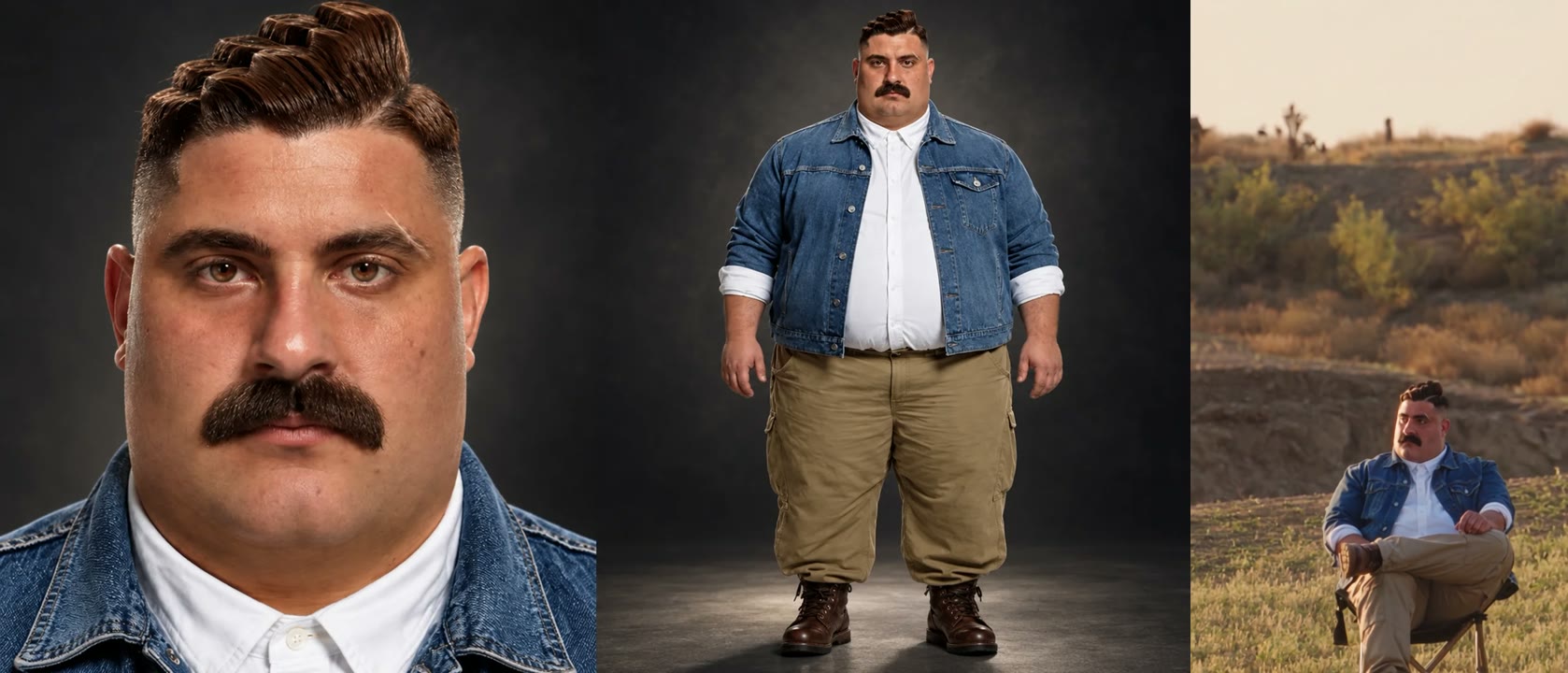
For the person we used a photo set of one man: a face close-up next to a full-body shot, with a pompadour, a wide black moustache, a denim jacket over a white shirt, khaki cargo pants and brown boots. For the car we used a black movie-style custom car with long tail fins, a round front intake and yellow lights. We picked both to be easy to spot, so we could check every frame.
| Setting | Our test |
|---|---|
| Date | 21 November 2026 |
| Model | Wan 3.0 |
| Photos | 2 (a person, a car) |
| Length | 12 seconds (13-second setting) |
| Resolution and frame | 480p (480 × 854), 9:16 vertical |
| Sound | On |
| Cost | 335 credits, about $3.72 |
| Render time | 3 minutes 58 seconds |
| Attempts | 1 (worked first time) |
The prompt we used
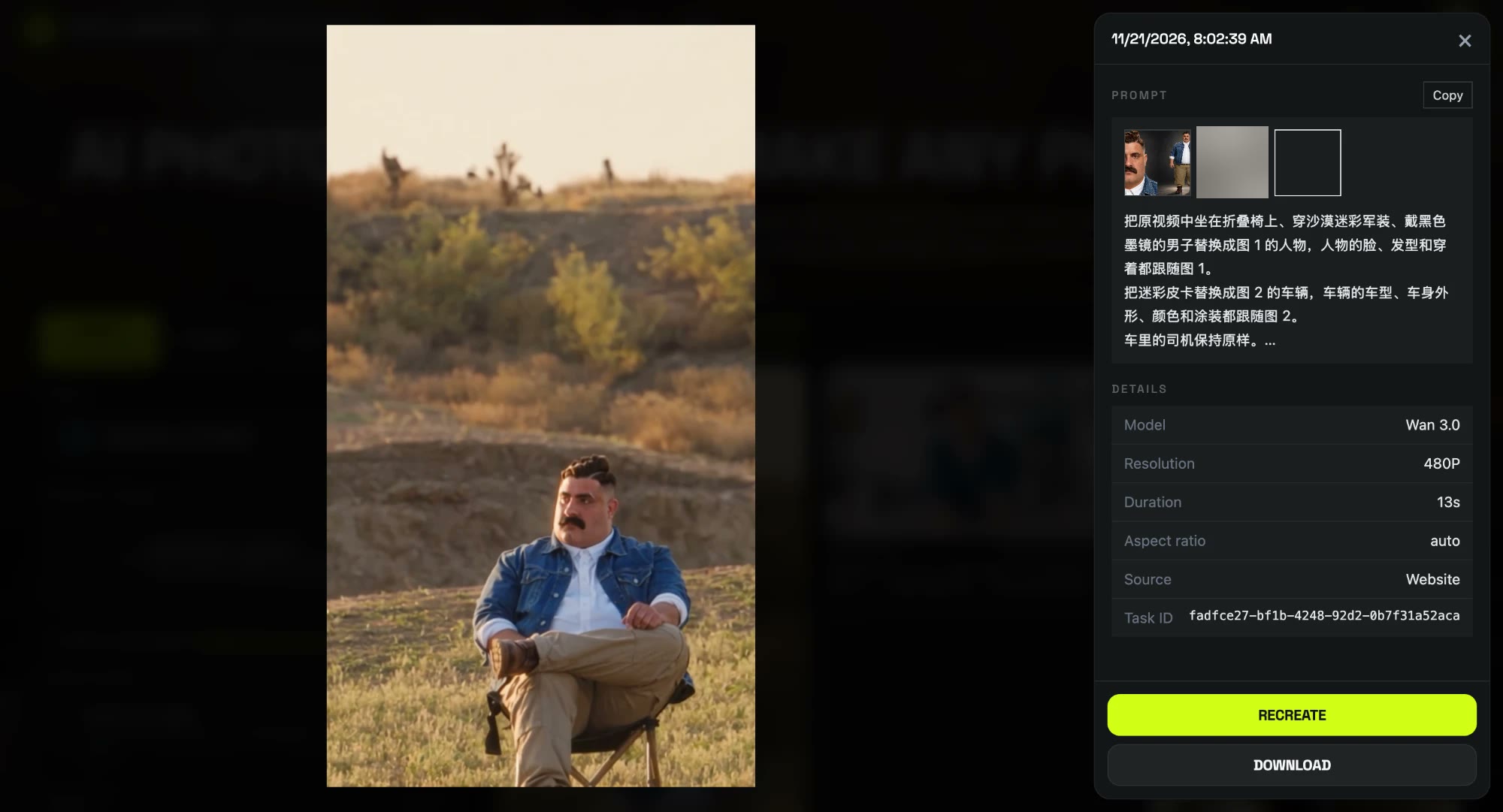
We ran it with four lines in Chinese, and it worked on the first try. Each line has one job: who goes in the chair, which car flies, what stays as it is, and what the scene keeps.
把原视频中坐在折叠椅上、穿沙漠迷彩军装、戴黑色墨镜的男子替换成图 1 的人物,人物的脸、发型和穿着都跟随图 1。 把迷彩皮卡替换成图 2 的车辆,车辆的车型、车身外形、颜色和涂装都跟随图 2。 车里的司机保持原样。 机位、构图、剪辑节奏、运动、扬尘、光线、黄昏草地背景和折叠椅都和原视频保持一致。
Replace the man in the desert camouflage military uniform and black sunglasses sitting in the folding chair with the person from image 1. The person's face, hairstyle and outfit all follow image 1. Replace the camouflage pickup truck with the vehicle from image 2. The vehicle's model, body shape, color and livery all follow image 2. Keep the driver inside the vehicle unchanged. Keep the original camera angles, framing, cuts, timing, motion, dust, lighting, golden-hour grassland background and folding chair exactly as in the original video.
Three choices mattered. We pointed at the man by what he looks like (the folding chair, the camo uniform, the sunglasses), not by what he does. We said the outfit follows image 1, so he wears his own clothes, not the uniform. And we didn't describe the new car at all: "follows image 2" works for any car you upload. The template on our effect page runs this setup for you, so you don't paste anything.
What we saw, frame by frame:
- The car was ours. The long tail fins, round front intake and yellow lights are there in the air and when it parks; none of the default camo pickup is left.
- The outfit stayed his. Denim jacket, white shirt, khakis and boots in every frame, and no sunglasses or camo were added.
- He never looked back. He raises a fist as the car goes over, just like the trend, and stays put while it parks.
- The small slips. There is still a figure in the driver's seat, visible through the windshield at the end, because the prompt kept the driver. In the jump the car is seen mostly from below, and at 480p the dust and the car's edges are soft.
Which photos work best for the desert truck jump AI video?
- You: one person, face to the camera. A front-facing face matches the shot, which looks at you the whole time.
- You: full body or knees-up. You are in the chair head to toe, so the photo should show your outfit and shoes.
- Car: the whole car. Missing wheels or a cropped roof get guessed. Side-front view, daylight.
- Car: on its own. No people next to it and no other cars in front, or bits of them can end up in the video.
- No celebrities or children. Only photos of yourself or adults who agreed, and cars you have the right to use.
Desert truck jump AI generators compared
On 21 November 2026 we found several sites with a car jump template. The figures below come from their own pages; we have not generated videos with them. Most use one photo of you and a fixed truck, and change the car only if you describe it in words.
| Tool | Photos | Your own car | Length and frame | Price per video |
|---|---|---|---|---|
| Our template | 2 (you + car) | From a photo | 12 s, 480p, 9:16 | 335 credits, about $3.72 ($5.99 pack) |
| Starrd | 1 | Describe it in a note | 11 s, 480p, 9:16 | 150 credits, about $7.50 |
| AI Trend Club | 1 | Not offered | 10 s, 9:16 | From $6.99 |
| SlapClip | 1 | Describe it in words | Not listed | 1 credit per second at 720p; packs from $9.99 |
Is the desert truck jump AI video a real stunt?
No. The desert truck jump AI video is generated from two still photos; nobody sat under a flying car. Our template is not affiliated with any car brand, film studio or the creators of the trend. When you post it, keep the platform's AI label on, and don't try the stunt for real.
Desert truck jump AI video problems and fixes
| Problem | Fix |
|---|---|
| Someone is in the driver's seat | The template keeps a driver at the wheel. You stay in the chair; nobody from your photos is put in the car. |
| The car looks off | Use a photo of the whole car from the side-front in daylight, with nothing in front of it. |
| You mostly see the underside in the air | That's the camera angle of the jump. The car's front shows clearly when it parks. |
| The generation failed | The credits come back automatically. Try again, or try other photos. |
Is Desert Truck Jump AI free?
Not completely. New accounts get 75 free credits and one desert truck jump AI video takes 335, so you need the one-time $5.99 pack (540 credits). That is about $3.72 for the video, with 205 credits left over and no subscription. See pricing. Failed renders are refunded automatically.
Can I use my own car?
Yes. The second photo is your car, and the video follows its shape, paint and lights. Our test used a black custom car with tail fins and it came through in every frame.
Can I use a dream car I don't own?
Yes, as long as you have the right to use the photo, for example your own photo of it at a car show. Don't use other people's photos or branded promo images without permission.
Can my dog sit in the chair?
We have only tested a person so far, so we can't show a pet result. A person's photo, face to the camera, is what we know works.
How long is the video?
12 seconds, 480p, 9:16 vertical, with sound and no watermark. Ours took 3 minutes 58 seconds to render.
Do I need to write a prompt?
No. On the effect page the template is already set up; you only add the two photos. The prompt above is what we used in our own test.
Want your car in another clip? Our AI Toy Car to Real Car template turns a car photo into a windowsill model that becomes the real thing.
Liked staying calm while things blow up behind you? Our Peaky Blinders Explosion AI tutorial does it in a 1920s manor with one photo.