How to Make the Waiting On My Fries AI Video (2 Photos)
What’s new on this page
- — Published: our first Waiting On My Fries AI video (Wan 3.0, 14 s, 480p, 9:16, 360 credits, first try, about 4 minutes) with both workers from two photos, second by second, photo tips and the honest limits (no laughing ending, a soft first second, one swear word in the dialogue).
A Waiting On My Fries AI video puts two people you choose behind a fast-food counter: a customer says they're still waiting on their fries, one worker realizes they forgot, and the other walks up and stalls with a slow, straight-faced dance. We made the clip above on 21 November 2026 from two photos, and both people kept their own face, hair and outfit from start to finish.
What is the Waiting On My Fries AI trend?
The Waiting On My Fries AI trend recreates the Still Waiting On My Fries skit with your own photos. In the skit, a customer off camera says "excuse me, I'm still waiting on my fries", one worker admits they forgot to make them, and the other turns to the customer and covers with a deadpan slow dance until the customer admits they're "hitting that for real". That line is why the trend is also called He's Hitting That.
It took off on TikTok in the week of 18 November 2026. An AI version with Mei Mei the snow leopard dancing behind the counter, posted on 18 November, had 3.73 million views and 679,000 likes by 21 November. People filmed their own versions too: one by @mio2.0_ on 19 November passed 240,000 views. By 21 November, CapCut templates and "how to make the viral fries video" posts were showing up every hour.
Most people searching for it want the same bit with themselves and a coworker or friend. That is what the Waiting On My Fries AI generator makes.
What happens in a Waiting On My Fries AI video?
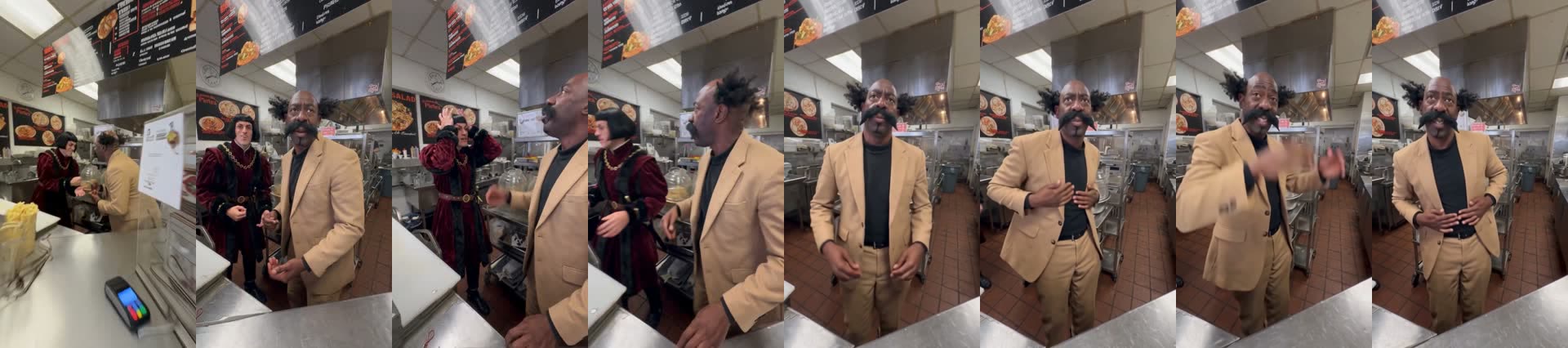
Our Waiting On My Fries AI video is 14 seconds, filmed over the counter of a small fast-food kitchen with fryers and a menu board. Photo 1 is the worker who forgot, photo 2 is the dancer. In our result:
| Seconds | What happens |
|---|---|
| 0–1 | The phone looks over the counter into the kitchen; both workers are small in the back |
| 1–3 | The customer asks about the fries while photo 1 and photo 2 talk by the fryers |
| 3–5 | Photo 1 grabs their head with both hands; photo 2 points toward the fryers |
| 5–6 | Photo 2 turns away from photo 1 and walks up to the counter |
| 6–14 | Photo 2 faces the camera and does the slow dance: hands behind the head, on the face, the chest, the stomach, never cracking a smile |
What do you need to make the Waiting On My Fries AI video?
- Two photos, one person in each. Photo 1 is the worker who forgot the fries, photo 2 is the one who dances. Face to the camera; a waist-up or full-body photo works best for photo 2.
- An account and 360 credits. New accounts get 75 free credits, so you need the one-time $5.99 starter pack (540 credits). It covers one video at about $3.99 and leaves 180 credits, with no subscription.
- About 5 minutes. Ours took 4 minutes 15 seconds from Generate to download.
How do you make the Waiting On My Fries AI video in 3 steps?
1. Decide who forgot and who dances
Photo 1 is in the back for the first six seconds: they talk by the fryers and grab their head when the customer asks. Photo 2 is the star: they walk up to the counter at 5 seconds and dance for the remaining eight. The joke lands hardest when photo 2 is the person who would never dance in real life.
2. Upload both photos to the template
Open the Waiting On My Fries AI page and add one photo to each slot. The kitchen, the counter, the camera and the sound are already set, so there is nothing to write. The button shows the credits before you spend anything.
3. Generate and download
Press Generate and come back in about 5 minutes. Download the MP4 from My Videos; it's vertical, has no watermark and the sound is already on it, so it goes straight to TikTok, Reels or Shorts.
How did our Waiting On My Fries AI test turn out?
Two-person scenes usually go wrong in one of two ways: the faces blend, or the two people end up in each other's roles. This skit adds a third risk: the dancer is in the back for the first five seconds and in a close-up for the last eight, so their look has to survive a big change in distance. We picked two looks that are hard to fake. Photo 1 was a man with a black bob in a burgundy velvet robe with a gold chain; photo 2 was a man with a big curled mustache and two bursts of curly hair, in a camel suit and black turtleneck.
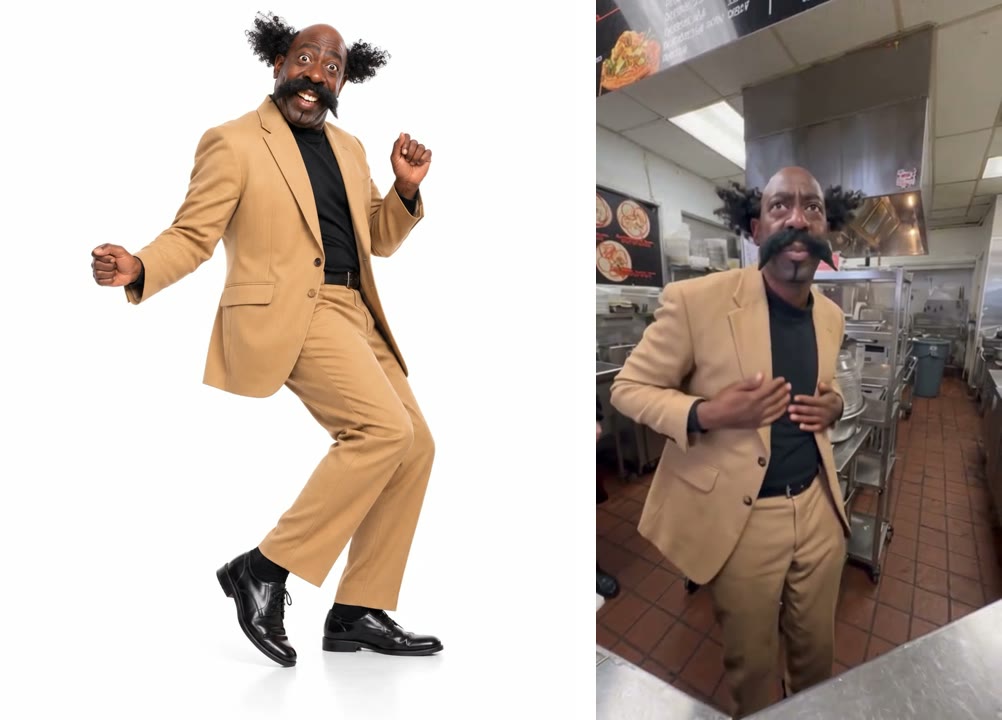
We ran it on Wan 3.0 at 480p with sound on 21 November 2026. It worked on the first try, cost 360 credits and took 4 minutes 15 seconds. What we saw:
- Nobody traded roles. The man in the robe stayed by the fryers and grabbed his head; the man in the camel suit did every second of the dance.
- Both looks held. The mustache and curly hair were there in every close-up; the bob, the velvet robe and the gold chain held in the back.
- The outfits came from the photos. There's no fast-food uniform or costume added: both men wore what they wore in their photos, which is what makes the result funny.
- Gender didn't matter. In the skit the worker who forgets is a woman; our photo 1 was a man and the role played exactly the same.
What didn't go perfectly in our Waiting On My Fries AI video?
- No laughing ending. The full skit swings the camera back to the other worker and ends with a laugh. Our 14-second version stops while photo 2 is still dancing.
- The first second is soft. It opens with a wide shot over the counter, so both faces are small in a 480p frame. From 6 seconds on, photo 2 fills the frame and is sharp.
- There's a swear word in the dialogue. The sound is the skit's dialogue, and one line has a swear word in it. Fine for most feeds, but check before you post it to a work account or send it to family.
Which photos work best for Waiting On My Fries AI?
- One person per photo. A couple selfie gives the model two faces to choose from; use a separate photo for each role.
- Face to the camera, even light. Photo 2 gets eight seconds of close-up, so a sharp face there pays off most.
- Waist-up or full-body for the dancer. Photo 2's hands and outfit fill the frame while they dance, and both come from the photo.
- Dress for the joke. Whatever you wear in the photo is what you wear behind the counter. A work uniform looks real; a suit or a costume looks absurd. Both work.
- Only adults who agreed. Use your own photos or a friend's with their OK; no celebrities, public figures or children.
How do you fix Waiting On My Fries AI problems?
| Problem | Fix |
|---|---|
| The wrong person is dancing | Photo 2 is always the dancer. Trade the two photos and generate again. |
| A face doesn't look like the photo | Use a sharp, front-facing photo of that person alone. Faces cropped from group shots lose detail. |
| The first second looks blurry | That's the wide shot at 480p. It sharpens once photo 2 reaches the counter; nothing to fix. |
| The generation failed | Credits come back automatically. Check both photos show one clear face and try again. |
Is Waiting On My Fries AI free?
Not completely. New accounts get 75 free credits and one Waiting On My Fries video takes 360, so you need the one-time $5.99 starter pack (540 credits). That makes one video at about $3.99, with 180 credits left and no subscription. See pricing. Failed generations are refunded.
Do I have to know how to dance?
No. You only upload a photo; the slow dance comes with the template. A still photo of someone who never dances is the funniest choice for photo 2.
Can we wear our work uniforms?
Yes. The outfit comes from each photo, so upload photos of you in your uniforms and that's what you'll wear behind the counter.
Why is it only 14 seconds?
Our template covers the customer's question, the panic and the dance. It doesn't include the final camera swing and laugh from the full skit.
Does the Waiting On My Fries AI video have swearing?
Yes, one line of the dialogue has a swear word. The rest is the customer asking about the fries and the two workers talking.
Can I post it on TikTok?
Yes. It's vertical 9:16 with sound and no watermark, so it posts as is. Tag #stillwaitingonmyfries so people find it with the trend.
Want another two-person scene? Our Bathroom Fight AI tutorial puts one of you in the bathtub and the other on the ceiling.