How to Make the TOESA Quit Job Dance AI Video With 3 Friends
What’s new on this page
- — Published: our first TOESA Quit Job Dance AI video (Wan 3.0, 15 s, 480p, 16:9, 385 credits, first try, about 5 minutes) with three people on one stage, second by second, photo tips, three-person vs. one-person versions and fixes.
A TOESA Quit Job Dance AI video puts three people on a K-pop music-show stage: one sings into the mic in the middle, the other two dance on the left and right, and the camera cuts between the whole stage and close-ups of the singer. We made the clip above on 19 November 2026 from three photos, in one go.
What is the TOESA Quit Job Dance trend?
I'm gonna TOESA (퇴사할게여) is SOYEON's song about quitting your job: toesa (퇴사) is Korean for resigning. It came out on 7 September 2026 as the title track of her first studio album and reached No. 1 on Melon's Top 100 on 21 September. Its music video had 21.1 million YouTube views by 9 October, according to mymytune, and office workers turned it into a TikTok dance under #퇴사할게여 and #imgonnatoesa, waving goodbye to their jobs.
Most TOESA AI templates put one person in the video. When we asked ChatGPT how to make it with friends, the best it could suggest was making one clip per person and editing them together. The TOESA Quit Job Dance AI generator puts all three of you on the same stage instead.
What happens in a TOESA Quit Job Dance AI video?
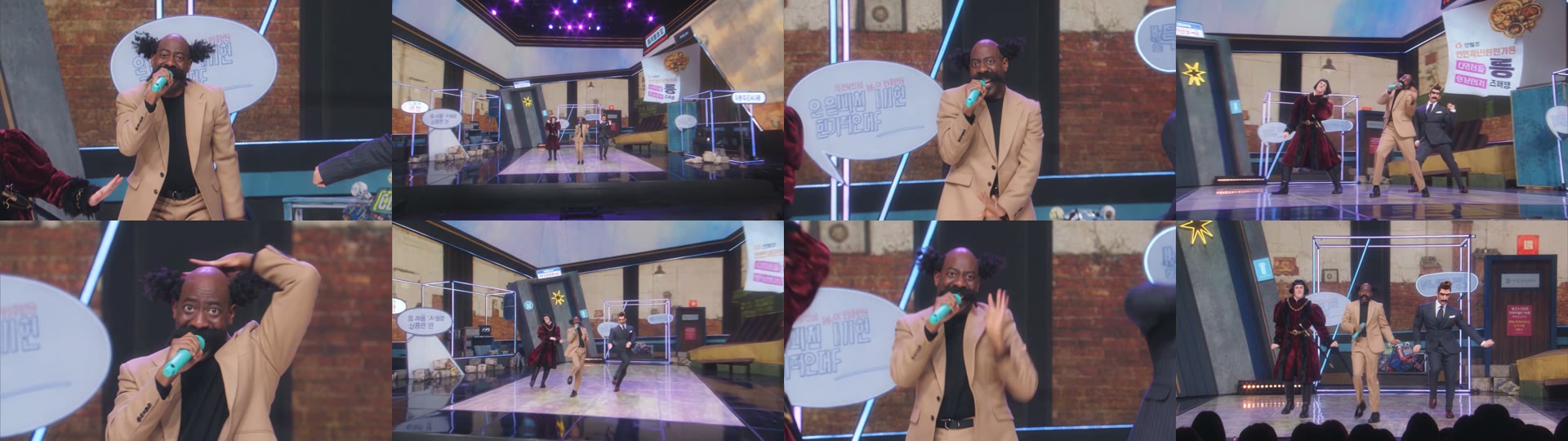
It's a 15-second music-show performance with fast cuts, the singer always in the middle. In our result:
| Seconds | What happens |
|---|---|
| 0–1 | Mid shot: the singer starts into the teal mic, the dancers' arms come in from the sides |
| 1–3 | Wide shot of the whole stage, the three standing in a row |
| 3–5 | Close-up of the singer; the right dancer leans into frame |
| 5–8 | Wide shot: all three dance, the side dancers kicking and swinging their arms |
| 8–9 | Close-up: the singer puts a hand on his head mid-line |
| 9–12 | Wide shot: the three bounce forward across the stage |
| 12–13 | Close-up of the singer, both hands moving |
| 13–14 | Wide shot: the three finish side by side, the audience's heads in the foreground |
What you need to make the TOESA Quit Job Dance AI video
- Three photos, one person in each. Photo 1 sings in the middle, photo 2 dances on the left, photo 3 on the right. Full body works best.
- An account and 385 credits. New accounts get 75 free credits, so you need the one-time $5.99 starter pack (540 credits). It covers one video at about $4.27 and leaves 155 credits, with no subscription.
- About 5 minutes. Ours took 5 minutes 3 seconds from Generate to download.
How to make the TOESA Quit Job Dance AI video in 3 steps
1. Pick who sings
Photo 1 holds the mic and gets every close-up, so it carries the video. Give it to whoever is actually quitting, or whoever complains about Mondays the loudest. Photos 2 and 3 are the backing dancers on the left and right.
2. Upload all three photos to the template
Open the TOESA Quit Job Dance AI page and add one photo to each slot. The stage, the moves, the camera and the sound are already set, so there's nothing to write and nobody has to learn the dance. The button shows the credits before you spend anything.
3. Generate and download
Press Generate and come back in about 5 minutes. Download the MP4 from My Videos; it has no watermark and the sound is already on it.
Our TOESA Quit Job Dance AI test: three people, one stage
We wanted to know whether three people in one fast-cut performance would each keep their own look, and whether they'd stay in their own spots. So we picked three very different looks: photo 1 a bald man with curly side tufts, a huge moustache and a camel suit; photo 2 a man with a black bob in a long red velvet robe; photo 3 our cartoon gentleman with a quiff, a twirled moustache and a navy suit.
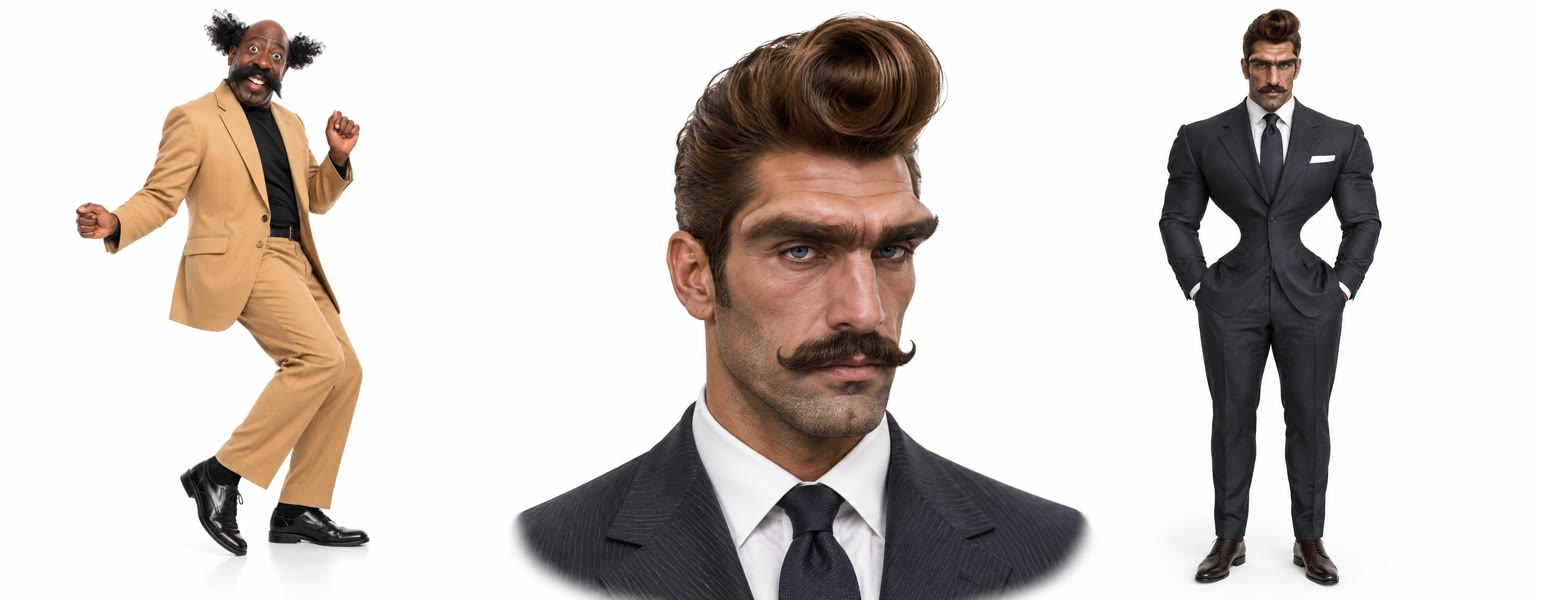
We ran it on Wan 3.0 at 480p with sound on 19 November 2026. It worked on the first try, cost 385 credits and took about 5 minutes. What we saw:
- Nobody changed places. The singer stayed center with the mic, the robe on the left and the navy suit on the right, through every cut.
- No mixed-up faces. With three people, the usual failure is one person getting another's face or outfit. Each look stayed on its own person, from the moustaches to the robe.
- The singer gets the spotlight. Half the clip is close-ups of photo 1, so that's the photo that matters most.
- Wide shots are soft. At 480p, the three of you are small on a big stage in the wide shots, and around the 2-second mark faces are hard to make out. The close-ups are sharp.
Which photos work best for TOESA Quit Job Dance AI?
- Full body, face to the camera. The wide shots show everyone head to toe, so a full-body photo gives the model your legs, shoes and build.
- One person per photo. Don't crop three people out of one group photo; use three separate photos.
- The clearest face goes in photo 1. The singer gets the close-ups; the side dancers are mostly seen from further away.
- Dress for the stage. Outfits come from the photos and show in every shot. Bold looks like a suit or a robe read better in the wide shots.
- Only adults who agreed. Use your own photos or your coworkers' with their OK; no celebrities, public figures or children.
TOESA Quit Job Dance AI: three-person stage vs. one-person templates
Other TOESA AI templates we read on 19 November 2026 are mostly built for one photo. We didn't generate on those tools; this is from their public pages.
| Typical TOESA AI template | Our template | |
|---|---|---|
| People | One (some have a three-person office version) | Three on one stage |
| Length | 10–15 seconds | 15 seconds |
| Shape | Mostly vertical 9:16 | Widescreen 16:9 |
| Sound | Varies, some add the song later | Comes with sound |
| Price per video | About $4.50–$10 for one person | About $4.27 for three people, no subscription |
If you want the three of you in one performance, make the TOESA Quit Job Dance AI video here. It's widescreen, so on TikTok and Reels it shows with bars above and below.
TOESA Quit Job Dance AI video problems and fixes
| Problem | Fix |
|---|---|
| The wrong person is singing | Photo 1 is always the singer. Move the photos around and generate again. |
| Faces are hard to see in the wide shots | That's 480p on a big stage. Use full-body photos with sharp, front-facing faces. |
| One person doesn't look like their photo | Use a sharp photo of that person alone. Faces cropped from group shots lose detail. |
| The generation failed | Credits come back automatically. Check all three photos show one clear face and try again. |
Is TOESA Quit Job Dance AI free?
Not completely. New accounts get 75 free credits and one TOESA video takes 385, so you need the one-time $5.99 starter pack (540 credits). That makes one video with all three people at about $4.27, with 155 credits left and no subscription. See pricing. Failed generations are refunded.
Can I make the TOESA dance video with three people?
Yes. The template takes three photos and puts all three people on the same stage: photo 1 sings in the middle, photos 2 and 3 dance on the sides.
What does TOESA mean?
Toesa (퇴사) is Korean for resigning from a job, so I'm gonna TOESA means "I'm gonna quit my job". It's also written 퇴사할게여 or 퇴사할게요.
Do we need to know the choreography?
No. The moves, the camera and the stage are in the template; you only add three photos.
How long is the video and what format is it?
15 seconds, 480p, 16:9 widescreen, with sound and no watermark. It takes about 5 minutes to make. On TikTok and Reels it shows with bars above and below.
Want to escape the office a different way? Office Parkour AI sends you running over the desks from one photo.
Got three friends and a wedding coming up? Make the Halay AI Trend video: one of you leads a Turkish halay line with a white handkerchief while the other two follow arm in arm.