How to Make the Shoulder Carry AI Trend Video From 2 Photos
What’s new on this page
- — Published with our tested two-photo run: settings, the exact prompt, the two details that came out wrong (boots and glasses), and photo tips.
We made our Shoulder Carry AI video with two images and no lifting: a man with a towering brown quiff, a handlebar moustache and a pinstripe suit, and a woman with a black bob, gold glasses and a camel blazer. About six minutes later, he was standing in a parking garage with her on his shoulders, spun around, bent over, and she flopped down his back to laugh into the camera. Neither of us had to film anything.
Shoulder Carry I’m the One trend
Shoulder Carry AI Trend video result
What Is the Shoulder Carry AI Trend?
The Shoulder Carry AI trend is a TikTok couple video where one person carries the other on their shoulders, spins around, and the rider flops over their back to grin at the camera on the line “’cause I’m the one”. It grew out of the “I’m the one” couple lip-sync: @lena.d_spam’s clip from October 17, 2026 had 1.95 million views by November 18. The AI version took over because most couples can’t do the lift: a tutorial by @lisa32973 on November 12 reached 834,000 views.
The sound is a sped-up rap line tagged on TikTok as “Famous (I’m the One)” by Mozzy & Iamsu!. It is not DJ Khaled’s 2017 song “I’m the One”, which a few template sites name by mistake.
What Happens in a Shoulder Carry AI Video?
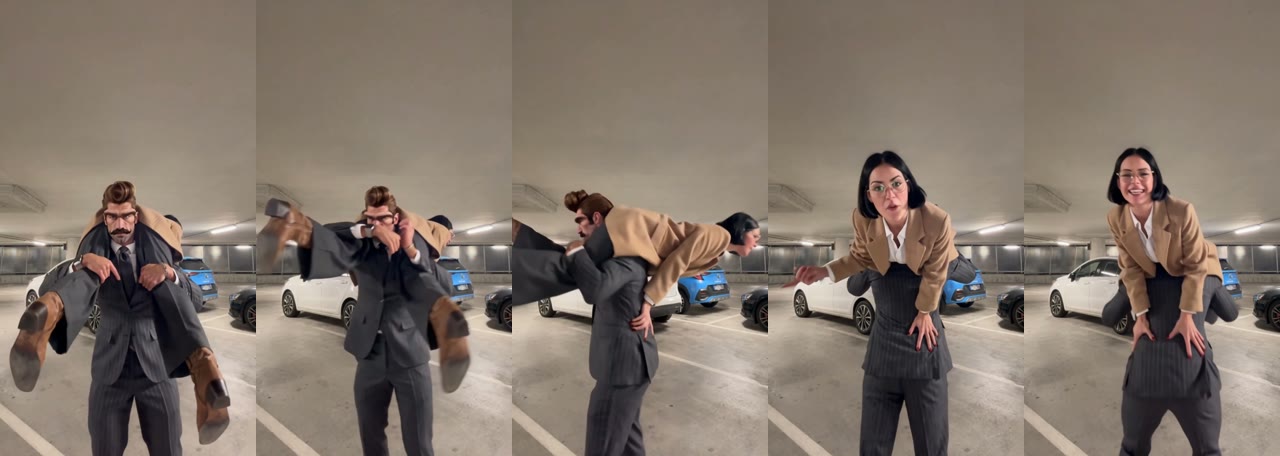
A Shoulder Carry AI video is a 9-second shot in an underground parking garage, in three beats: the carry, the turn, and the close-up. The person in photo 1 is the star for the first 3 seconds; the person in photo 2 owns the rest.
| Time | What happens | What to check |
|---|---|---|
| 0–3s | Photo 1 faces the camera with photo 2 on their shoulders, legs swinging | The carrier’s face, the only time it shows |
| 3–4s | The carrier turns 180° and bends forward | That the two bodies stay separate in the spin |
| 4–9s | The rider folds over the carrier’s back, faces the camera and laughs | The rider’s face and outfit in the close-up |
How Do I Make the Shoulder Carry AI Video? (3 Steps)
- Open the template. Go to the Shoulder Carry AI Trend page and play the example with sound once, so you see who ends up in the close-up.
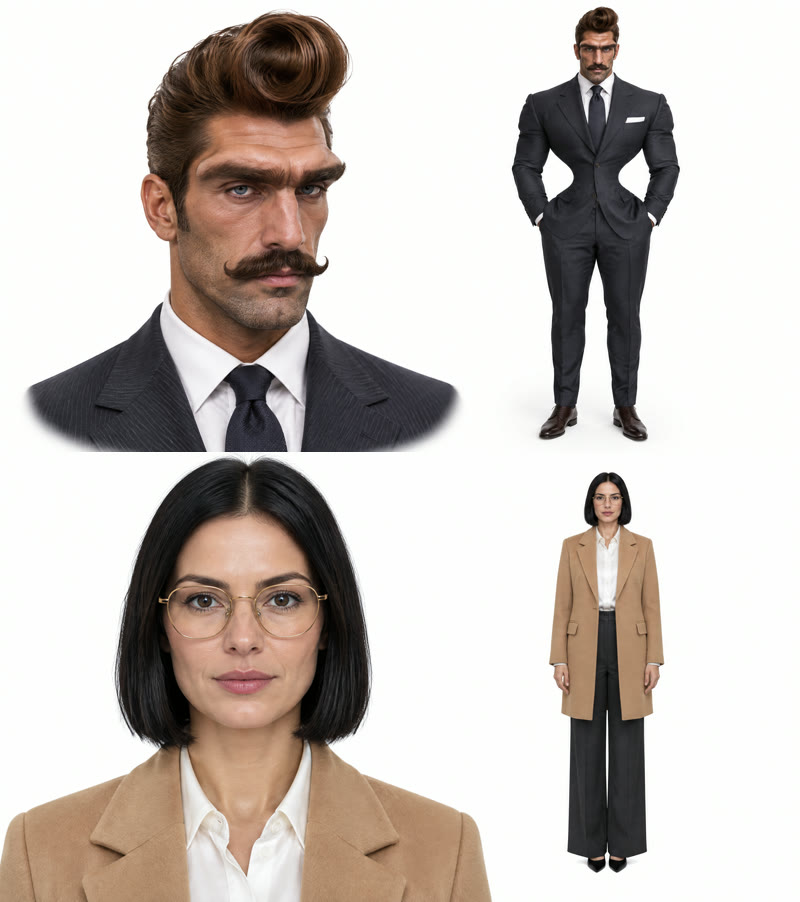
- Add two photos, in order. The first slot is who does the carrying, the second is who gets carried and grins. Put whoever should be seen most in the second slot. Head-to-toe photos work best. Ask your partner before you use their photo.
- Generate and download. The Generate button shows the cost before you start (260 credits on November 18, 2026). Ours was ready in about six minutes; download the watermark-free MP4 from My Videos.
If you don’t have credits yet, the $5.99 starter pack on the pricing page gives 540 credits, enough for two Shoulder Carry AI videos at 260 credits each, with no subscription. New accounts get 75 free credits, which isn’t enough for one.
Our Shoulder Carry AI Test: What Came Out Right and Wrong
We ran the Shoulder Carry AI template once and it worked on the first try: each face stayed on its own body through the carry, the spin and the close-up, and both outfits came through. The pinstripe suit, white shirt and tie stayed on the carrier; the camel blazer and white shirt stayed on the rider; her black bob and gold glasses were there in every close-up frame.
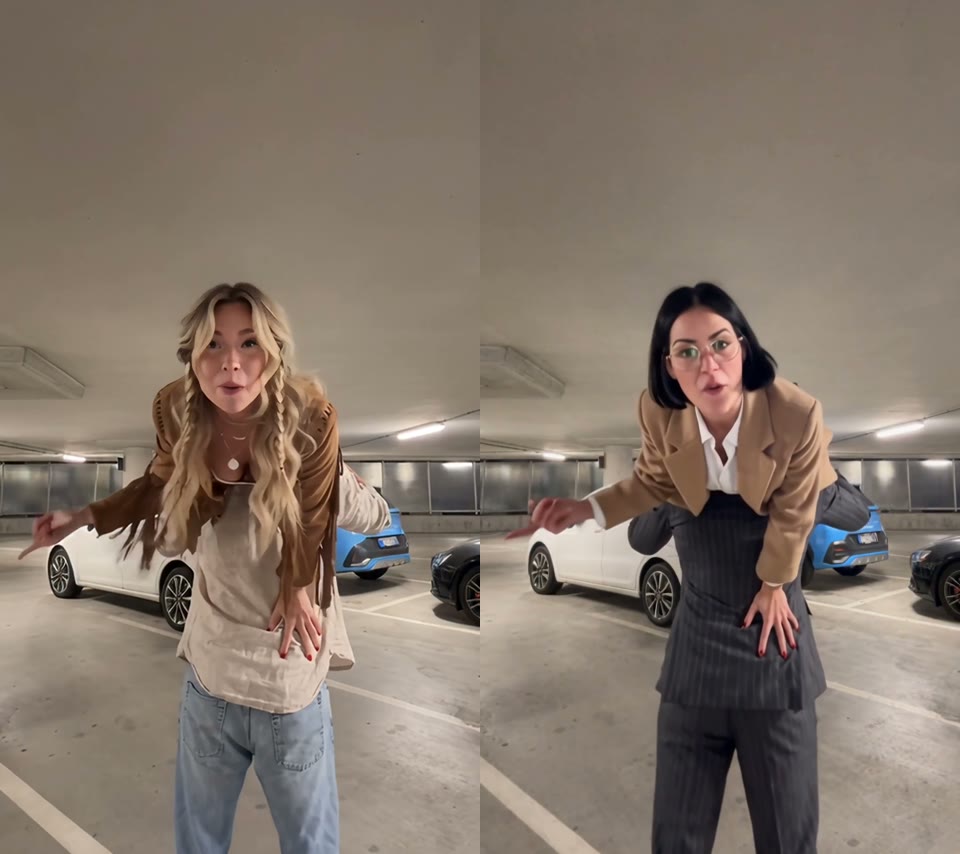
Two details did not follow the photos, and you should expect them too:
- The boots. The rider’s black pointed heels came out as brown cowboy boots, the footwear from the scene. Her legs swing right at the lens in the first 3 seconds, so you’ll notice it.
- The glasses. The carrier, whose photo has no glasses, picked up a pair of gold glasses like hers. Only one of our two photos had glasses, and the model shared them. If that bothers you, use a photo without glasses for whoever doesn’t wear them in real life, and make sure the other photo shows them clearly.
- The carrier’s face is short. That isn’t a flaw, it’s the move: he turns his back to the camera at about 3 seconds and stays bent over. That’s why the order of the photos matters.
The Exact Settings and Prompt We Used
Behind the one-tap template is a video-to-video run on Wan 3.0: a 9-second cut of the trend sets the garage, the carry, the spin and the camera, and your two photos set who is in it. These were the settings on November 18, 2026.
| Setting | Value |
|---|---|
| Model | Wan 3.0 |
| Resolution and length | 480p · 10-second setting (9.0-second clip) · vertical 9:16 (480 × 854) |
| Inputs | 2 reference images + the 9-second trend clip |
| Audio | On |
| Cost and time | 260 credits · about 6 minutes · first try |

We wrote the prompt in Chinese. The key is how it points at each person: by where they are and what they do (“standing on the ground, carrying the other on their shoulders” and “carried on the shoulders, legs over the carrier’s chest”), not by what they wear. In earlier multi-person runs on other templates, describing people only by their clothes made the model swap the wrong person. It also never describes the people in the reference images, so the same prompt works with any two photos.
把视频里的两个人替换成参考图里的人物,镜头、构图、节奏、动作、背景和音频保持原样不变。 - 站在地上、把另一个人扛在肩上的人替换为图 1 的人物。 - 被扛在肩上、双腿搭在扛人者胸前的人替换为图 2 的人物。 每个人的脸、发型、身材和穿着都跟随各自的参考图。
Replace the two people in the video with the people from the reference images. Keep the camera, framing, timing, motion, background and audio exactly as they are. - The person standing on the ground and carrying the other person on their shoulders becomes the person from image 1. - The person carried on the shoulders, with their legs over the carrier’s chest, becomes the person from image 2. Each person’s face, hairstyle, body and outfit follow their own reference image.
To fix the glasses, you could add a line such as “Only the person from image 2 wears glasses; the person from image 1 does not.” We haven’t tested that line yet. You don’t need any of this to make one: the Shoulder Carry AI template already has the clip, the prompt and the settings.
Which Two Photos Work Best for the Shoulder Carry Trend?
Two head-to-toe photos, one person each, with the person who should be seen most in photo 2, work best for a Shoulder Carry AI video. The carrier’s whole body is on screen and the rider’s legs swing at the lens, so full-body photos give the model the whole outfit.
- Order matters. Photo 1 always carries and shows their face for about 3 seconds; photo 2 always gets carried and fills the last 5. Swap the photos to swap the roles.
- Head to toe. A face close-up next to a full-body shot in one image worked well for us.
- Two different looks. A dark suit against a camel blazer made it easy to keep the two people apart.
- Watch the glasses. If only one of you wears glasses, expect the other to borrow them, as in our test.
- Only adults who agreed. No celebrities, public figures or children, and ask your partner before you post.
Shoulder Carry AI Fixes When It Goes Wrong
| Problem | Likely cause | Fix |
|---|---|---|
| The wrong person gets the close-up | Photos uploaded in the wrong order | Put the person you want to see in slot 2 and run it again |
| The carrier has the rider’s glasses | Only one photo has glasses | Use a photo without glasses, or accept the borrowed pair |
| Shoes don’t match the photo | The scene’s boots carry over | Expected; we saw brown cowboy boots too |
| A face doesn’t look like the photo | Small, dark or side-on face | Use a sharp, front-facing photo with even light |
| Faces swap between the two people | Two people who look alike, or a couple photo in one slot | One person per photo, two clearly different looks |
Shoulder Carry AI Trend FAQ
How much does a Shoulder Carry AI video cost? Is it free?
A Shoulder Carry AI video costs 260 credits, about $2.88, so the $5.99 starter pack of 540 credits makes two, with no subscription. The 75 free signup credits aren’t enough for one. See pricing; failed runs are refunded automatically.
How long does it take?
Our Shoulder Carry AI video took about six minutes, from 08:13 to 08:19 UTC on November 18, 2026. You can leave the page; it saves to My Videos.
Which photo goes first?
Photo 1 does the carrying and photo 2 gets carried. Photo 2 gets the close-up for the last 5 seconds, so put whoever should be seen most there.
What song is the Shoulder Carry trend?
A sped-up rap line, “’cause I’m the one”, tagged on TikTok as “Famous (I’m the One)” by Mozzy & Iamsu!. It isn’t DJ Khaled’s “I’m the One”. As of November 18, 2026, #imtheonetrend has 3,020 videos and 7.9 million views.
Can a girl carry a guy, or two friends do it?
The roles follow the photo order, so you can put anyone in photo 1. We have only tested a man carrying a woman so far, so we can’t say yet how a smaller carrier or two friends of the same build look.
Do we need a photo together?
No. One solo photo of each person is enough, which also works for long-distance couples. Ask your partner before you use their photo.
Want another two-person video? Try the Ice Ice Baby duo dance, or the Joaquin Buckley Kick AI if your friend deserves to hit the mat.