How to Make a Joaquin Buckley Kick AI Video With a Friend
What’s new on this page
- — Published with our tested two-photo runs: a 15-second version that mixed up faces, the fix, and the 7-second version the template uses, with settings, prompt and photo tips.
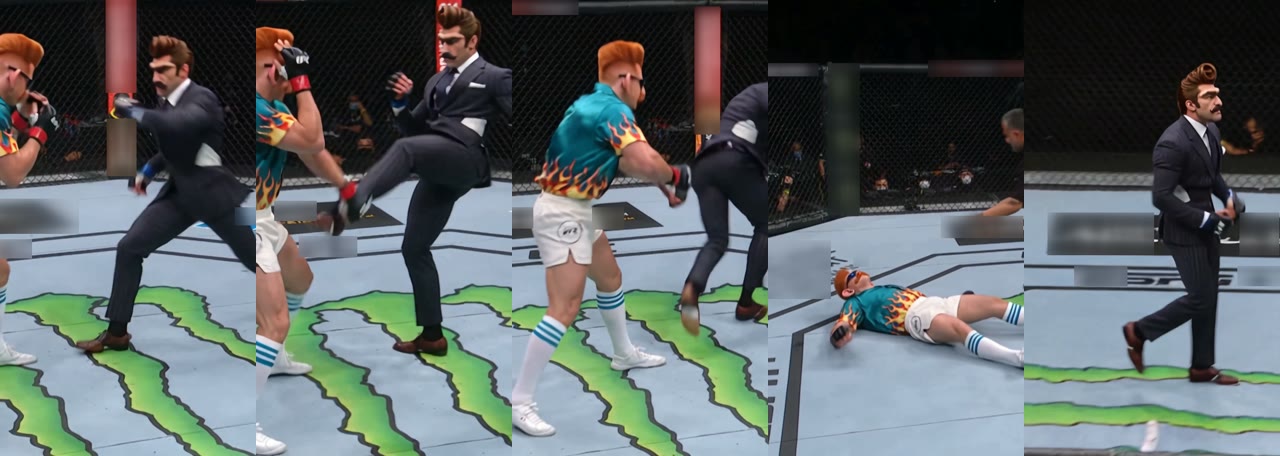
We made our Joaquin Buckley Kick AI video with two images: a man with a towering brown quiff, a handlebar moustache and a pinstripe suit, and his friend with an orange flat-top, blue mirrored sunglasses, a flame-print shirt and white shorts. About three minutes later, the man in the suit had his kick caught, spun into the back kick in his brown dress shoes, and his friend went down stiff on the mat. Neither of them ended up in fight shorts.
Joaquin Buckley spinning back kick knockout
Joaquin Buckley Kick AI video result
What Happens in a Joaquin Buckley Kick AI Video?
A Joaquin Buckley Kick AI video is a 7-second cage-fight shot: the person from photo 1 throws a kick, the person from photo 2 catches the leg, the kicker hops and spins into a back kick to the head, the friend goes stiff and falls flat, and the winner walks off while the referee rushes in. It copies Joaquin Buckley’s knockout of Impa Kasanganay at UFC Fight Island 5 on October 10, 2020, which MMA Fighting timed at 2:03 of the second round. The fighters are you and your friend, not Buckley and Kasanganay.
| Time | What happens | What to check |
|---|---|---|
| 0–1s | Photo 1 throws a kick and photo 2 catches the leg | That the right person is on each side |
| 1–2s | The kicker hops, spins and lands a back kick to the head | The outfit and shoes mid-spin |
| 2–3.5s | The friend goes stiff, staggers and falls | The friend’s face and clothes |
| 3.5–5s | The friend lies flat while the referee rushes in | That they stay one person on the mat |
| 5–7s | The winner turns and walks off across the cage | The winner’s face in the last shot |
The cage, the referee and the camera moves stay the same in every video. Only the two fighters change.
How Do I Make the Joaquin Buckley Kick AI Video? (3 Steps)
- Open the template. Go to the Joaquin Buckley Kick AI page and play the example once with sound so you know who does what.
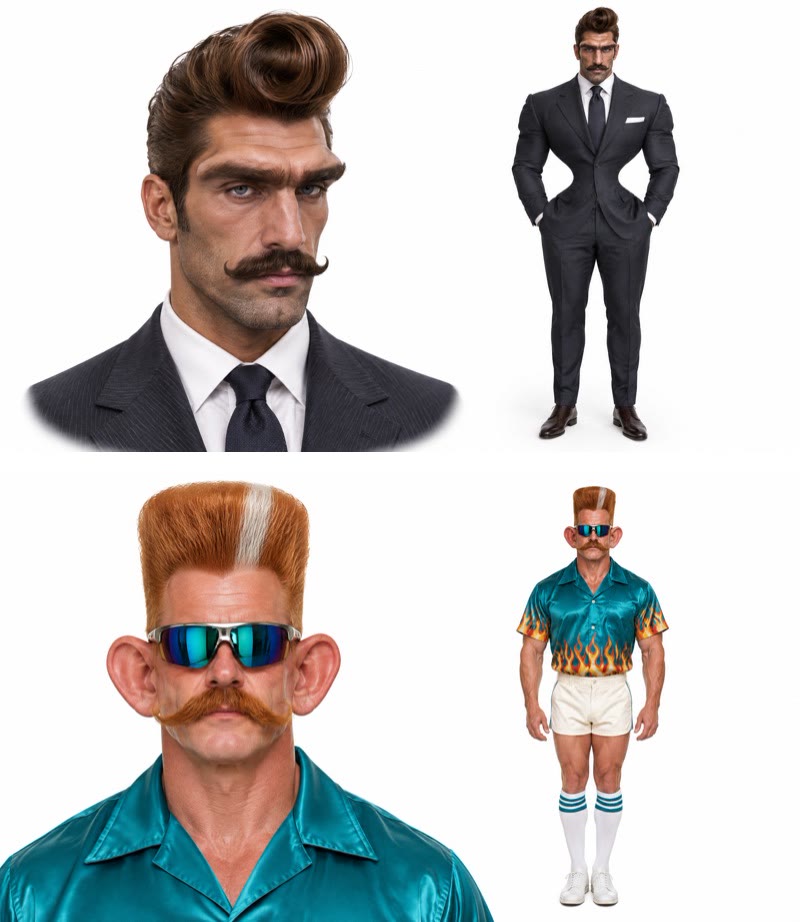
- Add two photos, in order. The first slot is who lands the kick, the second is who gets knocked out. Head-to-toe photos work best, because the outfits in the photos are what you fight in. Ask your friend before you use their photo.
- Generate and download. The Generate button shows the cost before you start (180 credits on November 17, 2026). Our video was ready in about three minutes; download the watermark-free MP4 from My Videos.
If you don’t have credits yet, the $5.99 starter pack on the pricing page gives 540 credits, enough for three Joaquin Buckley Kick AI videos at 180 credits each, with no subscription. New accounts get 75 free credits, which isn’t enough for one.
Which Two Photos Work Best for the Joaquin Buckley Kick?
Two head-to-toe photos of two people who look clearly different work best for a Joaquin Buckley Kick AI video. Both fighters are on screen from head to toe for most of the clip, and the model has to keep two people apart while they tangle up in the caught kick. Our two images were deliberately far apart, a dark pinstripe suit with brown hair against a turquoise flame shirt with an orange flat-top, and in the 7-second version each person kept their own face, hair and outfit in every frame.
- Order matters. Photo 1 always lands the kick; photo 2 always goes down. Swap the order to swap the winner.
- Head to toe. Legs and shoes are the whole point of a kick. A head-and-shoulders photo works, but the clothes below are guessed.
- Two different looks. Different hair, colors and outfits make it easy for the model, and for your viewers, to tell who is who.
- One person per photo, face visible. No group photos, and no hands, hats or hair over the eyes. Our photo 2 wore sunglasses and it held up, but clear eyes are the safer bet.
- Only adults who agreed. Photos of Joaquin Buckley, other fighters or any public figure are not allowed, and your friend should be fine with being the one on the mat.
Can We Do the Buckley Kick in a Suit Instead of Fight Shorts?
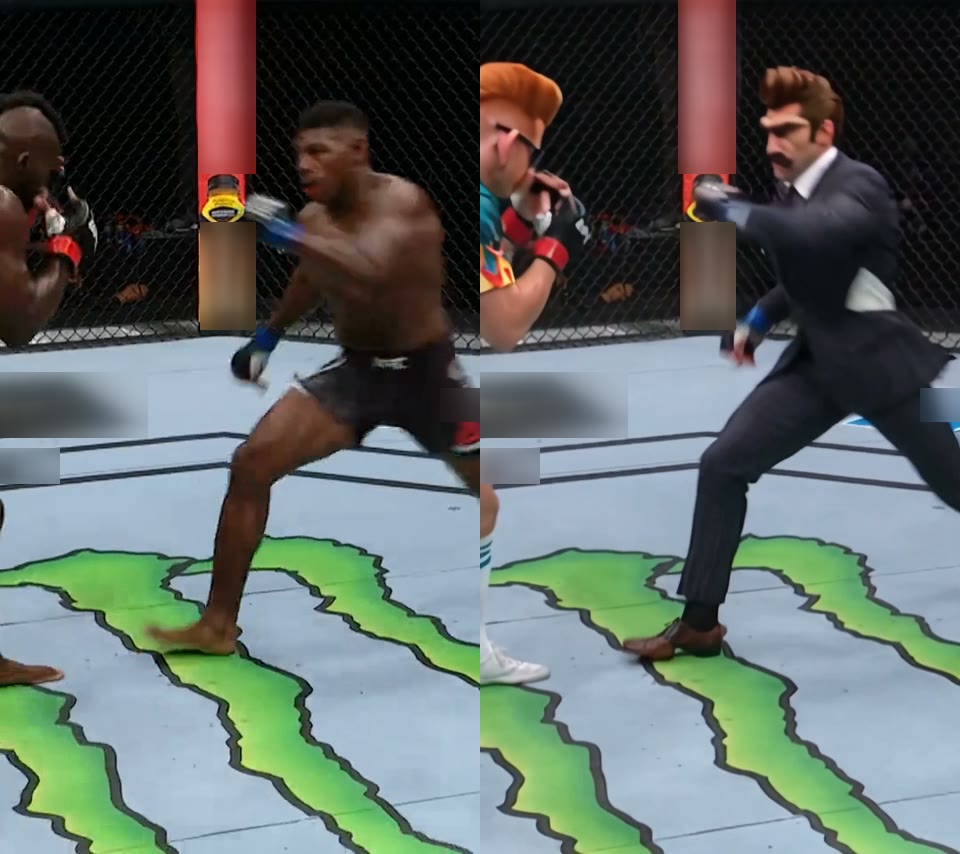
Yes. The Joaquin Buckley Kick AI template keeps the clothes from each photo, so you can land the kick in a suit, a wedding dress or a costume, and your friend goes down in whatever they wore. We tested it with a pinstripe suit, a white shirt, a tie and brown dress shoes against a flame-print shirt, white shorts, striped tube socks and white sneakers. The suit jacket held its shape through the spin, the trousers stayed trousers mid-kick, and the flame shirt was still flaming when he hit the mat.
That is the point of difference with templates that redraw everyone as a shirtless fighter in shorts: here the joke is a man in a suit throwing the most famous kick in UFC history.
The Exact Settings and Prompt We Used
Behind the one-tap template is a video-to-video run on Wan 3.0: a 7-second cut of the knockout sets the kick, the fall, the referee and the camera, and your two photos set who is fighting. These were the settings on November 17, 2026.
| Setting | Value |
|---|---|
| Model | Wan 3.0 |
| Resolution and length | 480p · 7 seconds · vertical 9:16 (480 × 854) |
| Inputs | 2 reference images + the 7-second knockout clip |
| Audio | On (arena sound) |
| Cost and time | 180 credits · about 3 minutes · first try |
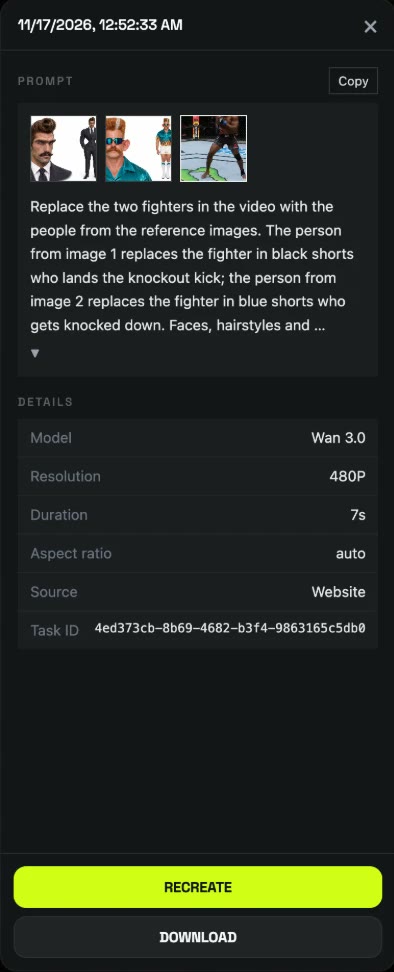
This is the prompt we used. It points at each fighter by what they wear in the clip and never describes the people in the photos, so the same prompt works with any two photos.
Replace the two fighters in the video with the people from the reference images. The person from image 1 replaces the fighter in black shorts who lands the knockout kick; the person from image 2 replaces the fighter in blue shorts who gets knocked down. Faces, hairstyles and clothing follow the reference images for each person. Keep everything else from the original video exactly: the octagon cage, mat, lighting, crowd, referee, camera angles, cuts, slow-motion replays, timing and motion.
You don’t need any of this to make one: the Joaquin Buckley Kick AI template already has the clip, the prompt and the settings.
What Went Wrong in Our 15-Second Test (and Why the Template Is 7 Seconds)
Our first run used a longer 15-second cut that kept the celebration close-up, a slow-motion replay and the walk to the cage wall. It cost 385 credits and took about five minutes, and most of it looked right, but from about 8.3 to 10 seconds, in the close-up of the winner crouching and shouting, the man in the suit had his friend’s head: the orange flat-top, the blue sunglasses and the big ears on top of the pinstripe suit. The two faces got mixed up in exactly the shot people look at most.
We tried two fixes. Adding one sentence to the prompt (“The person from image 1 keeps the face, hair and moustache of image 1 in every shot, including the close-up after the knockout and the slow-motion replay”) fixed the close-up in a second 15-second run. But the knockout itself is over by second 5, so we cut the clip to its first 7 seconds instead. The 7-second version kept both faces apart on the first try, costs less than half (180 credits instead of 385) and is done in about three minutes.
| Run | Length | Credits | Time | Result |
|---|---|---|---|---|
| 1 | 15s | 385 | ~5 min | Faces mixed up in the 8.3–10s close-up |
| 2 | 15s + face-lock sentence | 385 | ~5.5 min | Close-up fixed |
| 3 (template) | 7s | 180 | ~3 min | Both faces right, first try |
Joaquin Buckley Kick AI Template vs Face-Swapping the Clip Yourself
You can also put your face on the knockout with a face-swap tool such as HeyGen or CapCut, but it works differently. A face swap pastes one face onto the original fighter, so you keep his body, his shorts and his skin, and the person who gets knocked out is still the original opponent. The template redraws both fighters from your two photos, outfits included, so it is you and your friend. We haven’t tested the face-swap tools for this clip.
| This template | Face-swap tool | |
|---|---|---|
| What changes | Both fighters: faces, hair and clothes | Usually one face |
| Your friend in it | Yes, as the one who goes down | Only if the tool swaps two faces |
| Outfit from your photo | Yes | No, the original fight shorts stay |
| Clip to find and trim | None | You bring the clip |
| Cost per video | 180 credits, about $2.00 | The tool’s own pricing |
If you want you and your friend in the fight, make a Joaquin Buckley Kick AI video here; if you want to experiment with your own clip and prompt, the settings above are a good starting point.
Joaquin Buckley Kick AI Video FAQ
What is the Joaquin Buckley kick?
It’s the spinning back kick Joaquin Buckley used to knock out Impa Kasanganay at UFC Fight Island 5 on October 10, 2020, after Kasanganay caught his kick. According to ESPN, the UFC’s tweet of it became the most-liked (359,000) and most-viewed (12.8 million) in UFC history, and #joaquinbuckley has 500 million TikTok views as of November 17, 2026.
How much does a Joaquin Buckley Kick AI video cost? Is it free?
A Joaquin Buckley Kick AI video costs 180 credits, about $2.00, so the $5.99 starter pack of 540 credits makes three, with no subscription. The 75 free signup credits aren’t enough for one. See pricing; failed runs are refunded automatically.
Can I make it with only one photo?
No. The template needs two photos, one for each fighter. For a one-photo sports moment, try the Mbappe Run vs Argentina AI template.
Is the Joaquin Buckley Kick AI video real footage?
No. It’s an AI-made parody, and both fighters come from your photos, not Joaquin Buckley or Impa Kasanganay. We are not affiliated with Buckley, Kasanganay or the UFC; label it as AI-made when you post, and only post your friend going down if they agreed.
Is “That’s got to be AI” the same thing?
No. That’s what Buckley joked on a Kick livestream after Mike Malott knocked him out at UFC Edmonton on October 17, 2026, as Yahoo Sports reported. The Joaquin Buckley Kick AI template is about his 2020 spinning back kick win.
Is the video vertical, and does it have sound?
Yes to both. The export is a vertical 9:16 MP4, 7 seconds at 480p with arena sound, ready for TikTok, Reels or Shorts.
Why did the two faces get mixed up?
Usually it’s two people who look alike, or a longer clip with close-ups, as in our 15-second test. The template uses the 7-second version that kept both faces apart, so run it again with two people who look clearly different.
Want another sports moment? The Mbappe Run vs Argentina AI works from one photo, and our Mbappe Run guide shows how.