How to Make the Stereo Love Funk AI Dance Video (2 Photos)
What’s new on this page
- — Published: our first Stereo Love Funk AI Dance video (Wan 3.0, video to video, 480p, 10 s, 285 credits, first try, about 4 minutes) with a man in a camel suit and a green alien, plus the full prompt, frames, photo tips and fixes.
A Stereo Love Funk AI Dance video puts two people, or a person and a character, into the TikTok dance set to the funk remix of "Stereo Love": arms crossed, finger points, a hip bounce, all in sync. Most Stereo Love Funk AI tools take one photo and leave the song for you to add. We made the clip above on 9 November 2026 from two photos, one for each dancer, and the sound came with it. Here is exactly how: what we uploaded, what it cost, the prompt behind it and how to fix a result that doesn't look right.
What is the Stereo Love Funk dance?
The Stereo Love Funk dance is a short TikTok routine set to "STEREO LOVE FUNK", a sound credited to Cotneus, PVNZER and Kngmn that remixes the accordion hook of "Stereo Love" by Edward Maya and Vika Jigulina (2009) into Brazilian-style funk. According to tokchart, the sound was first used on 25 May 2026, peaked at #5 on its worldwide TikTok audio chart, and was in 1,337,158 TikTok videos as of 9 November 2026. It is also the sound behind the October 2026 Nightwing costume trend, which is a different format.
What happens in a Stereo Love Funk AI Dance video, second by second?
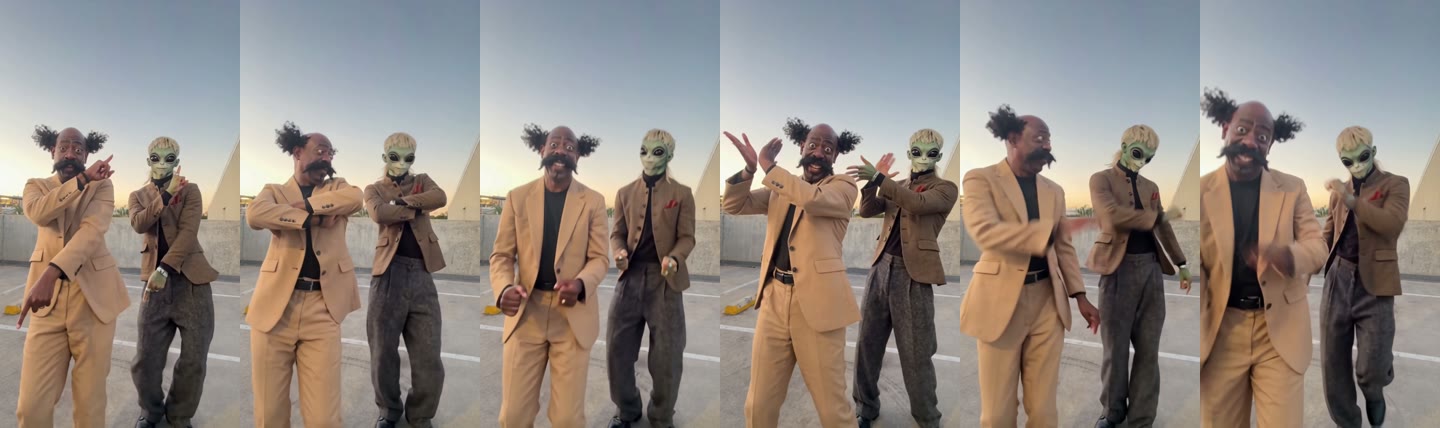
A Stereo Love Funk AI Dance video keeps the routine, the rooftop and the camera, and changes who dances. In our 10-second result:
| Seconds | What happens |
|---|---|
| 0–2 | Both dancers point to the side with one hand and down with the other |
| 2–4 | Arms cross over the chest |
| 4–6 | Small hip bounces, hands near the waist |
| 6–8 | A hand wave and arms opening out |
| 8–10 | One more point, then a lean toward the camera to finish |
How to make the Stereo Love Funk AI Dance video in 4 steps
1. Open the Stereo Love Funk AI Dance template
Go to the Stereo Love Funk AI Dance page. Wan 3.0, 480p, 10 seconds and sound are already set, and the Generate button shows the cost (285 credits) before you spend anything. You don't write a prompt.
2. Upload the left dancer and the right dancer
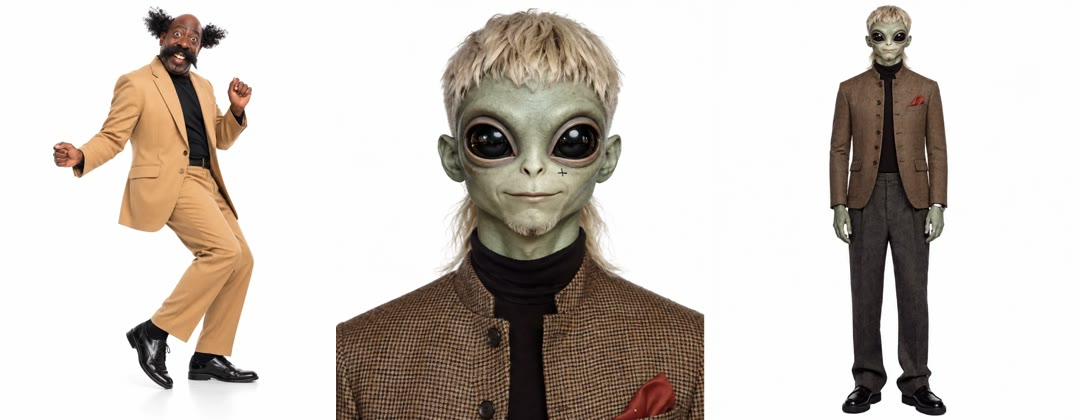
Slot 1 is the left dancer, slot 2 the right dancer. Each photo should show one adult or one character, full body or knees up, face clear. We used a full-body studio shot of a man in a camel suit with wild hair and a big moustache, and a green alien with a blond mullet in a tweed jacket (a close-up plus a full-body shot).
3. Press Generate
Press Generate. Ours finished in about 4 minutes and was saved to My Videos, so you can close the tab and come back.
4. Check both dancers, download, post
Watch seconds 2–4, when the arms cross over the chest, to check each dancer kept their own outfit, and the last second, when they lean in, to check the faces up close. Then download the MP4, which has no watermark.
Our Stereo Love Funk AI Dance test: settings and cost
| Setting | Our run |
|---|---|
| Model | Wan 3.0 (video to video) |
| Inputs | 2 photos (one per dancer) + the trend clip |
| Resolution | 480p, aspect ratio auto (vertical, 480×854) |
| Length | 10 seconds, with sound |
| Cost | 285 credits (about $3.16) |
| Time | About 4 minutes |
| Tries | 1, first try worked |
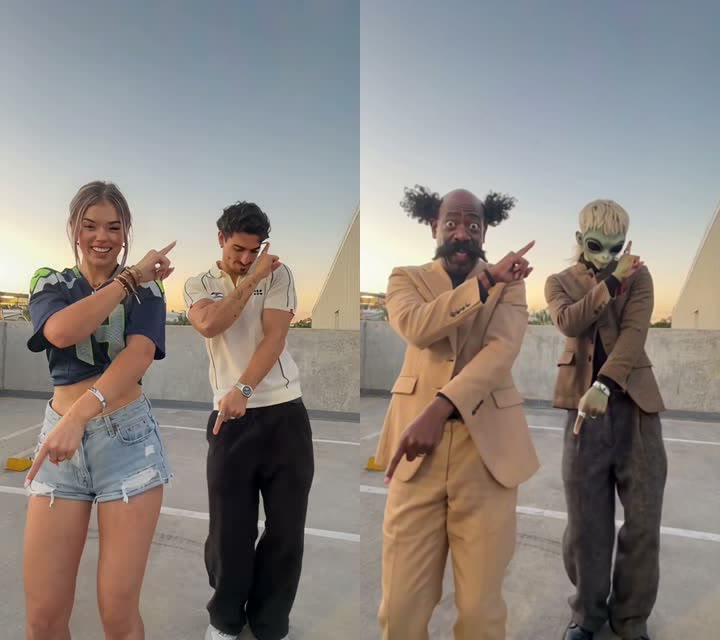
The template uses this exact run. Under the hood it is a video-to-video edit: the model gets the trend clip and your two photos, and the prompt tells it who goes where. This is the prompt, already built into the template:
Replace the person on the left with the character from IMG 1, and the person on the right with the character from IMG 2. Match each reference exactly: face, head shape, skin, hair and outfit all come from the reference photo, not from the original video. Keep everything else from the source clip unchanged: the background, camera movement, lighting, timing, and every pose, gesture and dance move of each person, frame by frame. The new characters should move naturally with consistent proportions, with no flicker or face drift. Do not add extra people or objects.
"On the left" and "on the right" pin each photo to one dancer, which is why the camel suit never ended up on the alien. "Not from the original video" makes the outfits come from your photos instead of the trend clip, and "no flicker or face drift" kept the alien's face stable through the fast arm moves.
Which photos work best for a Stereo Love Funk AI Dance video?
- One dancer per photo. Each slot is one dancer, so a second face in the same photo can get mixed in.
- Full body or knees up. Both dancers are seen head to toe, so a face-only selfie leaves the body and clothes to guesswork.
- Outfit you want to dance in. Clothes come from your photo, not the trend clip: our camel suit and tweed jacket both stayed on.
- Characters: original, front-facing, arms visible. Our alien worked because the full-body shot showed its hands and clothes. Don't use copyrighted cartoons.
- Adults only. No photos of children, celebrities or public figures.
Stereo Love Funk AI Dance ideas: friend, partner, alien, mascot
- You and your best friend: the classic version. Tag each other when you post.
- You and your partner: a couple version without learning the steps.
- You and an alien or monster: the mismatch is the joke. Our test is this one.
- Founder and mascot: a brand mascot doing the finger points is an easy Reel.
- Only one photo: use yours in slot 1 and keep the sample dancer in slot 2.
Want a dance with a whole crew behind you instead of one partner? Try the Bakar Lonyo AI dance.
Why doesn't my Stereo Love Funk AI Dance video look right?
- A dancer doesn't look like the photo: usually a face-only selfie or two people in the photo. Use one person, knees up or full body, and run the template again.
- The outfits got mixed: usually a photo where the clothes are cut off or hard to see. Use a full-length photo with one clear outfit.
- The character looks too human: usually a close-up with no body. Add a full-body image of the character, front-facing with arms visible.
- The wrong person is on the left: the left dancer is always slot 1. Swap the two photos and generate again.
Stereo Love Funk dance by hand vs with AI
Doing the Stereo Love Funk dance for real means learning the routine, getting both of you to the same rooftop at sunset and filming it in one take. The Stereo Love Funk AI dance generator needs two photos and about 4 minutes, at about $3.16 a video, and works even when your dance partner is an alien. Dedicated Stereo Love Funk sites we checked on 9 November 2026 list $9.90 per video. See pricing for packs.
How to post your Stereo Love Funk AI Dance video
The video is vertical 9:16 with the sound already in it, so post it as is on TikTok, Reels or Shorts. A caption like "us when Stereo Love Funk comes on" works; say it's AI, tag the other dancer and add #stereolovefunk and #stereolove.
Stereo Love Funk AI Dance FAQ
Is there a free Stereo Love Funk AI Dance generator?
Not fully. New accounts get 75 free credits and one Stereo Love Funk AI Dance video takes 285. The one-time $5.99 trial pack (540 credits) covers one video at about $3.16 and leaves 255 credits, and failed renders are refunded. See pricing.
What song is the Stereo Love Funk dance?
It's "STEREO LOVE FUNK" by Cotneus, PVNZER and Kngmn, a funk remix of "Stereo Love" by Edward Maya and Vika Jigulina (2009). The AI video comes with the sound already in it.
Can I do the Stereo Love Funk dance with a cartoon or an alien?
Yes. Our test used a green alien as the right dancer and it kept its skin, eyes, hair and tweed jacket for all 10 seconds. Use an original character with a front-facing, full-body image.
How many people can be in a Stereo Love Funk AI Dance video?
Two: one dancer per photo, side by side. If you only have one photo, keep the sample dancer in the second slot.
Why doesn't the dancer look like me?
Usually it's a face-only selfie or a photo with two people. Use one adult, knees up or full body with the face clear, then run the Stereo Love Funk AI Dance template again.
Do I need CapCut or an app?
No. It runs in your browser on phone or computer: upload two photos, press Generate and download the MP4.