How to Make the Rubber Band Prank AI Video (2 Photos)
What’s new on this page
- — Published: our first Rubber Band Prank AI video (Wan 3.0, video to video, 480p, 14 s, 360 credits, first try, about 4.5 minutes), with the prompt, frames, photo tips and fixes.
A Rubber Band Prank AI video puts you and a friend into the kitchen prank that backfires: you stretch a long green band at their head, it snaps back into your own mouth, they turn around, and you grab something off the counter and pretend to be busy. We made the clip above on 10 November 2026 from two photos. Here is how to make a Rubber Band Prank AI video yourself: what we uploaded, what it cost, the prompt behind it and how to fix a face that doesn't look right.
What is the Rubber Band Prank AI trend?
The Rubber Band Prank AI trend is a remake of a couple's kitchen video in which one person aims a long neon-green resistance band at the other's head, lets go, and gets it in their own mouth. It's also called the rubber band prank backfire or the rubber band prank gone wrong. In early November 2026 it turned into an AI template trend on TikTok. The funniest part comes after the snap: the target hears it and turns around, and the prankster, holding their mouth, suddenly finds something very important to do on the counter.
What happens in a Rubber Band Prank AI video, second by second?
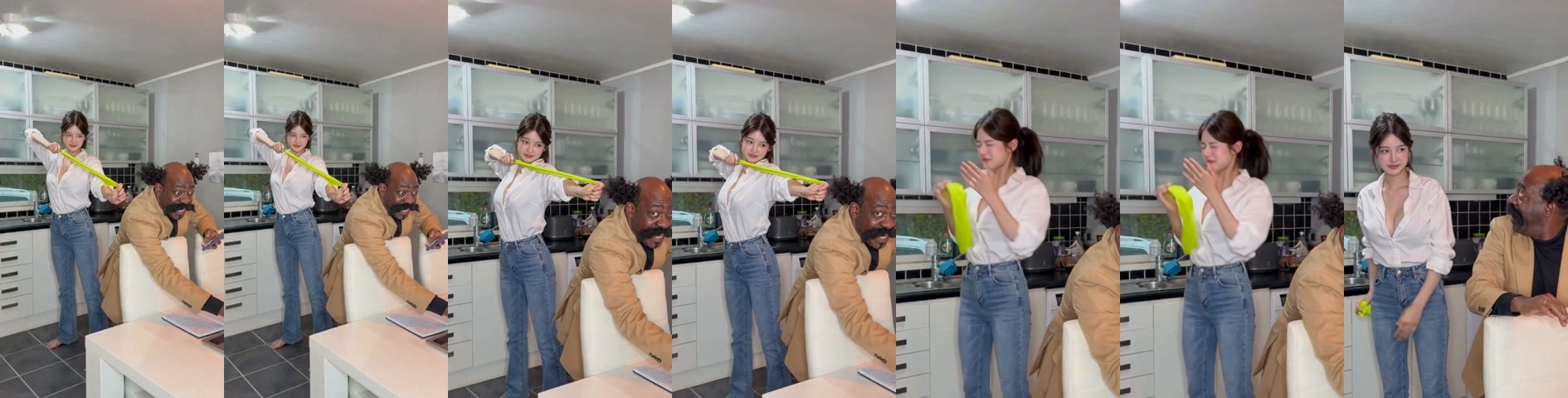
A Rubber Band Prank AI video keeps every beat of the prank and the kitchen, and changes only the two people. In our 14-second result:
| Seconds | What happens |
|---|---|
| 0–4 | The prankster stands behind the friend, who leans on a chair looking at a tablet, and pulls the green band back to aim at their head |
| About 4 | The band snaps back into the prankster's mouth; a hand flies up to cover it |
| 5–6 | The friend turns around; the prankster grabs a small item from the counter |
| 6–13 | The prankster shuffles around holding their mouth, acting busy |
| 13–14 | The friend glances back again |
How to make the Rubber Band Prank AI video in 4 steps
1. Open the Rubber Band Prank AI template
Go to the Rubber Band Prank AI generator. Wan 3.0, 14 seconds, 480p and sound are already set, and the Generate button shows the cost (360 credits) before you spend anything. You don't write a prompt.
2. Upload the prankster photo (slot 1)
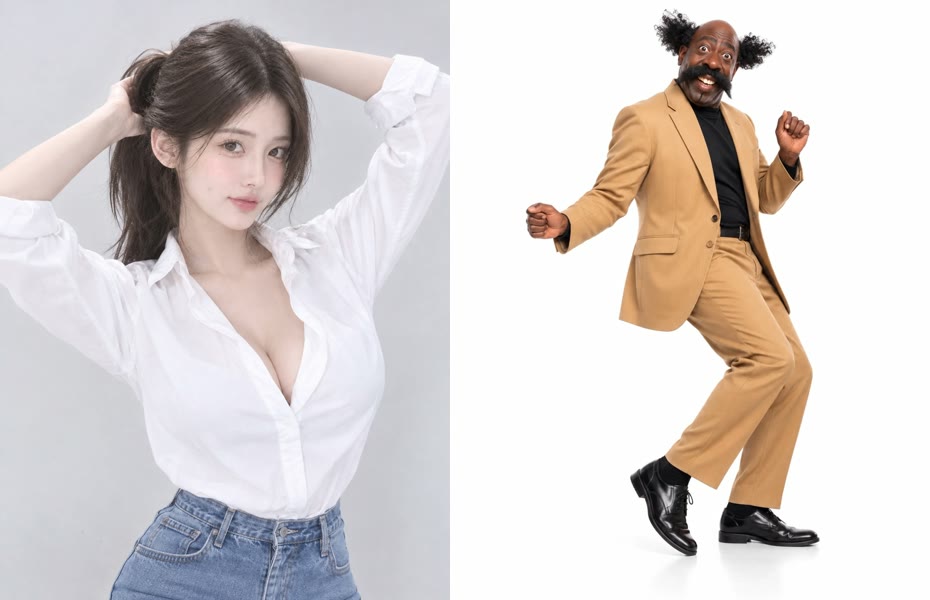
Slot 1 is the one who gets snapped: usually the friend who always starts the pranks. Use a waist-up or full-body photo of one person with the face clear, because the wince and the fake smile are the punchline. Our prankster kept her white shirt, jeans and ponytail the whole way through.
3. Upload the friend photo (slot 2)
Slot 2 is the friend leaning on the chair who turns around: you, or someone who has said yes. Their face shows when they look back, so pick a clear front-facing photo. Our friend kept his tan blazer and moustache.
4. Generate, check the snap, download
Press Generate. Ours finished in about 4.5 minutes and was saved to My Videos, so you can close the tab. Before posting, watch seconds 4 to 6: the band should hit the prankster's mouth and the friend should turn around. Then download the MP4, which has no watermark.
Our Rubber Band Prank AI test: settings and cost
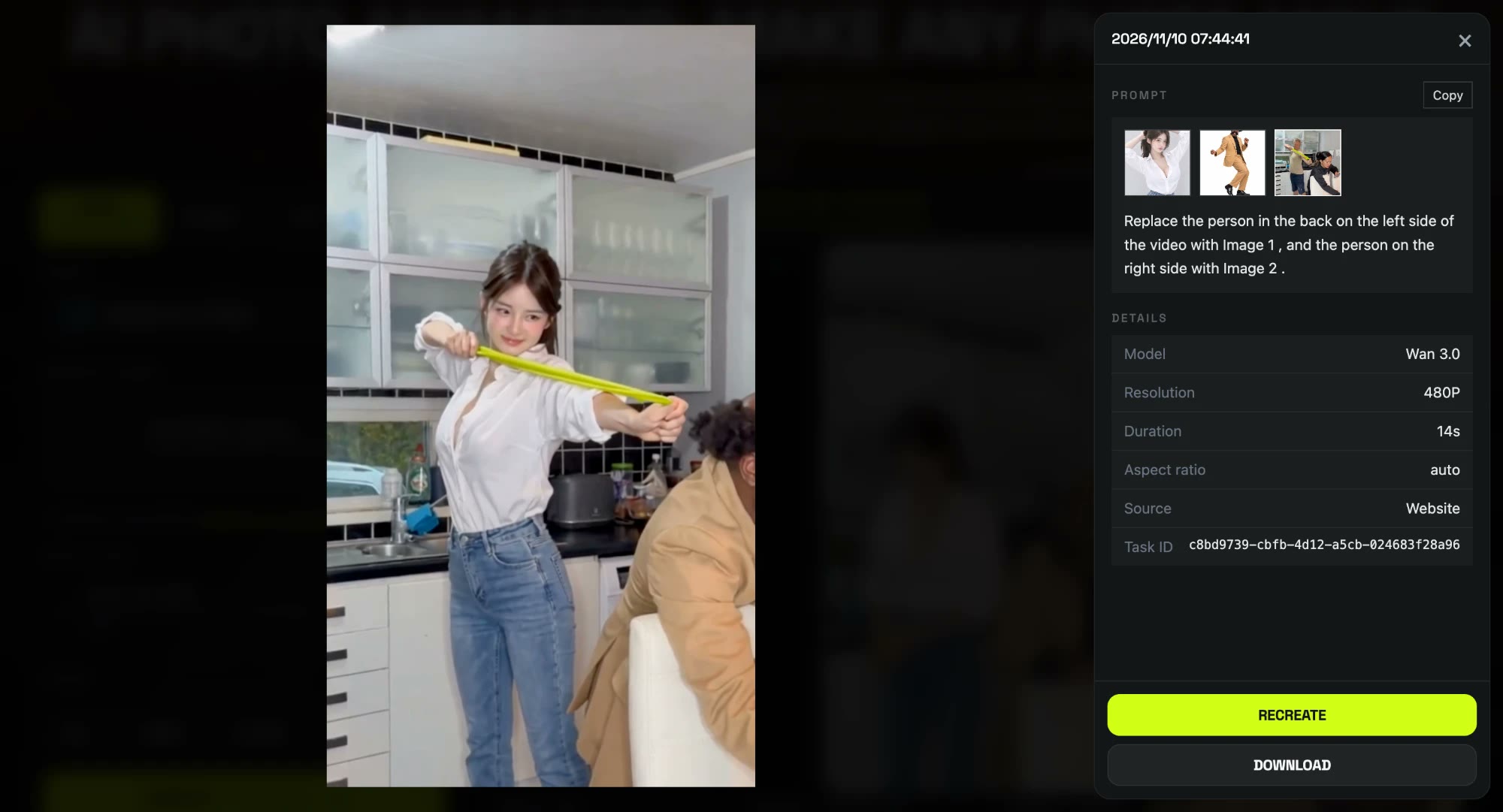
| Setting | Our run |
|---|---|
| Model | Wan 3.0 (video to video) |
| Inputs | 2 photos + the 14 s trend clip |
| Resolution | 480p, aspect ratio auto (vertical 480×854) |
| Length | 14 seconds, with sound |
| Cost | 360 credits (about $3.99 with the trial pack, $3.60 on Lite) |
| Time | About 4.5 minutes |
| Tries | 1, first try worked |
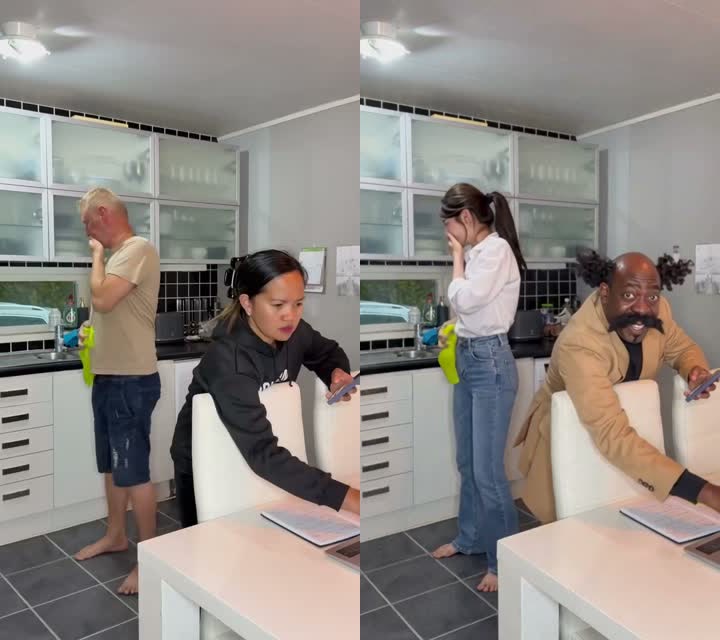
The template uses this exact run. Under the hood it's a video-to-video edit: the model gets the trend clip and your two photos, and the prompt says which photo plays which person. This is the prompt we used, already built into the template:
Replace the person in the back on the left side of the video with Image 1, and the person on the right side with Image 2.
Pointing at each person by position ("in the back on the left", "on the right side") is what kept the roles straight: the prankster stayed the prankster and nobody's clothes moved to the other person. A short prompt was enough here because the clip has only two people and one fixed camera.
Which photos work best for a Rubber Band Prank AI video?
- Waist up or full body. The prankster stands in full view for 14 seconds.
- One person per photo. Each slot plays one role; a second face in the photo can get mixed in.
- A clear, uncovered face. The band lands on the mouth, so sunglasses, masks or a hand over the face lose the reaction.
- Clothes you want to see. Outfits come from the photos.
- Only people who agreed. Use yourself or friends who said yes, 18 or older; no celebrities or children.
Why doesn't my Rubber Band Prank AI video look like my photos?
- The face looks off: usually a small or tilted face. Use a clear, front-facing single-person photo and run the template again.
- Features mixed between the two: usually a group photo. Crop to one person per slot.
- Roles swapped: the prankster must be in slot 1 and the friend in slot 2.
- A render failed: credits come back automatically; run it again.
How to post your Rubber Band Prank AI video
Post it as it is: 9:16 with sound fits TikTok, Reels and Shorts without cropping. Tag the friend with a caption like "it was supposed to hit you", say it's AI and add #rubberbandprank and #prankgonewrong. Want another prank? In the Dog Elevator Prank AI effect your pet kicks you into a lift.
Rubber Band Prank AI FAQ
Is there a free Rubber Band Prank AI generator?
Not fully. New accounts get 75 free credits and one Rubber Band Prank AI video takes 360. The one-time $5.99 trial pack (540 credits) covers one video at about $3.99, with 180 credits left over, and failed renders are refunded. See pricing.
Who gets snapped in the Rubber Band Prank AI video?
The person in slot 1. The Rubber Band Prank AI template puts slot 1 behind with the band and slot 2 on the chair; swap the photos to swap roles.
Does anyone get hurt in the video?
No. The video is AI-generated; nobody fires a real rubber band, and the snap leaves no marks.
Can I make it with just one photo?
We only tested the two-photo version, with one person in each slot, so that is what we recommend.
How long is the video and does it have sound?
14 seconds, vertical, with sound. Ours was 480p and took about 4.5 minutes.
Do I need an app?
No. It runs in the browser, and the MP4 downloads without a watermark.