How to Make a Cat Taxi AI Video From Two Photos
What’s new on this page
- — Published with the Wan 3.0 test and photo order.
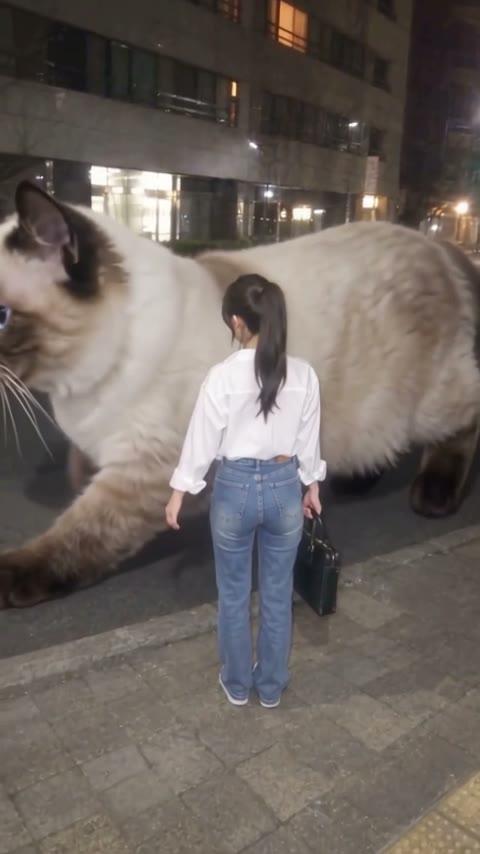
In our Cat Taxi AI test, the passenger waves from the curb and a blue-eyed giant cat walks up. The passenger pets the cat, climbs onto its back and rides out of frame.
What happens in the Cat Taxi AI video?
In the first few seconds, the passenger hails the cat from the curb. Around the middle, the cat crouches beside the passenger and gets a pat. The passenger then climbs on, and the cat heads down the street. The exported clip is 480 × 854, runs about 12 seconds and has an audio track. We used Wan 3.0 at 480p with the duration set to 13 seconds and audio enabled.
How do you make a Cat Taxi AI video?
1. Open the Cat Taxi AI template
Open the two-photo template in your browser and watch the example to see where each role appears.
2. Add your cat to Photo 1
A cat photo with visible ears, eyes and coat markings gives the model the details it needs as the cat approaches the camera.
3. Add the passenger to Photo 2
Use a single adult portrait. Hair and clothing matter because the passenger starts with their back to the camera. Use your own photo or get the passenger’s permission.
4. Check the credits and generate
Check the credit charge on Generate. Once the result appears in My Videos, play it through and check the cat’s markings and the passenger’s appearance before downloading.
Which photos work for Cat Taxi AI?
A sharp cat face
Look for visible eyes, ears and muzzle markings.
Room around the cat
Leave the shoulders and coat visible when possible.
One adult passenger
Use a portrait with a clear outline and visible clothes.
Even lighting
Choose a brighter photo if the face or fur is in shadow.
Where did Cat Taxi AI come from?
By November 2026, the nighttime giant-cat pickup was already appearing as a template. In the circulating clip, a giant calico crouches by the curb and carries away a passenger. The first upload remains unverified. See the early Giant Cat Taxi example.
Cat Taxi AI questions
How many photos does Cat Taxi AI need?
Use one cat photo in Photo 1 and one adult passenger photo in Photo 2.
What is the Cat Taxi AI trend?
A passenger waves from a curb at night, and a giant cat comes to give them a ride.
Is Cat Taxi AI free?
The tested settings calculate to 335 credits, above the 75-credit signup bonus. At $5.99 for 540 credits, that uses about $3.72 of the pack. Check the current charge on Generate. Failed generations return credits automatically.
How long is the Cat Taxi AI video?
Our Wan 3.0 test used a 13-second setting. The exported vertical 480p sample runs about 12 seconds and has an audio track.
How are my photos handled?
Uploads and generated videos are stored with your account. The model provider processes photos for generation. AI Photo Animator does not use your uploads to train models.