How to Make a No Scrubs AI Video Without Mixed-Up Faces
What’s new on this page
- — Published: our first No Scrubs AI video (Wan 3.0 Prime, video to video, 480p, 14 s, 12 shots, 3 photos, 550 credits, first try, 2 min 28 s).
A No Scrubs AI video puts you and two friends in the white space-station set of TLC's 1999 "No Scrubs" music video: the close-up finger point, the group steps, the metal corridor solo and the close-ups. The hard part isn't the dancing. It's keeping three people straight through 12 shots and 11 hard cuts, because that is exactly where multi-person AI videos start giving one friend another friend's face. We got it right on the first run and wrote down how.
Why Do Faces Get Mixed Up in a No Scrubs AI Video?
Faces get mixed up in a No Scrubs AI video because every hard cut makes the model work out again who is who, and this video has 11 of them in 14 seconds. Each new shot changes the angle, the distance and who is in frame, so a model that is only told "three people" can put the left friend's face on the lead, or give the lead the right friend's jacket.
- Many cuts, few seconds. Shots 4, 9 and 12 last half a second or less. There is almost no time for a face to settle before the next cut.
- People leave and come back. The lead is alone in the corridor (shot 7) and the left friend is alone in the close-up (shot 11). When the group comes back, the model has to put everyone back in the same spot.
- Look-alike or group photos. Three photos with the same light and similar hair, or one group selfie, give the model less to tell people apart.
- Leftovers from the original dancers. If the prompt doesn't say what the old performers looked like, their sweater, braid or jacket can stay on the new person.
Other No Scrubs AI generators say the same thing on their own pages: some note that every run is a new take and the backup dancers change between renders, and their fix for mixed-up faces is to change photos or models and run it again. That costs credits each time, so we tuned the setup until it worked on the first run.
How Do You Make a No Scrubs AI Video in 3 Steps?
You make a No Scrubs AI video on AI Photo Animator with three photos and one button; the template already has the model, the prompt and the shot list set up.
Step 1: Open the No Scrubs AI template
Go to the No Scrubs AI page. The template is open at the top with three photo slots: Center (the lead singer), Left and Right. The Generate button shows 550 credits.
Step 2: Upload one photo per spot
Photo 1 is the lead: the opening close-up, the corridor solo and the center of every group shot. Photo 2 dances on the left and gets the white close-up at 12.7 seconds. Photo 3 dances on the right. One person per photo; the three photos don't need to be taken together.
Step 3: Generate and download
Press Generate. Ours took 2 minutes 28 seconds and was saved to My Videos, so you can close the tab. Download the MP4 without a watermark and post it.

How We Kept All 3 People Straight Across 12 Shots
We kept all three people straight across the 12 shots by doing three things in the prompt and the settings. Each one fixes one of the causes above.
1. Write every cut and every position into the prompt
The prompt lists all 11 cut times (1.79 s, 2.54 s, 4.38 s and so on) and says, for each of the 12 shots, what the camera does and who stands where: "B left, A center, C right", "A alone", "close-up of B". The model never has to guess who comes back after a solo shot, because the answer is written down for that exact second.
2. Describe the original dancers so the model can drop them
The source dancers are real people with very recognisable looks: a platinum-blonde buzz cut and a cream cable-knit sweater in the center, a long dark braid and an olive bomber jacket on the left, a yellow striped track jacket on the right. We named each of those items and told the model not to keep any of them unless the new person's own photo has it. We also named who replaces whom by position ("the center person", "the left person"), so each spot has one clear owner.
3. Use Wan 3.0 Prime
We ran it on Wan 3.0 Prime, the stronger version of Wan 3.0 on our site. It costs more per second, but it held three separate identities through the cuts on the first run, which is cheaper than paying for two or three retries on a lighter model.
What Happens in the No Scrubs AI Video, Shot by Shot?
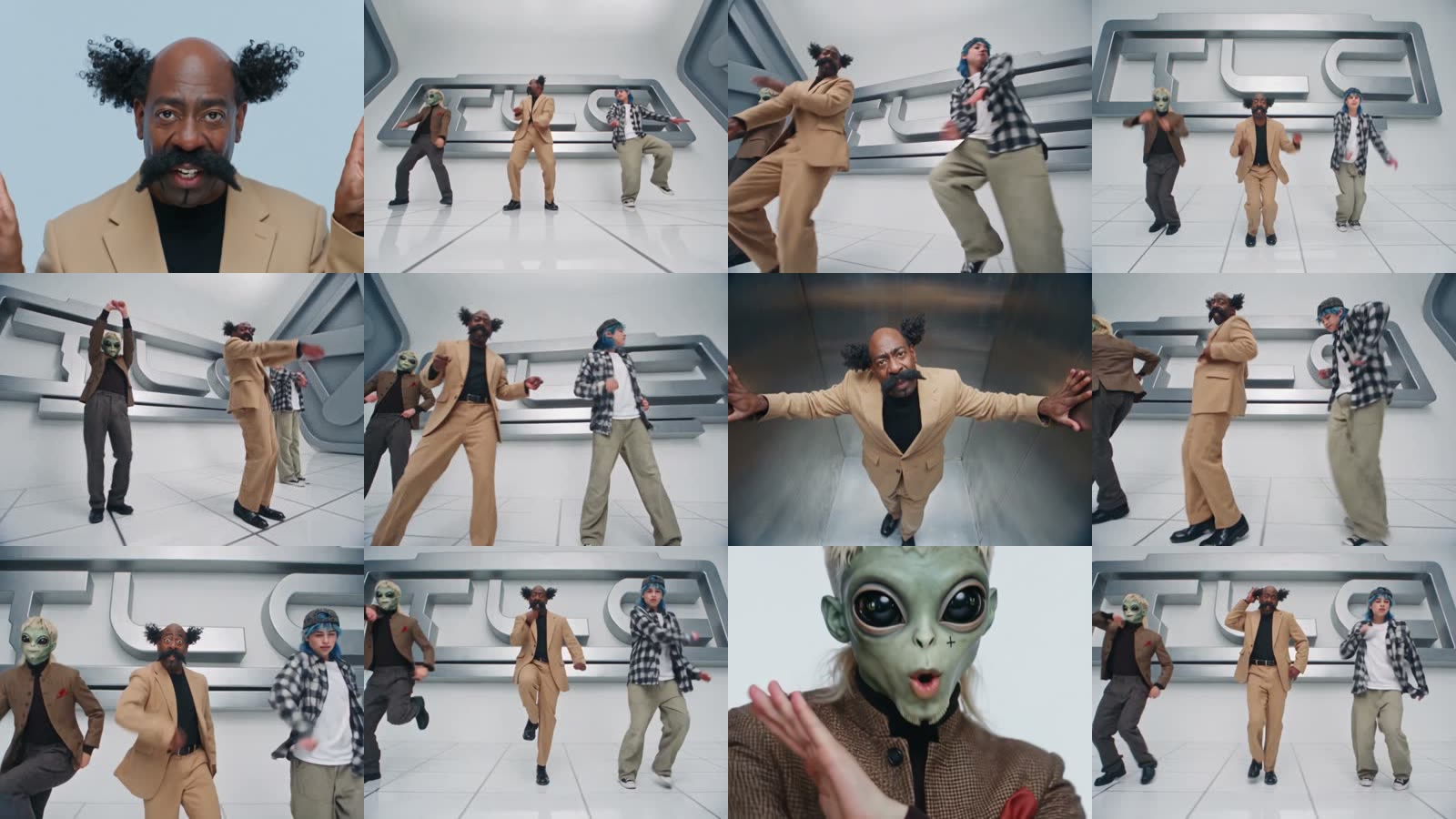
The No Scrubs AI video runs 14 seconds and cuts 11 times. This is the shot list from our result:
| Shot | Seconds | What happens |
|---|---|---|
| 1 | 0–1.79 | Close-up of the lead (center, Photo 1) singing against pale blue-grey, ending with a finger point at the camera |
| 2 | 1.79–2.54 | Wide front shot of the white studio: left, center and right dancing with bent knees |
| 3 | 2.54–4.38 | Low tilted shot: the lead waves one arm high, the right friend is close to the camera |
| 4 | 4.38–4.88 | Wide front shot, all three stepping in sync in a row |
| 5 | 4.88–6.54 | Tilted side shot: the left friend jumps with both arms overhead |
| 6 | 6.54–7.50 | Low medium-wide shot, arms moving in front of the chest |
| 7 | 7.50–9.38 | Top-down shot of the lead alone in a narrow metal corridor, arms to the walls, singing |
| 8 | 9.38–10.75 | Low wide shot, all three leaning and dancing |
| 9 | 10.75–11.33 | Medium front shot, all three stepping toward the camera |
| 10 | 11.33–12.71 | Wide front shot: the lead balances on one leg |
| 11 | 12.71–13.88 | White close-up of the left friend (Photo 2) singing, hand by the face |
| 12 | 13.88–14.00 | Back to the group, the lead with one hand at the head |
The Full No Scrubs AI Prompt We Used
This is the prompt behind the template, in English (2,909 characters, under the 4,000-character limit). You don't need to paste it anywhere: the No Scrubs AI template already uses it. It's here so you can see how the cuts, positions and the "do not keep" list are written.
Replace the 3 people in the source video with the 3 people from the reference images. Copy each person's face, hair (style, color, length), skin tone, body type, outfit and shoes exactly from their own photo, in every shot, also in close-ups. 3 different real people, never mix their looks. Ignore the background and lighting of the reference photos. Do NOT keep the source people's look: no blonde buzz cut, earrings, cream sweater or black wide trousers (center); no long dark braid, olive bomber jacket, white tank or light-blue jeans (left); no black curly hair, yellow striped track jacket or black cargo pants (right) — unless shown in their own photo. Baggy clothes stay baggy, jackets stay jackets. Hair moves naturally. Keep the source motion, choreography, timing, camera moves, framing, cuts and lighting exactly. Real-time speed, no slow motion, no speed-up. 14.00 s long. LIP-SYNC: music video, they sing along. Copy the source mouth frame by frame: jaw opens on vowels, lips close on m/b/p, no frozen smile, no delay. A sings in shots 1 and 7, B in shot 11; in group shots all three mouth the words. Natural blinks. 12 SHOTS, hard cuts at 1.79, 2.54, 4.38, 4.88, 6.54, 7.50, 9.38, 10.75, 11.33, 12.71, 13.88 s, no new cuts: 1 (0-1.79): close-up of A's head and shoulders, pale blue-grey background, singing, hands at frame edges, ends pointing a finger at the camera. 2 (1.79-2.54): wide front shot of the white studio: B left, A center, C right, bent knees, swinging arms. 3 (2.54-4.38): low tilted shot: A center waving one arm high, C close on the right, B partly on the far left. 4 (4.38-4.88): wide front, all three in a row stepping in sync. 5 (4.88-6.54): tilted side wide shot: B jumps with arms overhead, A and C dance on the right. 6 (6.54-7.50): low medium-wide: B left, A center, C right, arm moves in front of the chest. 7 (7.50-9.38): top-down into a narrow metal corridor: A alone, arms to the side walls, looking up, singing. 8 (9.38-10.75): low wide: A center, B left, C right, leaning and dancing. 9 (10.75-11.33): medium front: all three step toward the camera. 10 (11.33-12.71): wide front: A balances on one leg, B and C lean and jump. 11 (12.71-13.88): extreme close-up of B's face, plain white background, singing, open hand by the face. 12 (13.88-14.00): low medium-wide: A center, hand at the head, B and C dancing. WHO IS WHO: A = IMAGE 1, replaces the center person: lead singer, center of group shots, alone in the corridor and first close-up. B = IMAGE 2, replaces the left person, singer in the white close-up. C = IMAGE 3, replaces the right person. LOCATION unchanged: white futuristic studio, glossy white tiled floor, curved silver wall panels with the same large silver 3D letters; brushed steel corridor; white background in the close-up. No props. Only these 3 people, nothing in their hands. Five fingers per hand. No text, subtitles or watermark.
Person A, B and C map to the three photo slots: A is Image 1 (center), B is Image 2 (left), C is Image 3 (right).
What Settings Did Our No Scrubs AI Test Use?
| Setting | Value |
|---|---|
| Model | Wan 3.0 Prime |
| Mode | Video to video, with 3 reference photos |
| Length | 14 seconds, 12 shots |
| Resolution | 480p, widescreen (740×554) |
| Sound | Yes, the music from the No Scrubs video |
| Cost | 550 credits |
| Render time | 2 minutes 28 seconds |
| Tries | 1 (first run worked) |
Which Photos Work Best for a No Scrubs AI Video?
The best photos for a No Scrubs AI video are three separate single-person photos that look clearly different from each other, with the face and the outfit both visible.
- One person per photo. Crop a group selfie into three photos first.
- Face and outfit both visible. The video cuts between full-body group shots and face close-ups, so a waist-up or full-body photo with a clear face works best.
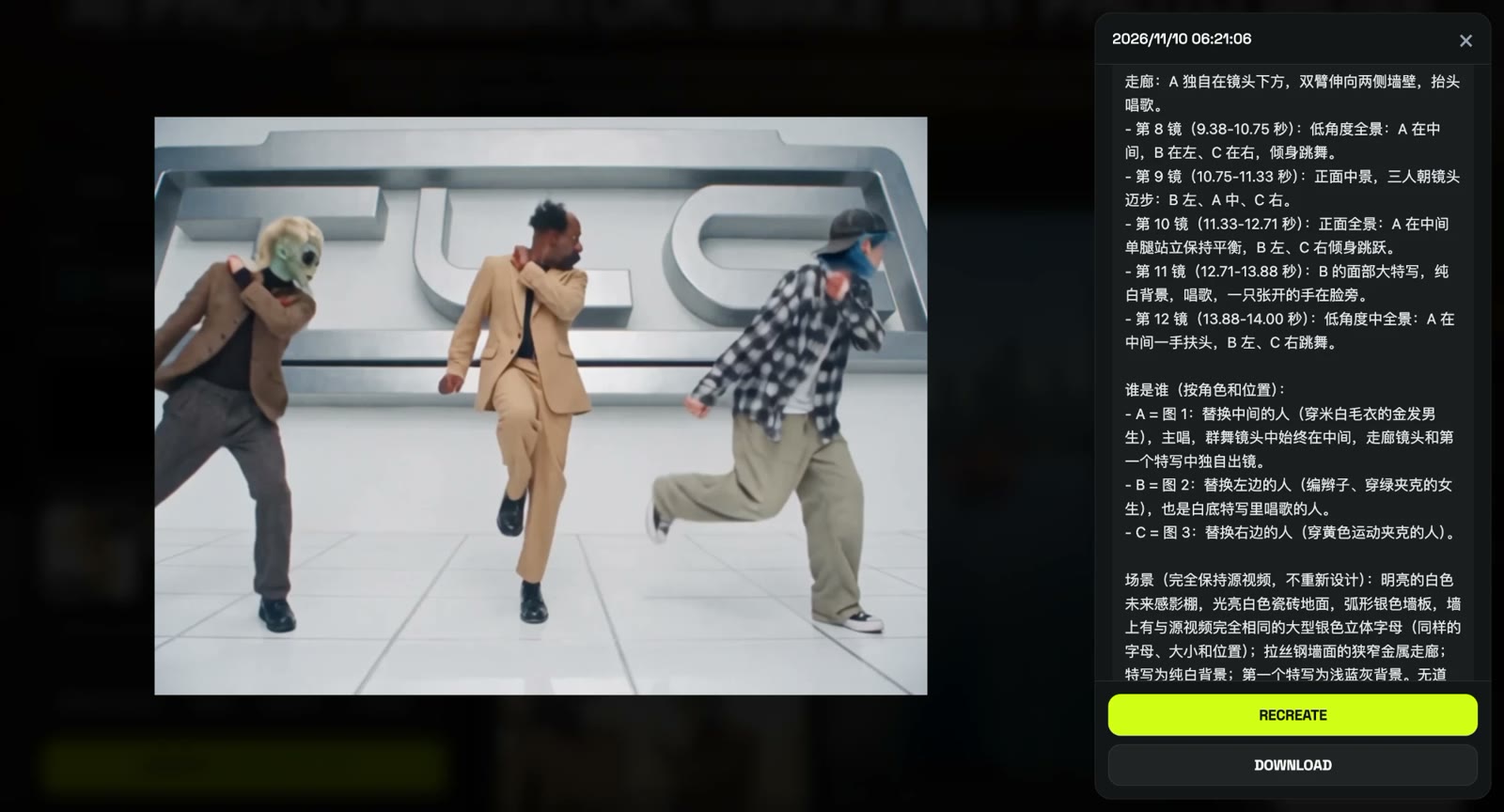
- Different looks help. Our three were a tan suit, a brown blazer with an alien mask and a plaid shirt with blue hair. The more different the three are, the easier they are to keep apart.
- Wear what you want on screen. Clothes, shoes, hats and masks come from the photo; the original dancers' outfits don't carry over.
- Pick the lead on purpose. Photo 1 gets the most screen time: the first close-up and the corridor solo.
What Is the No Scrubs AI Trend?
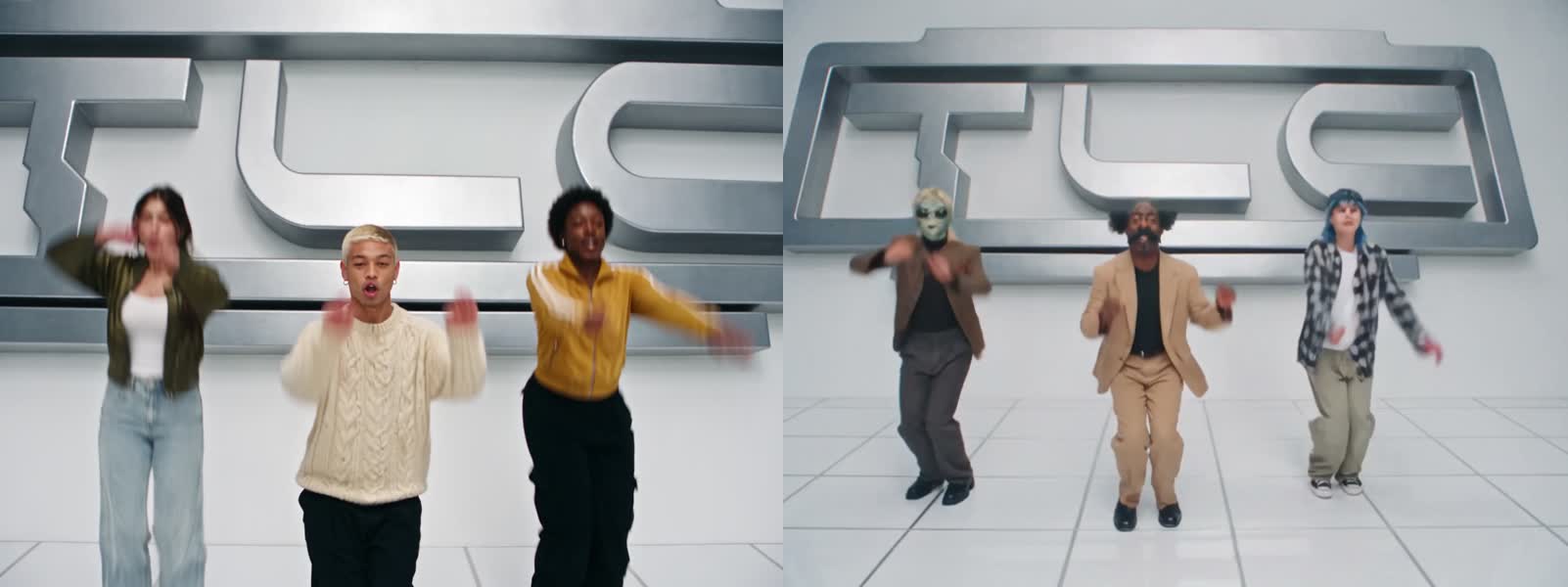
The No Scrubs AI trend recasts the music video for TLC's "No Scrubs", released on February 2, 1999 as the lead single from FanMail and directed by Hype Williams, with new people from photos. The song spent four weeks at No. 1 on the Billboard Hot 100. The earliest AI version we could find was posted on TikTok by @warped.ai on October 17, 2026, and by late October people were posting remakes daily, many through a CapCut template.
How Much Does a No Scrubs AI Video Cost?
A No Scrubs AI video costs 550 credits on AI Photo Animator, about $5.99 for your first one: new accounts get 75 free credits, and the one-time $5.99 trial pack adds 540, which together cover one video with 65 credits left. On the Lite plan ($9.99 for 1,000 credits a month) a video works out to about $5.49. No subscription is needed for the first one, and failed renders are refunded. See pricing.
For comparison, dedicated No Scrubs AI sites listed $8.99 to $9.99 for one video on their own pages when we checked on November 10, 2026; we did not generate on those tools.
Is there a free No Scrubs AI video generator?
Not fully. New accounts get 75 free credits and one No Scrubs AI video takes 550, so you need the $5.99 trial pack as well; together they cover one video with 65 credits left. Failed renders are refunded.
Do my friends need to be in the same photo?
No. Use three separate photos of one person each. They can be selfies taken on different days or in different cities.
Who goes in the middle of the No Scrubs AI video?
Photo 1 is the lead in the center, with the opening close-up and the metal corridor solo. Photo 2 is on the left and gets the white close-up; Photo 3 is on the right.
Can I make a No Scrubs AI video alone or with two people?
Yes. The template comes with sample dancers in all three spots: put your photo in the center and keep the samples on the left and right, or fill two spots and keep one sample dancer.
Does the No Scrubs AI video have the original song?
Yes. The video comes with sound, and the music is part of the No Scrubs music video.
Do I need CapCut?
No. The template runs in your browser on phone or desktop and you download an MP4.
Is this official TLC content?
No. It's a fan-made template, not affiliated with TLC or their label. Only upload photos of yourself or people who agreed to be in the video.