How to Make the Gas Station Dance AI Video From 3 Photos (Prompt Inside)
What’s new on this page
- — Published: two Gas Station Dance AI runs on Wan 3.0 Prime (video to video, 480p, 14 s, 3 photos, 590 credits, about 2–2.5 minutes each), including the photo-order lesson from the first run.
A Gas Station Dance AI video puts three of your friends into the viral road-trip clip: one dances on the lot at sunset, the one filming flips the phone into a selfie, and the third leans into the lens and dances by the car. The dance is the easy part. The hard part is getting each photo into the right shot without anyone swapping faces or clothes.
What Is the Gas Station Dance Trend?
The gas station dance trend is a one-take phone video in three parts: a dance on an open lot at a roadside stop, a selfie from the person filming, and a friend appearing by the car. The original is commonly credited to three friends on a road trip, Ravshan Dzhulpaev dancing, Mikhail Litvin filming and Adel Veigel by the car, and is usually traced to an Instagram post from July 1, 2024. Reposts tend to pair it with Akcent's "On and On", and the trend is also called the Litvin dance or the "Delai!" trend. AI remakes, where people put their own friends into the three spots, took off in October 2026.
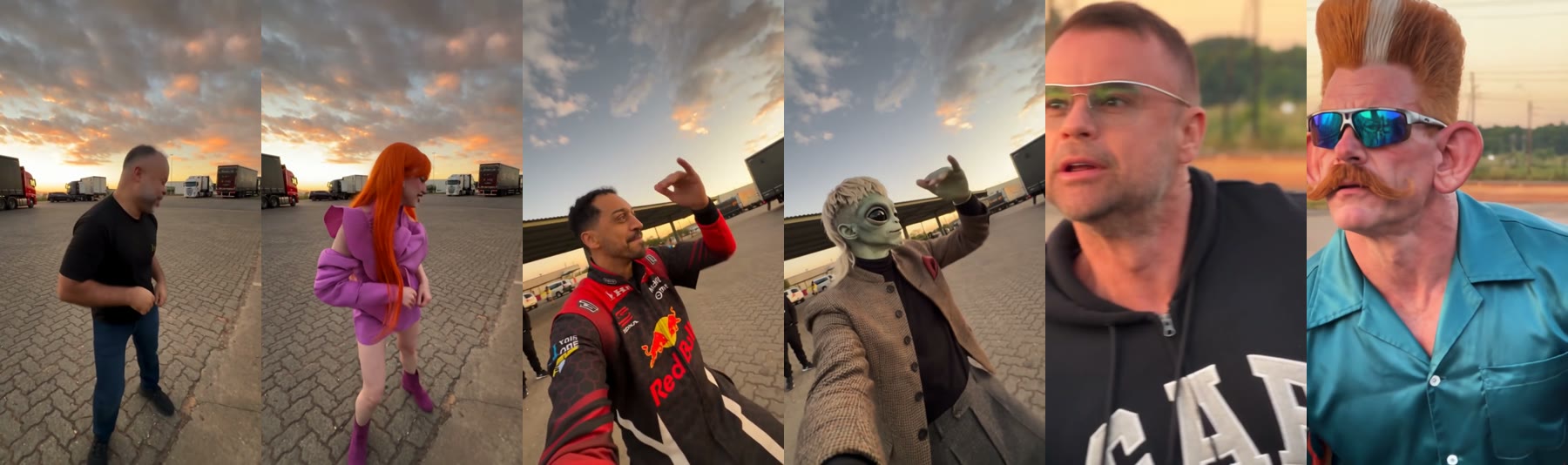
How Do You Make a Gas Station Dance AI Video in 3 Steps?
You make a Gas Station Dance AI video on AI Photo Animator with three photos and one button; the template already has the model, the prompt and the scene set up.
Step 1: Open the Gas Station Dance AI template
Go to the Gas Station Dance AI page. The template is open at the top with three photo slots, labeled the dancer, the one filming and the one by the car, and the Generate button shows the credits before you spend them.
Step 2: Upload three photos in the right order
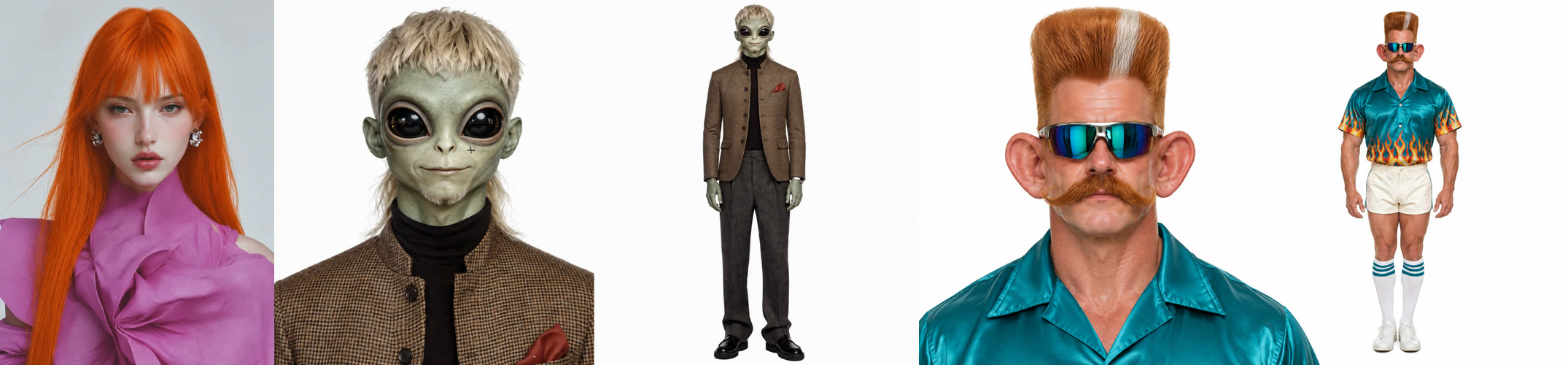
Slot 1 is the dancer, so use a full-body photo. Slot 2 is the person filming, who shows up in the selfie, so use a waist-up photo facing the camera. Slot 3 is the person by the car, who gets a close-up and then a full shot, so use a photo with a sharp face. One person per photo.
Step 3: Generate and download
Press Generate. Our two runs took about 2 and 2.5 minutes and were saved to My Videos, so you can close the tab. Download the MP4 without a watermark and post it.
What Happens in the Gas Station Dance AI Video, Second by Second?
| Seconds | What happens | Who's on screen |
|---|---|---|
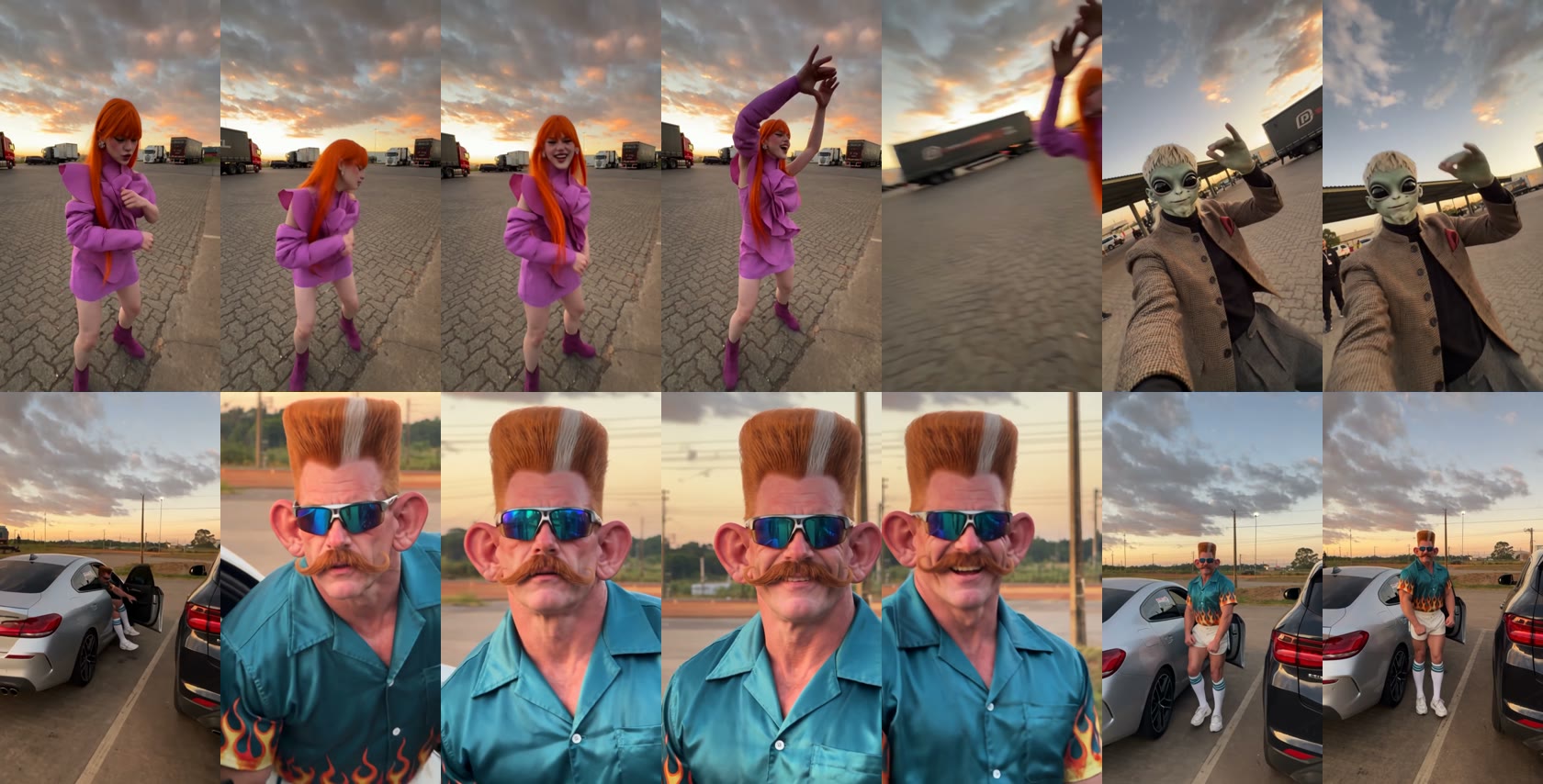
| 0–5 | Dance on the paving stones of a truck lot at sunset, ending with both hands overhead | Photo 1 |
| 5–7 | The camera whips around into a selfie, grinning and gesturing to the beat | Photo 2 |
| 7–10 | The camera swings to a silver car; a close-up leaning into the lens, then a big laugh | Photo 3 |
| 10–14 | Steps back by the open car door and dances | Photo 3 |
Why Photo Order Decides Who Dances in the Gas Station Dance AI Video
In our test the photo order, not the wording of the prompt, decided which person appeared in which shot. Our first prompt said image 1 was the person filming and image 2 was the dancer, but the model put photo 1 in the dance, photo 2 in the selfie and photo 3 by the car. The video still looked right, just not in the roles the prompt asked for.
So we rewrote the prompt to match that order: image 1 dances, image 2 films and takes the selfie, image 3 is by the car. We ran it again with the same three photos and got the same clean result, with the roles now matching the prompt. That's the version the template uses, which is why the slots are in that order.
What Changes and What Stays in a Gas Station Dance AI Video?
| Comes from your photos | Stays the same |
|---|---|
| Each person's face and skin tone | The truck lot, the sunset sky, the silver car and the dark SUV |
| Hair, including big styles like a flat-top | The handheld camera path: dance, selfie flip, swing to the car |
| The whole outfit, shoes and accessories like sunglasses | The moves and their timing |
| Body proportions | The sound and the 14-second length |
The Full Gas Station Dance AI Prompt We Used
This is the prompt behind the template, used with Wan 3.0 Prime in video-to-video mode on the first 14 seconds of the trend clip. You don't need to paste it anywhere: the Gas Station Dance AI generator already uses it. It's here if you want to adapt the idea to another clip.
Replace the three people with the people in image1, image2 and image3. Each person keeps the face, hairstyle, body type and outfit from their own photo. Do not keep the clothing from the original video. 0–5s: image2 is filming handheld in a truck parking lot at sunset. image1 dances on the paving stones and finishes with both hands raised high overhead, exactly matching the reference moves, pace and expression. 5–7s: Without cutting, image2 flips the phone to selfie mode and films themselves grinning to the beat, doing the same hand gestures as the reference, with trucks and the sky behind them. 7–14s: Without cutting, image2 turns the camera toward a silver car and a dark SUV. image3 leans in close to the lens and talks, then breaks into a big smile. They step back by the open car door and dance casually, matching the reference. MAIN RULE: The whole sequence is one continuous handheld recording by image2, with no cuts. Keep the original camera movement, wide-angle perspective, sunset lighting, location and timing. Do not add moves that are not in the reference. Each face must stay consistent and match its photo exactly.
Three things in it matter most. It says outfits come from the photos and not from the clip, which stops the model from dressing your friends in the original T-shirt and hoodie. It gives each person a time window, so nobody shows up in someone else's shot. And the main rule asks for one continuous handheld recording, which keeps the selfie flip and the swing to the car instead of turning them into hard cuts.
Gas Station Dance AI Settings, Cost and Time
| Setting | Value |
|---|---|
| Model | Wan 3.0 Prime, video to video |
| Photos | 3 (dancer, person filming, person by the car) |
| Length | 14 seconds |
| Resolution and ratio | 480p, 9:16 vertical (480×854) |
| Sound | Yes |
| Credits | 590 (about $5.89 on the Lite plan) |
| Render time | About 2 to 2.5 minutes in our two runs |
| Result | Both runs usable on the first try |
For comparison, dedicated gas station dance sites we checked on November 10, 2026 list about $6.99 to $9.99 for one video. See pricing for plans; new accounts get 75 free credits, which together with the $5.99 trial pack covers one Gas Station Dance AI video.
Which Photos Work Best for the Gas Station Dance AI Video?
- One person per photo. With two faces in a slot, the wrong person can end up in that shot.
- A full-body dancer. The first five seconds show the dancer head to toe, shoes included.
- A sharp, front-facing face for slots 2 and 3. The selfie and the car close-up fill the frame with a face.
- Characters are fine. Our alien in tweed and the flat-top with sunglasses both kept their look.
Want another multi-person trend after this one? The 58th Floor AI video also passes the camera between friends.
Gas Station Dance AI FAQ
Is there a free Gas Station Dance AI generator?
Not fully. New accounts get 75 free credits and one Gas Station Dance AI video takes 590, so you also need the $5.99 trial pack; together they cover one video. On the Lite plan each video is about $5.89, and failed renders are refunded.
How many photos do I need for the Gas Station Dance AI video?
Three, one person each: the dancer, the person filming who appears in the selfie, and the person by the car.
Why is the wrong friend in the selfie?
Usually the photos are in the wrong slots. In our tests the photo order decided the shots: slot 1 dances, slot 2 takes the selfie, slot 3 is by the car.
Will it change my friends' outfits?
No. Each person keeps their face, hair and outfit from their own photo. In our test nobody ended up in the original clip's clothes or in each other's.
What song is the gas station dance?
Reposts usually pair it with Akcent's "On and On". Our video has sound that matches the moves, but it isn't the official track, so pick the trend sound in TikTok or Instagram if you want it.
Can I use cartoon characters?
Yes, as long as each photo shows one clear figure. Our test used an alien character and an exaggerated flat-top, and both kept their look.
Is this official?
No. It's a fan-made template, not affiliated with Mikhail Litvin, Ravshan Dzhulpaev, Adel Veigel or Akcent. Only upload photos of people who agreed to be in the video.
Is there a version for just two people?
Yes. For a duo, try Christmas Dance AI: two photos, and you and a friend do the TikTok Christmas dance side by side by a lit tree.