How to Make the Christmas Dance AI Video With a Friend (Full Prompt)
What’s new on this page
- — Published: one Christmas Dance AI run on Wan 3.0 (video to video, 480p, 15 s, 2 photos, 385 credits, about 5 minutes), first try, no face mixing.
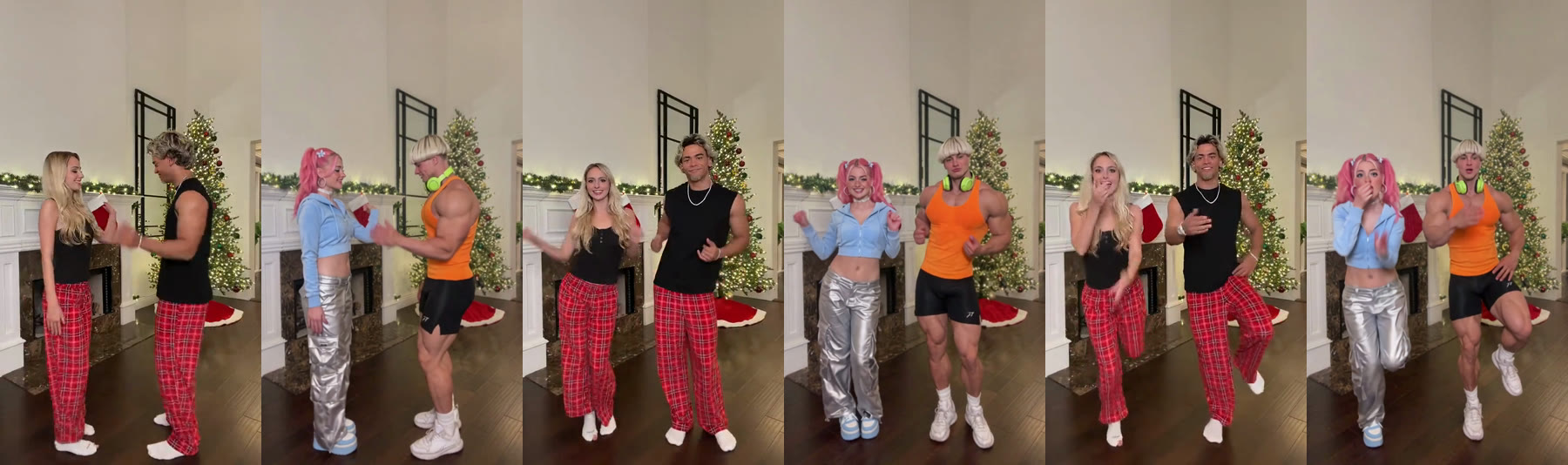
A Christmas Dance AI video puts you and one other person into the TikTok Christmas dance: two people side by side at home, doing the same stiff little routine in perfect sync. You don't need to be in the same room, learn the moves or own matching pajamas. You need two photos, and you need them in the right order.
What Is the TikTok Christmas Dance Trend?
The TikTok Christmas dance trend is a short synced routine that two people, or a family, do side by side at home, often in matching Christmas pajamas and with straight faces, to a Deck the Halls remix by DJ Izzy Duzzit that mixes the carol with Blow the Whistle. The remix was posted in December 2025, and the dance took off in early November 2026, when duo and mom-and-daughter takes spread across TikTok. It's also called the Deck the Halls dance or the Christmas pajama dance.
How Do You Make a Christmas Dance AI Video in 3 Steps?
You make a Christmas Dance AI video on AI Photo Animator with two photos and one button; the template already has the model, the prompt and the living-room scene set up.
Step 1: Open the Christmas Dance AI template
Go to the Christmas Dance AI page. The template is open at the top with two photo slots, the left dancer and the right dancer, and the Generate button shows the credits before you spend them.
Step 2: Upload two photos, left first
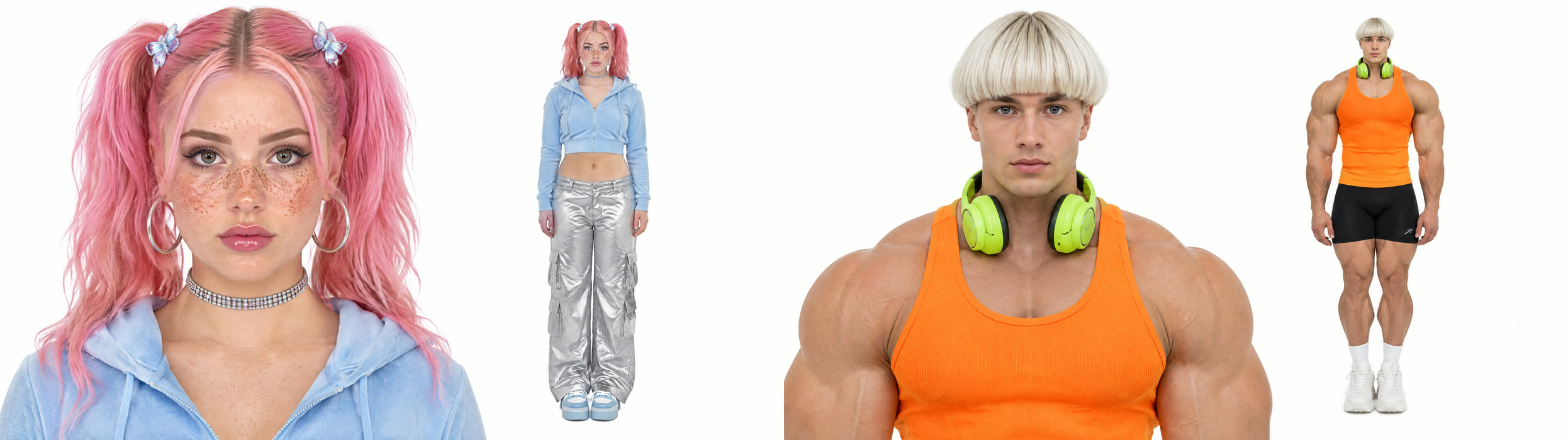
Slot 1 dances on the left, slot 2 on the right. Use one person per photo, full body, facing the camera. Our photos went one step further: each was a reference sheet with a face close-up next to a full-body shot, which gave the model both the face detail and the whole outfit down to the sneakers.
Step 3: Generate and download
Press Generate. Our run took about 5 minutes and was saved to My Videos, so you can close the tab. Download the MP4 without a watermark and post it.
What Happens in the Christmas Dance AI Video, Second by Second?
| Seconds | What happens |
|---|---|
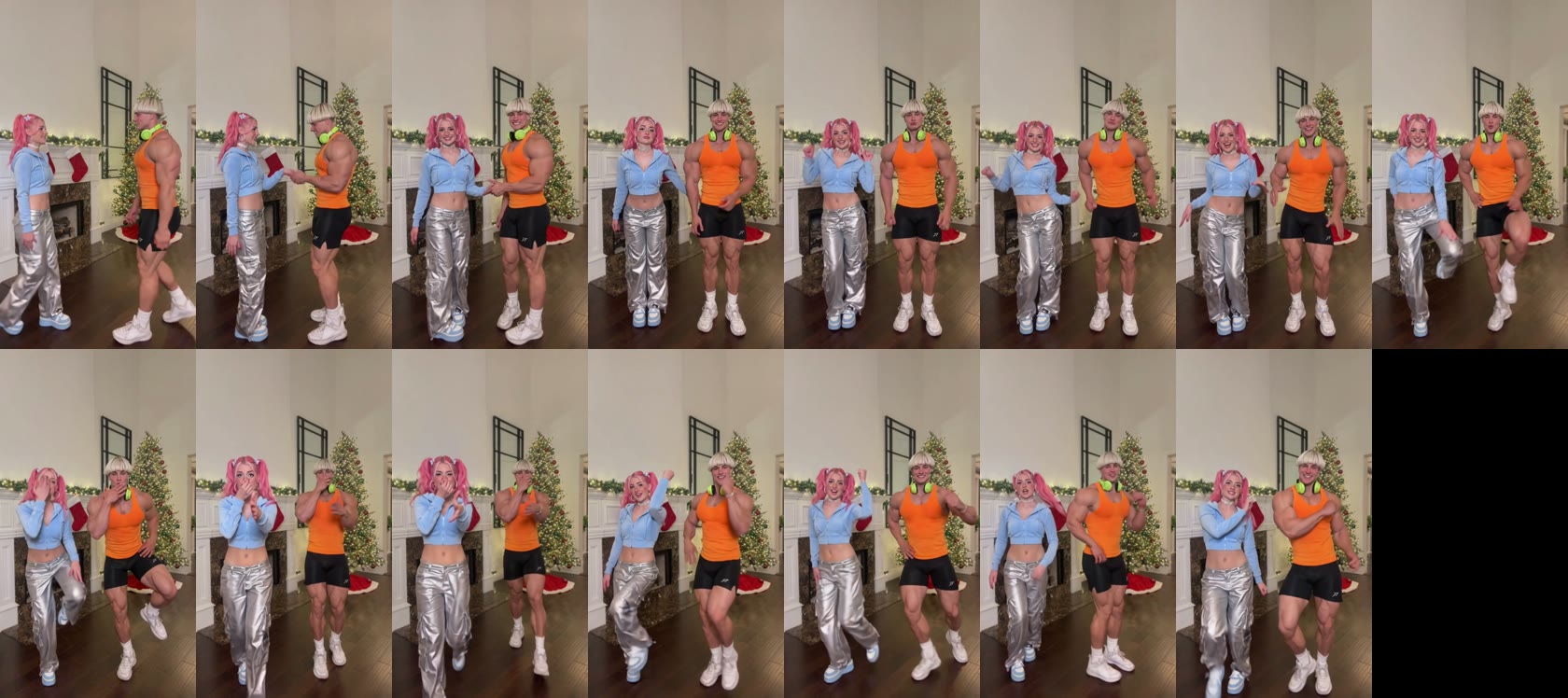
| 0–2 | The two dancers face each other and shake hands |
| 2–7 | They turn to the camera and sway side by side with straight faces |
| 7–8 | Knee lift |
| 8–10 | Both cover their faces and crack up |
| 10–12 | One arm goes up |
| 12–15 | Arm rolls and a flex to finish |
What Prompt Makes a Christmas Dance AI Video?
If you'd rather build it yourself, the Christmas Dance AI video is a video-to-video job: start from a 15-second clip of the duo dance, add one photo per person, and use a prompt that names who goes where. This is the exact prompt we ran on Wan 3.0 (480p, 15 s, sound on, aspect ratio auto).
Replace the two people in the source video with the people from the reference images. The person on the left becomes the person in IMG 1, and the person on the right becomes the person in IMG 2. Each keeps their own face, hairstyle, skin tone, body type, accessories and the outfit they wear in their reference image. Keep every dance move, the timing, both people's positions in the frame, the camera framing and the background from the source video exactly as they are. Each person keeps their own identity in every frame, with no blending of faces between the two. Lighting and skin tones look natural and match the scene. Realistic, sharp and stable faces, smooth motion, no flicker.
把源视频里的两个人替换成参考图里的人。左边的人变成 IMG 1 里的人,右边的人变成 IMG 2 里的人。每个人保留自己参考图里的脸、发型、肤色、体型、配饰和衣服。源视频里的每个舞蹈动作、节奏、两个人在画面里的位置、镜头取景和背景都保持不变。每一帧里每个人都保持自己的身份,两个人的脸不要互相混合。光线和肤色自然,和场景一致。脸部真实、清晰、稳定,动作流畅,不闪烁。
Three lines do the heavy lifting. "The person on the left becomes IMG 1" pins each photo to a side. "The outfit they wear in their reference image" stops the model from keeping the original matching pajamas. "No blending of faces between the two" matters most in a duo, because two people dancing close together is exactly where faces drift into each other.
Which Photos Work Best for a Christmas Dance AI Video?
- One person per photo. A photo of both of you makes it unclear who is who, and faces can mix. Crop each person out first.
- Full body, head to shoes. The dance shows knee lifts and feet; from a face-only selfie the model has to guess your body and clothes.
- Wear what you want to dance in. Each dancer keeps their own outfit. For the classic look, wear matching Christmas pajamas in both photos.
- Photos don't have to match. Ours were taken separately, against plain backgrounds, and still landed in the same living room.
How Much Does a Christmas Dance AI Video Cost?
| Setting | Our run |
|---|---|
| Model | Wan 3.0 |
| Length | 15 seconds, with sound |
| Resolution | 480p, 9:16 vertical |
| Photos | 2, one per dancer |
| Credits | 385 (about $3.85 on Lite, about $4.27 with the $5.99 trial pack) |
| Time | About 5 minutes |
| Result | First try, no face mixing |
New accounts get 75 free credits, which isn't enough for one video on its own. The one-time $5.99 trial pack (540 credits) covers one, with 155 credits left over. Failed renders are refunded automatically, and downloads have no watermark. See pricing for plans.
Christmas Dance AI FAQ
Is there a free Christmas Dance AI generator?
Not fully. New accounts get 75 free credits and one Christmas Dance AI video takes 385, so you also need the $5.99 trial pack; together they cover one video. On the Lite plan each video is about $3.85, and failed renders are refunded.
How many photos do I need for the Christmas Dance AI video?
Two, one person each. The first photo dances on the left, the second on the right.
Can I do the Christmas dance alone?
Not with this template; it needs two dancers. For a solo clip, try a single-photo dance like Hotline Bling Dance AI.
Why don't the two dancers look like our photos?
Usually it's a group photo, sunglasses or a face-only selfie. Use two separate full-body photos with faces clearly visible and generate again with the template.
What song is the Christmas dance?
A Deck the Halls remix by DJ Izzy Duzzit that mixes the carol with Blow the Whistle, posted in December 2025. To use that exact sound, add it from TikTok's sound library when you post.
Can we make it with three people?
This template is a duo. For three friends in one take, try Gas Station Dance AI.
Want more seasonal ideas? Every AI Christmas trend we support is on one page, from Christmas dances to New Year clips, and each card plays a real result.