How to Make the Phone on the Train Trend AI Video (1 Photo)
What’s new on this page
- — Published: our first Phone on the Train Trend AI video (Wan 3.0, video to video, 480p, 15 s, 300 credits, first try, about 5 minutes) from one photo, with the full prompt, frames, photo tips and fixes.
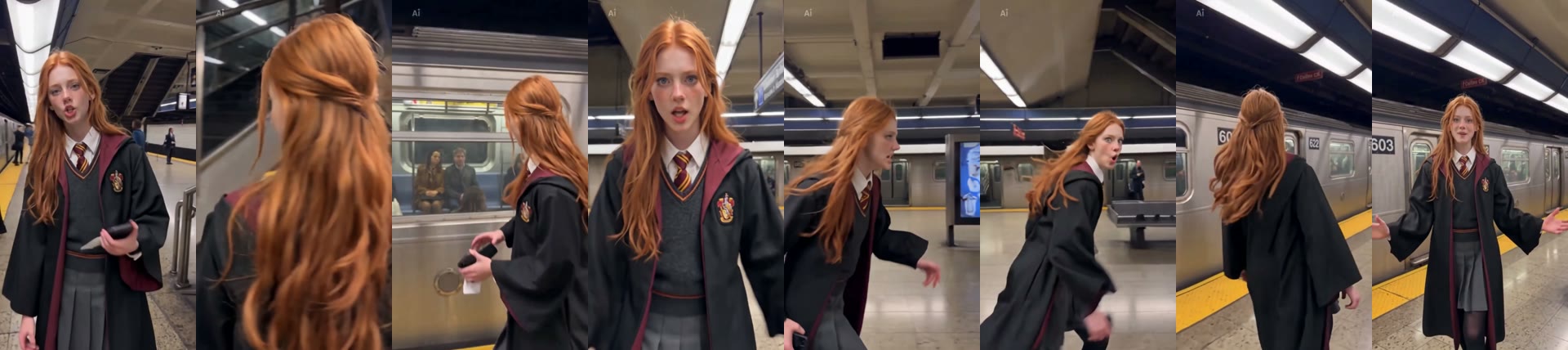
A Phone on the Train Trend AI video puts the person from your photo on a subway platform: you walk toward the camera, lean into the lens, press a hand to the train window, spin and strut off. We made the clip above on 7 November 2026 from one photo of a red-haired girl in a school uniform, and she kept her hair, robe and tie in every shot.
What is the phone on the train trend?
The phone on the train trend is a subway video format by creator Ollie Muhl (@olliemuhl): he tapes his phone to a subway car window and runs after the train as it pulls out. Most versions play Dua Lipa's "Training Season (Live from the Royal Albert Hall)", so it's also called the Training Season trend. By 15 October 2026 AI copies starring Messi, Neymar, a dog and Peter Griffin were common enough that Just Jared reported Muhl's reaction.
What happens in a Phone on the Train Trend AI video?
A Phone on the Train Trend AI video is one handheld vertical take on a subway platform. In our result:
| Seconds | What happens |
|---|---|
| 0–3 | You walk down the platform toward the camera |
| 3–5 | You lean in close to the lens |
| 5–8 | You press a hand against the train window while passengers watch |
| 8–11 | You spin back toward the camera |
| 11–13 | You strut along the platform beside the train |
| 13–15 | You walk toward the camera with a big open-mouthed grin |
How to make the Phone on the Train Trend AI video in 3 steps
- Open the template. Go to the Phone on the Train Trend AI generator. Wan 3.0, 15 seconds, 480p and sound are already set, and the Generate button shows the cost (300 credits) before you spend anything.
- Upload one photo. One person, face visible, full body or waist up, wearing what you want on screen.
- Generate and download. The video lands in My Videos, so you can close the tab. Download the MP4 without a watermark and add the Training Season sound when you post.
How we made our first Phone on the Train Trend AI video
1. One full-body character photo
We used a full-body photo of a red-haired girl in a black school robe, grey sweater, pleated skirt and red-and-gold tie. The original clip stars a man in a brown tweed suit with a bowl cut, so any leak from the original would be obvious.
2. Video to video with Wan 3.0
In the generator we chose Video, added a 15-second subway platform clip and the photo, kept the sound on and left the ratio on auto at 480p. This is the prompt we used:
Replace the man in this video with the person from the reference photo. Keep the person's face, hairstyle, body shape and clothing exactly as in the reference photo. Keep everything else from the original video unchanged: the New York subway platform setting, the silver train, the fluorescent ceiling lights, the yellow platform edge, the passengers in the background, the handheld vertical camera, and every movement and timing beat — walking confidently toward the camera, leaning in close to the lens, pressing a hand against the train window, spinning around, strutting along the platform, and finally walking toward the camera with a wide-mouthed exaggerated expression. Natural lighting matching the subway scene, realistic skin and fabric detail, consistent identity in every frame, no extra people added, no text or watermark.
"Keep the person's face, hairstyle, body shape and clothing exactly as in the reference photo" is the line that matters: without it, models tend to keep the original tweed suit and only swap the face. The one-photo template uses exactly this setup, so you only upload the photo.
3. The result: first try, about 5 minutes, 300 credits
| Setting | Our test |
|---|---|
| Model | Wan 3.0 |
| Input | 1 photo (template) / subway clip + 1 photo (manual) |
| Length and quality | 15 seconds, 480p, vertical 9:16 |
| Sound | On |
| Cost | 300 credits, about $3.33 with the trial pack |
| Time | About 5 minutes |
| Tries | 1 |
The uniform, robe, tie and long red hair held through the walk, the close-up and the spin, and the passengers behind the window stayed in place. The one thing the clip kept from the source was a small "Ai" label in the top-left corner, because the source clip had it.
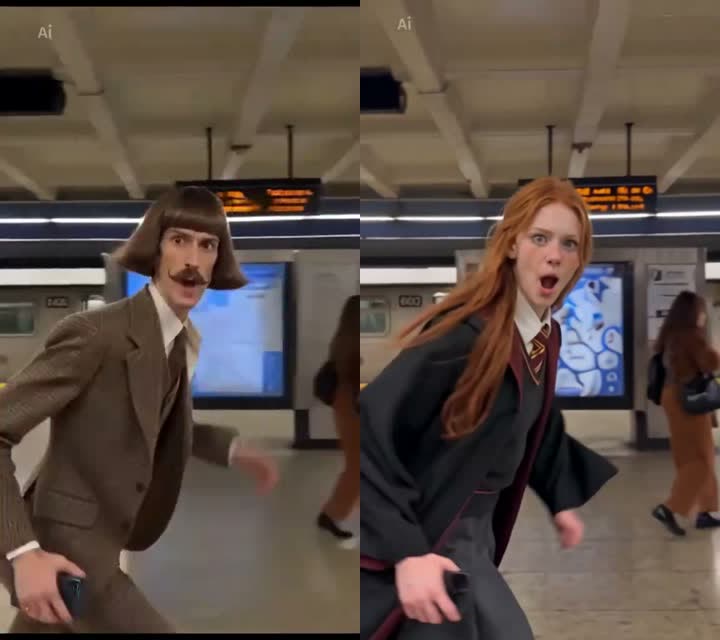
Keep your own look or copy the bowl cut?
Our prompt keeps your own hairstyle and outfit, which is what most people want. If the point of your video is to look like the mustached guy, remove "hairstyle" from the second sentence and add this line:
Give the person a voluminous brown bowl haircut and a thick mustache like the original.
Which photo works best for a Phone on the Train Trend AI video?
The best photo for a Phone on the Train Trend AI video shows one person full body or waist up with the face clearly visible, because the scene shows you walking, from behind and in close-up.
- One person. Crop yourself out of a group photo.
- Face visible. The lean into the lens is a close-up.
- Wear what you want on screen. Clothes come from your photo, down to the tie.
- No sunglasses or heavy filters. They blur the identity the model has to keep.
Why doesn't my Phone on the Train Trend AI video look like me?
Most Phone on the Train Trend AI videos that don't look like the person come from the photo, not the template. Check these first:
- Group photo: features can blend. Use a single-person photo.
- Small or blurry face: the close-up magnifies it. Use a sharp photo where the face is easy to see.
- Outfit switched to a suit (manual prompt): your prompt is missing the clothing line. Use ours above, or the template.
If a render fails, the credits come back automatically, so trying a better photo costs nothing extra. Plans and packs are on the pricing page.
Phone on the Train Trend AI FAQ
What song is used in the phone on the train trend?
Most phone on the train videos use "Training Season (Live from the Royal Albert Hall)" by Dua Lipa. The studio single came out on 15 February 2024.
Is there a free Phone on the Train Trend AI generator?
Not fully. New accounts get 75 free credits and one Phone on the Train Trend AI video takes 300. The one-time $5.99 trial pack (540 credits) covers one video at about $3.33 and leaves 240 credits; there's no subscription, and failed renders are refunded.
Do I need to go to a subway station?
No. The template builds the platform, train and camera moves from one photo, so you never tape a phone to a train.
Can I keep my own outfit?
Yes. Clothes, hairstyle and face come from your photo; in our test a school uniform with robe and tie stayed the same in every shot.
Does it work for women?
Yes. Our own test video stars a red-haired woman in a school uniform.
Is this connected to Ollie Muhl?
No. Our Phone on the Train AI page is a fan-made template, not affiliated with Ollie Muhl, Dua Lipa or any transit company. Only use photos of yourself or people who agreed.