How to Make an I Love the Smiths AI Video From Two Photos
What’s new on this page
- — Published: our first I Love the Smiths AI video (Wan 3.0, video to video, 480p, 15 s, 300 credits, first try, about 5.5 minutes) from two photos, with the full prompt, frames, photo tips and fixes.
An I Love the Smiths AI video puts two people from your photos into the elevator meet-cute from (500) Days of Summer: one of you takes off your headphones, the other turns, smiles and says "I love the Smiths." We made the clip above on 7 November 2026 from two character photos. Here is how to make an I Love the Smiths AI video yourself: the steps, what it cost, the prompt we used, which photo goes where and how to fix faces that don't look right.
What is the I Love the Smiths AI trend?
The I Love the Smiths AI trend recreates the elevator scene from (500) Days of Summer (2009) with two people from photos. In the film, Summer hears The Smiths' "There Is a Light That Never Goes Out" leaking from Tom's headphones and tells him "I love the Smiths." TikTok has used the scene for years as a music-taste meet-cute, and in early November 2026 AI template sites began offering two-photo versions.
What happens in an I Love the Smiths AI video?
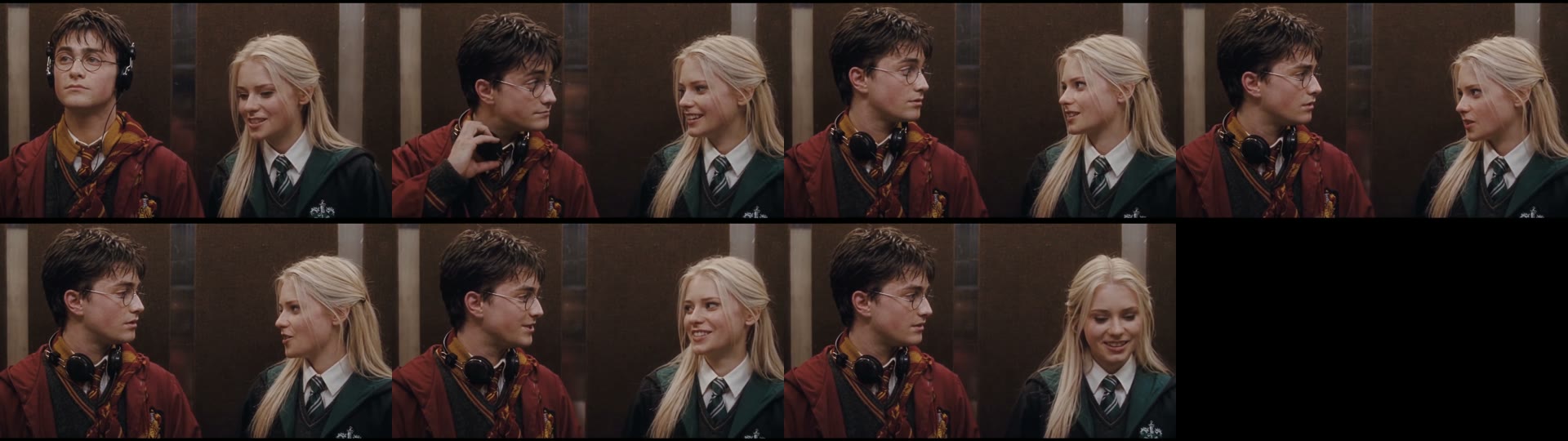
An I Love the Smiths AI video plays as two alternating close-ups in an elevator. In our result:
| Seconds | What happens |
|---|---|
| 0–2 | Person 1 stands in over-ear headphones looking away; person 2 glances over and smiles |
| 2–4 | Person 1 pulls the headphones down around the neck |
| 4–9 | They turn and look at each other; person 2 talks with a small hand gesture |
| 9–15 | Both smile; person 2 looks down shyly, then looks up and says the line |
How to make the I Love the Smiths AI video in 3 steps
- Open the template. Go to the I Love the Smiths AI generator. Wan 3.0, 15 seconds, 480p and the sound are already set, and the Generate button shows the cost (300 credits) before you spend anything.
- Upload two photos. Photo 1 is the listener, who starts in headphones. Photo 2 is the person who says the line. One person per photo, facing the camera. Nobody needs headphones in their photo.
- Generate and download. Press Generate. The video lands in My Videos, so you can close the tab; ours took about 5 minutes. Download the MP4 without a watermark and post it.
How we made our first I Love the Smiths AI video
1. Two full-body character photos
We used two photos with very different looks: a dark-haired young man in glasses and a red robe, and a blonde young woman in a school uniform with a green tie. Different hair, clothes and colors make it easy to see if anything leaks from one person to the other.
2. Video to video with Wan 3.0
In the generator we chose Video, added the 15-second elevator clip, set photo 1 and photo 2, kept the sound on and left the ratio on auto at 480p. This is the prompt we used:
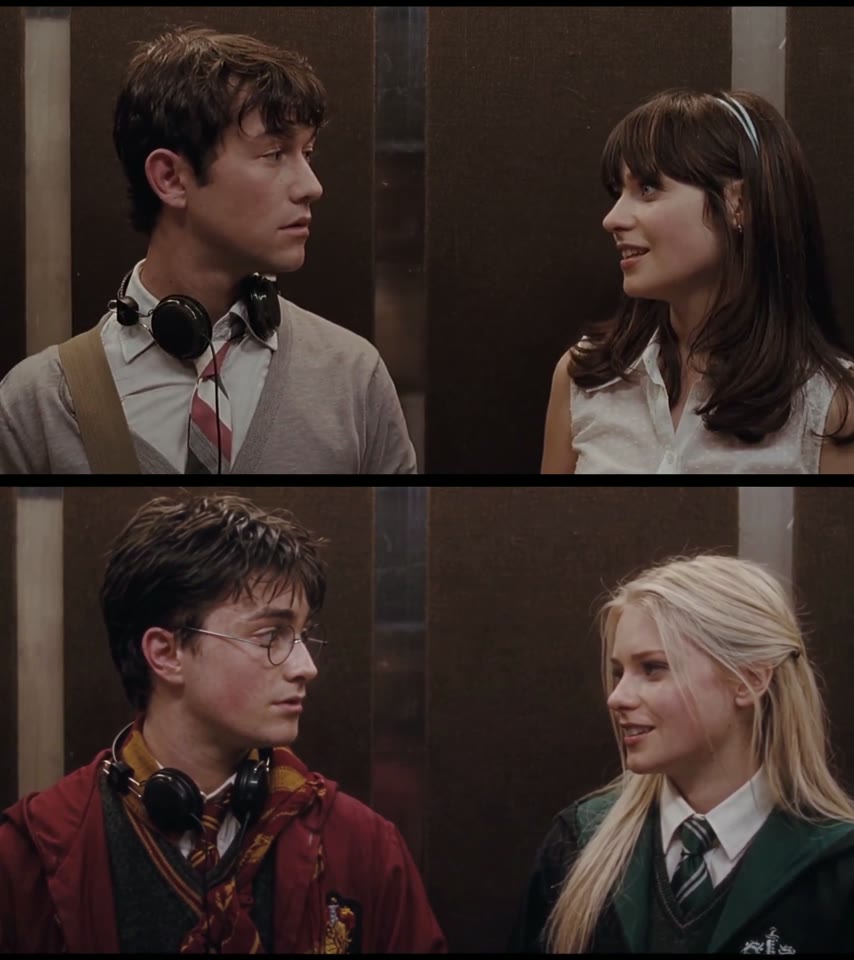
Replace the two people in the video with the people from the reference photos. Image 1 replaces the man (left close-up, headphones around his neck), Image 2 replaces the woman (right close-up, long hair with bangs). Keep each person's face, hairstyle and clothing exactly as shown in their reference photo; do not keep the original outfits. Preserve the original video's camera cuts, framing, timing, lighting and elevator background. Keep all expressions and motion from the original: the man glancing over, the shy smiles, the woman turning her head and speaking with a playful smile. Natural skin texture, consistent identity across every shot, realistic cinematic look, no extra people.
"Do not keep the original outfits" is the line that matters: without it, models tend to keep the film's grey cardigan and white blouse and only change the faces. The two-photo template uses exactly this setup, so you don't need the clip or the prompt.
3. The result: first try, about 5 minutes, 300 credits
| Setting | Our test |
|---|---|
| Model | Wan 3.0 |
| Input | 2 photos (template) / elevator clip + 2 photos (manual) |
| Length and quality | 15 seconds, 480p, widescreen 16:9 |
| Sound | On |
| Cost | 300 credits, about $3.33 with the trial pack |
| Time | About 5.5 minutes (06:14 to 06:19 UTC) |
| Attempts | 1, no retries |
Both people kept their own outfits in every shot: the red robe and striped scarf on one side, the green tie and crest on the other, with no mixing. The headphones came off on the same beat as the scene, even though the prompt only mentioned them around the neck. The output stays 16:9 because the scene is widescreen; crop it to vertical in TikTok or CapCut if you want 9:16.
Which photos work best for an I Love the Smiths AI video?
The best photos for an I Love the Smiths AI video show one person each, facing the camera from the chest up, because both faces stay in close-up for all 15 seconds.
- One person per photo. Crop a couple selfie into two photos so the faces don't mix.
- Face toward the camera. Side profiles leave the model guessing in the turn toward each other.
- Wear what you want on screen. Clothes come from your photo, down to the tie.
- No sunglasses or heavy filters. They hide the eyes, and the scene is all eye contact.
- No headphones needed. The scene adds them for photo 1. For another two-person trend, try the Smalltown Boy AI dance next.
Why doesn't my I Love the Smiths AI video look like us?
Most I Love the Smiths AI videos that don't look like the people come from the photos, not the template. Check these first:
- Two faces in one photo: features can blend. Use two single-person photos.
- Small or blurry face: the close-ups magnify it. Use a sharp photo where the face fills much of the frame.
- Photos in the wrong slots: the listener goes first, the speaker second. Swap them if the wrong person ends up in headphones.
- Heavy beauty filter: the result looks like the filter, not the person. Use an unfiltered photo.
If a render fails, the credits come back automatically, so trying better photos costs nothing extra. Plans and packs are on the pricing page.
I Love the Smiths AI FAQ
What song is in the I Love the Smiths scene?
The song in the film's elevator scene is "There Is a Light That Never Goes Out" by The Smiths, from the 1986 album The Queen Is Dead.
Is there a free I Love the Smiths AI generator?
Not fully. New accounts get 75 free credits and one I Love the Smiths AI video takes 300. The one-time $5.99 trial pack (540 credits) covers one video at about $3.33 and leaves 240 credits; there's no subscription, and failed renders are refunded.
Which photo is which in the I Love the Smiths AI video?
Photo 1 is the listener who starts in headphones and takes them off; photo 2 is the person who turns, smiles and says the line.
Can I use one couple photo?
Two separate photos work best. Crop each person out of a couple photo first so the faces don't blend.
Is the video vertical?
No, our I Love the Smiths AI video came out 16:9 widescreen at 480p. Crop it to 9:16 in TikTok or CapCut if you want it vertical.
Is this connected to the film?
No. Our I Love the Smiths AI page is a fan-made template, not affiliated with (500) Days of Summer, its studio or The Smiths. Only use photos of yourself or people who agreed.