How to Make the It's My Life Dog AI Video From One Photo
What’s new on this page
- — Published: our first It's My Life Dog AI video (Wan 3.0, video to video, 480p, 15 s, 300 credits, first try, about 5 minutes) with a golden retriever photo, the full prompt, frames, photo tips and fixes.
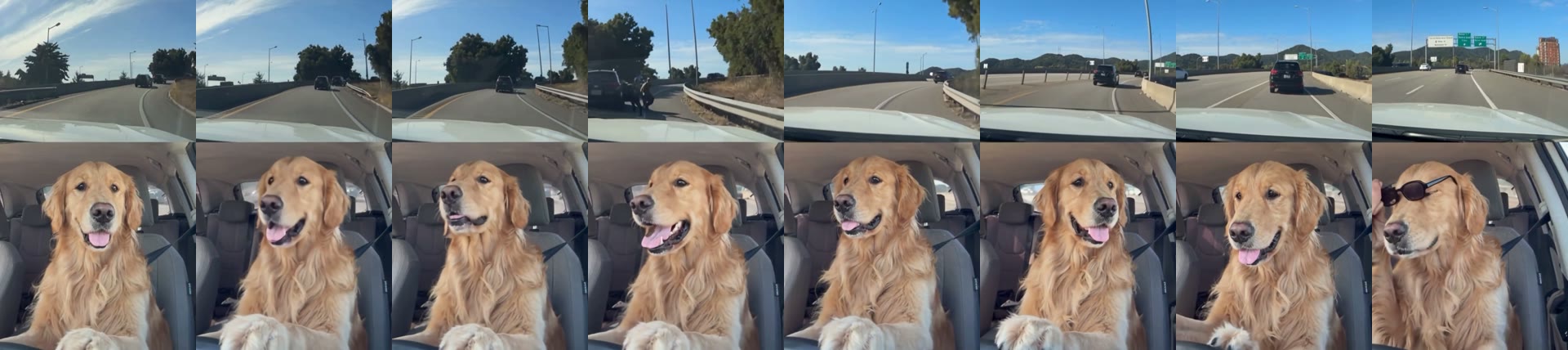
An It's My Life Dog AI video puts your pet in the split-screen car meme everyone is sharing: the highway rolls by on top, and your dog sings Bon Jovi in the passenger seat, goes quiet, puts on sunglasses with one paw and sings on. We made the clip above on 6 November 2026 from one photo of a golden retriever sitting on grass. Here is how to make an It's My Life Dog AI video yourself: what we did, what it cost, the prompt we used and how to fix a dog that doesn't look like yours.
What is the It's My Life Dog AI trend?
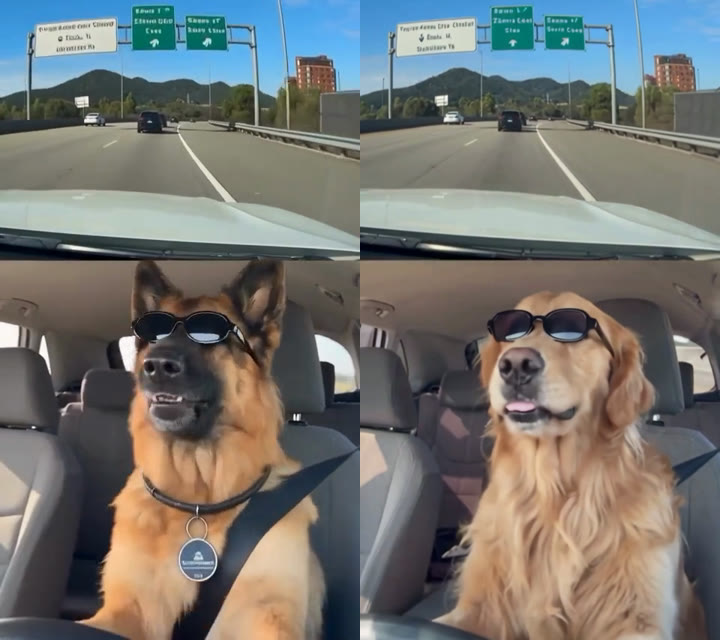
The It's My Life Dog AI trend is a split-screen car meme in which a dog in the passenger seat sings Bon Jovi's It's My Life), the 2000 single from Crush. The first clip showed a German shepherd and spread on TikTok and X in late October 2026. The joke is in the pause: the dog sings with its whole face, stops to stare at the road like a nervous passenger, then calmly puts on black sunglasses and picks the chorus back up. Within days pet owners were remaking it with their own dogs and cats.
What happens in an It's My Life Dog AI video?
An It's My Life Dog AI video keeps every beat of the meme and changes only the pet. In our result:
| Seconds | What happens |
|---|---|
| 0–4 | Your dog sings with its mouth wide open and head tilted up, the highway rolling above |
| 4–8 | It closes its mouth and watches the road like a nervous passenger |
| 8–10 | It relaxes and turns toward the camera |
| 10–11 | One paw lifts a pair of black sunglasses onto its face |
| 11–15 | It sings the last line in shades as the car drives on |
How to make the It's My Life Dog AI video in 3 steps
- Open the template. Go to the It's My Life Dog AI generator. Wan 3.0, 15 seconds, 480p and the sound are already set, and the Generate button shows the cost (300 credits) before you spend anything.
- Upload one pet photo. One dog or cat, facing the camera, face and coat clear, in daylight. It doesn't need to be taken in a car or with sunglasses.
- Generate and download. Press Generate. The video lands in My Videos, so you can close the tab; ours took about 5 minutes. Download the MP4 without a watermark and post it.
How we made our first It's My Life Dog AI video
1. We picked a photo with an obvious coat
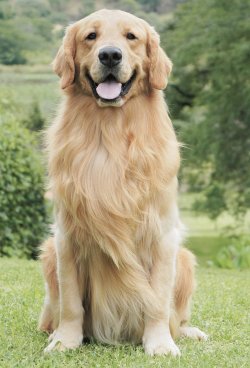
We wanted a hard test: the meme's dog is a short-haired German shepherd with a black saddle and pointed ears, so we used a long-haired golden retriever with soft, floppy ears, sitting up on grass and facing the camera. If the fur or ears blended, we would see it straight away.
2. We ran it as video to video with Wan 3.0
In the generator we chose Video, added the 15-second meme clip, put the golden retriever in as image 1 and kept the sound on, at 480p with auto ratio. The prompt never names the animal, so the same wording works for a cat or any other pet:
Replace the main subject in the video with the one from image 1. Match image 1 exactly: same breed, face, fur color, coat length, markings, ears and body size. Keep everything else from the original video unchanged: the motion, head turns, expressions, timing, camera movement, framing, lighting, background and audio. The new subject should sit in the same position and interact with the scene naturally, with consistent lighting and shadows. No traces of the original subject should remain.
The last sentence matters. Without it, a pet that looks very different from the shepherd is more likely to keep a dark saddle or pointed ears. The one-photo template uses exactly this setup, so you don't need the clip or the prompt.
3. The result: first try, 5 minutes, 300 credits
| Setting | Our test |
|---|---|
| Model | Wan 3.0 |
| Input | 1 pet photo (template) / meme clip + 1 photo (manual) |
| Length and quality | 15 seconds, 480p, vertical 9:16 |
| Sound | On, the meme's song |
| Cost | 300 credits, about $3.33 with the trial pack |
| Time | About 5 minutes (12:57 to 13:02) |
| Attempts | 1, no retries |
The golden kept its gold coat, long chest fur and soft ears in every frame, and the timing matched the meme beat for beat: the stare, the paw and the sunglasses landed on the same seconds. The one thing it dropped was the shepherd's collar and round tag, which our photo didn't have either.
Which photo works best for an It's My Life Dog AI video?
The best photo for an It's My Life Dog AI video shows one pet facing the camera, with its face and fur sharp, because the dog is in close-up for all 15 seconds.
- One pet only. There is one seat in the scene; two pets in a photo can mix features.
- Face toward the camera. Head and chest, or sitting up, works best.
- Daylight. Indoor yellow light can shift the coat color in the video.
- No car or sunglasses needed. The template adds both.
- Cats work too. Use a clear, front-facing cat photo; for a cat-only joke, try the cat middle finger AI effect next.
Why doesn't my It's My Life Dog AI video look like my dog?
Most It's My Life Dog AI videos that don't look like the pet come from the photo, not the template. Check these first:
- Blurry or far away: a small face falls apart in the close-up. Use a sharp photo where the pet fills most of the frame.
- Side profile: the singing is front-on, so a profile photo leaves the model guessing. Use a front-facing one.
- Two animals: crop to one pet before uploading.
- Costume or hat: anything over the face or ears can carry into the video. Use a plain photo.
If a render fails, the credits come back automatically, so trying a better photo costs nothing extra. Plans and packs are on the pricing page.
It's My Life Dog AI FAQ
What song is in the It's My Life dog meme?
It's "It's My Life" by Bon Jovi, the 2000 lead single from the album Crush. The It's My Life Dog AI template keeps the sound on, so you don't add the music yourself.
Is there a free It's My Life Dog AI generator?
Not fully. New accounts get 75 free credits and one It's My Life Dog AI video takes 300. The one-time $5.99 trial pack (540 credits) covers one video at about $3.33, with 240 credits left over, and failed renders are refunded.
Can I make the It's My Life trend with my cat?
Yes. Upload a clear, front-facing photo of one cat; the car seat, the sunglasses and the singing come from the template. We tested with a dog, so front-facing photos give other animals the most natural result.
Do I need a photo of my dog in a car?
No. Any clear photo of your pet works. Ours was a golden retriever sitting on grass, and the template put it in the passenger seat.
How long does it take?
Ours took about 5 minutes. The video is saved to My Videos, so you can close the page while it renders.
Can I post it on TikTok?
Yes, the MP4 is vertical with no watermark. If TikTok or Instagram mutes the song for copyright, add the trending It's My Life sound from the app instead.
Want your pet in a calmer clip instead? Animate a pet photo with simple, natural motion.