How to Make the Dog Elevator Prank AI Video (2 Photos)
What’s new on this page
- — Published: our first Dog Elevator Prank AI video (Wan 3.0, video to video, 480p, 15 s, 300 credits, first try, about 5.5 minutes) with a cartoon bull and a punk, the full prompt, frames, photo tips and fixes.
A Dog Elevator Prank AI video puts your pet and you in the prank clip everyone is sharing: a dog walks you to a hotel elevator, presses the button, kicks you in while you take your shoes off, then throws the shoes after you. We made the clip above on 6 November 2026 from two photos, a yellow cartoon bull character and a punk with a green mohawk. Here is exactly how to make a Dog Elevator Prank AI video yourself: what we uploaded, what it cost, the prompt behind it and how to fix a result that doesn't look like your photos.
What is the Dog Elevator Prank AI trend?
The Dog Elevator Prank AI trend is a pet prank meme in which a husky standing on its hind legs waits for an elevator with a man in a green suit, presses the button for him, kicks him inside and throws his shoes in after him. It's also called the dog lift prank. The clip is almost certainly AI-made, since no real husky stands and kicks on two legs for 15 seconds, and we couldn't find the account that first posted it. What makes it work is the kick at the 10-second mark: until then the dog acts like a polite bellboy.
What happens in a Dog Elevator Prank AI video, second by second?
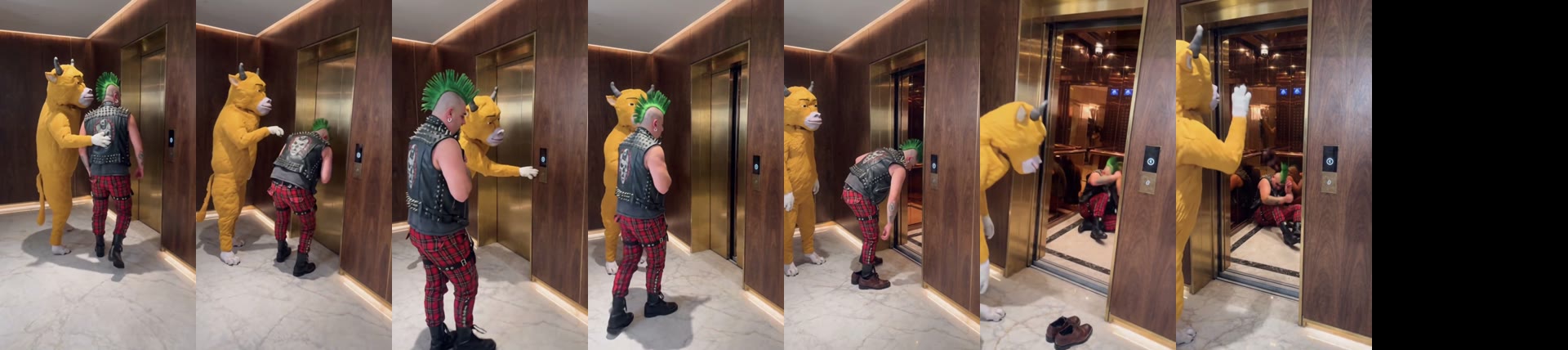
A Dog Elevator Prank AI video keeps every beat of the prank and changes only the two characters. In our 15-second result:
| Seconds | What happens |
|---|---|
| 0–2 | The prankster taps the victim on the back in front of the elevator |
| 2–5 | The victim presses the call button and waits |
| 5–7 | The prankster reaches past him and presses it too |
| 8–10 | The victim bends over and takes off his shoes |
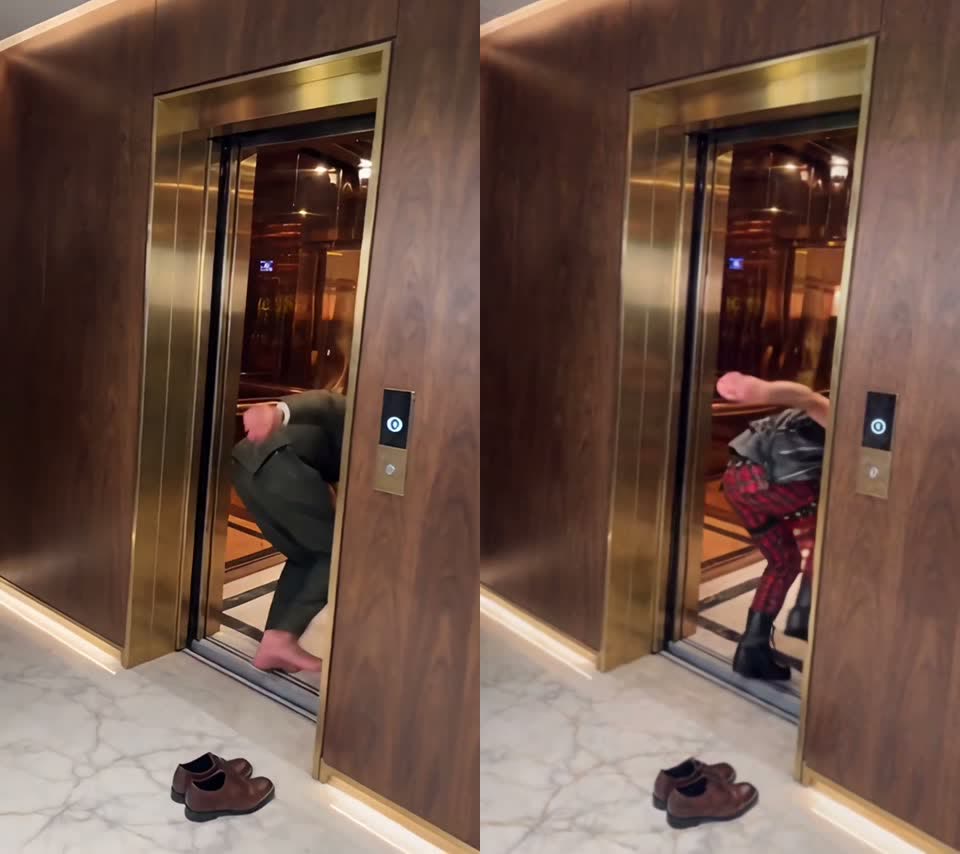
| 10–11 | The doors open and the prankster kicks him in; he lands sitting on the floor |
| 12–13 | The prankster picks up the shoes and throws them into the lift |
| 14–15 | It glances at the camera and walks out of frame |
How to make the Dog Elevator Prank AI video in 4 steps
1. Open the Dog Elevator Prank AI template
Go to the Dog Elevator Prank AI generator. Wan 3.0, 15 seconds, 480p and sound are already set, and the Generate button shows the cost (300 credits) before you spend anything. You don't write a prompt.
2. Upload the prankster photo (slot 1)
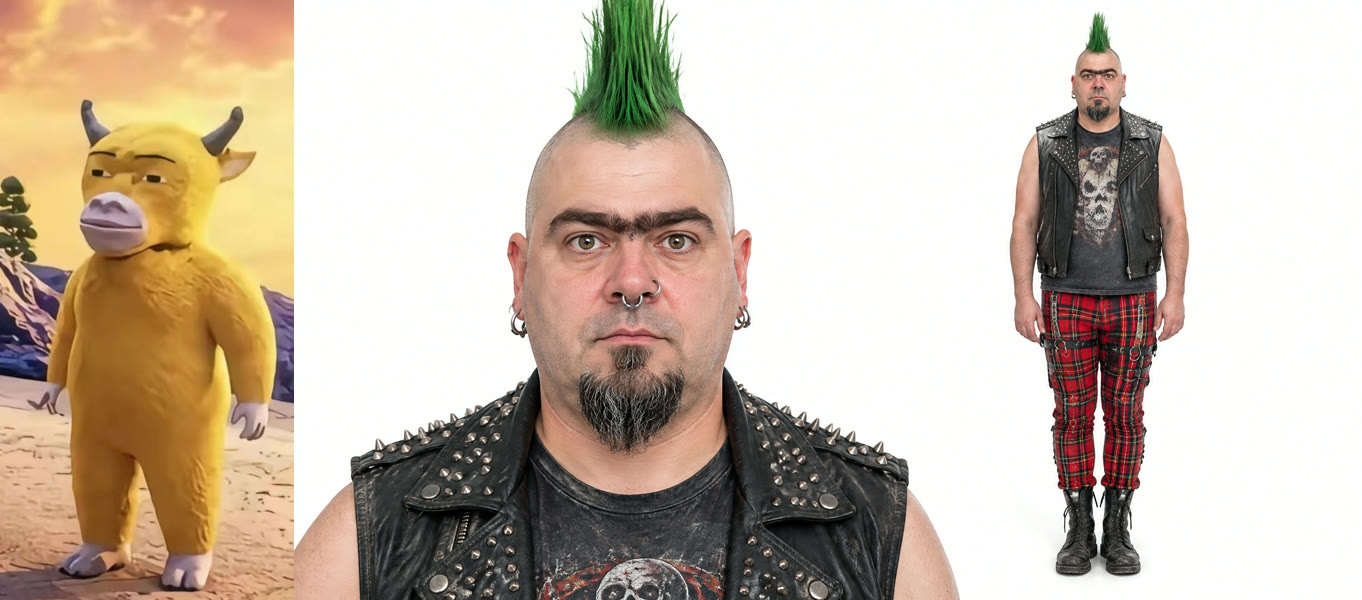
Slot 1 is the one who does the kicking: your dog, your cat or a character. Use a full-body photo with one subject. We used a yellow cartoon bull standing upright; it kept its horns, colour and white hooves the whole way through.
3. Upload the victim photo (slot 2)
Slot 2 is the one who gets kicked in: you, or a friend who has said yes. Again full body, face clear. The outfit comes from this photo, so our punk walked into the lift in his studded vest, tartan trousers and boots.
4. Generate, check the kick, download
Press Generate. Ours finished in about 5.5 minutes and was saved to My Videos, so you can close the tab. Before posting, watch seconds 10 to 13: the kick should land and the shoes should fly into the lift. Then download the MP4, which has no watermark.
Our Dog Elevator Prank AI test: settings and cost
| Setting | Our run |
|---|---|
| Model | Wan 3.0 (video to video) |
| Inputs | 2 photos + the 15 s trend clip |
| Resolution | 480p, aspect ratio auto (vertical) |
| Length | 15 seconds, with sound |
| Cost | 300 credits (about $3.33) |
| Time | About 5.5 minutes |
| Tries | 1, first try worked |
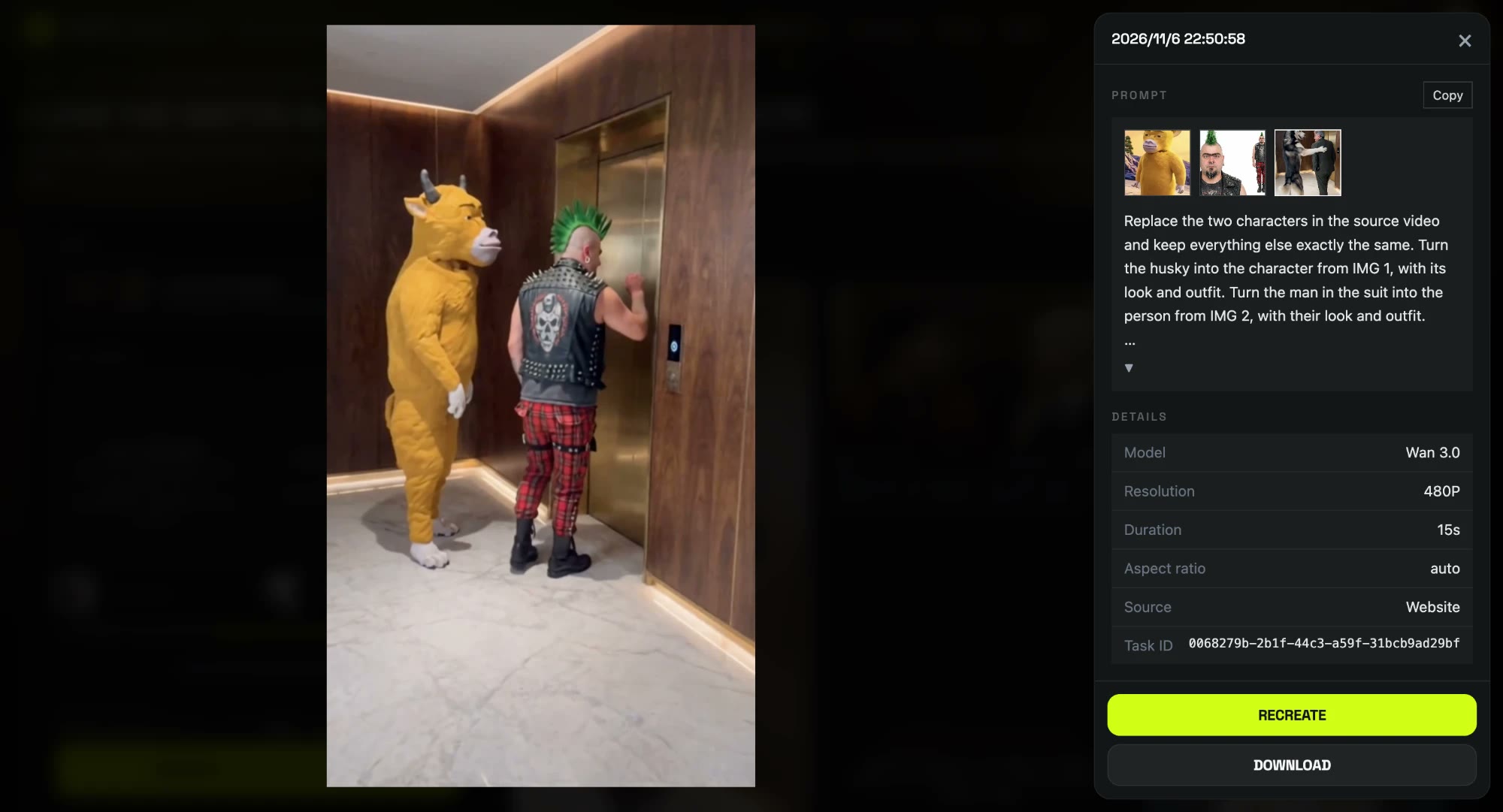
The template uses this exact run. Under the hood it's a video-to-video edit: the model gets the trend clip and your two photos, and the prompt tells it which photo plays which role. This is the prompt we used, already built into the template:
Replace the two characters in the source video and keep everything else exactly the same. Turn the husky into the character from IMG 1, with its look and outfit. Turn the man in the suit into the person from IMG 2, with their look and outfit. Keep the original camera angle, framing, elevator hallway, lighting and pacing. Every movement and interaction stays as in the source: same poses, gestures and positions. Both characters look the same in every frame. Lighting and shadows match the scene, with no flicker or warping.
Two choices made it work on the first try. Naming each character by what it is in the clip ("the husky", "the man in the suit") stops the model from swapping roles. And asking for each character "with its look and outfit" keeps the punk's clothes on the punk instead of mixing in the green suit.
Which photos work best for a Dog Elevator Prank AI video?
- Full body for both. Both characters are on screen head to toe for 15 seconds, shoes included.
- One subject per photo. Each slot plays one role; a second face in the photo can get mixed in.
- Pets, cats and characters all fit slot 1. The prankster stands upright in the clip, so a standing character or a dog photographed side-on works well.
- Clothes you want to see. The victim's outfit comes from the photo.
- Only people who agreed. Use yourself, your own pets, or friends who said yes; no celebrities or children.
Why doesn't my Dog Elevator Prank AI video look like my photos?
- The face looks off: usually a face-only selfie. Use a full-body photo and run the template again.
- Features mixed between the two: usually two people or pets in one photo. Crop to one subject per slot.
- Roles swapped: check that the pet is in slot 1 and the person in slot 2.
- A render failed: credits come back automatically; run it again.
How to post your Dog Elevator Prank AI video
Post it as it is: 9:16 with sound fits TikTok, Reels and Shorts without cropping. A caption like "he pressed the button for me, I should have known" works; say it's AI and add #dogprank and #dogsoftiktok. Want another pet prank? Try the It's My Life Dog AI effect, where your dog sings in the car.
Dog Elevator Prank AI FAQ
Is there a free Dog Elevator Prank AI generator?
Not fully. New accounts get 75 free credits and one Dog Elevator Prank AI video takes 300. The one-time $5.99 trial pack (540 credits) covers one video at about $3.33, with 240 credits left over, and failed renders are refunded. See pricing.
Does the prankster have to be a dog?
No. The Dog Elevator Prank AI template takes a dog, a cat or a cartoon character in slot 1. Our test used a yellow cartoon bull.
Is the dog elevator prank video real?
No. The husky clip is AI-generated as far as anyone can tell; a real dog can't stand, press buttons and kick for 15 seconds.
Can I put my friend in it?
Yes, if they agree. Put their full-body photo in slot 2; their face and outfit carry into the video.
How long is the video and does it have sound?
15 seconds, vertical, with sound. Ours was 480p and took about 5.5 minutes.
Do I need an app?
No. It runs in the browser, and the MP4 downloads without a watermark.