How to Make the Goodbye 2026 Welcome 2027 AI Video (3 Steps)
What’s new on this page
- — Published: our first Goodbye 2026 Welcome 2027 AI video (Wan 3.0, 8 s, 480p, 180 credits, first try, about 3 minutes), the full prompt, frames, photo tips and the CapCut template problems.
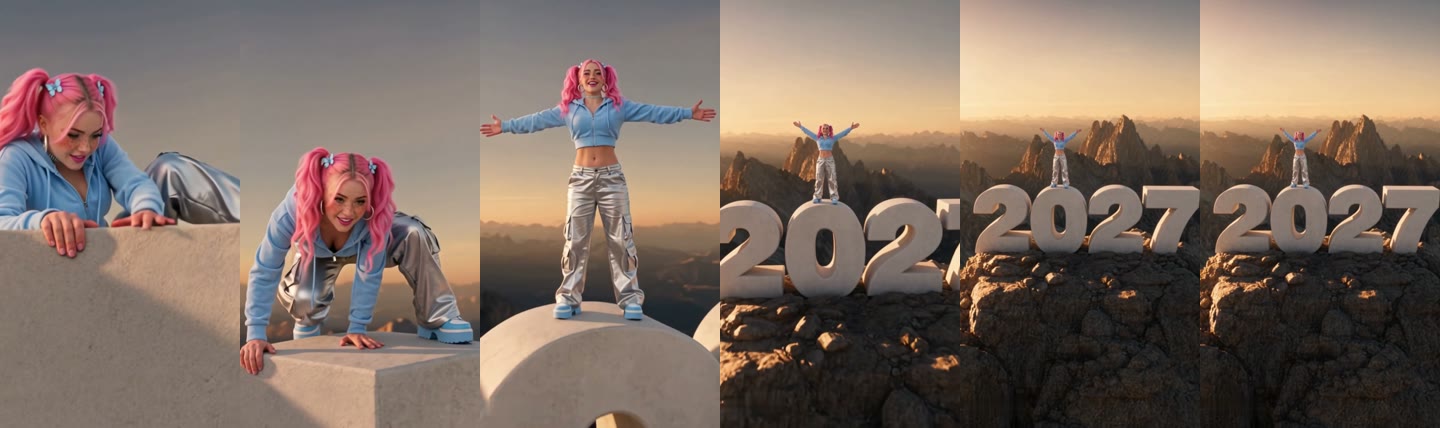
A Goodbye 2026 Welcome 2027 AI video turns one photo of you into the summit-climb New Year clip that has been all over TikTok since late October 2026: you haul yourself over the edge of a huge white block, stand up laughing, throw your arms wide, and the camera flies back to show you're standing on a giant 2027 on a mountaintop at sunset. We made the clip above on 4 November 2026 from a single photo. This is exactly what we did, what it cost and how you can make the same one.
What happens in the Goodbye 2026 Welcome 2027 AI video?
The clip is one continuous move from a close-up to a drone-style wide shot, with an uplifting piano and strings soundtrack. In our result:
| Seconds | What happens |
|---|---|
| 0–2 | Close-up: your hands grip the edge of a huge white block and you pull yourself up |
| 2–4 | You swing a knee over and crawl onto the top; the camera starts easing back |
| 4–5 | You stand, laugh and throw both arms wide |
| 5–8 | The camera flies back and up: the block is the 0 of a giant white 2027 on a rocky summit at sunset |
How we made our first Goodbye 2026 Welcome 2027 AI video
We built it by hand first, the way you would without a template, so we know which parts matter.
1. We started from an 8-second summit-climb clip
The summit version of the trend comes from a CapCut template that appeared at the end of October 2026. We used an 8-second vertical clip of that climb as the motion reference: the grip, the crawl, the arms-wide moment and the pull-back to 2027 are all in it.
2. We used one photo with a face close-up and a full-body shot
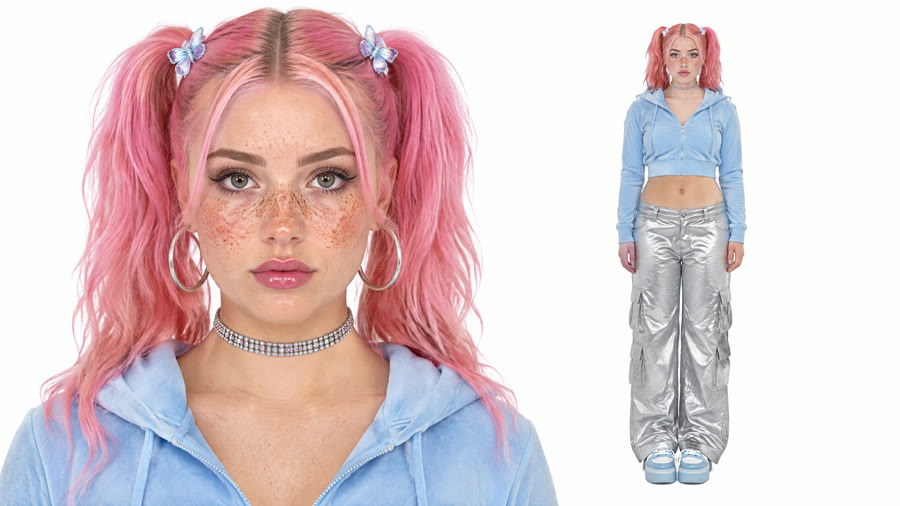
Our photo was a woman with pink pigtails and butterfly clips, hoop earrings, a cropped blue zip hoodie, silver cargo pants and blue sneakers. One image held both a face close-up and a full-body shot, so the model saw the face for the climb and the whole outfit for the wide shot.
3. We asked the model to keep the whole outfit
The original climber wears a beige fur-hooded parka. We didn't want everyone to end up in that coat, so the prompt asks for the face, hair, body shape and outfit from the photo in every frame. This is the prompt we ran on Wan 3.0, 480p, sound on, with the climb clip as the reference video:
Replace the person in the video with the person from the reference photo. Keep their face, hairstyle, body shape and outfit exactly as they appear in the photo, consistent in every frame.
4. It rendered in about 3 minutes
We submitted at 04:35 UTC and the video was ready at 04:38: first try, 180 credits. The pigtails, hoodie, silver pants and blue sneakers held from the first grip to the wide shot, and all four digits read 2027. AI versions of this trend can spell the year wrong, for example 2227; ours didn't. That run is what the template now uses, with the prompt and settings already in place.
How to make a Goodbye 2026 Welcome 2027 AI video in 3 steps
Step 1: Open the template
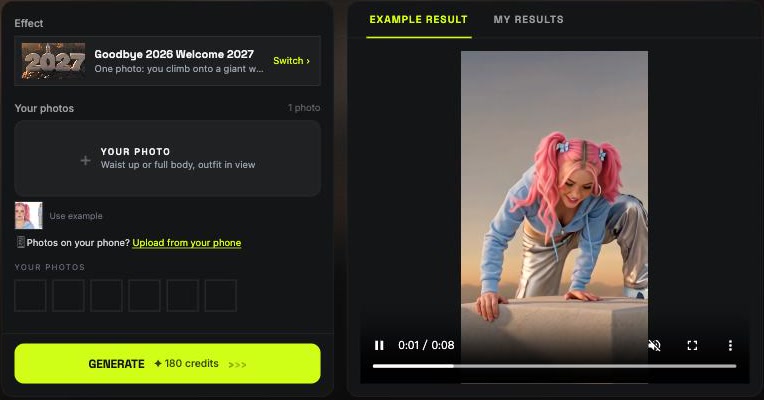
Go to the Goodbye 2026 Welcome 2027 AI page. The template is already loaded at the top, with the model and prompt set up.
Step 2: Upload one photo
Use a waist-up or full-body photo of just you, face toward the camera, with your outfit in view. Want to see the result first? Click Use example under the slot to try it with our sample photo.
Step 3: Generate and download
Press Generate. The button shows 180 credits before anything is charged. The video lands in My Videos, so you can close the tab while it renders. Download the MP4, which has no watermark, and post it.
What photos work best for a Goodbye 2026 Welcome 2027 AI video?
- Show your outfit. The last three seconds are a wide shot where you're small; your clothes are what make it read as you.
- Keep the face clear for the climb. The first seconds are close up, so use a sharp photo facing the camera.
- One person only. The template makes one climber; couples and friends each make their own clip.
- Skip sunglasses and big printed logos. Sunglasses turn into a dark smudge in the wide shot, and printed text on clothes can come out garbled.
- Adults only. Use photos of yourself or adults who said yes. Photos of children, celebrities and public figures aren't allowed.
Will my outfit and the year stay right in the Goodbye 2026 Welcome 2027 AI video?
Yes, in our test both held. The model kept the photo's pink pigtails, cropped blue hoodie, silver cargo pants and blue sneakers instead of the original parka, and the giant numbers read 2027 in every frame. Both are the two things people complain about most in AI versions of this trend, which is why we packaged the run that got them right.
Goodbye 2026 Welcome 2027 CapCut template not working?
The CapCut template is the original way to make this video, and it often fails for one of these reasons:
- It asks you to pay. Many viewers find the template locked behind a paid offer.
- It opens but won't generate. Some users report an error after adding their photo.
- It isn't available in your country. Templates can be region-locked.
- The tutorial opens a different template. Several templates share the same trend name; some are 16:9 and leave black bars on TikTok.
If any of that happens, you can make the Goodbye 2026 Welcome 2027 AI video in your browser from one photo instead: no app, vertical by default, failed renders refunded.
Is the Goodbye 2026 Welcome 2027 AI video free?
Not completely. New accounts get 75 free credits and one video takes 180, so you need the one-time $5.99 pack (540 credits). That covers three videos at about $2.00 each, with no subscription. See pricing. Failed renders are refunded automatically.
How long is the video and how much does it cost?
About $2.00 for one video: 180 credits for an 8-second, 480p vertical clip with sound. Ours took about 3 minutes to render.
Can I make it from one selfie?
Yes, but a waist-up or full-body photo works better. With only a face in the photo, the model has to invent your clothes for the wide shot.
Is it the same as Welcome 2027 AI or Hello 2027?
Yes. Welcome 2027 AI, Hello 2027 and the French Adieu 2026 Bienvenue 2027 are other names for the same New Year trend; the summit climb is the most copied version.
Why doesn't the video look like me?
Usually it's a tight selfie, a side angle or sunglasses. Use a sharp waist-up or full-body photo facing the camera and run the Goodbye 2026 Welcome 2027 AI template again.
Is this the official CapCut template?
No. It's a fan-made template, not affiliated with CapCut, TikTok or any creator of the trend.
Want another one-photo clip? Our Bicep Heart Trend AI tutorial walks through another single-photo template, and our guide to keeping characters consistent in AI video explains why the outfit holds.