How to Make the 58th Floor AI Video With a Friend (4 Steps)
What’s new on this page
- — Linked the POV First Time in a Fancy Cafe AI tutorial.
- — Published: our first 58th Floor AI video (Wan 3.0, 15 s, 480p, 300 credits, first try, about 6.5 minutes), the full prompt, frames, who stands where and photo tips.
A 58th Floor AI video puts two people from two photos into the COLORS performance of "58th Floor" by Anderson .Paak and Cordae: a teal studio, one vintage mic hanging between you, one of you finishing the hook and the other turning to take the verse. We made the clip above on 3 November 2026 from two photos of our own. This is exactly what we did, what it cost and how you can make the same thing with a friend.
What happens in a 58th Floor AI video?
The whole clip stays in the teal room with the mic hanging between you. The camera cuts four times, in the same order as the COLORS performance. In our result:
| Seconds | What happens |
|---|---|
| 0–4 | Waist-up two-shot: the left rapper finishes the hook, the right one vibes along |
| 4–5 | The right rapper turns to face the left: the handover |
| 5–9 | Close-up of the right rapper taking the verse at the mic |
| 9–12 | Wide shot, both of you full length; the left rapper dances |
| 12–15 | Low two-shot: the right rapper raps straight at the left, who nods along |
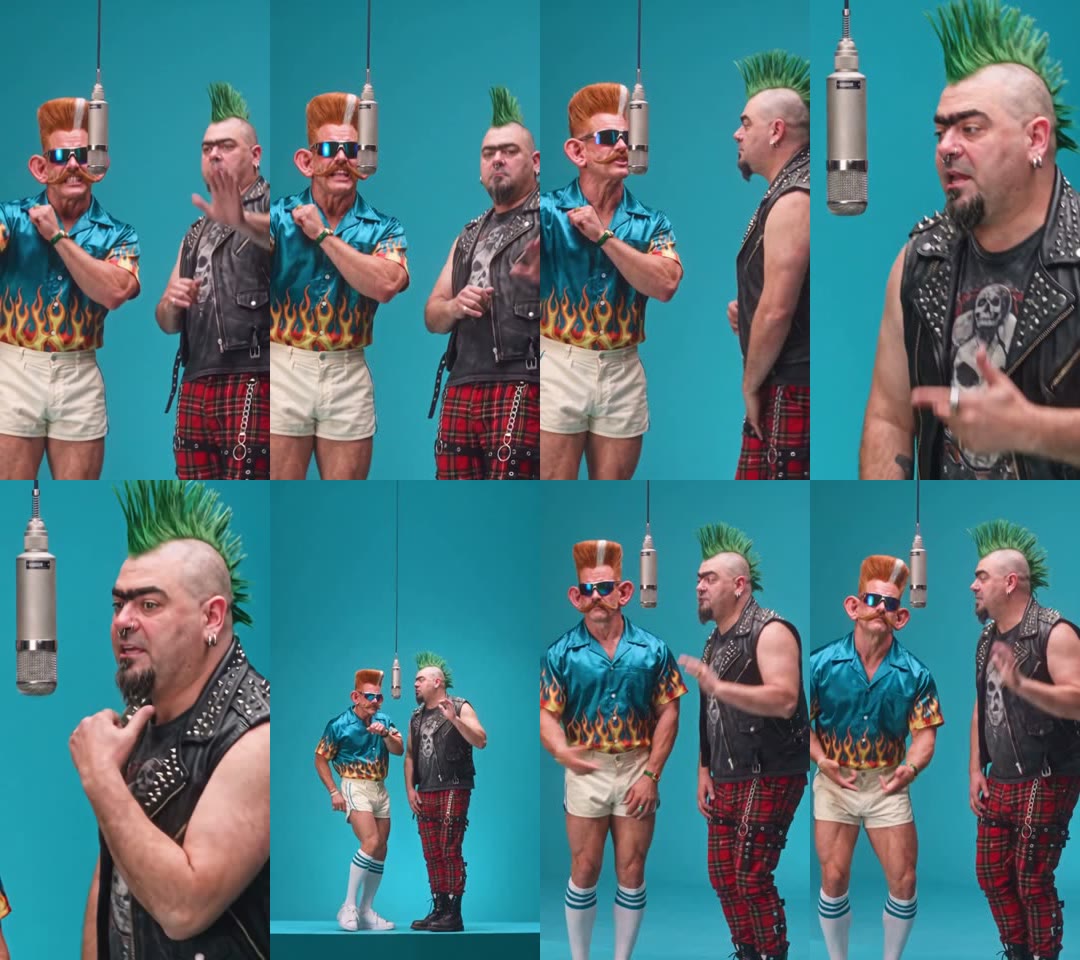
How we made our first 58th Floor AI video
We built it by hand first, the way you would without a template, so we know which parts matter.
1. We started from a 15-second cut of the COLORS performance
COLORS posted "58th Floor – A COLORS SHOW" on 30 October 2026; by 3 November its vertical TikTok cut had passed 700,000 plays. We used a 14.9-second vertical stretch that has the whole handover in it: the end of .Paak's hook, Cordae turning to face him, and Cordae's first lines of the verse.
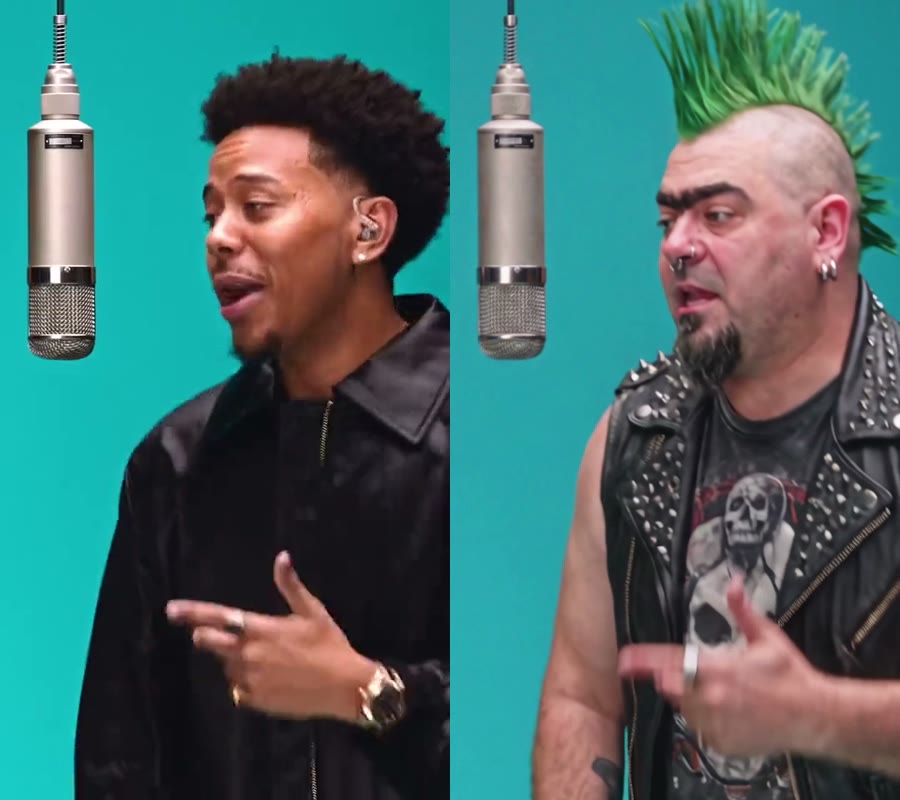
2. We used two photos with nothing in common
Photo 1 was a man with an orange flat-top, mirrored sunglasses, a flame-print satin shirt, white shorts and striped tube socks. Photo 2 was a punk with a green mohawk, piercings, a studded leather vest, plaid trousers and boots. Each image paired a face close-up with a full-body shot, so the model saw both the face and the whole outfit. Two looks this far apart made it easy to check that nobody ended up in the other person's clothes.
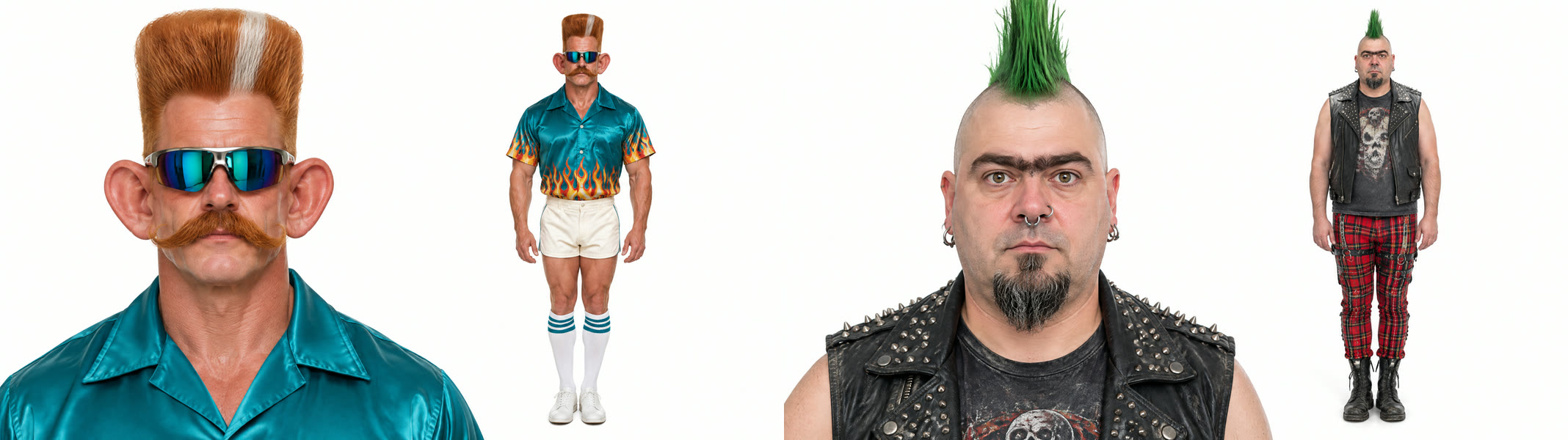
3. We told the model who stands where
With two people in one frame, the model needs to know which face goes on which rapper, so we described each performer by position and clothing. We also asked it to keep the full outfit from each photo, not only the face. This is the prompt we ran on Wan 3.0, 480p, 15 seconds, sound on, with the performance clip as the reference video:
Replace the two men in the reference video with the characters from image 1 and image 2. The man on the left (wearing the hat and sunglasses) becomes the character from image 1; the man on the right (in the black jacket) becomes the character from image 2. Keep each character's face, hairstyle, facial hair, accessories, outfit and body type exactly as in their photo, including the full-body outfit shown. Keep the original camera framing, timing, poses, gestures, lip movements, the microphone and the teal background unchanged. Natural lighting that matches the scene, no extra people, no text.
4. It rendered in about 6.5 minutes
We submitted at 15:39 UTC and the video was ready at 15:46: first try, 300 credits. Both faces held up in the close-up, the flame shirt, tube socks, plaid trousers and boots all showed up in the wide shot, and the mic stayed hanging between them. That run is what the template now uses, with the prompt and settings already in place.
How to make a 58th Floor AI video in 4 steps
Step 1: Open the template
Go to the 58th Floor AI page. The template is already loaded at the top, with the model and prompt set up.
Step 2: Add the left rapper
The Left rapper finishes the hook in the opening two-shot and dances in the wide shot. Full body works best, so the wide shot shows your whole outfit.
Step 3: Add the right rapper
The Right rapper turns, takes the verse and fills the screen in the close-up, so a sharp face matters most here. Pick whoever deserves the spotlight. Missing a friend? Click Use example under that slot and keep our sample photo.
Step 4: Generate and download
Press Generate. The button shows 300 credits before anything is charged. The video lands in My Videos, so you can close the tab while it renders. Download the MP4, which has no watermark, and post it.
Which photo plays which rapper in the 58th Floor AI video?
| Slot | Role | Best photo |
|---|---|---|
| Photo 1 | Left; finishes the hook, dances in the wide shot | One person, full body, face clear |
| Photo 2 | Right; takes the verse, close-up at 5–9 s | One person, face sharp and facing the camera |
To swap who gets the verse, swap the upload order.
What photos work best for a 58th Floor AI video?
- One person per photo. A face cut out of a group shot is too small for the close-up.
- Show the outfit. The wide shot shows you head to toe, shoes included. A face close-up plus a full-body shot in one image worked well for us.
- Two different looks. Contrast is half the joke, and it keeps each outfit on the right person.
- Keep the face clear. No phone or hands over the face. Sunglasses are fine if you want them on: ours stayed on the whole time.
- Adults only. Use photos of yourself or adults who said yes. Photos of children, celebrities and public figures aren't allowed.
Do you have to rap for the 58th Floor AI video?
No. You only upload photos. The template makes both of you perform the lines, mouth movements and gestures to the song, so nobody records or lip-syncs anything. That's also why it works for friends who would never rap on camera.
What to watch for in a 58th Floor AI video
- The room and song stay the same. The teal studio, the hanging mic, the camera cuts and the track come with the template; faces, hair and clothes come from your photos.
- The close-up is the hard part. The right rapper's face fills the screen for four seconds, so that photo needs to be the sharpest.
- 480p is made for phones. It looks sharp on a vertical feed and soft if you blow it up on a big screen.
That's why we packaged it: the left-right order, the full-outfit line in the prompt and the model are already set, so you don't pay to rediscover them. Make your 58th Floor AI video with the same settings.
Is 58th Floor AI free?
Not completely. New accounts get 75 free credits and one video takes 300, so you need the one-time $5.99 pack (540 credits). That covers one video at about $3.33 and leaves 240 credits, with no subscription. See pricing. Failed renders are refunded automatically.
How long is the video and how much does it cost?
About $3.33 for one video: 300 credits for a 15-second, 480p vertical clip with the song. Ours took about 6.5 minutes to render.
What song is the 58th Floor AI video?
"58th Floor" by Anderson .Paak and Cordae, the opening track of their joint album Heavy Is the Crown (23 October 2026), as performed for COLORS. The AI video comes with it, so you don't add music yourself.
Do we keep our own outfits?
Yes. In our test both men kept everything from their photos, from the flame shirt and tube socks to the studded vest, plaid trousers and boots.
Why don't we look like our photos?
Usually it's a small face cropped from a group shot or a mirror selfie with the phone in the way. Use a sharp single-person photo facing the camera for each slot and run the 58th Floor AI template again.
Is this the official COLORS video?
No. It's a fan-made template, not affiliated with COLORS, Anderson .Paak, Cordae or their labels.
Want another duo? Our Hop Hop Hop AI Dance tutorial walks through a two-person dance template, and our 24K Magic AI tutorial puts two of you on a cruise ship deck. Same two characters, different joke: our Pimp Walk Entrance AI tutorial has one holding a burger-shop door while the other struts in. Prefer a silent skit? Our POV First Time in a Fancy Cafe AI tutorial has one of you sitting on a cafe table like a chair until a friend walks in.