Lil Yachty Walkout AI: Put Yourself in the Meme
What’s new on this page
- — Published: our first Lil Yachty walkout AI video (Wan 3.0, video to video, 720p, 14 s, 600 credits, first try, about 13 minutes), the full prompt, frames, photo tips and two failed runs.
- — Linked the new Lil Yachty Walkout AI one-photo template; fixed the length to 14 seconds.
A Lil Yachty walkout AI video puts you in the stage entrance the internet keeps remixing: you stride out from backstage, throw the mic up, turn to a festival crowd and high-step down the runway. We made the clip above on 5 November 2026 from one photo of a man in a blue suit. Here is how to make a Lil Yachty walkout AI video yourself: exactly what we did, what it cost, the prompt we used and the two runs that failed first.
What is the Lil Yachty walkout AI meme?
The Lil Yachty walkout AI meme is a 2021 concert entrance that people remake by swapping Lil Yachty for someone else. The footage is his set at Lyrical Lemonade's Summer Smash in Chicago in August 2021; according to Sporting News he walks out to his song "Coffin". The clip went up on YouTube in June 2022 and passed 4 million views. On 8 April 2024 the account AI Warper replaced him with the Joker using Viggle AI, and within days there were Hitler, Sam Bankman-Fried and Nikola Jokić versions, as Know Your Meme logs. Two years on, people still put their friends, pets and coworkers in it.
What happens in a Lil Yachty walkout AI video?
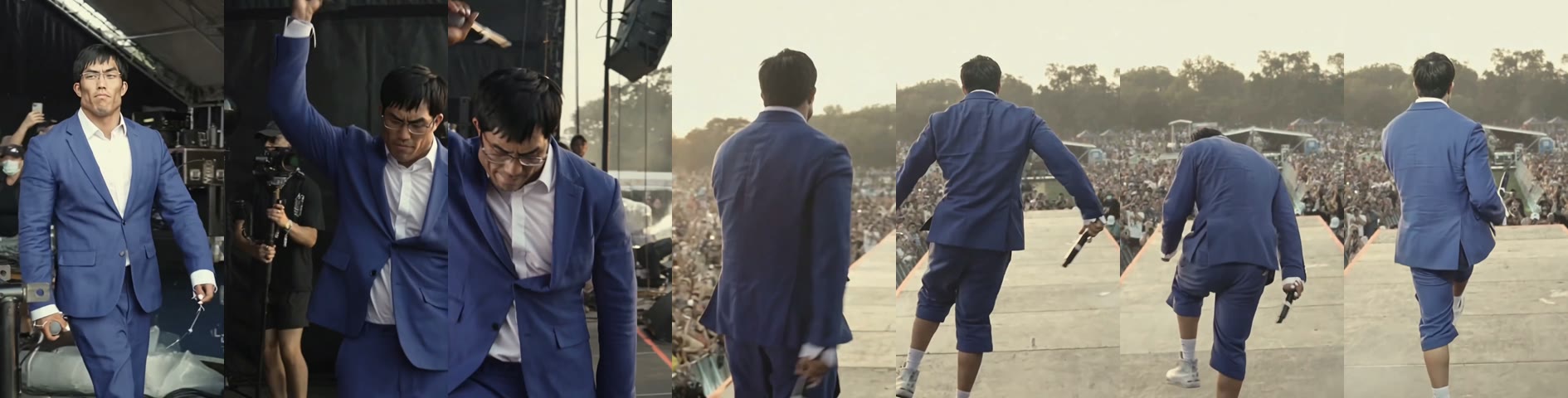
A Lil Yachty walkout AI video keeps every beat of the entrance and changes only the person. In our result:
| Seconds | What happens |
|---|---|
| 0–2 | You walk out from backstage toward the camera, mic in hand, a phone filming behind you |
| 2–4 | You throw the mic arm up and lean into the camera |
| 4–6 | You turn your back to the camera and face the crowd at sunset |
| 6–14 | You high-step down the long runway into the festival crowd |
How we made our first Lil Yachty walkout AI video
1. We cut the walkout clip to 14 seconds
The vertical version that circulates runs longer than the 15-second limit, so we kept the first 14 seconds: the backstage walk, the mic raise, the turn and the run down the ramp. That stretch has the whole joke in it, and the clip length decides the length of your video.
2. We used one photo with an obvious outfit
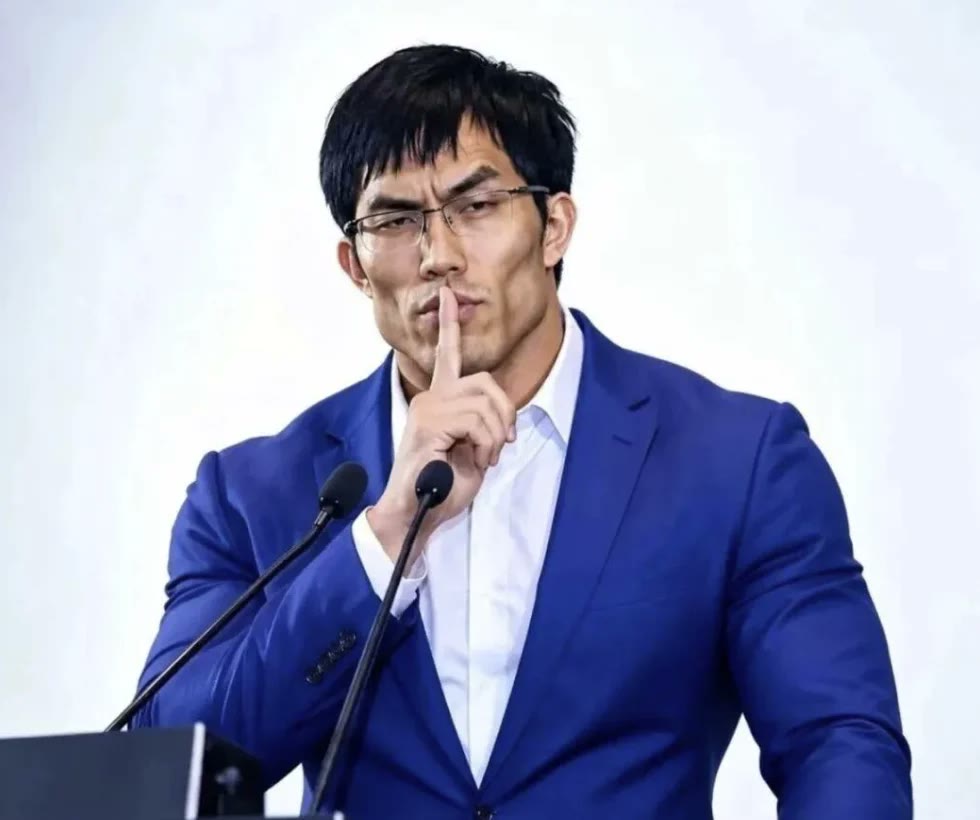
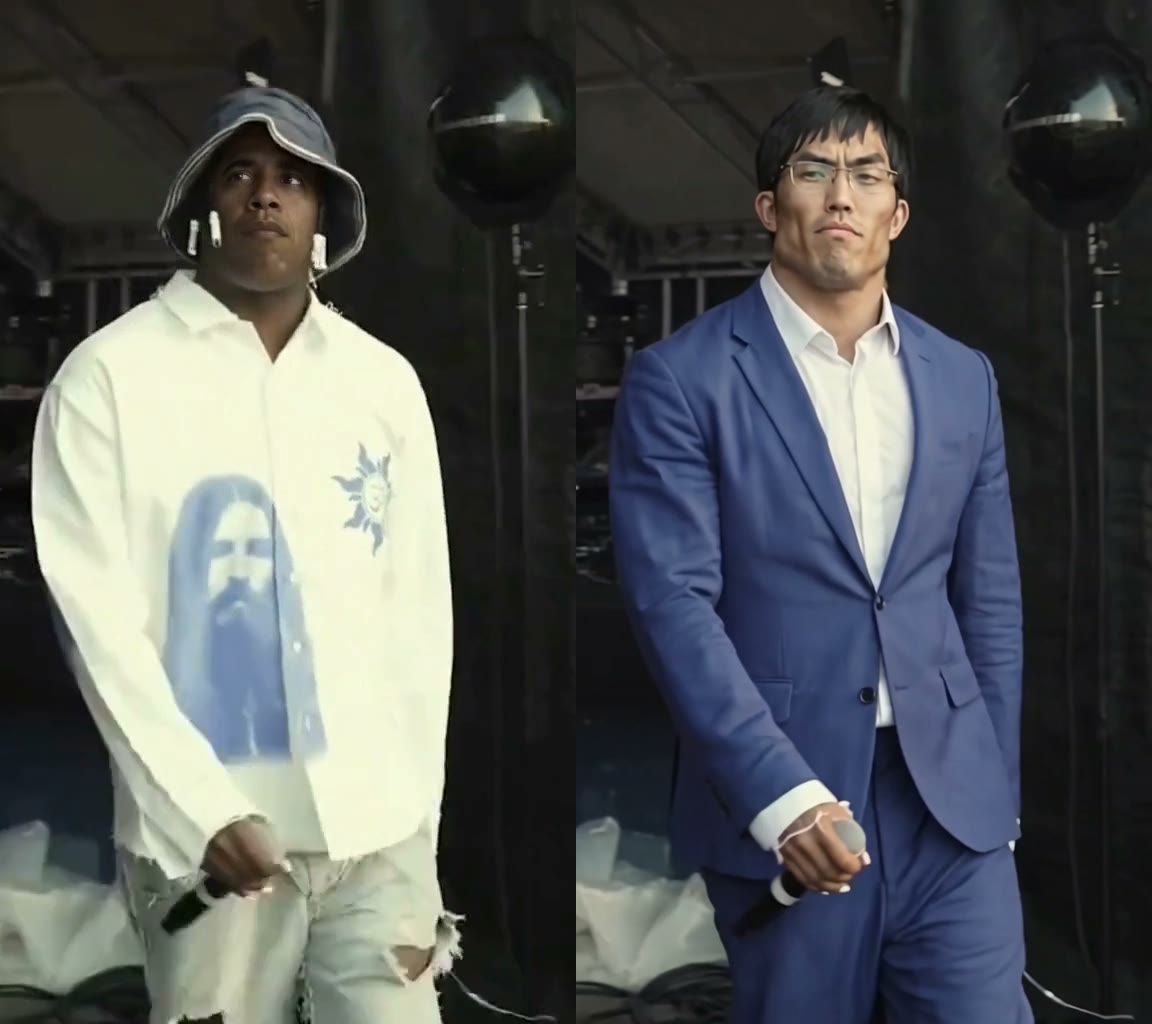
Our photo was a man with black hair and glasses in a blue suit and white shirt, shot from the waist up and facing the camera. The original performer wears a white printed shirt and a bucket hat, so a blue suit made it easy to see whether the clothes really changed.
3. We asked for the face and the outfit
Most face-swap apps only change the face. We wanted the whole person, so the prompt says the outfit follows the photo too, and that everything else stays as it was. We ran it on Wan 3.0, 720p, duration 15 seconds (the output followed the 14-second clip), sound on, aspect ratio auto.
Replace the man in the video with the person from the reference photo. Keep the person's face, hairstyle, body shape and skin tone exactly as in the reference photo, and the outfit follows the reference photo as well. Keep everything else from the original video unchanged: the backstage walk, the mic raise, the turn toward the crowd and the run down the runway, the camera movement, the timing, the lighting and the atmosphere.
4. It rendered in about 13 minutes
We submitted at 13:39 UTC and the video was ready at 13:52: first try, 600 credits. The face and glasses held up in the close-up, the blue suit replaced the white shirt in every frame, and the crowd, the ramp and the sound stayed the same. One thing to know: on the runway the trousers turned into knee-length shorts, because the original performer wears shorts there and the model followed his legs.
How to make a Lil Yachty walkout AI video in 4 steps
Step 1: Cut the walkout clip
Save the walkout clip, either the original YouTube upload from June 2022 or a vertical repost on TikTok, and trim it to 15 seconds or less, starting from the backstage walk. Any phone editor or CapCut does this.
Step 2: Upload the clip and your photo
Open the generator and choose the Video tab (video to video). Upload the clip, then add one photo under Reference images. Nothing to install: it all runs in the browser.
Step 3: Paste the prompt
Paste our prompt into the prompt box. If you want to keep the original clothes and only change the face, delete the part about the outfit.
Step 4: Pick 720p and generate
Leave Match source and Audio on, choose 720p and press Generate. The button shows the credits before anything is charged. The video lands in My Videos and stays private, so you can close the tab while it renders. Download the MP4, which has no watermark, and post it.
What photo works best for a Lil Yachty walkout AI video?
- Waist-up or full body. From 4 seconds on you are seen from behind, so the model needs your shape and clothes, not just your face.
- Face the camera with your face sharp and uncovered. The first 4 seconds are a close walk toward the lens.
- Clothes you want to be seen in. The outfit in your photo is what walks out. A loud jacket or a suit reads well from behind.
- One person per photo. A face cropped out of a group shot is too small.
- Not a celebrity. Use yourself or a friend who said yes. Photos the model reads as a famous person get refused.
Why your Lil Yachty walkout AI video fails or doesn't look like you
- "Possible celebrity photo". Before this run we tried a different stage-entrance clip of a famous athlete, twice. Both were refused with this message and the 560 credits came back automatically. Use an ordinary person's photo, and a clip where the star isn't the whole frame for long.
- The face drifts. Usually the photo is a side profile, blurry or a tiny face. Use a sharp front-facing photo and run it again.
- The legs follow the original. Our suit trousers became shorts on the runway. If the full outfit matters, use a photo that clearly shows your legs and say "full-length trousers" in the prompt.
- Wrong length. The video follows the clip; trim the clip to 15 seconds or less first.
Lil Yachty walkout AI vs Viggle: which should you use?
Viggle made the original 2024 remakes and still has a free plan; in our test, our generator changed the whole person, outfit included, from one photo. Viggle facts below are from its pricing page on 5 November 2026; we did not generate with Viggle.
| AI Photo Animator (our test) | Viggle free plan | |
|---|---|---|
| Watermark | None | Free exports may carry one |
| Limit | Credits, failed runs refunded | Up to 5 videos a day |
| Price per video | 600 credits, about $8.99 (pack) or $5.99 (Lite plan) | Free tier |
Want to be the one walking out, in your own clothes, without a watermark? Make your Lil Yachty walkout AI video with the same settings already packaged as a one-photo template. Please keep it a meme: don't use someone else's face without their OK, and don't pass it off as real footage.
What app did people use for the Lil Yachty walkout AI meme?
The 2024 originals were made with Viggle AI; AI Warper posted the first one, a Joker version, on 8 April 2024. You can make your own today with our Lil Yachty Walkout AI generator from one photo, with no watermark.
Is there a free Lil Yachty walkout AI generator?
Not fully. New accounts get 75 free credits and one 720p walkout video takes 600. The $5.99 starter pack (540 credits) is not enough for one, so you need the $14.99 1,000-credit pack, with no subscription (about $8.99 per video). Failed renders are refunded automatically. See pricing.
How much does a Lil Yachty walkout AI video cost?
Our 14-second 720p test cost 600 credits: about $8.99 on the one-time pack, or about $5.99 on the Lite plan. Dedicated template sites list $8–$10 per video (checked 5 November 2026).
What song plays in the Lil Yachty walkout?
"Coffin", his entrance song at Lyrical Lemonade's Summer Smash in Chicago, August 2021, according to Sporting News. Leave Audio on and the sound stays in your version.
Why did I get "Possible celebrity photo"?
The model refuses photos or clips it reads as a famous person. Use a photo of yourself or a friend; the credits come back automatically.
Can I keep my own clothes in the Lil Yachty walkout?
Yes. Write "the outfit follows the reference photo" in the prompt. In our test the white printed shirt became the blue suit from the photo.
How long does a Lil Yachty walkout AI video take?
About 13 minutes for our 14-second 720p run. It renders in My Videos, so you can close the tab.
Want another entrance? Our Pimp Walk Entrance AI tutorial has one friend holding a door while the other struts in, and our 58th Floor AI tutorial puts two of you at one mic in a COLORS studio.