How to Make a Giant Ramp Climbing AI Video From 1 Photo (4 Steps)
What’s new on this page
- — Published: our first Giant Ramp Climbing AI video (Wan 3.0, 15 s, 480p, 300 credits, 7 min 26 s), the full prompt, the two problems we hit before it ran, real screenshots of the tool and the task, and photo tips.
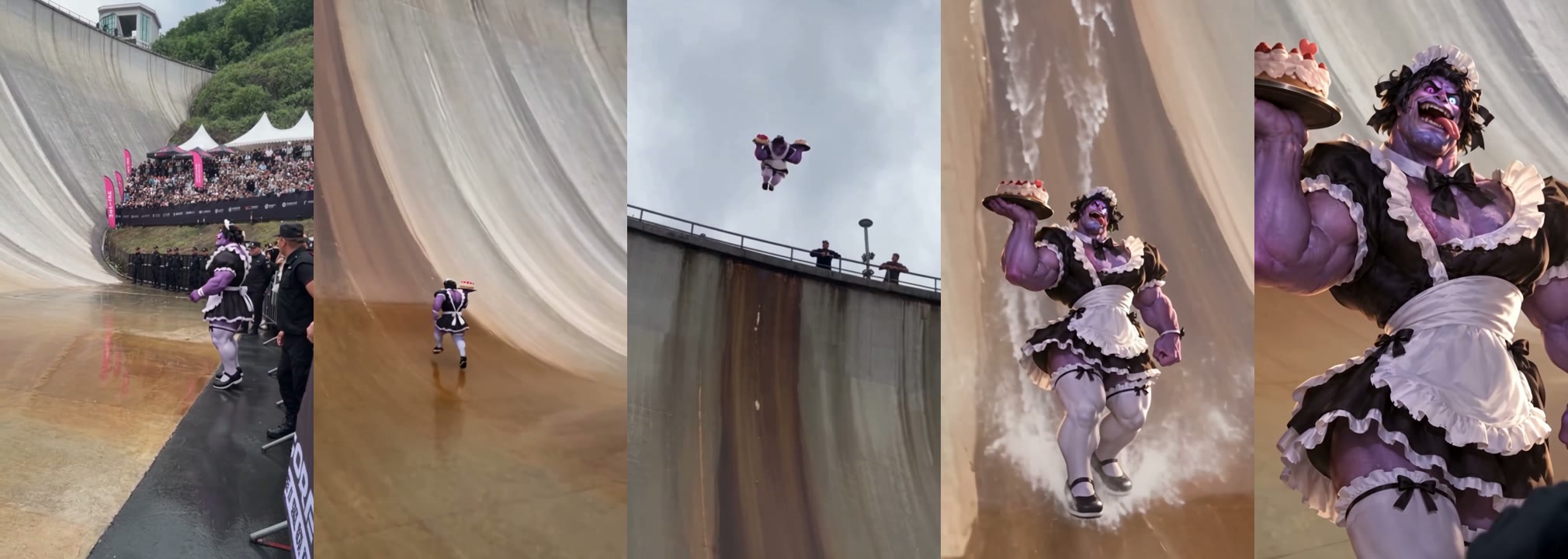
A Giant Ramp Climbing AI video puts the person from your photo into the viral dam wall clip: a sprint past a packed grandstand, a run straight up a curved concrete dam, a leap off the top edge, a slide back down through the spray and a shout at the camera. We made the clip above on 2 November 2026 from one photo of a purple cartoon character in a maid dress. This is exactly what we did, what it cost and the two things that stopped us on the way.
What happens in a Giant Ramp Climbing AI video?
The camera is handheld, like a fan filming from the barrier. In our result:
| Seconds | What happens |
|---|---|
| 0–3 | You stand at the crowd barrier at the foot of the dam, security guards and a full grandstand behind you |
| 3–5 | You sprint across the wet concrete toward the wall |
| 5–8 | You run straight up the near-vertical dam face |
| 8–9 | You leap off the top edge against the sky, people watching from the railing |
| 9–12 | You slide back down with your arms out and water spraying around your feet |
| 12–15 | You land and shout at the camera, fists clenched |
How we made our first Giant Ramp Climbing AI video
We built it by hand first, the way you would without a template, so we know where it breaks. This is a video-to-video job: the trend clip supplies the dam, the crowd and the motion, and your photo supplies the runner.
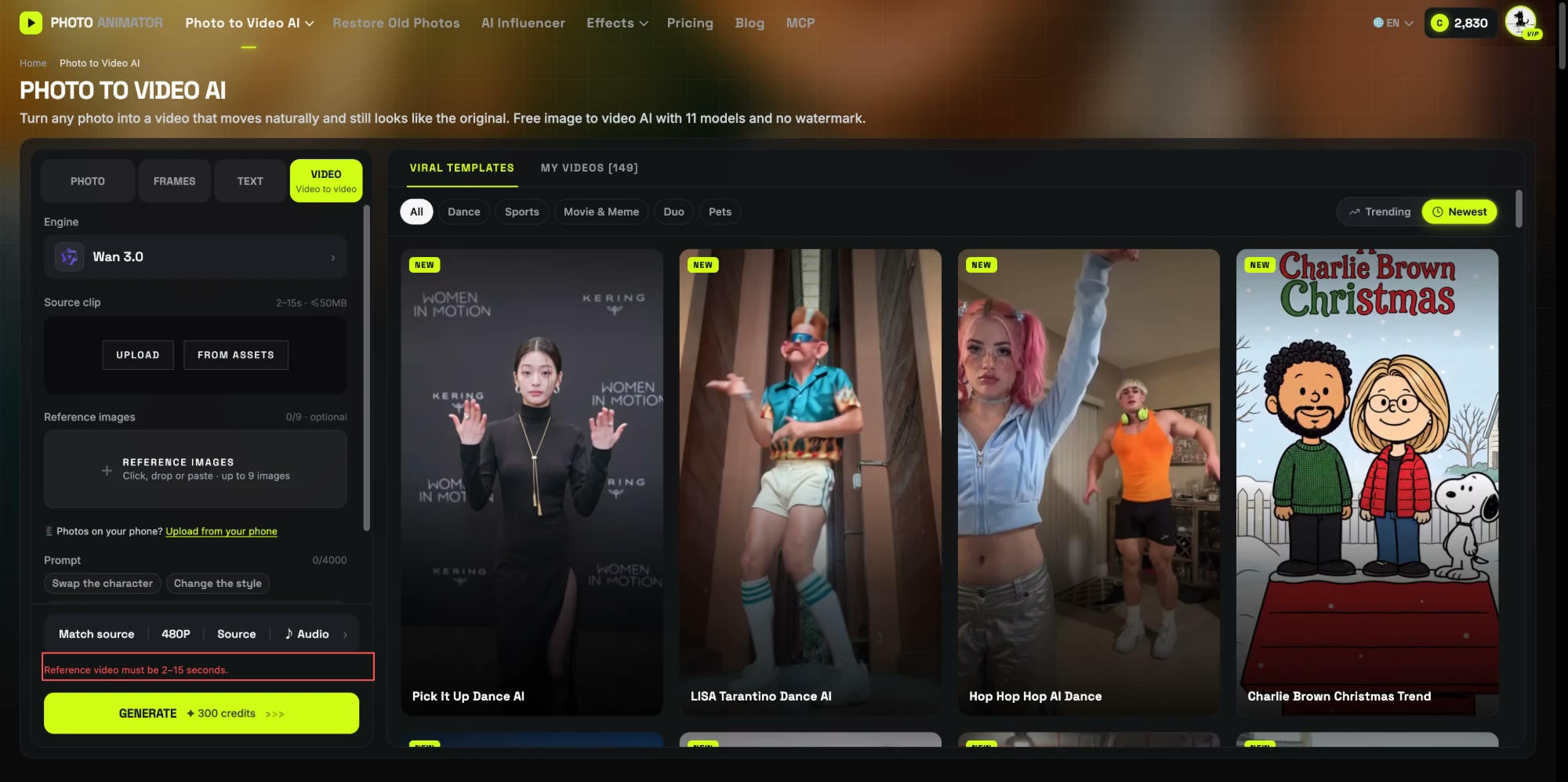
1. Our first upload was rejected for length
The trend clip we started from was longer than 15 seconds, so we cut it to exactly 15.0 seconds. The tool still refused it with Reference video must be 2–15 seconds. The reason: the upload check leaves a safety margin below the limit, because a browser can read a clip as slightly shorter than the video model does. We trimmed the clip to 14.3 seconds and it went through. If you ever upload your own clip, keep it a little under the limit.
2. We told the model to change the clothes too
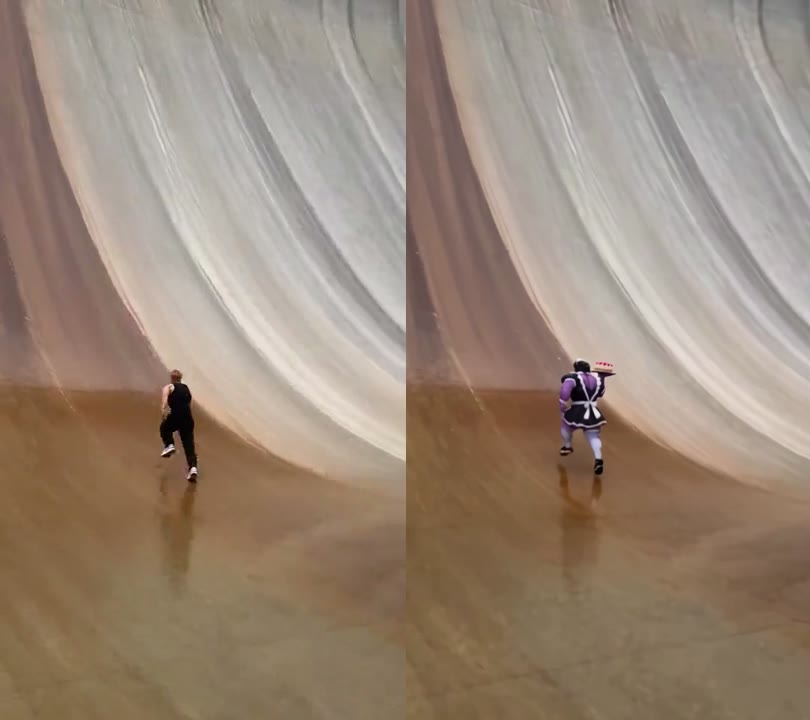
Our first draft of the prompt kept the runner's black tank top and track pants, which would only change the face and leave your photo in someone else's gym clothes. We rewrote the outfit line to take the clothes and shoes from the photo instead. In the final video the frills, the apron, the white stockings and even the cake tray from the photo all went up the wall.
3. We used one photo with the whole outfit visible
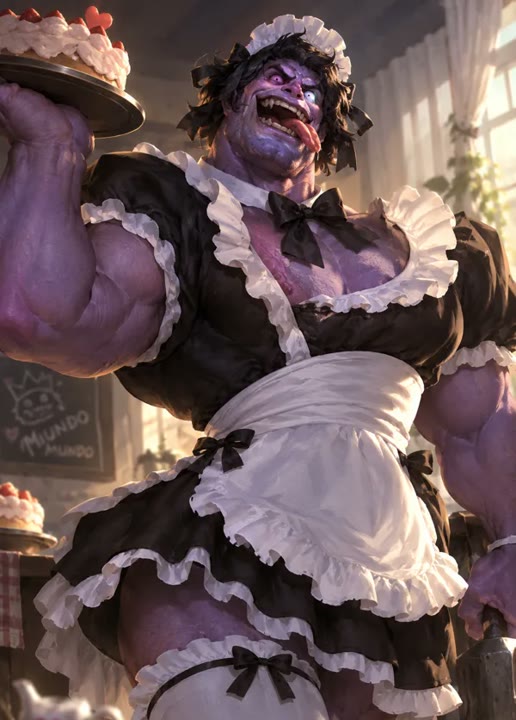
Our photo shows the character from the head down to the stockings, face to the camera. Because the climb is a wide shot and the ending is a close-up, the model needs both a clear face and the full outfit.
This is the prompt we ran, on Wan 3.0, 480p, 15 seconds, sound on:
Replace the man in the video with the person from the reference photo. Keep the new person's face, hairstyle, skin tone, body shape and outfit exactly as in the reference photo, and keep them consistent in every frame and every camera angle. The new person wears the same clothes and shoes as in the reference photo, not the original black tank top and track pants. Keep everything else exactly as in the original video: the curved concrete dam wall with its rust-brown water stains, the crowd and security guards behind the barriers, the wet ground, the camera movement, the lighting and the timing. Keep the original motion: running toward the dam, sprinting up the near-vertical wall, sliding back down with arms spread and water spraying around the feet, then landing and shouting with excitement at the camera, pointing and clenching fists. Realistic, natural body movement, clothes moving naturally with the body, no face distortion, no flickering, no extra people changed.
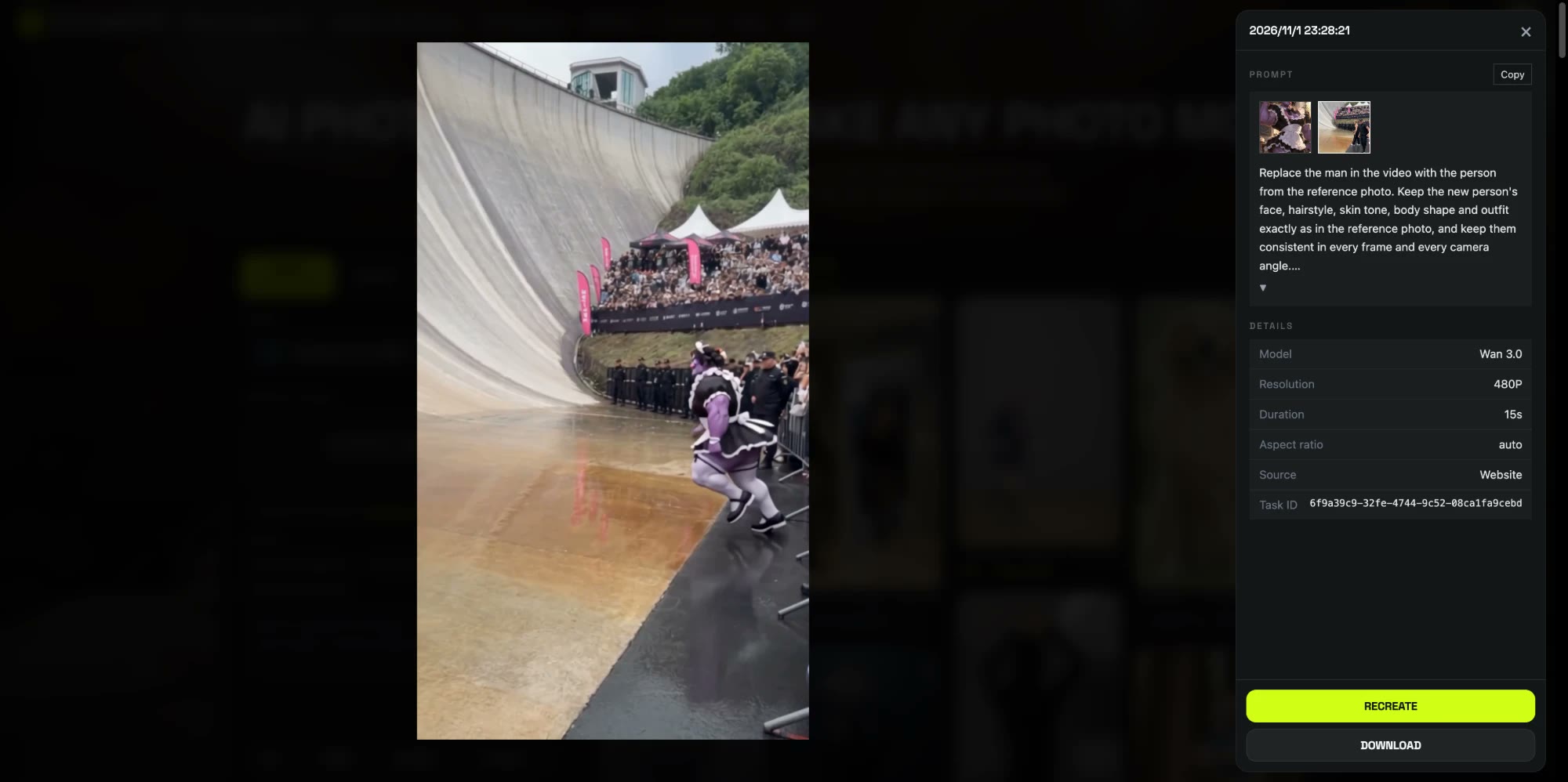
4. It rendered in about 7 and a half minutes
We submitted at 07:28 UTC and the video was ready at 07:35: 7 minutes 26 seconds, 300 credits. That run is what the template now uses, with the trimmed clip, the outfit line and the model already set up.
How to make a Giant Ramp Climbing AI video in 4 steps
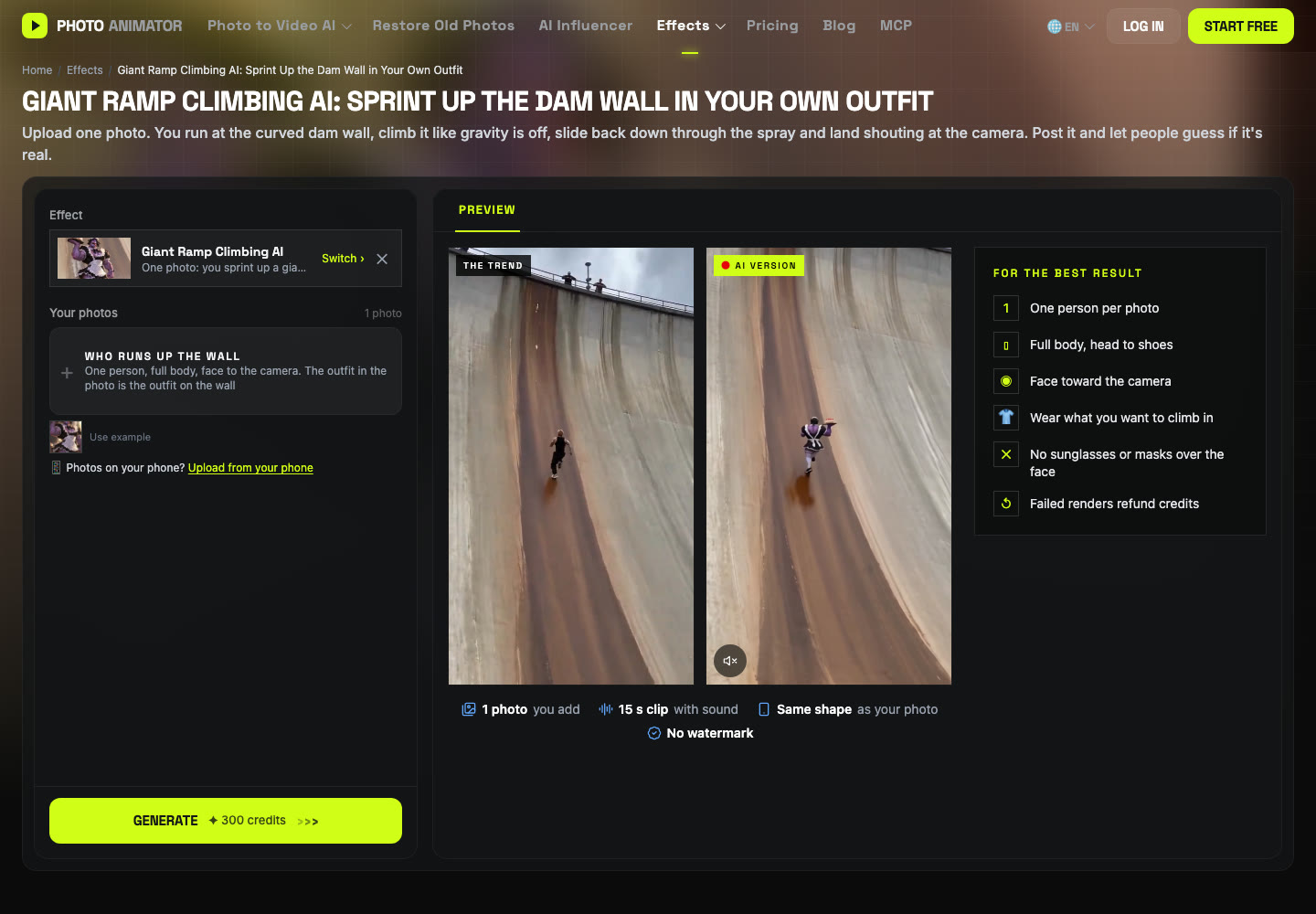
Step 1: Open the template
Go to the Giant Ramp Climbing AI page. The template is already loaded at the top, with the model, the clip and the prompt set up.
Step 2: Pick your outfit before you pick your photo
Whatever you wear in the photo is what you wear on the wall, so choose the photo by its clothes: a team jersey, a costume, a suit. Bright colors stand out against the gray dam.
Step 3: Upload one full-body photo
The slot is called Who runs up the wall. Use one person, head to shoes, face to the camera, no sunglasses.
Step 4: Generate and download
Press Generate. The button shows 300 credits before anything is charged. The video lands in My Videos in about 7 to 8 minutes, so you can close the tab. Download the MP4, which has no watermark, and post it.
What photos work best for a Giant Ramp Climbing AI video?
- Full body, head to shoes. The run and the slide are wide shots; if your photo stops at the knees, the legs and shoes get guessed.
- Face to the camera, clear and well lit. The last three seconds are a close-up shout.
- One person per photo. There is one runner; with two people the model can't tell who to use.
- Wear the joke. A costume or a jersey is funnier going up a dam than a plain T-shirt, and it stays on for all 15 seconds.
- Adults who said yes. Use photos of yourself or adults who agreed. Photos of children, celebrities and public figures aren't allowed.
What to watch for in a Giant Ramp Climbing AI video
- Props come along. Anything you hold in the photo may be carried up the wall. Our character kept the cake tray the whole way.
- Body shape follows the photo. A very muscular or very small figure in the photo stays that way on the dam.
- 480p is made for phones. It looks sharp on a vertical feed and soft on a big screen.
These are the reasons we packaged it: the 14.3-second cut, the outfit line in the prompt and the model are already set, so you don't pay to rediscover them. Make your Giant Ramp Climbing AI video with the same settings.
Is the Giant Ramp Climbing video real?
No. The Giant Ramp Climbing video is AI-made. The trend started with an Instagram reel from the AI virtual popstar account @jacksonzhangai on 23 October 2026, and a CapCut template copy spread it on TikTok a few days later. Fact-checkers at Lead Stories had already warned on 9 October 2026 that viral clips of people running up giant curved walls are mostly AI. Nobody should try it on a real dam.
Is Giant Ramp Climbing AI free?
Not completely. New accounts get 75 free credits and one video takes 300, so you need the one-time $4.99 pack (540 credits). That covers one video at about $2.77 and leaves 240 credits, with no subscription. See pricing. Failed renders are refunded automatically.
Do I need a full-body photo?
Yes, for the best result. The climb is filmed from far away, so a head-to-shoes photo lets your whole outfit come through. A face-only selfie leaves the body and clothes to guesswork.
Can I keep my own clothes instead of the black tank top?
Yes. The template takes the clothes and shoes from your photo, so whatever you wear in it is what you wear on the wall. In our test a full maid dress came through.
Why was my 15-second clip rejected?
Clips right at 15 seconds can read as slightly longer to the video model, so the upload check keeps a small margin under the limit. Trim your clip to about 14.5 seconds. With the template you don't upload a clip at all.
How long does it take?
Our test took 7 minutes 26 seconds. The video saves to My Videos, so you can close the tab and come back.
Can I use a photo of my dog?
We haven't tested pets on this template yet, so we can't promise how a four-legged runner comes out. People and costumed characters work.
Want another one-photo trend? Our Pick It Up Dance AI tutorial shows a dance template that keeps your own background.