Hop Hop Hop AI Dance: How to Make It From 2 Photos (and Why the Switch Fails)
What’s new on this page
- — Published: three Wan 3.0 tests (two failed at the switch, one worked: 9 s, 480p, 180 credits), full prompts and photo tips.
A Hop Hop Hop AI dance video puts two people from two photos into the TikTok squash-and-switch gag: one stands at the camera and squashes the other with a flat hand, then a hard cut switches their places and the squashing goes the other way. The clip above took us three tries. The first two looked fine for four seconds and then fell apart right at the switch, which is the part that makes the trend.
What is the Hop Hop Hop AI dance trend?
The Hop Hop Hop trend is a two-person TikTok gag set to Shluzov's Russian song "Её парень" ("Her Boyfriend"), slowed down. It took off with a post by @gabilagaba on 18 October 2026, which is why some people call it the gabi trend. AI versions followed within a week: @pouzato7's from 25 October had 2.6 million views by 30 October (figures as reported by hophophopdance.org), and CapCut edits like @lawuw66jpxk5's put cartoon characters into it.
What happens in a 9-second Hop Hop Hop AI dance video?
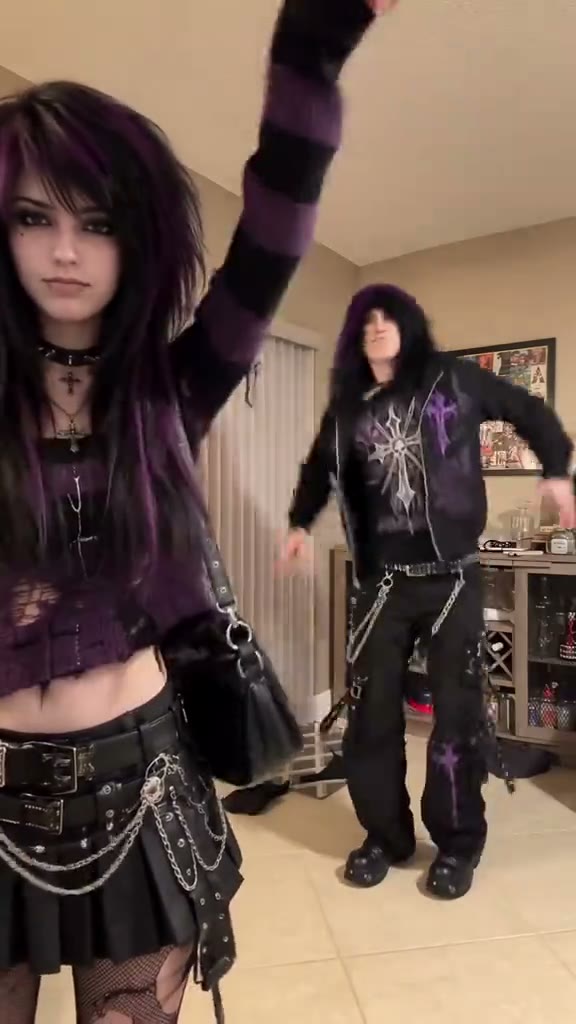
The camera stays still in a living room; everything happens through who is close and who is far. In our result:
| Seconds | What happens |
|---|---|
| 0–2 | The pink-haired friend (photo 2) dances at the camera; the muscle guy (photo 1) hops far behind |
| 2–4 | She lowers a flat hand on the beat and he squats down, squashed |
| ~4 | Hard cut: they switch places |
| 4–9 | Now he is at the camera, pointing back and squashing her while she hops |
Why did our first two Hop Hop Hop AI dance tests fail?
Both failures came from the same thing: the prompt told the model who to replace by where they stood or what they wore, and in this trend both of those change at the cut. Here are all three runs, same two reference photos, same model.
| Test | How we told it who is who | Source clip | Result |
|---|---|---|---|
| 1 | By jacket color, and "each person stays in the same position" | Two guys on a street, white jacket and black jacket | Failed: the switch disappeared. The muscle guy stayed at the camera for all 10 seconds |
| 2 | By coat color, plus "they swap in the second half, the mapping stays fixed" | Same street clip | Failed: each half only replaced the person at the camera; the original guy stayed in the back, then came back to the front |
| 3 | By gender and full outfit, "not by position", plus when the switch happens | Girl and guy with very different outfits, living room | Worked: both people right before and after the cut |
Test 1: identity tied to position
Replace the man in the white jacket with the person from Image 1, and replace the man in the black jacket with the person from Image 2. Keep each person's face, hairstyle and outfit exactly as in their reference image. Keep the original video's motion, timing, camera movement, background and lighting unchanged. Each person stays in the same position and does the same actions as the man they replace.
The last sentence was the mistake. "Stays in the same position" is exactly what the trend doesn't do, so the model kept the muscle guy in front the whole time and the payback never came.
Test 2: telling it about the switch
Replace the characters in every frame of the entire video. Image 1 replaces the character wearing the white coat. Image 2 replaces the character wearing the black coat. This mapping stays fixed for the whole video. In the second half, the two characters swap positions. After the swap: - the character in the white coat is still Image 1, - the character in the black coat is still Image 2. Keep the original motion, timing, camera movement, background and lighting unchanged. In every frame, each character's face and outfit match their own reference image. No original faces, no blended faces, no identity swapping between the two characters.
Describing the switch helped a little: the people in the back did get replaced in the second half. But the two original guys looked too alike (similar hair, both in jackets over striped shirts), so the model lost track of the white coat and the black coat and only replaced whoever was easiest to see.
Test 3: gender + outfit, on a clearer clip
Replace the two people in this video for the entire clip, every frame. Image 1 replaces the man: black zip-up hoodie with a large cross print, black baggy pants with chains, dark shaggy hair. Image 2 replaces the woman: purple-and-black striped sweater, black pleated skirt, fishnet tights, long black-and-purple hair. Identify each person by their outfit, not by their position. At the start the woman is in the foreground and the man dances in the background. Around the middle they swap: the man moves to the foreground close-up and the woman goes to the background. After the swap the man is still Image 1 and the woman is still Image 2. Keep the original dance moves, timing, camera framing, room, background and lighting unchanged. Each person's face, hair and body match their reference image in every frame, including close-ups and the moment of the swap. No original faces, no blended faces, no swapping identities between the two people.
Two changes made it work. First, a different source clip with a girl and a guy whose outfits share nothing, so there is no way to mix them up. Second, each person is named by gender plus a full outfit, the prompt says outright to ignore position, and it describes who is where before and after the switch. The Hop Hop Hop AI Dance template uses exactly this run, so you don't need the clip or the prompt.
| Setting | Value |
|---|---|
| Model | Wan 3.0 |
| Inputs | 2 photos + 8 s trend clip |
| Length | 9 s |
| Resolution / ratio | 480p · auto (came out vertical) |
| Sound | On, from the clip |
| Credits | 180 (about $1.66) |
| Render time | About 3 minutes |
| Runs needed | 3 (2 failed) |
How should you write a Hop Hop Hop AI dance prompt?
Anchor each person to something that never changes during the clip. For two-person video-to-video with a position switch, that means:
| Do | Don't |
|---|---|
| Name each person by gender + outfit ("the man in the black cross-print hoodie") | Name them by place ("the person on the left", "the one in front") |
| Say when and how they switch, and who is where after | Say "each person stays in the same position" |
| Repeat the mapping after the switch | Assume the model remembers it |
| Pick a source clip where the two people look nothing alike | Use two similar people in similar clothes |
If your clip still fails, cut it at the switch and generate two halves with simple position prompts (front = photo 2, back = photo 1, then the reverse), then join them. The hard cut hides the seam.
How to make a Hop Hop Hop AI dance video in 4 steps
Step 1: Open the Hop Hop Hop AI Dance template
Go to the Hop Hop Hop AI Dance page. The model, the prompt above and the settings are already loaded.
Step 2: Upload photo 1, the one who gets squashed first
Photo 1 starts far back, gets squashed, then takes the camera after the cut. Knees up or full body works best, because this person is small in the first half.
Step 3: Upload photo 2, the one who squashes first
Photo 2 starts at the camera. To change who goes first, swap the two uploads.
Step 4: Generate and download
Press Generate. It takes about 3 minutes and saves to My Videos, so you can close the tab. Download the MP4 (no watermark) and post it to TikTok, Reels or Shorts.
What photos work best for the Hop Hop Hop AI dance?
Two separate photos of one person each, knees up or full body, facing the camera, in good light. Different outfits and hair help the model keep the two of you apart after the switch; two people in matching black hoodies is the hardest case. Skip sunglasses, masks, group photos and photos of celebrities or children.
Is the Hop Hop Hop AI dance free?
Not completely. New accounts get 75 free credits and one video takes 180, so you need the one-time $4.99 pack (540 credits). That covers three videos at about $1.66 each, with no subscription. See pricing.
Why didn't the two people switch in my Hop Hop Hop video?
Usually the prompt ties each person to a position, or the two people in the source clip look too alike. Name each person by gender and outfit, describe the switch, and use a clip where they look clearly different, or just use our template, which already has the working setup.
Can I make the Hop Hop Hop AI dance with one photo?
Our template needs two photos, one per person. Each photo should show one person only.
What song is used in the Hop Hop Hop dance?
"Её парень" ("Her Boyfriend") by the Russian artist Shluzov, released on 23 January 2026, used slowed down on TikTok. The template video includes it.
Why is it called the gabi trend?
Because @gabilagaba's post on 18 October 2026 is the one that made it go viral.
Do I need CapCut?
No. You upload the photos in your browser and download a finished MP4 with sound.