How to Make a Chipmunks Dance AI Video From 3 Photos (4 Steps)
What’s new on this page
- — Published: our first Chipmunks Dance AI video (Wan 3.0, 15 s, 480p, 300 credits, first try, about 30 minutes), the full prompt, screenshots of the template and the task, who stands where and photo tips.
A Chipmunks Dance AI video puts three people from three photos into the TikTok trio dance set to a sped-up You Spin Me Round: a line of three in a hallway, spins, hair flips, and one close-up each. We made the clip above on 3 November 2026 from three photos of our own, without a single Chipettes costume. This is exactly what we did, what it cost and how you can make the same thing with two friends.
What happens in a Chipmunks Dance AI video?
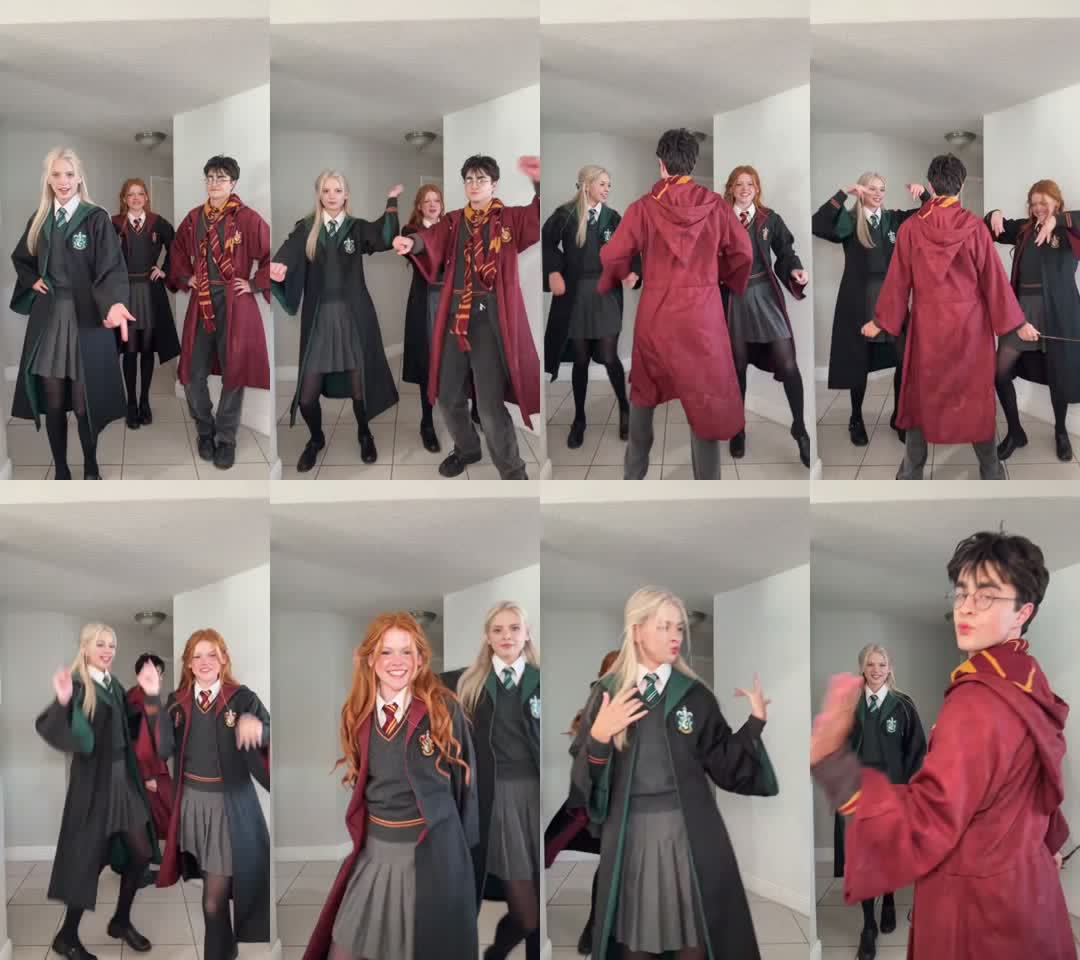
The camera stays at the end of a white hallway. The three of you start in a row, then each dancer breaks out for a moment in front of the lens. In our result:
| Seconds | What happens |
|---|---|
| 0–2 | All three stand in a row, hands on hips |
| 2–5 | Everyone starts bouncing and pointing at the camera |
| 5–9 | The right dancer spins to the front; all three dance with hands on their heads |
| 9–12 | The middle dancer runs right up to the camera, hair flying |
| 12–14 | The left dancer takes the next close-up |
| 14–15 | The right dancer leans into the lens and pouts |
How we made our first Chipmunks Dance AI video
We built it by hand first, the way you would without a template, so we know which parts matter.
1. We started from a trend clip and cut it to 14.9 seconds
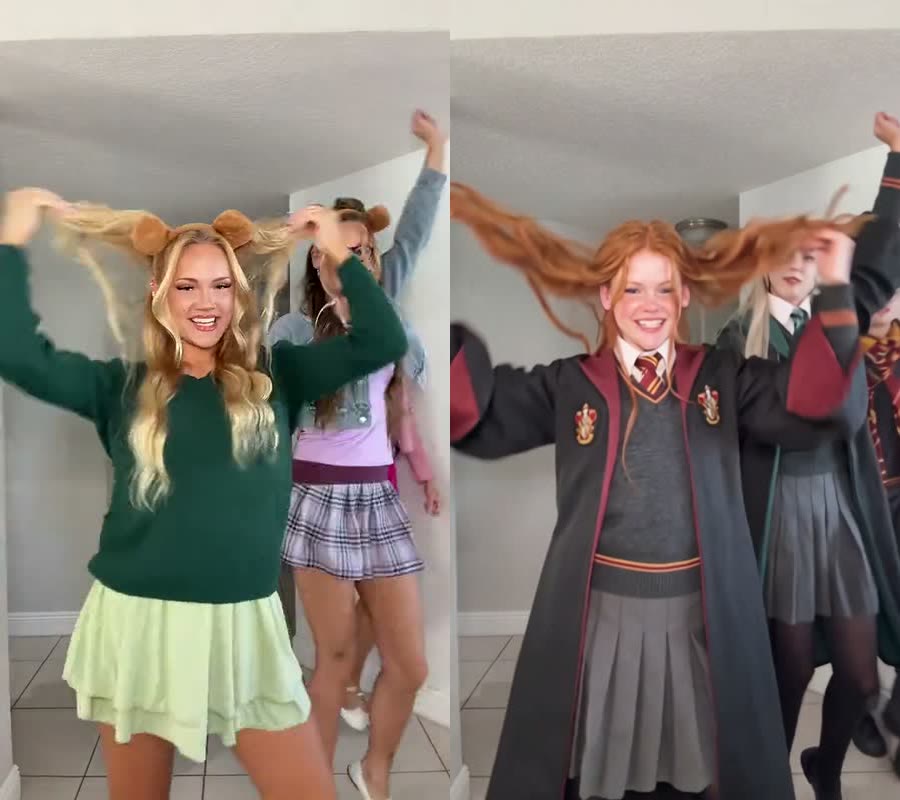
The routine is everywhere on TikTok; one of the earliest versions, by @wenersisters on 15 October 2026, had 4.8 million plays and 565,900 likes when we checked on 3 November. Our 15.0-second copy of the clip was rejected as too long for the 15-second limit, so we trimmed 0.1 seconds off the end and it went through. Since 3 November our site trims clips that are a fraction over the limit automatically.
2. We used one photo per person, each in a different look
Photo 1 was a blonde girl in a green-trimmed school robe, photo 2 a red-haired girl in a red-trimmed robe, photo 3 a dark-haired boy in a long red robe. The first two images paired a face close-up with a full-body shot, so the model saw both the face and the whole outfit. Three very different looks made it easy to check that nobody ended up in someone else's clothes, the same way the Chipettes' pink, purple and green keep the trend easy to follow.

3. We told the model who stands where, and to drop the costumes
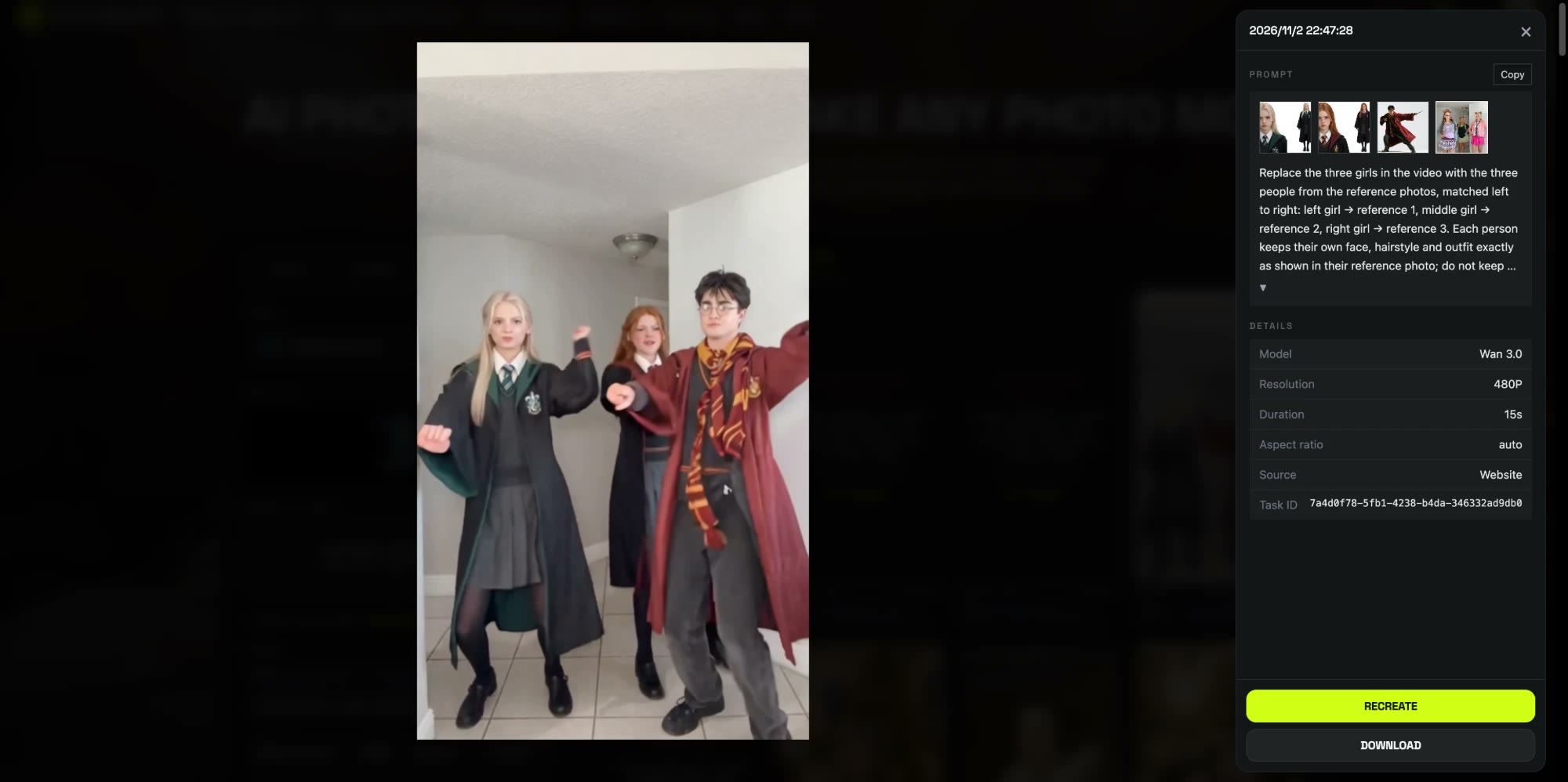
With three people in one frame, the model needs to know which face goes on which dancer, so we matched them left to right. We also told it not to keep the trend's costumes and not to add the bear-ear headbands, so each outfit comes only from its photo. This is the prompt we ran on Wan 3.0, 480p, 15 seconds, sound on, with the trend clip as the reference video:
Replace the three girls in the video with the three people from the reference photos, matched left to right: left girl → reference 1, middle girl → reference 2, right girl → reference 3. Each person keeps their own face, hairstyle and outfit exactly as shown in their reference photo; do not keep the original costumes, and do not add any headbands or head accessories. Keep everything else from the original video unchanged: the white hallway with tiled floor and ceiling light, the full dance choreography and timing (standing in a row with hands on hips, taking turns dancing up close to the camera, hair flips and spins, the final close-up pouting at the lens), the handheld vertical camera framing, lighting and music. Natural, realistic body proportions and smooth motion, no face distortion, no extra people.
4. It rendered in about 30 minutes
We submitted at 06:47 UTC and the video was ready at 07:17: about 30 minutes, first try, 300 credits. All three robes, faces and hairstyles stayed on the right dancer through every spin and close-up, and no headbands appeared. That run is what the template now uses, with the prompt and settings already in place.
How to make a Chipmunks Dance AI video in 4 steps
Step 1: Open the template
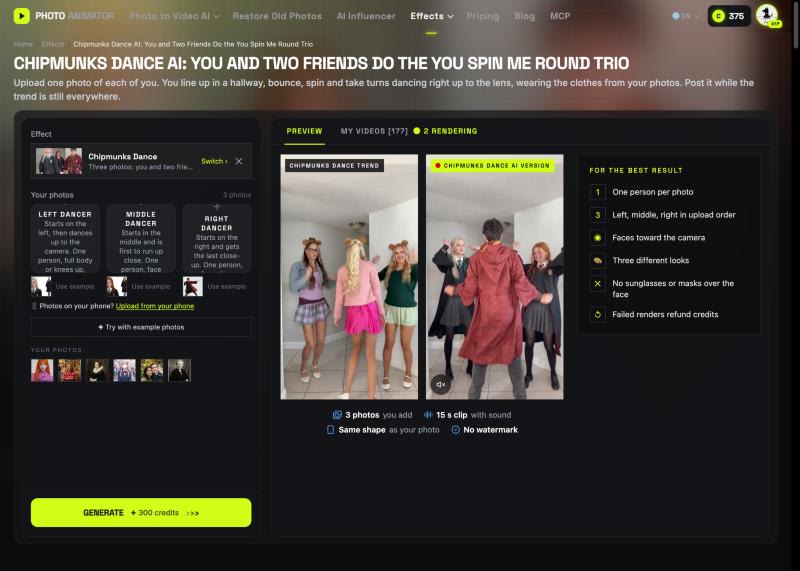
Go to the Chipmunks Dance AI page. The template is already loaded at the top, with the model and prompt set up.
Step 2: Add the left and middle dancers
The Left dancer starts on the left and gets the second close-up. The Middle dancer is the first to run up to the camera, so a sharp face matters most there. Full body or knees up works for both.
Step 3: Add the right dancer
The Right dancer spins to the front early and closes the video with a pout into the lens. Pick whoever deserves the last word. Missing a friend? Click Use example under that slot and keep our sample photo.
Step 4: Generate and download
Press Generate. The button shows 300 credits before anything is charged. The video lands in My Videos, so you can close the tab while it renders. Download the MP4, which has no watermark, and post it.
Which photo plays which dancer in the Chipmunks Dance AI video?
| Slot | Role | Best photo |
|---|---|---|
| Photo 1 | Left in the line; second close-up around 12 s | One person, full body or knees up, face clear |
| Photo 2 | Middle; first to run up to the camera around 9 s | One person, face sharp |
| Photo 3 | Right; spins to the front, last close-up at 14 s | One person, face clear |
To change who gets the final close-up, swap who you upload third.
What photos work best for a Chipmunks Dance AI video?
- One person per photo. Faces cut out of a group shot are small and blurry, and the fast spins turn them into strangers.
- Three different looks. Different hair and outfits keep each dancer in their own spot, just like the Chipettes' three colors.
- Show the outfit. Full body or knees up. A face close-up plus a full-body shot in one image worked well for us.
- Keep the face clear. No sunglasses, masks or hands over the face; every dancer gets a close-up.
- Adults only. Use photos of yourself or adults who said yes. Photos of children, celebrities and public figures aren't allowed.
Do you need Chipettes costumes for the Chipmunks Dance AI video?
No. The AI version dresses each dancer in the outfit from their own photo, so school robes, jerseys or everyday clothes all work. If you do want the classic look, take your photos in pink, purple with glasses, and green, and those are the colors you'll dance in.
What to watch for in a Chipmunks Dance AI video
- The hallway and song stay the same. The white hallway, the choreography and the sped-up You Spin Me Round come with the template; faces, hair and clothes come from your photos.
- Spins are the hard part. Hair flips and turns are where a weak photo shows. A sharp, front-facing photo keeps the face steady when you come back around.
- 480p is made for phones. It looks sharp on a vertical feed and soft if you blow it up on a big screen.
That's why we packaged it: the left-to-right order, the no-costume line in the prompt and the model are already set, so you don't pay to rediscover them. Make your Chipmunks Dance AI video with the same settings.
Is Chipmunks Dance AI free?
Not completely. New accounts get 75 free credits and one video takes 300, so you need the one-time $4.99 pack (540 credits). That covers one video at about $2.77 and leaves 240 credits, with no subscription. See pricing. Failed renders are refunded automatically.
How long is the video and how much does it cost?
About $2.77 for one video: 300 credits for a 15-second, 480p vertical clip with the song. Ours took about 30 minutes to render.
What song is the Chipmunks Dance?
A sped-up, high-pitched edit of You Spin Me Round (Like a Record), Dead or Alive's 1984 single. The AI video comes with it, so you don't add music yourself.
Can we make it with only two people?
Yes. Upload two photos and click Use example under the third slot, so our sample photo dances with you.
Why don't we look like our photos?
Usually it's a face cropped from a group shot, a side angle or sunglasses. Use a sharp single-person photo facing the camera for each slot and run the Chipmunks Dance AI template again.
Is this the official Alvin and the Chipmunks dance?
No. It's a fan-made template, not affiliated with Alvin and the Chipmunks, Bagdasarian Productions, Dead or Alive or TikTok.
Only two of you this time? Our Hop Hop Hop AI Dance tutorial walks through a duo dance template.