How to Make a Cat Middle Finger AI Video From 1 Photo (and Get the Toe Up)
What’s new on this page
- — Published: two Wan 3.0 runs (6 s, 480p, 120 credits each), the open-paw failure, the prompt that fixed it, and photo tips.
A cat middle finger AI video is the TikTok trend where one photo of a cat becomes a 6-second clip of it walking up on two legs, raising one paw with only the middle toe up, and strolling off. We made the one above from a single photo of a cat lying on its back. It took two runs: the first one gave an open paw and no middle finger.
What happens in a cat middle finger AI video?
Your cat appears on a quiet street by a wooden fence, with the face and fur from your photo. In our 6-second result:
| Seconds | What the cat does |
|---|---|
| 0–2 | Runs into the frame from the side |
| 2–3 | Stands up on its hind legs in front of the camera |
| 3–5 | Raises one paw with only the middle toe up |
| 5–6 | Turns and walks off |
Why our first cat middle finger AI video showed an open paw
Our first run used the same short prompt we use for most trend templates: put the character from the photo into the clip and keep the original moves. The cat looked right, the walk was right, and at second 4 it raised its paw. But it was an open paw, all toes spread, like a high five. The joke was gone.
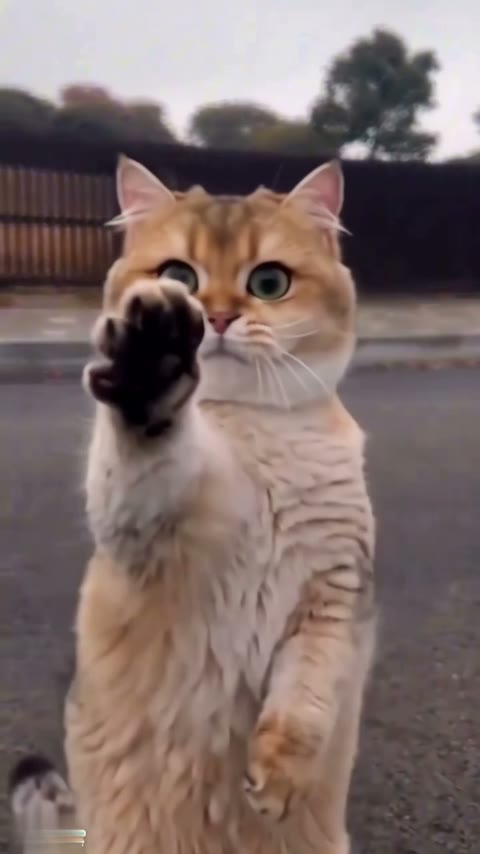
Replace the person in the video with the character from image 1, keep the original moves, camera and background.
Two things work against the gesture. A cat's paw has no finger that can stand alone, so the model leans toward drawing the paw it knows. And "keep the original moves" does not tell the model that this one hand shape is the whole point, so it gets simplified like any other small detail.
The prompt that got the cat's middle toe up
In the second run we said three things the first prompt left out: make the middle finger gesture, how a paw should do it (one toe up, the rest folded), and keep the cat's own look. We also wrote it for any subject, so the same prompt works for a person or an animal.
Replace the person in the video with the main subject from image 1, follow the original video to make the middle finger gesture, keep the original moves, camera and background. If the subject is an animal or has no fingers, use a cartoon-like anthropomorphic paw or hand, with only the single middle toe extended upright and the rest folded in. Keep the subject's face, body shape, colors, fur or clothing and overall look from image 1.
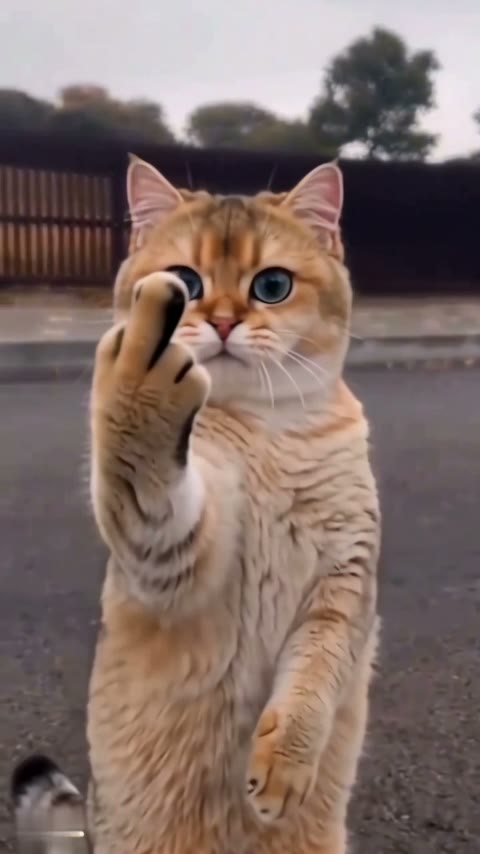
| Run 1 | Run 2 | |
|---|---|---|
| Prompt | Keep the original moves | Name the gesture + how a paw does it + keep the look |
| Gesture at second 4 | Open paw ❌ | Single middle toe ✅ |
| Cat looks like the photo | Yes | Yes |
| Model / length | Wan 3.0 · 6 s · 480p | Wan 3.0 · 6 s · 480p |
| Credits | 120 | 120 |
The Cat Middle Finger AI template uses run 2's settings, so you skip both the clip and the prompt.
Why won't AI video generators make the middle finger gesture?
Most AI video models treat the middle finger as a detail they can drop, or as an offensive gesture to avoid. Researchers have measured how sensitive AI models are to rude hand gestures (see the paper Mind the Gesture), and when we tested most of the cat middle finger tools on the market, the majority gave an open paw or a wave instead of a single toe. On top of that, a cat's paw is the wrong shape, so a vague prompt gets the version the model finds easiest to draw. Naming the gesture and describing one toe up is what changed our result.
How to make a cat middle finger AI video in 4 steps
Step 1: Open the Cat Middle Finger template
Go to the Cat Middle Finger AI page. The template is loaded at the top with the model, length and sound set, so there is no prompt to write.
Step 2: Upload one photo of your cat
One cat with its face and fur clearly visible. It does not need to be standing: our test cat was lying on its back on a wooden floor, and the video still had it walking upright.
Step 3: Press Generate
The button shows the cost (120 credits) before anything is charged. Our render took about 2 minutes 20 seconds; it runs in the background and lands in My Videos. If the render fails, the credits go back automatically.
Step 4: Download and post
Download the MP4. It has no watermark and is vertical with sound, so it goes straight to TikTok, Reels or Shorts.
Which cat photo works best for the middle finger AI video?
| Use | Avoid |
|---|---|
| One cat alone | Two pets in one photo |
| Face and eyes clearly visible | Face hidden in a blanket or turned away |
| Natural light, sharp | Blur, heavy filters, night shots |
| Any pose: standing, sitting, lying down | Tiny cat far away in the frame |
Eye color and fur pattern carry over well: our cat kept its green eyes and golden coat. If you want a dog, note that we have only tested cats.
Is the cat middle finger AI video free?
Not completely. New accounts get 75 free credits and one video takes 120, so you need the one-time $4.99 pack (540 credits). That covers four videos at about $1.11 each, with no subscription. See pricing.
Why does my AI cat show an open paw instead of the middle finger?
The prompt probably only said to copy the moves. Name the middle finger gesture and say only one toe goes up while the rest fold in, or use our template, which already does.
Can I use a photo of my cat lying down?
Yes. Our test photo was a cat lying on its back, and the video had it walking upright with the same face and fur.
Does it work with a dog?
We have only tested a cat, so we can't promise how a dog turns out. The prompt is written for any animal, but the template has only been checked with cats.
Which AI model makes the cat middle finger video?
We used Wan 3.0 at 480p, 6 seconds, with audio on. The template uses exactly that run.
Is there a best cat middle finger AI generator?
We compared the tools in Best Cat Middle Finger AI Generators. Ours is tuned so the single toe actually shows, at about $1.11 per video with no subscription.