How to Make the Angry Dance Filter AI Video (2026)
What’s new on this page
- — Published, based on our own Wan 3.0 and Seedance 2.0 test runs.
The angry dance filter trend started spreading as a CapCut template in late October 2026. Someone points straight at the camera, flips their palms up, shrugs, then points again, like they're listing everything the person filming got wrong. It's the same dance and song (Imael Angel's "Bad Times") as the Bad Times AI trend, just a different part of it: Bad Times is the head-grabbing argument, the angry dance is the pointing.
We made two versions with the same clip and the same prompt. One copied the moves almost exactly. The other drifted into a different dance. The difference wasn't the prompt, it was the photo, and that's the main thing this guide is about.
What we learned: match the camera angle of the clip
A reference photo shot from roughly the same angle as the clip gives much closer moves. The original angry dance clip is filmed from the front, a little above eye level, with the whole body in frame. Our first photo matched that: a front-facing character sheet with a full-body view. Our second photo was a low-angle action shot, body turned sideways, half crouched, camera tilted.
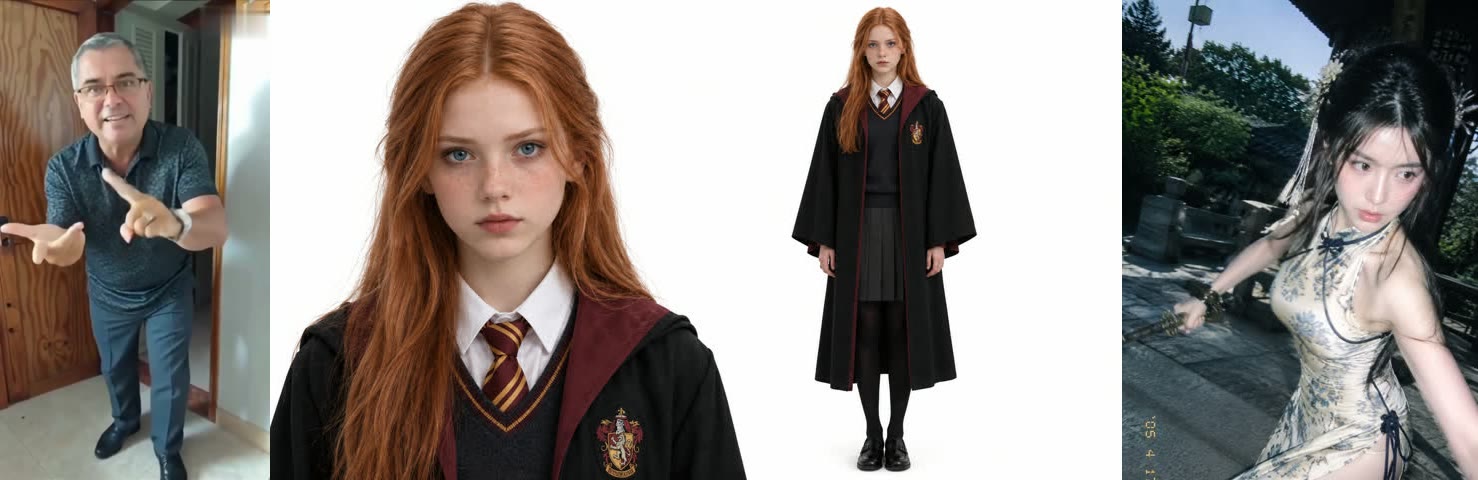
Same clip, same prompt, very different results. The front-on photo produced the pointing, palms and shrugs almost frame for frame. The low-angle photo produced a woman posing and waving her arms. She kept the qipao, the pavilion and the lighting from the photo, but the actual angry dance mostly disappeared.
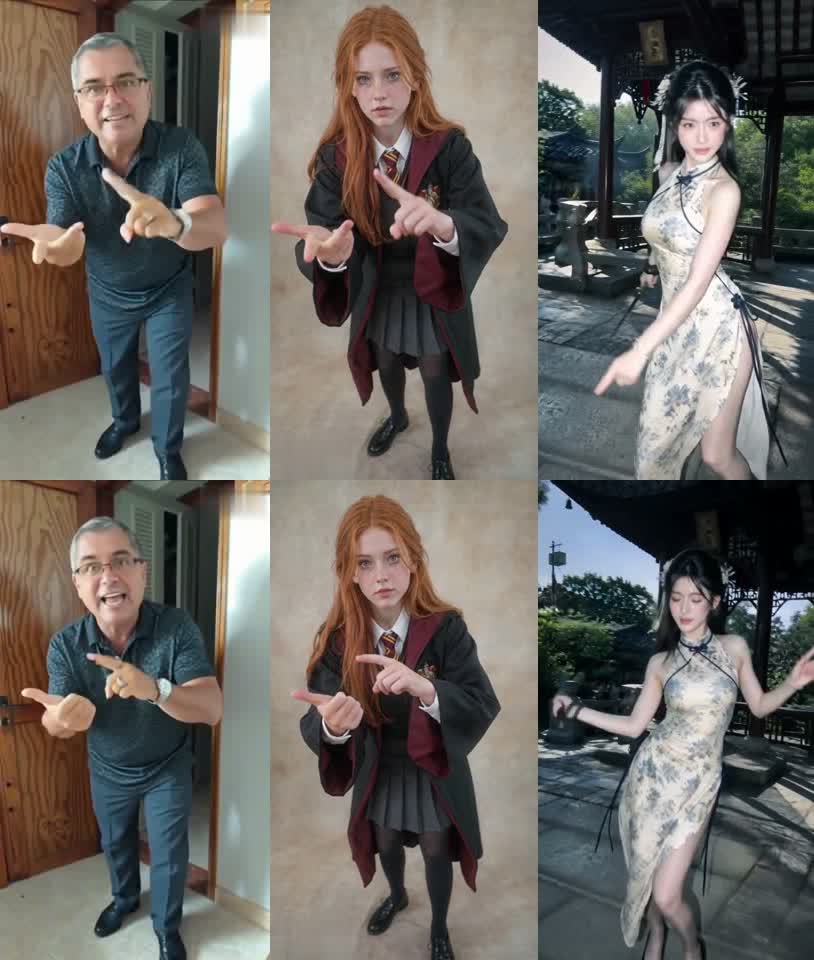
Why it happens: in video-to-video the model has to reconcile two things, the body in the clip and the body in your photo. When both are seen from the same angle, it only has to swap the person. When the photo is shot from below and from the side, it has to rebuild a body it never saw from the front, and it tends to keep the photo's pose instead of the clip's moves.
Method 1: Make it yourself with Wan 3.0
Step 1: Save an angry dance clip
Pick an angry dance video with one person and a mostly still camera. Save it as an MP4, 15 seconds or less (the cap for video-to-video). If it has a watermark or an "AI" label, crop or clean it first; logos in the clip can bleed into the result.
Step 2: Pick a photo with the same angle
- Front-on, eye level. The camera straight in front, not from below or above.
- Full body. The joke is in the hands and stance, so the feet and hands should be in the frame.
- Neutral standing pose. Arms down or relaxed. A dramatic pose in the photo competes with the dance.
- One person, face visible. No sunglasses, no heavy filters.
- The look you want. The prompt below builds the background from the photo's style and lighting, so a studio shot stays a studio shot.
Step 3: Choose Wan 3.0 and the settings
Open Photo to Video AI, switch to the Video tab, add the clip as Source clip and your photo under Reference images, then pick Wan 3.0. Settings: 480P, aspect ratio Match source, Audio on, 15 seconds. That run cost 300 credits.
Step 4: Paste the prompt
Replace the person in the video with the character from reference image 1, and replace the entire background with a new scene that matches the style and lighting of the reference image. Keep the original dance exactly: same choreography, rhythm, body poses, hand gestures, camera framing and camera movement, including the close-up shots. Keep the character's face, hairstyle, skin tone and outfit from the reference image consistent in every frame. Natural lighting that matches the new scene, realistic and smooth motion, no flicker, no extra people, no text or watermark.
The prompt says "reference image 1" instead of describing the person, so you can reuse it with any photo. It also names the close-ups on purpose: the clip ends with the dancer leaning into the lens, and models tend to reframe or drop that part unless you ask for it. Press Generate; ours was done in a few minutes, first try.
Method 2: Use the ready-made angry dance template
We saved the Wan 3.0 run as a template: the clip, model, settings and prompt are all set, so you only add a photo.
- Open the angry dance filter AI template.
- Upload one photo: front-on, full body, one person.
- Press Generate. The video appears in My Videos, so you can close the tab.
- Download the MP4 (no watermark) and post it.
Our two test runs
| Run 1 | Run 2 | |
|---|---|---|
| Model | Wan 3.0 | Seedance 2.0 |
| Reference photo | Front-on, eye level, full body | Low angle, sideways, mid-action |
| Settings | 15s, 480P, audio on | 15s set, 480P, audio on |
| Output length | 15s | 5s |
| Moves match the clip? | Yes, pointing and shrugs line up | No, mostly the photo's pose |
| Background | Studio backdrop from the photo | Pavilion from the photo |
FAQ
What is the angry dance filter trend?
The angry dance filter trend is a short clip where someone points at the camera, shrugs and scolds in time with Imael Angel's song "Bad Times". It spread as a CapCut template in October 2026.
Is the angry dance the same as the Bad Times trend?
The angry dance and Bad Times come from the same dance and song. Bad Times uses the head-grabbing argument part, and the angry dance uses the pointing part. Our Bad Times guide covers the other half.
Why don't the AI moves match the original dance?
In our test the main cause was the reference photo's camera angle. A front-on, full-body photo copied the moves closely; a low-angle, sideways action shot made the model keep the photo's pose. Use a photo shot from the same angle as the clip.
Which model should I use?
Wan 3.0 got it right on the first try for us. Our Seedance 2.0 run used a very different photo, so it wasn't a fair comparison of the models.
Do I need CapCut?
No. The angry dance filter AI template runs in the browser and gives you a finished MP4.
How much does it cost?
Our Wan 3.0 run was 300 credits for 15 seconds at 480P with audio. The cost shows on the Generate button first, and failed renders are refunded.
Can I use someone else's photo?
Only your own, someone who gave you permission, or a character you made. No celebrities, public figures or minors.