How to Make the Tiny Desk AI Video (Outstanding Trend) Without the Looks Mixing Up
What’s new on this page
- — Published: five Wan 3.0 runs (one success), the anti-bleed prompt, face masking, and the four-photo template.
The Tiny Desk AI trend took off in October 2026. It uses Charlie Wilson's NPR Tiny Desk Concert from June 2023, where his band sings "Outstanding" (The Gap Band, 1982) packed behind the famous desk. On October 18 a TikTok parody put five college football coaches who had just lost into that band, and every weekend since has brought a new version.
Swapping four people at once is much harder than swapping one. Our first four runs failed, and the usual problem in this kind of video is that looks bleed between people: a cap, a jacket or a hairline from the original clip, or from another reference photo, ends up on the wrong person, so nobody quite looks like their photo. Below is what we changed to stop that, the exact prompt, and what it cost.
Why AI face swaps in this trend stop looking like your photos
The model overfits to what it sees most. In a video-to-video run it sees the original people in every frame, and your reference photos only once. So it tends to blend the two: it keeps the original coach's white cap on your friend, mixes the red jacket from the clip with the outfit in the photo, or drifts the face halfway between the original person and yours.
With four people it gets worse. The model also mixes the references with each other, so the hairstyle from image 2 can show up on the person from image 3. The result is a video where everyone looks a bit off, which kills the joke, because the whole point is recognizing who's in the band.
The two things we changed
Fix 1: Pixelate the faces in the source clip
We pixelated every face in the trend clip before using it. With no original face to copy, the model has to take the face from the reference image instead of averaging the two. The bodies, the fist pumps, the camera and the room stay readable, so motion and timing still come through.
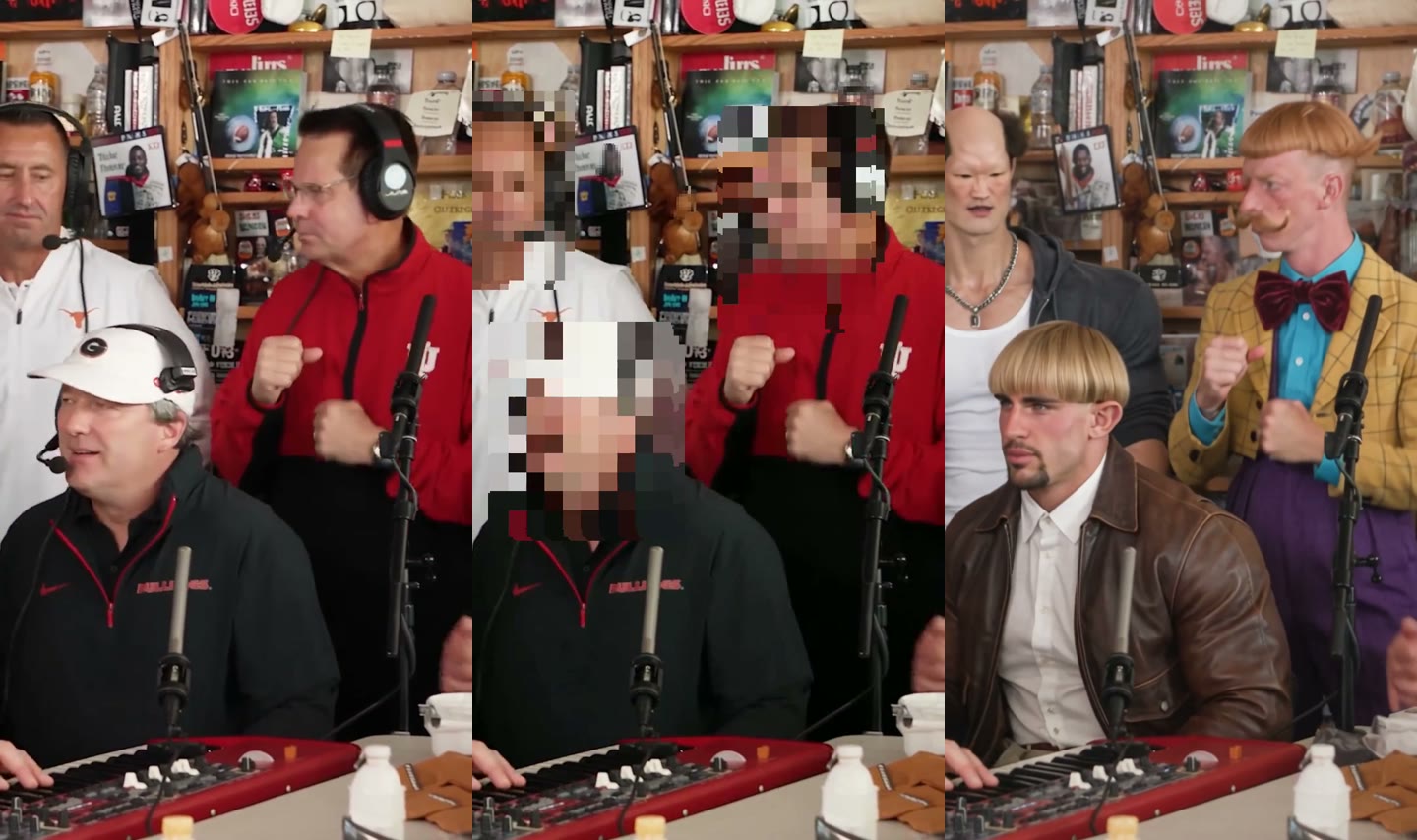
Fix 2: Tell the prompt the original clothes are only labels
To tell the model who is who, you have to describe the original people ("the person in the red jacket"). That description is exactly what makes the model keep the red jacket. So the prompt says outright that those clothes are only for identification, that each new person takes the full look from their own photo, and that no hats or accessories from the original stay. Since one coach wore a cap that kept coming back, we added "No one wears a hat."
Replace the people in the video with the characters in the reference images. Keep the original camera, cuts, timing, movements, and expressions. Replace the person on the left in the white shirt and headset with the character in image 1. Replace the person sitting in the middle in the white cap with the character in image 2. Replace the person on the right in the red jacket with the character in image 3. Replace the person in the close-up wearing a red cap with the character in image 4. The clothing described above is only for identifying who is who. Each new character must fully use the hairstyle, outfit, and look from their reference image. Do not keep any hats, clothes, or accessories from the original people. No one wears a hat. Clear, natural faces matching the reference images. Same background and props. Realistic, consistent identity, no extra people.
Method 1: Make it yourself with video-to-video AI
- Save a clip. Save one Tiny Desk AI version from TikTok as an MP4 and trim it to the part you want. Video-to-video models take up to about 15 seconds; ours was 11.5 seconds, 720×1280, starting just after the first second so the clip opens on the band.
- Pixelate the faces in the clip with any video editor (a mosaic or blur on each face is enough).
- Pick four photos. One person per photo, face toward the camera, waist up with the outfit visible. The outfit in the photo is what they will wear in the video.
- Set up the Video tab: engine Wan 3.0 Prime, the pixelated clip as source, your four photos as images 1 to 4, ratio and length matching the source, 480P, audio on.
- Paste the prompt above and change the four position descriptions to match your clip. Press Generate; the result appears in My Videos, and failed renders refund their credits automatically.
Our test runs: what worked and where it slips
We ran the same prompt five times on October 26, 2026. Four runs failed (three on Wan 3.0 Prime, one on Wan 3.0) and returned no video; their credits were refunded automatically. The fifth, on Wan 3.0 Prime, worked: all four characters kept their own hair and outfits, the cap from the original never came back, and the camera moves, fist pumps and the song line up with the trend clip.
Where it slips: the person standing far left is small and often half out of frame, so likeness is weakest there. Put the photo you care least about in that slot and your best, sharpest face in the middle (the keyboard) or the close-up slot.
| Our run | |
|---|---|
| Model | Wan 3.0 Prime |
| Length | 12s, vertical 9:16 |
| Resolution | 480p, with sound |
| Reference images | 4, one character each |
| Attempts | 5 (4 failed, refunded) |
| Credits | 370 |
| Time | ~1.9 min |
Method 2: Use the ready-made Tiny Desk template (four photos)
We packaged the working run as a template: the pixelated clip, Wan 3.0 Prime, the prompt above and the settings (12s · 480p · vertical · with sound). You only add the photos.
- Open the Tiny Desk AI template. The template is already loaded.
- Upload four photos into the four slots: standing left, at the keyboard, standing right, and the close-up.
- Press Generate. The video shows up in My Videos when it's ready, so you can close the tab. Download the MP4, no watermark.
FAQ
What song is in the Tiny Desk AI trend?
"Outstanding" by The Gap Band (1982), sung by Charlie Wilson in his NPR Tiny Desk Concert from June 2023.
Why does the AI put the wrong hat or jacket on my friend?
The model overfits to the original clip, which it sees in every frame, and blends it with your photos. Pixelating the original faces and stating in the prompt that the original clothes are only for identification fixed it in our test.
Why pixelate the faces in the source video?
With the original faces hidden, the model can only take faces from your reference images, so it stops averaging the two. Motion and timing still come through from the bodies.
How long does it take and what does it cost?
Our successful Wan 3.0 Prime run took about 1.9 minutes and 370 credits for 12 seconds at 480p with sound. Failed runs are refunded.
Can I use photos of celebrities or coaches?
Only use yourself or people who agreed. Don't upload photos of celebrities or strangers. The template isn't affiliated with NPR, Tiny Desk or Charlie Wilson.