How to Make the Middle Finger Dunk AI Video from Photos (2026)
What’s new on this page
- — Published, based on three of our own Wan 3.0 Prime runs.
The middle finger dunk is the basketball clip everyone is remaking this week: a night court, a crowd on the baseline, one player blowing past the defender, leaping into a full split at the rim with a middle finger already up, then walking at the camera and doing it again. You can make the AI version from two photos, one for the dunker and one for the defender.
We made it three times with the same clip, the same two photos and the same model. The first two came out with the players swapped. The third one was right. The only thing we changed was how the prompt told the two players apart, and that's what this guide is mostly about.
What we learned: tell the players apart by the ball, not the clothes
The most reliable way to tell two players apart in a prompt is the ball: who is dribbling and who is defending. Clothes are what you notice first, but in a fast, blurry clip they are a weak signal. The ball is in every frame, the camera follows it, and only one of the two ever touches it.
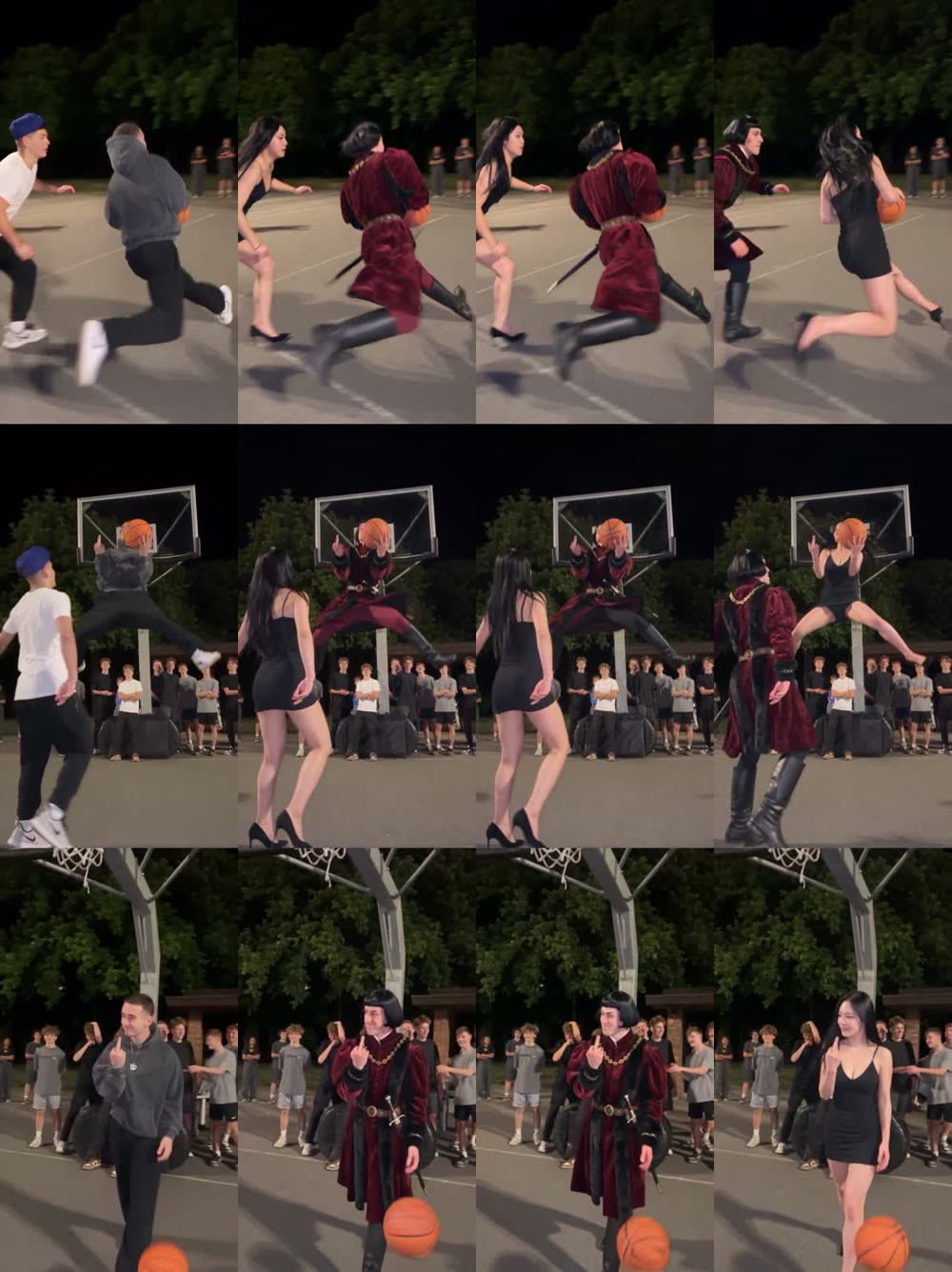
We wanted Image 1 (a man in a red velvet medieval coat) to replace the defender in the white T-shirt, and Image 2 (a girl in a black slip dress) to replace the dunker in the grey hoodie. Here is what each prompt said about the two players:
| How the prompt described the two players | Result | |
|---|---|---|
| Run 1 | "The guy wearing a blue baseball cap, white T-shirt and black pants" / "The man wearing a grey hoodie and baggy black pants" | Swapped: the red coat dunked |
| Run 2 | Shorter: "blue baseball cap, white T-shirt" / "grey hoodie" | Still swapped |
| Run 3 | "white T-shirt, who is defending" / "grey hoodie, who is dribbling the ball and jumps toward the basket" | Correct: the black dress dunked |
Why clothes failed: both players wear black pants, the clip is mostly motion blur, and the hoodie spends half the time in the air with the hood flapping. Cutting the description shorter in run 2 didn't help, because the problem wasn't too many words, it was that the words didn't point at anything the model could follow. "Who is dribbling" does: the ball is the brightest, most tracked object in the clip, so tying each role to it gave the model an anchor it could hold for all 9 seconds.
Method 1: Make it yourself with Wan 3.0 Prime
Step 1: Save the middle finger dunk clip
Save the clip as an MP4, 15 seconds or less. Ours was the 9-second night court version with the grey hoodie dunker and the white T-shirt defender. Crop out any watermark first; logos in the clip can bleed into the result.
Step 2: Pick two photos
- One person per photo, full body. The split jump needs legs in frame.
- Face clearly visible. No sunglasses, no heavy filters.
- Contrast helps the joke. A dress and heels, a costume, a suit. Our dunker was in heels and the split still worked.
- Decide the order now. Remember which photo is Image 1 and which is Image 2; the prompt refers to them by number.
Step 3: Choose Wan 3.0 Prime and the settings
Open Photo to Video AI, switch to the Video tab, add the clip as the source and both photos under Reference images, then pick Wan 3.0 Prime. Settings: 480P, aspect ratio Match source, Audio on. Each 9-second run cost 280 credits and took about 2 minutes.
Step 4: Paste the prompt
Keep the original camera motion, framing, pacing, night basketball court setting, lighting, crowd of onlookers and the basketball's trajectory completely unchanged. Only replace the two main characters: 1. The guy wearing white T-shirt, who is defending, is replaced with the person from Image 1, including the outfit. 2. The man wearing a grey hoodie, who is dribbling the ball and jumps toward the basket, is replaced with the person from Image 2, including the outfit. Both characters' movements, poses, running, jumping and hand gestures match the original video frame by frame. Keep their identities consistent throughout the entire video. Do not swap them, and do not mix their outfits. All other onlookers remain unchanged.
If your clip is a different version, change the clothing words, but keep the role phrases: "who is defending" and "who is dribbling the ball". Those are what kept our third run from swapping. If it still comes out swapped, the quick fix is to swap the order of the two photos and run it again.
Method 2: Use the ready-made middle finger dunk template
We saved the working run as a template. The clip, model, settings and prompt are all set, and each slot already has a fixed role, so the swap problem is handled for you.
- Open the Middle Finger Dunk AI template.
- Slot 1: the defender, the friend who gets dunked on.
- Slot 2: the dunker.
- Press Generate. The video appears in My Videos, so you can close the tab.
- Download the MP4 (no watermark).
Our three test runs
| Run 1 | Run 2 | Run 3 | |
|---|---|---|---|
| Model | Wan 3.0 Prime | Wan 3.0 Prime | Wan 3.0 Prime |
| Settings | 9s, 480P, audio on | 9s, 480P, audio on | 9s, 480P, audio on |
| Players described by | Clothes (full) | Clothes (short) | Clothes + who has the ball |
| Roles correct? | No, swapped | No, swapped | Yes |
| Credits | 280 | 280 | 280 |
FAQ
What is the middle finger dunk?
The middle finger dunk is a viral basketball clip from October 2026: a player dunks over a defender in a split jump with a middle finger up, then walks toward the camera and flips it off again.
Why did my two people come out swapped?
Swapped players usually mean the prompt told them apart only by clothes. Describe each one by what they do with the ball, "who is dribbling" and "who is defending", and the roles stick. That fixed it for us on the third run.
How many photos do I need?
Two: one for the dunker and one for the defender. In our template, slot 1 is the defender and slot 2 is the dunker.
Which model should I use?
Wan 3.0 Prime handled the split jump and kept both faces for all 9 seconds in our tests. All three of our runs used it; the swap was a prompt problem, not a model problem.
How many credits does it cost?
Each of our runs was 9 seconds at 480P with sound and cost 280 credits. The Generate button shows the exact cost first, and failed renders are refunded automatically.
Can I use other people's photos?
Only of yourself, people who gave you permission, or characters you created. No celebrities, public figures or minors.