How to Make the Window Peeper AI Meme Video From One Photo (Tested on Wan 3.0)
What’s new on this page
- — Published: one Wan 3.0 test run and the one-photo template built from it.
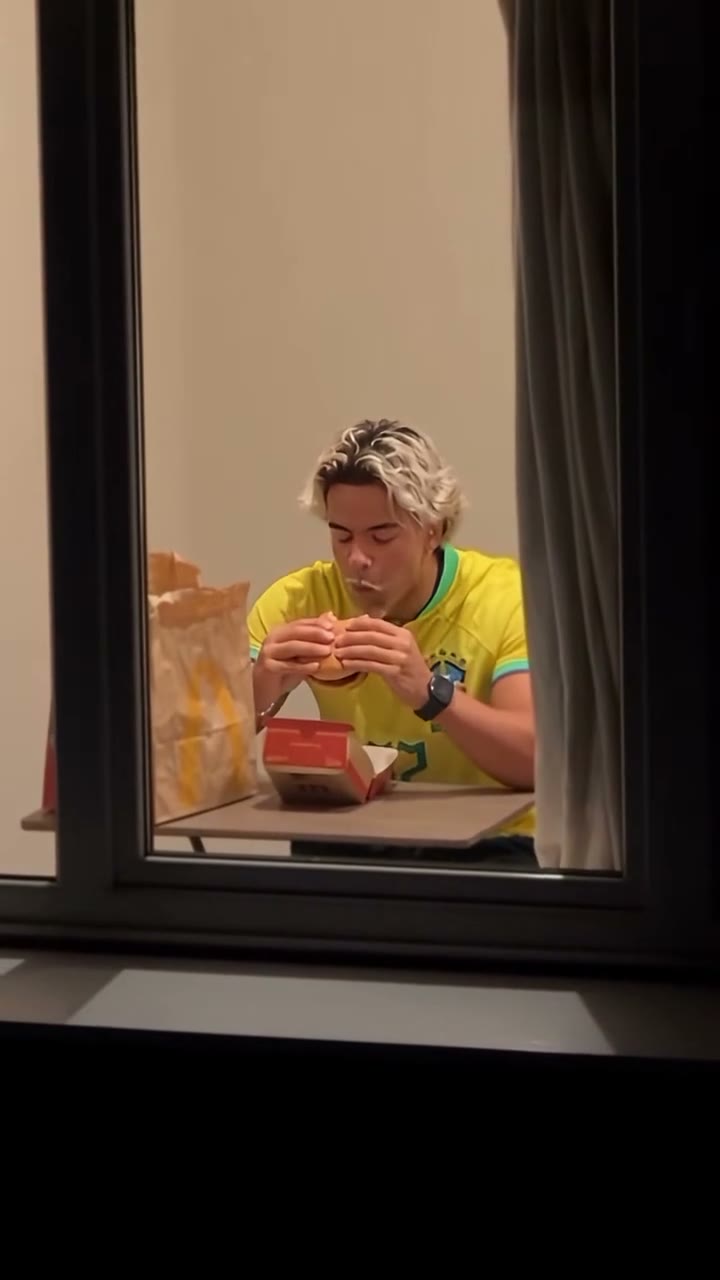
The window peeper trend (also searched as "burger thru window") is all over TikTok in October 2026. A night shot zooms into the one lit window of an apartment block, someone is eating a burger alone, they look up, glare straight at the camera, then get up and pull the curtain before the light goes off. The #windowpeeper tag is full of versions with Mr. Bean, Neymar, cats and people's friends.
The window peeper AI meme video keeps that whole scene and puts a different person in the window, from a single photo. We made one on Wan 3.0 with a short, general prompt and it worked on the first try. Below is the setup, the exact prompt, what it cost, and where it slips.
Method 1: Make it yourself with video-to-video AI
Step 1: Save a window peeper clip
Save one window peeper clip from TikTok as an MP4. Pick a version with one person and the full sequence: the zoom in from outside, the burger, the stare, and the curtain. Ours was 15 seconds, 720×1280. Video-to-video models take up to 15 seconds. Remove any watermark first so it doesn't carry over, and credit the creator when you post.
Step 2: Pick a reference photo
This prompt carries over the face, the hairstyle and the outfit, so the clothes in your photo will be what the person wears in the window. A sharp, front-facing photo with the outfit visible works best. We used a portrait plus a full-body shot of the same girl in a school robe, combined into one image.
Step 3: Set up the Video tab
- Engine: Wan 3.0.
- Source clip: the 15-second window peeper clip.
- Reference image: your photo, as image 1.
- Ratio and length: Match source, so you keep the 15 seconds and the vertical 9:16 frame.
- Resolution: 480P, Audio on.
Step 4: Use a short, general prompt
Unlike trends with an outfit change, this clip is one continuous scene, so it doesn't need a list of things to avoid. We kept the prompt generic on purpose, so it works with any photo:
Replace the person in the video with the person from reference image 1, including their face, hairstyle, and outfit. Keep everything else from the original video unchanged: the scene, background, objects, lighting, camera movement, and all of the person's motions, expressions, and timing. Natural, realistic look, with a consistent identity in every frame.
Press Generate. The result appears in My Videos; failed renders refund their credits automatically.
Our test run: what worked and where it slips
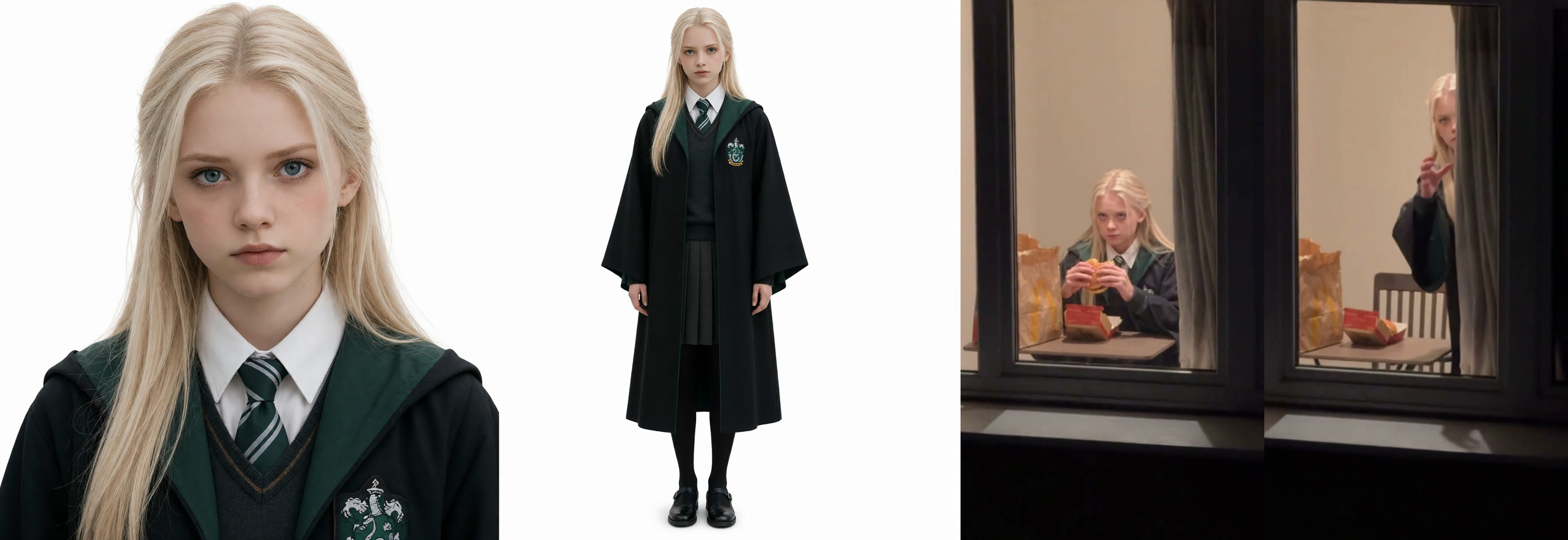
The face, the long platinum hair and the robe, white shirt and striped tie all came through from the photo, and she stays the same person from the zoom-in to the curtain. The camera move, the burger bites, the slow look up and the timing match the trend clip, and the sound is kept.
Where it slips: in the last seconds, when she stands up and half hides behind the curtain, the face is small and partly covered, so likeness is weaker there. The first two seconds from outside the building are tiny anyway. If the stare matters most to you, use a photo where the face is large and sharp.
| Our run | |
|---|---|
| Model | Wan 3.0 |
| Length | 15s, vertical 9:16 |
| Resolution | 480p, with sound |
| Face, hair, outfit from photo | Yes |
| Credits | 300 |
| Time | ~4.7 min |
Method 2: Use the ready-made Window Peeper template (one photo)
We packaged this run as a template: the clip, Wan 3.0, the prompt above and the settings (15s · 480p · vertical · with sound). You only add the photo.
- Open the Window Peeper AI template. The template is already loaded.
- Upload one sharp photo of one person, waist up with the outfit visible.
- Press Generate. The video shows up in My Videos when it's ready, so you can close the tab. Download the MP4, no watermark.
FAQ
What is the window peeper trend on TikTok?
A filter trend, also called "burger thru window": a night shot zooms into a lit apartment window, someone eating a burger looks up and glares at the camera, then closes the curtain. Search #windowpeeper on TikTok to see versions.
Do I need CapCut or the TikTok filter?
No. With the template you upload a photo in the browser. With method 1 you need the trend clip and a video-to-video model, not CapCut.
Will the outfit in my photo show up?
Yes. Our prompt carries over face, hairstyle and outfit. If you only want the face changed, drop "and outfit" from the prompt, but results will vary more.
How long does it take and what does it cost?
Our Wan 3.0 run took about 4.7 minutes and 300 credits for 15 seconds at 480p with sound. New accounts get free credits, and failed renders are refunded.
Can I use someone else's photo?
Only yourself or people who agreed. Don't use photos of celebrities or strangers.